Author: admin

  • Managing 10,000+ SKUs on Shopify: When Your Store Needs a Custom Node.js Middleware 

    Managing 10,000+ SKUs on Shopify: When Your Store Needs a Custom Node.js Middleware 

    Managing 10,000+ SKUs on Shopify: When Your Store Needs a Custom Node.js Middleware

    Shopify works exceptionally well, until it doesn’t. 

    For brands operating with a few hundred products, Shopify’s native tools, apps and Liquid templates are usually sufficient. But once your catalog crosses 10,000+ SKUs, Shopify begins to show structural limitations that are not solvable with themes, plugins, or admin workflows alone. 

    At this scale, performance degradation, operational friction and data inconsistencies are not edge cases,they become systemic problems. This is where custom Node.js middleware shifts from being an optimization to a necessity. 

    This article explains why high SKU Shopify stores struggle, where native tooling breaks down and how a middleware driven architecture restores performance, control and scalability. 

    Why Shopify Struggles at High SKU Volumes 

    Shopify is fundamentally optimized for simplicity and speed of setup, not deep operational complexity. 

    As SKU counts grow, merchants typically encounter: 

    • Slow collection and category pages 
    • API rate limit bottlenecks 
    • Admin bulk updates timing out 
    • Overloaded Liquid templates 
    • Fragmented product data across apps 

    The issue is not Shopify’s infrastructure,it’s where logic is being executed. When business logic, filtering, transformations and enrichment all happen inside Shopify (or Liquid), performance suffers. 

    At scale, Shopify needs to be treated as a transaction engine, not a full business logic layer. 

    What Is Custom Node.js Middleware in a Shopify Context? 

    Custom middleware is a backend layer, often built in Node.js,that sits between Shopify and your frontend or internal systems. 

    Its responsibilities typically include: 

    • Fetching and batching Shopify API data 
    • Normalizing and enriching product information 
    • Caching expensive operations 
    • Orchestrating bulk updates 
    • Serving optimized data to the storefront 

    For stores with massive catalogs, Shopify custom middleware for large inventory becomes the only sustainable way to control data flow without overwhelming Shopify’s native limits. 

    The Real Cost of API Limits at Scale 

    Shopify’s APIs are powerful, but heavily rate limited. When dealing with 10,000+ SKUs, naive API usage leads to: 

    • Sync failures 
    • Partial updates 
    • Inconsistent storefront data 
    • Broken automation workflows 

    A proper middleware layer implements: 

    • Intelligent batching 
    • Retry logic with backoff 
    • Incremental syncing 
    • Change detection (diff based updates) 

    This is essential for Node.js Shopify API sync for 10k+ SKUs, where brute force polling or full catalog refreshes are operationally unsafe. 

    Middleware allows Shopify to breathe, and your system to scale. 

    Performance Is Not a Theme Problem 

    Many high volume merchants attempt to solve performance issues by: 

    • Switching themes 
    • Installing optimization apps 
    • Simplifying Liquid logic 

    These efforts help, but only marginally. 

    The real bottleneck lies in: 

    • Excessive Liquid computation 
    • Over-fetching product metafields 
    • Runtime filtering inside templates 
    • Rendering logic that should have been precomputed 

    By moving logic into Node.js middleware, teams unlock optimizing Shopify store speed for massive catalogs through: 

    • Pre-aggregated category data 
    • Cached product responses 
    • Edge-ready JSON payloads 
    • Minimal Liquid rendering responsibility 

    Liquid should render, not think. 

    When Shopify Becomes the Wrong Place to Store Product Logic 

    As catalogs grow, so does product complexity: 

    • Variant-specific metadata 
    • Multi-region attributes 
    • Supplier-specific fields 
    • Internal operational flags 
    • Search and merchandising rules 

    Shopify’s data model was not designed to be a full PIM. 

    At scale, many teams introduce a custom product information management (PIM) for Shopify, where: 

    • Shopify holds transactional product data 
    • Middleware manages enrichment and logic 
    • External systems control classification and rules 

    This decoupling prevents Shopify from becoming a bottleneck and allows teams to evolve product logic without schema hacks. 

    Bulk Updates: The Silent Scaling Killer 

    Bulk operations are where Shopify pain becomes most visible. 

    Common challenges include: 

    • Admin bulk editor timeouts 
    • App-based updates failing mid-process 
    • Inconsistent rollback behavior 
    • No validation layer before publishing 

    With middleware in place, teams can implement Shopify bulk product update automation Node.js workflows that: 

    • Stage changes outside Shopify 
    • Validate updates before deployment 
    • Execute controlled batch updates 
    • Log failures and retry intelligently 

    This transforms bulk updates from a risky operation into a predictable system process. 

    Liquid Has Limits, and You’re Hitting Them 

    Liquid is intentionally restrictive. At scale, this becomes a constraint. 

    Symptoms include: 

    • Inability to perform complex filtering 
    • Poor pagination control 
    • Expensive loops over large collections 
    • Workarounds that harm performance 

    Rather than fighting Liquid, advanced teams focus on solving Shopify liquid limits with custom middleware, where: 

    • Complex logic runs in Node.js 
    • Liquid receives preprocessed data 
    • Storefront rendering becomes lightweight 

    This approach dramatically improves both performance and developer sanity. 

    Enterprise SKU Management Requires Architectural Separation 

    At enterprise scale, SKU management is no longer just a merchandising concern, it’s an operational one. 

    High-SKU stores require: 

    • Data consistency guarantees 
    • System observability 
    • Controlled publishing pipelines 
    • Clear ownership boundaries 

    This is the foundation of high-volume SKU management for enterprise e-commerce, where: 

    • Shopify handles checkout and transactions 
    • Middleware orchestrates logic and data 
    • Internal tools manage complexity without touching Shopify directly 

    Without this separation, teams are forced to treat Shopify as something it was never designed to be. 

    Why Integriti Studio Recommends Middleware-First Shopify Architectures 

    At Integriti Studio, we work with brands that outgrow Shopify’s default capabilities,not because Shopify fails, but because the business evolves. 

    Our approach focuses on: 

    • Node.js middleware design 
    • API-first product architecture 
    • Performance-driven storefront delivery 
    • Scalable catalog operations 

    For stores managing 10,000+ SKUs, middleware is not an enhancement, it’s the system that keeps everything else stable. 

    Final Thoughts 

    Shopify is an exceptional platform,but scale changes the rules. 

    Once catalogs reach five figures, success depends on: 

    • Where logic lives 
    • How data flows 
    • How much control your team has 

    A custom Node.js middleware layer turns Shopify from a bottleneck into a powerful engine, capable of supporting complex catalogs, fast storefronts and enterprise grade operations. 

    At this scale, the question is no longer if you need middleware,but how soon you implement it. 

  • Why the Next.js + Airtable Stack is the Most Scalable Choice for 2026 Bootstrapped MVPs 

    Why the Next.js + Airtable Stack is the Most Scalable Choice for 2026 Bootstrapped MVPs 

    Why the Next.js + Airtable Stack is the Most Scalable Choice for 2026 Bootstrapped MVPs 

    In 2026, bootstrapped startups face a very different reality than they did even three years ago. Speed still matters, but architectural flexibility, cost discipline and future scalability matter more. Founders are no longer asking, “How fast can we launch?” but rather, “How fast can we launch without boxing ourselves into technical debt?” 

    This is where the Next.js + Airtable stack has quietly emerged as one of the most effective architectures for early stage products. When implemented correctly, it delivers a rare combination: rapid iteration, production grade performance and a clean migration path to more complex systems later. 

    This article explores why this stack works, where it outperforms traditional setups and how it aligns with modern MVP economics. 

    The MVP Problem Has Changed 

    Traditional MVP thinking assumed: 

    • A relational database from day one 
    • Backend heavy architecture 
    • Large upfront engineering investment 

    In reality, most bootstrapped MVPs fail not because of scale but because: 

    • Product assumptions change too quickly 
    • Features are rebuilt multiple times 
    • Engineering effort outpaces validation 

    The modern MVP requires: 

    • A frontend that can scale to production 
    • A backend that is flexible, observable and replaceable 
    • Minimal operational overhead 

    This is precisely where serverless first, API driven stacks outperform traditional monoliths. 

    Why Next.js is the Frontend of Choice in 2026 

    Next.js is no longer “just a React framework.” In 2026, it has become a full application platform: 

    • Hybrid rendering (SSR, ISR, SSG) 
    • Native API routes and edge functions 
    • Excellent performance defaults 
    • Strong SEO and routing primitives 

    For bootstrapped teams, Next.js enables: 

    • Shipping production grade UI early 
    • Avoiding premature backend complexity 
    • Supporting future traffic spikes without replatforming 

    When paired with the right data layer, it becomes exceptionally powerful. 

    Airtable Is Not “Just a Spreadsheet” 

    Airtable’s biggest misconception is that it’s a temporary tool. In reality, Airtable functions as a structured, permissioned, API first data platform. 

    Used correctly, it enables: 

    • Rapid schema iteration 
    • Visual data management for non technical teams 
    • Strong API support with predictable performance 
    • Built in automation and validation 

    For early stage products, this enables building a database as a service with Airtable API without maintaining infrastructure, migrations, or complex ORM layers. 

    The Strategic Advantage of a Serverless Stack 

    When Next.js is combined with Airtable, the result is a serverless architecture with Next.js and Airtable that dramatically reduces operational friction. 

    Key advantages include: 

    • No database hosting or scaling concerns 
    • No DevOps overhead 
    • Minimal backend maintenance 
    • Faster iteration cycles 

    Instead of managing infrastructure, teams focus on: 

    • Product logic 
    • User experience 
    • Go to market execution 

    This is especially valuable for bootstrapped startups operating under tight financial constraints. 

    Airtable vs PostgreSQL for MVP Development 

    A common objection is: “Why not just use PostgreSQL from day one?” 

    The answer depends on stage, not ideology. 

    Airtable vs PostgreSQL for MVP development is not a question of power. It’s a question of timing. 

    PostgreSQL excels at: 

    • Complex joins 
    • High transactional throughput 
    • Long term data integrity at scale 

    Airtable excels at: 

    • Rapid schema changes 
    • Low setup cost 
    • Visibility for non technical stakeholders 
    • Fast iteration without migrations 

    For MVPs where: 

    • Data models are still evolving 
    • Usage patterns are unclear 
    • Speed outweighs optimization 

    Airtable is often the strategically correct choice. 

    A Low Code Backend Without Sacrificing Engineering Quality 

    One of the most overlooked benefits of this stack is how it balances control. 

    Airtable provides a low code backend with high code frontend benefits, allowing: 

    • Product teams to adjust logic without engineering bottlenecks 
    • Developers to retain full control over frontend behavior 
    • Clean separation between presentation and data logic 

    This hybrid approach avoids the extremes of: 

    • Fully no code tools (which limit flexibility) 
    • Fully custom backends (which slow iteration) 

    The result is a system that evolves with the product. 

    Scaling Beyond the MVP Phase 

    A common fear is vendor lock in. In practice, the Next.js + Airtable stack is transitional by design. 

    Well architected systems: 

    • Abstract Airtable behind service layers 
    • Keep business logic inside Next.js APIs 
    • Treat Airtable as a replaceable data source 

    When scale demands it: 

    • PostgreSQL or DynamoDB can replace Airtable 
    • Frontend remains untouched 
    • APIs evolve, not the UI 

    This makes Airtable an acceleration layer, not a long term liability. 

    Why This Stack Is Especially Relevant for 2026 

    In 2026, product teams are judged by: 

    • Speed of validation 
    • Cost efficiency 
    • Architectural foresight 

    The Next.js + Airtable stack aligns with all three by enabling: 

    • Faster MVP launches 
    • Lower burn rates 
    • Clear upgrade paths 

    At Integriti Studio, we design MVP architectures that balance speed today with scalability tomorrow. For bootstrapped founders, this stack is often the most pragmatic way to move fast without rewriting everything six months later. 

    Final Thoughts 

    The best MVP stack is not the most powerful. It’s the one that lets you learn the fastest without regret. 

    For many bootstrapped startups in 2026, Next.js + Airtable offers: 

    • Production ready frontend performance 
    • Flexible, low friction data management 
    • Minimal operational overhead 
    • Future proof architectural decisions 

    Used intentionally, it’s not a shortcut. It’s a strategy. 

  • The Delayed Payout Problem: How to Configure Stripe Connect for Service Marketplaces 

    The Delayed Payout Problem: How to Configure Stripe Connect for Service Marketplaces 

    Delayed payouts are one of the fastest ways to erode trust in a service marketplace. Whether you are operating a two sided platform for freelancers, home services, consultants, or on demand professionals, payout delays directly impact provider retention, platform credibility and cash flow predictability. 

    For many marketplace founders, the issue does not stem from Stripe itself, but from misconfigured Stripe Connect setups, misunderstood account models and poor alignment between product logic and payment flows. 

    This article breaks down why delayed payouts happen, how Stripe Connect should be configured for service marketplaces and what architectural decisions separate scalable platforms from operational bottlenecks. 

    Why Delayed Payouts Are a Marketplace Specific Problem 

    Unlike traditional eCommerce, service marketplaces introduce complexity at multiple layers: 

    • Funds are collected before the service is delivered 
    • Multiple parties are involved in a single transaction 
    • Disputes, cancellations and refunds are more common 
    • Regulatory and compliance requirements vary by region 

    Stripe defaults are optimized for direct sellers, not marketplaces. When platforms apply basic Stripe logic to a marketplace model, payouts often become delayed due to: 

    • Incorrect account types 
    • Improper fund flow ownership 
    • Compliance verification gaps 
    • Manual intervention points in automated systems 

    This becomes even more critical for teams launching a white-label service marketplace MVP, where payout reliability directly affects early provider adoption and brand trust across multiple deployments. 

    Choosing the Right Stripe Connect Account Type 

    Stripe Connect offers three primary account types and selecting the wrong one is a leading cause of payout delays. 

    Standard Accounts 

    Best for platforms that want minimal responsibility. Providers manage their own Stripe accounts and payout schedules. 

    Common problem: 

    You lose control over payout timing, fee logic and dispute handling. Providers blame the platform for delays you cannot technically control. 

    Express Accounts 

    Stripe handles most compliance, but the platform retains control over payout timing and fee structures. 

    Best for: 

    Most service marketplaces where providers expect fast payouts but don’t want full Stripe ownership. 

    Custom Accounts 

    The platform fully controls onboarding, payouts and compliance. 

    Best for: 

    High volume or enterprise marketplaces with strict payout logic, escrow like flows, or region specific compliance rules. 

    Key insight: 

    Many delayed payout issues occur when platforms start with Express accounts but implement logic that requires Custom level control, creating technical mismatches that Stripe resolves by holding funds. 

    Understanding Stripe’s Fund Flow Logic 

    One of the most misunderstood concepts in Stripe Connect is who owns the money and when. 

    Stripe operates on three key fund states: 

    1. Pending – Funds are captured but not yet settled 
    1. Available – Funds cleared Stripe’s risk and bank settlement checks 
    1. Paid Out – Funds transferred to the connected account 

    Delayed payouts often happen because platforms assume: 

    “Once a payment is successful, payouts should be instant.” 

    In reality, Stripe enforces: 

    • Risk evaluation windows 
    • Bank settlement timelines 
    • Dispute and fraud buffers 

    If your platform: 

    • Captures payment before service completion 
    • Uses manual capture 
    • Applies delayed transfers without clarity 

    Stripe may hold funds longer to reduce exposure. 

    Designing Payout Timing Based on Service Completion 

    Service marketplaces must explicitly model service lifecycle states into payment logic. 

    A scalable approach looks like this: 

    1. Authorization at booking 
    1. Capture after service completion 
    1. Transfer after confirmation window 
    1. Payout based on provider preference 

    Common mistake: 
    Platforms capture and transfer funds immediately, then attempt to “reverse” flows in case of disputes. Stripe flags this as high risk, leading to payout delays. 

    Instead: 

    • Use separate charges and transfers 
    • Delay transfers, not charges 
    • Keep platform funds segregated until conditions are met 

    This reduces Stripe risk scoring and accelerates payouts long term. 

    Compliance Holds: The Silent Payout Killer 

    Stripe is aggressive about compliance, and for good reason. 

    Delayed payouts frequently occur due to: 

    • Incomplete identity verification 
    • Missing tax information 
    • Unsupported countries or currencies 
    • Inconsistent business details 

    What platforms get wrong: 

    • Treating onboarding as a one time step 
    • Not monitoring verification status changes 
    • Ignoring Stripe webhooks related to account restrictions 

    Best practice: 

    Build proactive compliance checks into your admin dashboards. If a connected account enters a “restricted” state, surface it immediately to the provider instead of letting payouts silently fail. A well-executed multi-role dashboard design ensures that admins, service providers, and finance teams each have real-time visibility into payout status, verification issues, and transfer failures without relying on manual support workflows. 

    Webhooks: The Backbone of Reliable Payouts 

    Many payout delays are not Stripe issues, they’re visibility issues. 

    If your platform is not consuming and acting on: 

    • account.updated 
    • payout.failed 
    • balance.available 
    • transfer.created 

    You are operating blind. 

    Webhooks allow you to: 

    • Trigger payouts the moment funds become available 
    • Alert providers about verification issues 
    • Retry failed payouts automatically 
    • Maintain accurate wallet balances 

    Without webhooks, platforms often rely on cron jobs or manual checks, introducing artificial delays that users blame on “Stripe. This event-driven approach plays a major role in reducing operational overhead through backend automation, eliminating the need for manual payout reconciliation and reactive customer support. 

    Multi Region Marketplaces and Currency Pitfalls 

    Global marketplaces face additional payout delays due to: 

    • Currency conversion windows 
    • Cross border settlement times 
    • Local banking infrastructure limitations 

    Stripe may settle funds quickly in one region and slowly in another. 

    Advanced platforms: 

    • Offer region specific payout schedules 
    • Clearly communicate expected timelines 
    • Adjust provider expectations during onboarding 

    Transparency reduces churn even when delays are unavoidable. 

    When Custom Development Becomes Necessary 

    A robust Stripe Connect delayed payout architecture becomes essential once marketplaces move beyond simple charge-and-transfer flows and begin enforcing service completion, dispute windows, or escrow-like logic. 

    You likely need custom backend logic if: 

    • You support partial payouts 
    • You offer platform wallets or balances 
    • You manage escrow style flows 
    • You apply tiered commissions 
    • You operate in multiple regulatory zones 

    These scenarios often demand a carefully planned service marketplace escrow workflow design, where funds are programmatically held, released, or redistributed based on real-world service outcomes. 

    At Integriti Studio, we design and implement Stripe Connect architectures that align payout logic with real world service workflows. From choosing the correct account model to building webhook driven payout engines, we ensure marketplaces scale without payout friction or trust erosion. 

    Final Thoughts 

    Delayed payouts are rarely caused by Stripe alone. They are almost always the result of: 

    • Incorrect account models 
    • Poor lifecycle modeling 
    • Inadequate compliance handling 
    • Missing event driven architecture 

    Service marketplaces that treat payouts as a core product feature, not an afterthought, retain providers longer and scale faster. 

    Configuring Stripe Connect correctly is not just a financial decision. It is a platform trust decision. 

  • Website Features That Are Becoming Standard User Expectations 

    Website Features That Are Becoming Standard User Expectations 

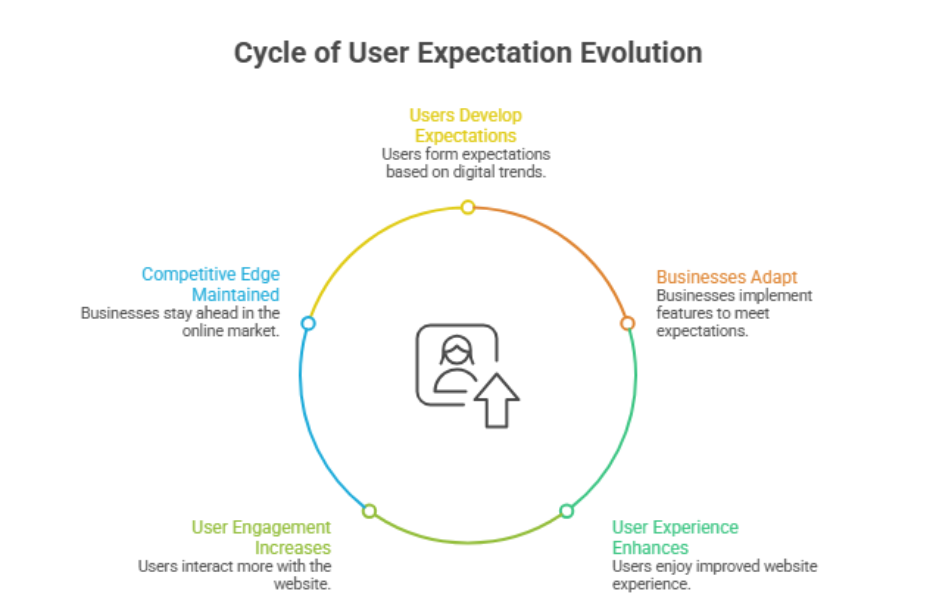
    Why do some websites convert better than others while others struggle to engage visitors? The answer often lies in the combination of user experience, website design, and the strategic optimization of core website features. Factors such as navigation, responsive design, loading speed, and accessibility directly influence how users interact with your site and whether they stay or bounce. Understanding user behavior and implementing professional development practices ensures your business website meets the expectations of 2025’s digitally-savvy audience. 

    Websites in 2025 must meet rising user expectations by offering accessible, responsive design, intuitive navigation, fast loading speed, clear ctas, and social proof. Prioritizing user experience, seo, and optimization not only boosts conversion but also builds trust, reduces bounce rate, and positions your business website competitively. 

    Investing in a professionally developed site ranging from initial audit and layout planning to ongoing maintenance and seo support can significantly boost conversion rates and build trust with your visitors. Even modest budgets for custom features like social proof, effective ctas, and accessibility enhancements demonstrate the real value of good design and ongoing support. For instance, small businesses often see measurable results from a strategic package that combines design, optimization, and content updates without major upfront costs. 

    Essential Website Features Boost User Experience And Accessibility 

    Essential Website Features Boost User Experience And Accessibility 

    Creating a business website that meets evolving user expectations in 2025 requires integrating essential website features that enhance website user experience and accessibility. Websites that prioritize these elements not only improve user engagement but also increase website traffic, reduce bounce rate, and establish a professional website presence that boosts user trust and satisfaction. 

    Prioritize Accessibility Features 

    Accessibility features are no longer optional they are non-negotiable. Every modern website must include screen reader compatibility, keyboard navigation, and clear content hierarchy to ensure your website is usable across mobile devices and by users with different abilities. These features enhance user satisfaction while aligning your site with customer expectations and legal standards. 

    Optimize Loading Speed and Performance 

    Website speed significantly affects both website performance and user engagement. Optimizing images, leveraging caching, and monitoring core web vitals ensures enhanced user experiences. A well-structured website with fast loading speed encourages user actions, improves seo ranking, and creates a good website experience for every visitor. 

    Personalization and Advanced Features 

    Integrating personalization based on user behavior and user preferences allows your site to deliver content, ctas, and recommendations that visitors expect. Advanced features, such as security features and tailored layouts, address business needs while creating a professional website that aligns with user needs and digital world trends. Regularly updating these web design features ensures your site remains competitive and relevant. 

    By focusing on essential features, accessibility, speed, and personalization, you can create a business website that meets user expectations, maximizes user engagement, and establishes long-term digital credibility in 2025. 

    Social Proof And Security Features Build Trust Online 

    Building trust online is a critical factor in creating digital experiences that convert visitors into loyal customers. A website that meets modern expectations in 2025 must combine social proof with robust website security. These elements not only reassure your audience but also encourage repeat website visits and improve overall engagement. 

    Step 1: Showcase Social Proof 

    Features like testimonials, reviews, case studies, and client logos demonstrate credibility. When users visit a website, seeing feedback from real customers helps them feel confident in your brand. Website content that highlights success stories or industry recognition reinforces trust and encourages personalised user interactions. This step is essential for building a website that meets customer expectations. 

    Step 2: Implement Robust Security Features 

    A secure website protects both your business and your users’ user privacy. Incorporate SSL certificates, two-factor authentication, and regular security audits. Website security reassures visitors that their data is safe, which is increasingly important as search engines like Google prioritize secure sites in rankings. This step ensures your website needs to meet modern safety standards. 

    Step 3: Combine Social Proof and Security Strategically 

    Integrating trust indicators and security in visible areas of your custom website enhances website functionality. Tools like badges, trust seals, and verification markers signal safety, while voice user interfaces and personalised user experiences increase engagement. Together, these steps help website owners create a website that meets user expectations, encourages interaction, and keep your website competitive in the trends of 2025. 

    Conclusion 

    Meeting the rising user expectations in 2025 requires more than just visually appealing website design. A business website must integrate essential features that enhance user experience, accessibility, and personalization, while maintaining fast loading speed, intuitive navigation, and strong security features. Leveraging social proof builds credibility, boosts user engagement, and builds trust, ensuring your site remains competitive and effective in today’s digital landscape. Regular updates, professional development, and strategic optimization of website features are critical to creating a website that meets both business goals and user needs. 

    By prioritizing these elements, your site becomes a reliable, engaging platform that encourages visitors to take action, reduces bounce rates, and strengthens long-term relationships with your audience. Every thoughtful investment from personalized user experiences to robust security features delivers measurable impact and positions your website for sustainable growth. 

    So, if you want a custom website that truly boosts user engagement and meets modern expectations, why not contact Integriti Studio and see how your site can outperform competitors? 

    Frequently Asked Questions (Website Features That Are Becoming Standard User Expectations)

    What are the key features of a good website?

    Key features of a good website include fast loading speed, mobile responsiveness, clear navigation, and user-friendly design. It should have engaging content, strong SEO, secure connections, and accessibility for all users. Visual appeal, consistent branding, and easy contact options also enhance user experience and trust.

    What 5 essential website design features will define 2026?

    In 2026, essential website design features will include AI-driven personalization, immersive interactive elements, mobile-first responsiveness, accessible and inclusive design, and ultra-fast performance. These features enhance user experience, engagement, and SEO, ensuring websites remain modern, efficient, and competitive in a rapidly evolving digital landscape.

    What are the 5 key principles of good website usability?

    The 5 key principles of good website usability are simplicity (clear and intuitive design), consistency (uniform layout and navigation), feedback (inform users of actions), efficiency (fast loading and easy task completion), and accessibility (usable for all, including people with disabilities).

    What are the five features of a website?

    Five key features of a website are navigation menus for easy browsing, responsive design for all devices, high-quality content to inform and engage users, visual elements like images and videos, and contact or call-to-action options to encourage user interaction and conversions.

  • Factors That Will Influence Shopify Store Performance In 2026 

    Factors That Will Influence Shopify Store Performance In 2026 

    Factors That Will Influence Shopify Store Performance In 2026

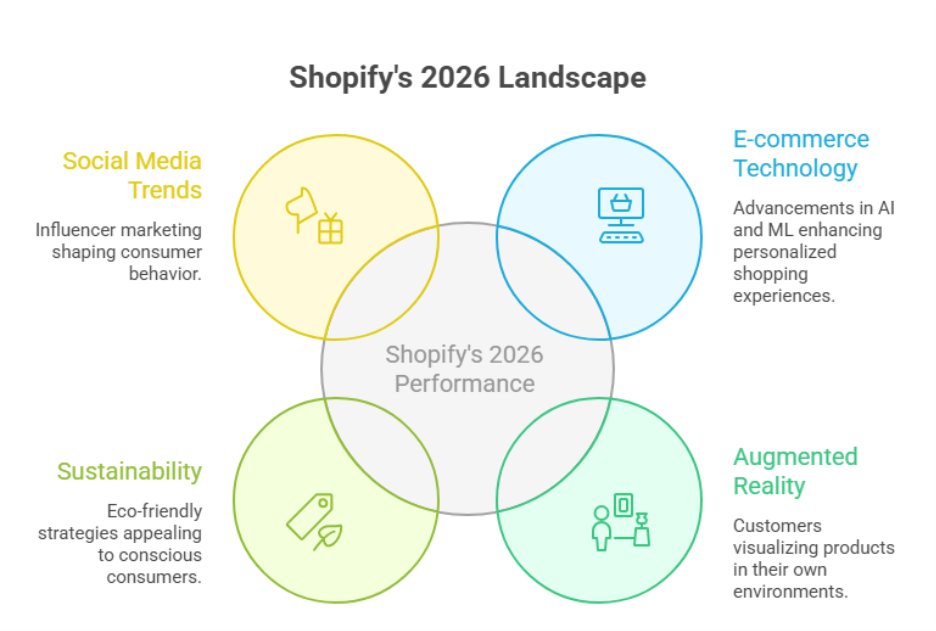
    Why do some Shopify stores convert consistently while others struggle to retain customers? The answer often lies in the combination of optimization, load time, checkout design, and overall conversion rate management. Factors such as product page layout, site speed, core web vitals, and strategic use of analytics directly influence your store’s performance. Understanding shopper behavior and implementing professional development practices ensures your Shopify store in 2026 meets evolving customer expectations. 

    In 2026, Shopify store performance will depend on site speed, seamless checkout, AI-powered optimization, and effective conversion rate strategies. Personalization, analytics, and UX improvements will influence repeat purchases and engagement, while professional store development and ongoing support ensure your Shopify site meets evolving shopper expectations and drives sustained growth. 

    Investing in a professionally developed Shopify site covering everything from initial audit and layout planning to ongoing maintenance, speed optimization, and personalized experiences can significantly improve conversion and encourage repeat purchases. Even modest budgets for enhancements like streamlined checkout, intuitive funnels, and personalization demonstrate the tangible value of good design and ongoing support. Many store owners see measurable ROI from packages that combine analytics, UX improvements, and strategic optimization without major upfront costs. 

    Shopify Store Optimization To Boost Conversion Rates 2026 

    Shopify Store Optimization To Boost Conversion Rates 2026 

    Optimizing your Shopify store is essential to increase purchase rate, average order value (AOV), and overall store’s performance in 2026. As shopper behavior evolves, brands must adopt AI-powered tools, mobile-first strategies, and targeted conversion rate optimization (CRO) techniques to drive higher conversions. By combining speed, usability, and analytics, you can create a seamless shopping experience that removes friction and boosts shopify traffic. 

    Prioritize Shopify Speed Optimization 

    Site speed is one of the most critical factors affecting conversions, especially on mobile. Implement cache strategies, compress images, and optimize theme code to improve LCP and reduce loading times. Fast mobile performance enhances mobile UX, encouraging visitors to add-to-cart and complete purchases efficiently. 

    Implement AI-Powered CRO Tools 

    AI tools and LLMs can analyze customer behavior and suggest improvements for CTAs, product pages, and checkout flows. Leveraging AI-powered personalization increases engagement, boosts average order value, and ensures your store’s performance matters more in 2026. 

    Optimize User Experience and Checkout 

    A mobile-first design, simplified navigation, and privacy policy transparency remove friction and build trust. Clear CTAs, optimized add-to-cart flows, and seamless checkout processes improve purchase rate and higher conversions. Regular shopify analytics review, SEO audits, and faqs integration help you track performance and adapt strategies. 

    Use a Checklist for 2026 

    Maintain a checklist for 2026 covering shopify speed optimization, CRO, SEO, mobile UX, CTAs, and AI-powered personalization. Consistently reviewing this checklist ensures your store’s performance stays competitive and drives measurable growth. 

    AI-Powered Shopify Tools Improve Speed And Checkout 

    Step 1: Enhance Site Speed 

    The first step is to focus on improving load times across your Shopify store using AI-powered tools. By automatically implementing image compression and lazy loading, pages become lighter and faster. Optimizing tap targets for mobile devices ensures that users can interact smoothly without frustration. Faster pages create a frictionless experience, reduce cart abandonment, and improve search visibility, keeping visitors engaged and more likely to complete purchases. 

    Step 2: Personalize Checkout and Recommendations 

    Next, use AI tools to streamline your checkout flow and personalize product suggestions. By analyzing customer behavior, the system can retarget visitors with relevant products and promotions tailored to their preferences. Focusing on high-intent users at this stage helps influence purchase decisions and increases average order value. This personalized approach also contributes to building trust, as shoppers feel the store understands their needs. 

    Step 3: Leverage Data Analysis for Continuous Improvement 

    Finally, continuously monitor your Shopify store using AI-driven data analysis. Examine checkout flow performance, track where users drop off, and identify friction points. By regularly refining product recommendations, cart experiences, and page layouts, you maintain a frictionless, highly optimized Shopify store that maximizes store performance, conversions, and customer satisfaction. 

    Conclusion 

    The performance of your Shopify store in 2026 depends on a combination of site speed, seamless checkout flow, AI-powered optimization, and strategic conversion rate optimization (CRO). By focusing on mobile-first design, personalized recommendations, and continuous data analysis, you can enhance purchase decisions, reduce cart abandonment, and increase average order value. Leveraging AI tools to streamline checkout, optimize product pages, and personalize high-intent experiences not only builds trust but also ensures your store’s performance remains competitive. 

    Regularly reviewing your checklist for 2026, implementing speed enhancements, and monitoring analytics allows you to maintain a frictionless, engaging shopping experience that meets evolving shopper expectations. Investing in professional development and ongoing support ensures measurable ROI while strengthening long-term customer relationships. 

    If you want a Shopify store that truly maximizes conversions and stays ahead in 2026, why not contact Integriti Studio and see how your store can outperform competitors? 

    Frequently Asked Questions (Factors That Will Influence Shopify Store Performance In 2026 )

    How to increase Shopify store performance?

    To increase Shopify store performance, optimize images, use a fast and responsive theme, and minimize apps. Enable caching, lazy loading, and CDN services. Regularly review analytics, streamline checkout, improve SEO, and monitor site speed to enhance user experience, reduce bounce rates, and boost conversions.

    What are the performance issues with Shopify?

    Common Shopify performance issues include slow loading due to unoptimized images, excessive apps, or heavy themes. Other problems are slow checkout, server response delays, poor mobile optimization, and large scripts or third-party integrations. These can hurt user experience, SEO, and overall conversion rates.

    Which of the following is an important factor in optimizing your Shopify dropshipping store for SEO?

    An important factor in optimizing a Shopify dropshipping store for SEO is using relevant keywords in product titles, descriptions, and meta tags. optimizing site speed, creating unique content, improving mobile usability, and building high-quality backlinks all help increase visibility and search engine rankings.

    How to make your Shopify store successful?

    To make your Shopify store successful, focus on high-quality products, clear branding, and a user-friendly design. Optimize for SEO and speed, run targeted marketing campaigns, offer excellent customer service, and use analytics to improve strategies. Consistency, trust-building, and engaging content drive sales and growth.

  • Evaluating Your WordPress Website’s Readiness For The Next Phase 

    Evaluating Your WordPress Website’s Readiness For The Next Phase 

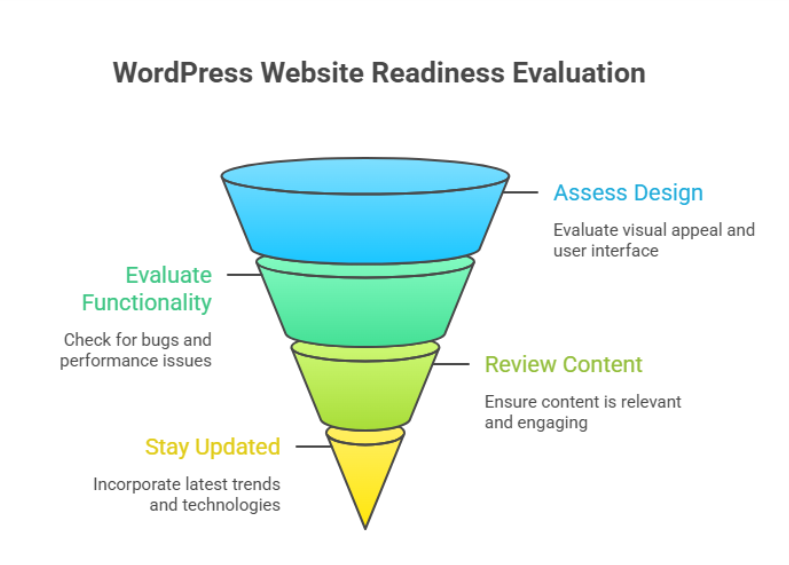
    Why do some businesses outgrow their WordPress site while others struggle to scale despite steady traffic and content? The difference often lies in how prepared your site truly is for its next phase of growth. Factors such as architecture, plugins, code quality, hosting provider, and long-term maintenance directly influence speed and performance, stability, and user trust. 

    Evaluating your website’s readiness means assessing performance, structure, scalability, and maintenance quality. It helps identify limitations that affect growth, user experience, and conversions, ensuring your site can support future business goals through better development, optimization, and long-term technical planning. 

    When professional development is overlooked, even a well-designed website can face slow page load, inconsistent behavior on mobile and desktop, and declining user experience. Agencies frequently see cases where a business spends a few hundred dollars on a theme, then thousands later, trying to fix deeper issues that could have been avoided with proper planning, testing, and optimization from the start. 

    How to test your WordPress site speed effectively today 

    How to test your WordPress site speed effectively today 

    Testing site speed is not a one-time task. It is a structured process that helps you understand how your website performs under real-world conditions and what actions are required to fix speed and performance issues before they impact growth. 

    Step 1: Prepare your website for accurate testing 

    Before testing your WordPress, make sure no major changes or updates are running in the background. Pause heavy imports, complete updates if pending, and confirm your hosting environment is stable. This ensures your results reflect the real performance of your site speed, not temporary activity. 

    Step 2: Choose the right performance testing tools 

    Use reliable tools designed for WordPress environments to test your site. These tools simulate real visitors and measure page speed, load behavior, and interaction delays. A proper website speed test provides a clear performance score and highlights how quickly key elements respond on different devices. 

    What these tools measure 

    • Page speed and visual stability 
    • Interaction with the next paint for responsiveness 
    • Core web vital indicators that affect rankings and usability 

    Step 3: Analyze results with a strategic mindset 

    Do not focus only on raw numbers. Look at how site speed affects user journeys, conversion paths, and engagement. Understanding the performance score helps agencies identify whether issues stem from the website builder, theme structure, or development decisions made during development. 

    Step 4: Retest after improvements 

    After applying changes, always re-run tests. Testing your site repeatedly ensures improvements are measurable and sustainable. This step confirms that your actions genuinely enhance page speed and support long-term optimization of your website rather than creating short-term gains. 

    Fix speed and performance issues for long-term success 

    Long-term performance improvements require a strategic mindset rather than reactive fixes. Slow websites often emerge when growth outpaces structure, leaving the speed of your website affected by hidden technical debt. For any online business, consistent load speed and reliability are essential to maintain trust, engagement, and conversions. 

    Protecting stability before optimization 

    Before making changes, backing up your site is a critical safeguard. Using a trusted backup plugin ensures you retain full control of your website while implementing improvements. This safety net allows updates, adjustments, or even updates to be rolled out without risking data or functionality for the user. 

    Understanding what truly impacts performance 

    Performance issues are rarely caused by a single factor. The elements on your website, including media files, scripts, and third-party features, directly influence WordPress speed. Poor image optimization, excessive parts of your site loading at once, or a poorly chosen new plugin can make a site significantly slow. Testing the performance with a free tool or professional tools to test helps assess total blocking time, load responsiveness, and how fast your site loads under real conditions. 

    Building sustainable performance improvements 

    Fixes should focus on reducing complexity and improving efficiency, not shortcuts. Smart optimization ensures the site is performing well even as content grows. WordPress offers flexibility, and the community provides guidance and tools, but success depends on applying them thoughtfully, creating a website without unnecessary overhead that scales smoothly over time. 

    Conclusion 

    Evaluating your WordPress website’s readiness for the next phase is not just a technical exercise; it is a business decision. Performance, structure, scalability, and maintenance all play a direct role in how well your site supports growth, user trust, and long-term conversions. From testing site speed correctly to addressing deeper performance bottlenecks, every improvement contributes to a more stable and future-ready foundation. 

    Businesses that take a proactive approach avoid the costly cycle of temporary fixes and reactive troubleshooting. Instead, they build a site that evolves with their goals, handles increasing demands, and delivers consistent experiences across devices. When performance is treated as an ongoing strategy rather than a one-time task, your site becomes an asset, not a limitation. 

    Is your current setup strong enough to support what comes next, or is it time to talk to Integriti Studio? 

    FAQs

    How to check the performance of a WordPress website?

    To check a WordPress website’s performance, use tools like Google PageSpeed Insights, GTmetrix, or Lighthouse. Analyze loading speed, Core Web Vitals, mobile usability, and server response time. Regular testing helps identify issues and improve user experience and SEO.

    How to set a WordPress website to coming soon?

    To set a WordPress website to “Coming Soon,” install a plugin like SeedProd or Coming Soon Page. Activate the mode, customize the message and design, and publish it. This hides the live site from visitors while allowing admins to work in the background.

    How to build a WordPress website in 2026?

    To build a website in 2026, choose fast hosting, install WordPress, and use a lightweight theme. Customize with block editor or page builders, add essential plugins for SEO, security, and performance, and optimize for mobile, accessibility, and Core Web Vitals before launch.

    What steps would you take to update or maintain a WordPress website?

    To update and maintain a website, regularly update core, themes, and plugins. Back up the site, check for broken links, optimize the database and images, monitor security, and test performance. Ensure content stays current, review SEO, and fix any issues to keep the site fast and secure.

  • WordPress Capabilities That Will Become More Important Over Time 

    WordPress Capabilities That Will Become More Important Over Time 

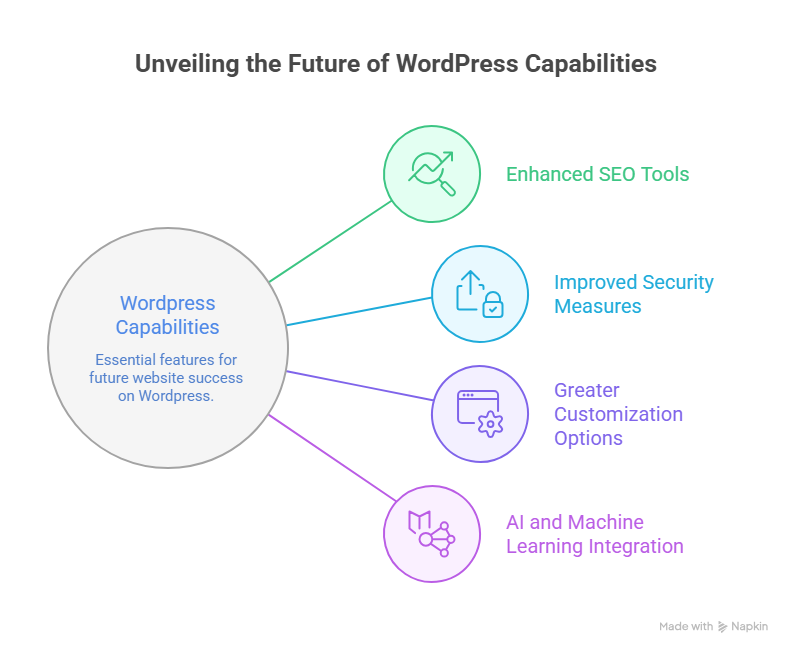
    Why do some websites built on WordPress remain scalable and efficient, while others struggle to keep up with changing expectations? The answer lies in how well evolving capabilities are understood and implemented over time. As the future of WordPress takes shape, performance differences are increasingly driven by structure, maintenance, and the ability to adapt to smarter technologies like AI. 

    WordPress capabilities that will become more important include advanced customization, AI-driven features, stronger security, scalable content management, and performance optimization. As the future of WordPress evolves, professional development, reliable plugins, and strategic maintenance will be essential for long-term growth, usability, and competitive advantage. 

    Factors influencing website performance now extend far beyond appearance. Speed, security, flexibility, and long-term adaptability directly affect trust and usability. This is where professional WordPress development becomes critical. When you invest in thoughtful architecture, reliable support, and ongoing maintenance, your site remains user-friendly while supporting business goals. In practical terms, professional services may cost anywhere from a few hundred to several thousand dollars annually, often a modest investment compared to the long-term value they protect. 

    Future of WordPress development trends shaping modern website development 

    Future of WordPress development trends shaping modern website development

    The future of WordPress development is rapidly evolving, and staying ahead requires understanding emerging trends and technologies that will define WordPress in 2026. As a content management system, WordPress remains a dominant platform for website development, but its capabilities are expanding beyond traditional blogging into fully customizable, scalable, and secure web solutions. 

    Key Trends Shaping the Future of WordPress 

    One major trend is the rise of headless WordPress, allowing developers to separate the frontend and backend for faster, more flexible user experiences. Integration of the Gutenberg block editor continues to empower WordPress users with drag-and-drop customization, while modern WordPress themes and improved wordpress themes and plugins provide more design flexibility and scalability. 

    Security is also evolving. As threats become more sophisticated, WordPress introduces advanced security features and recommends managed WordPress hosting to safeguard websites without compromising speed or usability. Performance optimization, SEO enhancements, and AI-driven content tools are becoming standard, helping websites maintain strong search engine rankings and a better user experience. 

    Shaping the Growth and Evolution 

    The evolution of WordPress reflects a broader shift toward modular, user-friendly, and future-ready solutions. WordPress professionals now focus on leveraging technologies within WordPress to streamline workflows, enhance customization, and provide better scalability for businesses. By tracking key trends and adopting best practices, your website can stay competitive while harnessing the growth of WordPress and its thriving WordPress community. 

    WordPress in 2026: AI security features, user-friendly evolution 

    The evolution of WordPress is accelerating, with a clear focus on AI, enhanced security features, and more user-friendly experiences. As a content management system, WordPress remains central to modern website development, empowering businesses to scale efficiently while protecting both data and user trust. Here’s a breakdown of what to expect by 2026: 

    Key Trends Shaping the Future 

    • AI Integration: 
    • WordPress offers AI-driven tools for content creation, SEO optimization, and workflow automation. 
    • Predictive analytics and smart suggestions help WordPress users optimize website development strategies. 
    • Enhanced Security Features: 
    • With threats becoming more sophisticated, security features such as two-factor authentication, automated backups, and real-time monitoring will become standard. 
    • Managed WordPress hosting continues to protect websites without compromising speed or flexibility. 
    • User Experience and Customization: 
    • The Gutenberg block editor and modern WordPress themes provide intuitive, user-friendly design tools. 
    • Streamlined WordPress themes and plugins simplify customization, reducing development time while improving overall site aesthetics. 
    • Performance and SEO Optimization: 
    • Faster load times, mobile responsiveness, and optimized layouts support higher search engine ranking. 
    • Technologies within WordPress enable improved accessibility and enhanced workflow for developers and content managers alike. 
    • Community and Ecosystem Growth: 
    • The WordPress community drives innovation, offering resources, training, and updates that keep the platform competitive. 
    • The growth of WordPress ensures a sustainable ecosystem, with new trends to watch continuously shaping the future of web development. 

    Conclusion 

    As WordPress continues to evolve, its future lies in advanced AI integration, robust security features, and a more user-friendly experience. By leveraging modern WordPress themes, reliable plugins, and professional WordPress development, you can optimize performance, improve search engine ranking, and create a scalable, future-ready website. The platform’s ongoing evolution and active WordPress community ensure that staying updated with key trends is essential for long-term success. Investing in strategic customization, managed hosting, and thoughtful workflows not only protects your online business but also enhances usability, trust, and growth potential.  Are you ready to future-proof your WordPress site if you contact Integrity Studio today? 

    FAQs

    What are the capabilities of WordPress?

    WordPress offers capabilities like custom website creation, content management, and theme customization. It supports plugins for SEO, e-commerce, security, and performance, enabling blogs, business sites, and online stores. Its flexibility allows scalable design, user management, multilingual support, and integration with third-party tools for diverse website needs.

    Which of these is the future of WordPress?

    The future of WordPress lies in headless architecture, AI-driven content management, and advanced block-based editing. Emphasis on speed, security, scalability, and seamless integration with third-party tools will continue, making it a versatile platform for businesses, e-commerce, and creators seeking flexible, modern, and future-proof websites.

    What are the most exciting and useful features of WordPress?

    The most exciting and useful WordPress features include flexible themes and plugins, a block-based Gutenberg editor, an SEO-friendly structure, and strong community support. It also offers customizable user roles, e-commerce integration, multilingual support, and robust security options, enabling businesses and creators to build scalable, professional, and versatile websites.

    Which is the latest version of WordPress, and why is it important to update WordPress regularly?

    The latest WordPress version is 6.9.1. Regular updates ensure security, bug fixes, plugin compatibility, improved performance, new features, and protect your site from vulnerabilities and crashes.

  • Webflow Practices That Will Remain Relevant Beyond 2026

    Webflow Practices That Will Remain Relevant Beyond 2026

    Webflow Practices That Will Remain Relevant Beyond 2026

    Why do some webflow sites outperform others even when their content or products are similar? The answer often lies in factors influencing website performance clean layout, responsive design, fast load times, and seamless UX all play a role. Businesses that underestimate these elements can struggle with conversion, scaling, and overall ROI, especially when targeting B2B or SaaS audiences. 

    Webflow practices that will remain relevant beyond 2026 focus on clean, responsive web design, seamless UX, scalable frameworks, and SEO-friendly structures. Prioritizing professional development, ongoing maintenance, and analytics-driven improvements ensures marketing sites and landing pages deliver consistent conversion, ROI, and long-term value for B2B, SaaS, and e-commerce businesses. 

    Investing in professional development ensures your webflow site remains efficient and adaptable. From maintaining design systems and templates to leveraging animations and landing page best practices, ongoing support and maintenance make a measurable difference. For instance, professional agencies may charge anywhere from $2,000–$5,000 for a single high-quality marketing site or redesign, reflecting the value of strategic UX, integrated analytics, and SEO optimization. 

    This blog will explore webflow practices that will remain relevant beyond 2026, highlighting how marketers and designers can unlock long-term success. You’ll learn which best practices, design frameworks, and technical choices support high-performing webflow sites, improve user experience, and ensure your marketing teams achieve sustained ROI well into the future. 

    Webflow Practices Every Web Designer Should Follow Beyond 2026 

    Webflow Practices Every Web Designer Should Follow Beyond 2026 

    Creating webflow sites that remain relevant and high-performing beyond 2026 requires a thoughtful combination of design, technical strategy, and workflow optimization. Whether you are a webflow agency or an independent designer, following proven practices ensures your projects are scalable, maintainable, and conversion-focused, particularly for B2B SaaS companies and SaaS marketing teams. 

    Prioritize Scalable and Maintainable Webflow Development 

    A scalable webflow development approach allows your webflow project to grow alongside your client’s business. This includes structured CMS collections, reusable components, and clear naming conventions. Emphasizing maintainability helps both non-technical marketers and web designers manage content without breaking functionality. Platforms like webflow offer built-in tools to unlock additional features, reducing reliance on external plugins and streamlining workflows for redesigns or migrations to webflow. 

    Optimize Performance and SEO for Every Webflow Site 

    Performance and SEO are critical for B2B and SaaS teams targeting high-converting audiences. Optimizing core web vitals, compressing media, and structuring URLs properly enhances website experience platforms for users and search engines alike. Implementing 301 redirects during redesigns and ensuring proper localization supports global reach, while analytics integration allows teams to measure ROI effectively. 

    Design with User Experience and Brand Identity in Mind 

    Webflow design should balance aesthetic appeal with functional UX. Adopting a design-first mindset ensures web experiences reflect the client’s brand identity while supporting intuitive navigation and conversion-focused layouts. Keeping up with web design trends, exploring design ideas from the webflow community, and referencing top webflow projects can inspire innovative solutions.using templates strategically and built-in webflow features helps web designers deliver consistent, high-quality results for B2B SaaS companies and ecommerce websites. 

    Embrace No-Code Workflows and Webflow Community Resources 

    No-code tools like webflow streamline the workflow, allowing web designers to focus on strategy and UX rather than complex coding. Engaging with the webflow community, reading the webflow blog, and following platform updates help teams stay ahead in what’s next for website builders and web experiences. For SaaS websites or marketing sites, this ensures both performance and scalability while empowering marketing teams to maintain control without relying solely on technical staff. 

    Get Started For Free With Smart Webflow SEO Strategies 

    Implementing effective SEO strategies in Webflow doesn’t have to be complex or costly. By focusing on performance and SEO from the start, you can transform your webflow site into a polished, high-converting platform. These strategies are especially valuable for B2B SaaS companies and growing teams who want to convert visitors into customers while keeping scalability in mind. 

    Step 1: Optimize SEO and Performance from Day One 

    Ensuring performance and SEO go hand-in-hand is crucial. Webflow allows you to manage metadata, alt attributes, and semantic markup seamlessly. Teams that need content at scale can also integrate tools like Contentful or APIs to manage content efficiently without sacrificing speed. Minimalist design combined with fast load times improves user experience and positively impacts search engine rankings. 

    Step 2: Choose the Right Structure for Long-Term Growth 

    Choosing the right CMS structure and layout ensures your site continues to evolve as your business grows. For B2B SaaS companies, this means designing for scalability in mind, building templates that support multiple products or landing pages, and maintaining polished user experience for all visitors. Launching a new webflow site with these principles reduces the need for frequent redesigns. 

    Step 3: Implement Tracking and Analytics 

    To convert visitors into customers, tracking is essential. Integrate analytics to monitor SEO performance, user behavior, and traffic sources. Teams who want actionable insights can use these metrics to refine content strategy, optimize internal linking, and improve on-page SEO elements without relying solely on external consultants. 

    Step 4: Get Started for Free and Iterate 

    Webflow offers the ability to get started for free, allowing marketers and web designers to test SEO strategies without upfront investment. Begin with foundational best practices, track results, and iterate based on performance. By following these steps, growing teams can maintain a site that performs well for both users and search engines while positioning their brand for long-term success. 

    Conclusion 

    Sustaining a high-performing webflow site beyond 2026 requires a careful balance of design, technical strategy, and ongoing optimization. By prioritizing scalable development, polished UX, SEO and performance, and no-code workflows, you can ensure your marketing sites and SaaS platforms remain competitive and deliver consistent ROI. Leveraging analytics, maintaining design systems, and following best practices allows both web designers and growing teams to convert visitors into customers while reducing the need for frequent redesigns. 

    Whether you are launching a new webflow site or planning a redesign, these strategies support long-term growth, brand identity, and user experience. Webflow’s flexibility, combined with professional guidance, ensures your projects continue to evolve seamlessly alongside your business. 

    if you want expert support to implement these practices and unlock your site’s full potential, why not contact Integriti Studio today? 

    Frequently Asked Questions (Webflow Practices That Will Remain Relevant Beyond 2026 )

    Is Webflow still relevant in 2025?

    Yes Webflow is still relevant in 2025. It continues growing in adoption, powering hundreds of thousands of sites with a rising CMS market share and strong no-code design appeal. Its AI, design flexibility, and increasing enterprise use keep it meaningful in web development today.

    What is the future of Webflow?

    The future of Webflow looks strong and innovative beyond 2025. It will keep expanding AI-driven design, automation, and content tools, making websites smarter and faster to build. Webflow is also improving performance, security, enterprise features, CMS flexibility, and integrations, positioning itself as a major no-code/low-code platform for business and advanced web projects.

    What are the web design trends in 2026?

    In 2026 web design trends, expect AI-driven personalization, immersive 3D/AR experiences, voice UI, and micro-animations for engagement. Minimal, performance-first layouts, responsive mobile-first design, and eco-friendly websites will also dominate. Bold typography, organic shapes, and human-centred interfaces are shaping modern aesthetics.

    Is there anything better than Webflow?

    Yes there are platforms often considered “better” than Webflow for specific needs. For example, Wix and Squarespace are easier for beginners with drag-and-drop simplicity, WordPress offers unmatched flexibility with plugins, and Framer gives strong design tools; other options like Webstudio also compete closely.

  • Building A Shopify Store Structure That Supports Sustainable Growth 

    Building A Shopify Store Structure That Supports Sustainable Growth 

    Building A Shopify Store Structure That Supports Sustainable Growth

    Why do some ecommerce brands grow steadily on Shopify while others struggle to scale despite strong products? The answer often lies in how your shopify store is structured, optimized, and maintained over time. A high-performing shopify setup goes beyond visuals it reflects strategic planning, clean architecture, and development choices that support sustainable growth as your business evolves. 

    Building a Shopify store structure that supports sustainable growth requires strategic planning, scalable design, and ongoing optimization. By focusing on performance, SEO, user experience, and professional maintenance, you ensure your Shopify store can handle growth, improve conversions, and support long-term ecommerce success. 

    Website performance is shaped by multiple factors working together, including design consistency, technical structure, load efficiency, and how well your store is built to optimize both search visibility and user experience. Professional development ensures your shopify store remains scalable, secure, and aligned with modern seo and scalability requirements. Strong design, ongoing support, and structured maintenance directly improve conversion and protect long-term performance. Many businesses typically invest a few hundred dollars per month in optimization and support far less than the cost of rebuilding a poorly structured store later. 

    Building a scalable Shopify store structure for sustainable ecommerce growth 

    Building a scalable Shopify store structure for sustainable ecommerce growth 

    Why scalability matters for Shopify success 

    When building a scalable Shopify store, the goal is to create a foundation that supports sustainable ecommerce growth without frequent overhauls. A scalable Shopify store ensures your infrastructure can handle increased traffic, a growing product catalog, and higher order volumes, while maintaining speed, security, and a seamless user experience. Planning for scalability from the start reduces future costs and prevents disruptions as your business expands. 

    Core principles for building a scalable Shopify store 

    1. Modular store architecture: Use flexible templates and modular sections that allow you to add new products, collections, and pages without redesigning the entire site. 
    1. Optimized apps and integrations: Choose apps that integrate efficiently with your store and avoid unnecessary plugins that can slow performance or create conflicts. 
    1. Performance and SEO focus: Ensure product pages, collections, and checkout workflows are optimized to improve load speed and conversion, while aligning with shopify’s SEO best practices. 

    Sustainable ecommerce practices in store design 

    Incorporating sustainable business practices into your store can enhance brand reputation and appeal to eco-conscious consumers. Examples include highlighting sustainable products, using energy-efficient hosting, and reducing digital waste. A sustainable ecommerce approach not only supports environmental responsibility but also builds trust with a loyal customer base. 

    Strategies to scale your Shopify store effectively 

    To scale your Shopify store, invest in professional development services to ensure long-term stability. Regularly review workflows, optimize apps and integrations, and monitor analytics to inform decisions. By building with scalability in mind, your store can grow organically, improve customer retention, and achieve ecommerce success over time. 

    Optimizing Shopify store user experience SEO and conversion scalability 

    Creating a scalable Shopify store isn’t just about adding products it’s about ensuring every aspect of your store drives ecommerce success, improves customer retention, and supports long-term growth. Optimizing user experience (UX), SEO, and conversion processes in a structured, step-by-step manner allows you to scale a Shopify store efficiently while maintaining performance and engagement. 

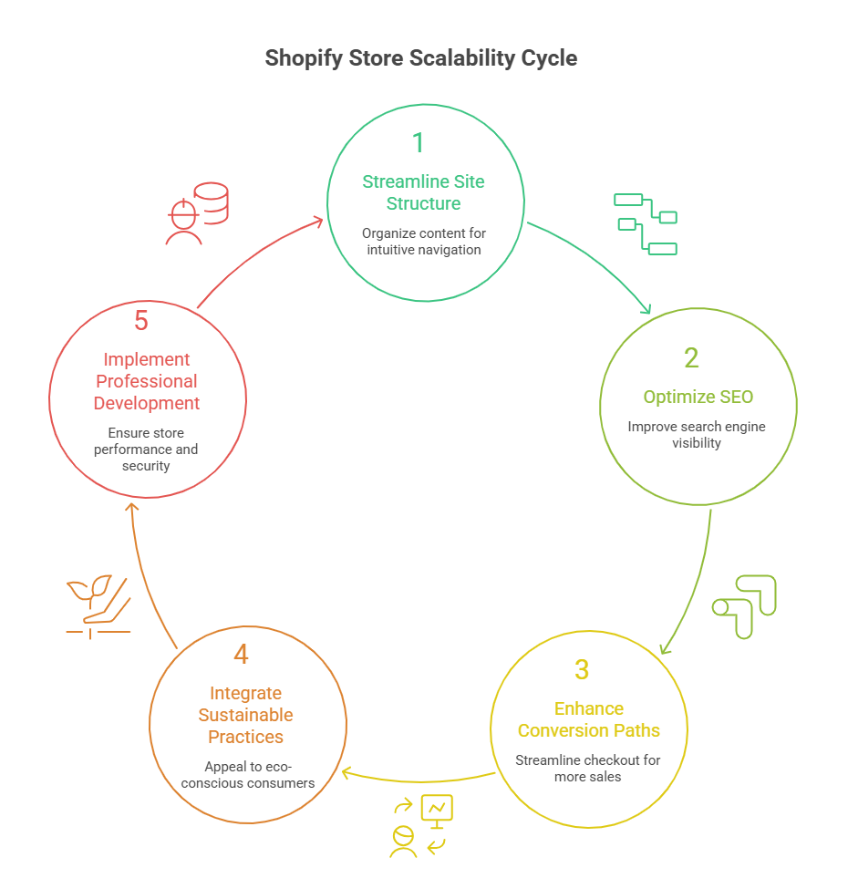
    Step 1: Streamline site structure for better user experience 

    A modular layout makes navigation intuitive and scalable. Organize collections, menus, and product pages logically to ensure a seamless browsing experience. Highlight sustainable products and eco-conscious messaging to appeal to eco-conscious shoppers, improving trust and encouraging repeat purchases. 

    Step 2: Optimize SEO for discoverability 

    Use shopify’s built-in SEO features and carefully structured URLs to improve search rankings. Optimize product titles, meta descriptions, and images to enhance visibility. This helps attract new traffic while also supporting organic growth from existing customers. Implementing proper SEO practices ensures your scalable Shopify store grows sustainably without losing relevance. 

    Step 3: Enhance conversion paths 

    Focus on streamlining checkout flows, optimizing product pages, and improving page speed to maximize conversion. Integrate apps and analytics tools to monitor customer behavior and test actionable strategies. This step ensures your building a scalable Shopify plan converts visitors into loyal buyers efficiently. 

    Step 4: Integrate sustainable business practices 

    Show your commitment to sustainable operations, whether through eco-friendly packaging, energy-conscious hosting, or messaging about sustainable products. Incorporating sustainable practices reinforces brand values, builds a loyal customer base, and supports long-term scalability. 

    Step 5: Implement professional development services 

    Leverage expert development services to audit, optimize, and maintain your store. Regular updates, testing, and apps and integrations ensure your scalable Shopify store remains fast, reliable, and capable of handling growth without compromising user experience or SEO. 

    Conclusion 

    Building a Shopify store that truly supports sustainable growth requires more than attractive design or product variety. It demands a carefully scalable Shopify store structure, optimized user experience, strong SEO, and professional maintenance. By focusing on modular layouts, efficient apps and integrations, streamlined conversion paths, and eco-conscious practices, you ensure your store can handle increasing traffic, improve customer retention, and achieve long-term ecommerce success. Regular audits and professional development services further safeguard performance, allowing your store to grow organically while maintaining reliability, speed, and engagement. 

    Every strategic choice from highlighting sustainable products to optimizing checkout flows contributes to building a sustainable business that appeals to both eco-conscious and loyal shoppers. By combining performance, scalability, and sustainability, your Shopify store becomes a robust platform ready to evolve with your business needs. 

    if building a truly scalable, sustainable Shopify store could transform your growth, why not reach out to Integriti Studio and see how they can help you achieve it?

    Frequently Asked Questions (Building A Shopify Store Structure That Supports Sustainable Growth )

    How to make your Shopify store grow?

    To grow your Shopify store, focus on strong product positioning, fast and mobile-optimized design, SEO-friendly structure, and data-driven marketing. Use email and paid ads strategically, improve conversion rates, analyze customer behavior, and continuously optimize checkout, apps, and performance for long-term scalable growth.

    What is the organizational structure of Shopify?

    Shopify follows a decentralized, product-led organizational structure. Teams are arranged around functions like product development, engineering, design, marketing, sales, and operations. This structure promotes cross-functional collaboration, faster decision-making, innovation, and scalability while supporting millions of merchants globally.

    How to make a retail store more sustainable?

    Make a retail store sustainable by using eco-friendly materials, reducing energy consumption, minimizing waste, sourcing locally, offering reusable packaging, promoting recycling, and adopting green supply chain practices.

    Is Shopify eco-friendly?

    Yes Shopify is considered eco-friendly in several ways. Its platform runs on renewable-energy cloud hosting that is carbon neutral, and it offers tools like the Planet app for carbon-neutral shipping. Shopify also supports sustainable packaging, carbon offset programs, and eco-focused merchant integrations.

  • Common WordPress Website Issues That May Impact Visibility In  2026 

    Common WordPress Website Issues That May Impact Visibility In 2026 

    Common Wordpress Website Issues That May Impact Visibility In 2026

    Why do some businesses struggle to gain visibility on WordPress while others consistently perform better in search results? The difference often lies in how a wordpress website is built, managed, and maintained over time. As 2026 approaches, even a well-designed wordpress site can lose traction due to overlooked technical factors, bloated plugins, weak seo, or poor decisions made inside the admin panel. 

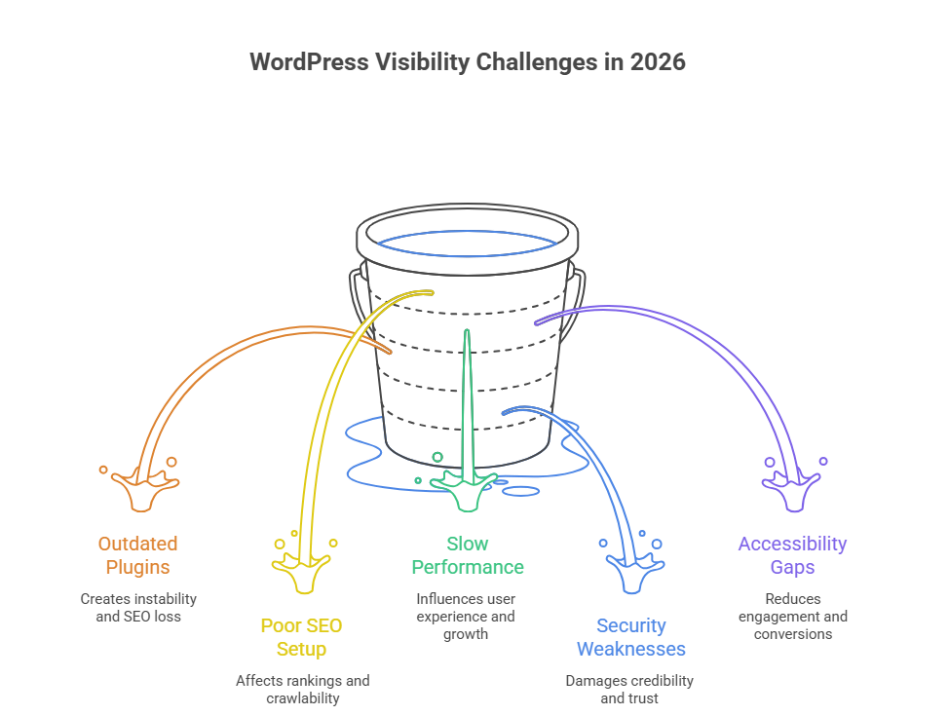
    Common WordPress website issues impacting visibility in 2026 include outdated plugins, poor SEO setup, slow performance, security weaknesses, and accessibility gaps. Without regular updates, professional maintenance, and technical audits, even a well-built WordPress site can lose search engine rankings and user trust. 

    Website performance is influenced by multiple elements working together, including code quality, design structure, hosting environment, and ongoing maintenance. Professional development ensures these components remain aligned, helping you fix issues before they impact rankings or credibility. Smart design choices, reliable support, and routine maintenance directly improve user experience and long-term growth. For example, businesses often invest a few hundred dollars monthly for maintenance and updates, compared to the much higher cost of repairing damage later. 

    Common WordPress site SEO issues affecting visibility in 2026 

    Common WordPress site SEO issues affecting visibility in 2026

    Understanding common WordPress SEO challenges 

    Many visibility problems stem from common WordPress configuration gaps that site owners overlook as their platform grows. These common WordPress issues are not always obvious but can significantly affect rankings, crawlability, and trust signals. For wordpress sites in 2026, search engines are far less forgiving of technical weaknesses, especially when common WordPress practices are not followed correctly. 

    Technical errors that weaken search performance 

    One major issue is broken URLs leading to 404 errors, which interrupt crawl paths and frustrate users. Another frequent concern is outdated plugins, often caused by delayed regular updates, creating instability and SEO loss. Poorly managed plugin or theme choices can also introduce compatibility issues, reducing site efficiency and visibility. 

    Security and accessibility impact on SEO 

    Search engines increasingly evaluate wordpress security as part of ranking signals. Unaddressed security vulnerabilities create a security risk that can damage credibility. At the same time, website accessibility and unresolved accessibility issues affect usability, especially on mobile devices, reducing engagement and conversions. 

    Strategic approach for long-term visibility 

    A structured review of the wordpress core, supported by a skilled wordpress developer, ensures your business website remains stable, compliant, and competitive. Addressing common WordPress mistakes through proactive audits helps protect SEO performance and supports sustainable growth beyond 2026. 

    Plugins admin errors 404 problems and fixes for WordPress 

    Step 1: Review plugin and admin configuration 

    Begin by checking settings inside the wordpress admin area. Many issues start from common mistakes such as activating a plugin or theme that conflicts with the wordpress core. Ensure the configuration supports website accessibility and does not introduce early technical gaps. 

    Step 2: Identify causes of 404 errors 

    Next, audit pages and links producing 404 errors. These often occur after plugin removals, URL structure changes, or failed updates. Persistent 404 issues reduce trust and impact user flow, especially on mobile devices. 

    Step 3: Update or replace outdated plugins 

    Running outdated plugins increases maintenance complexity and creates a serious security risk. Apply regular updates carefully, confirming compatibility before activation. If plugins are no longer supported, replace them with stable alternatives. 

    Step 4: Resolve compatibility and accessibility issues 

    Multiple tools can create compatibility issues that affect layouts, forms, and navigation. Addressing accessibility issues ensures your business website remains usable for all audiences and compliant with evolving standards. 

    Step 5: Apply long-term fixes with professional support 

    Consistent regular updates and expert oversight from a wordpress developer ensure stability. This structured approach prevents admin errors, protects performance, and supports sustainable growth as WordPress environments become more complex. 

    Conclusion 

    As WordPress continues to evolve, visibility challenges in 2026 will be less about the platform itself and more about how strategically it is managed. From outdated plugins and unresolved 404 errors to security gaps and accessibility limitations, small technical oversights can quietly erode search performance and user trust. A successful WordPress strategy requires more than basic setup it demands consistent updates, informed decision-making, and a proactive approach to SEO, security, and performance. 

    When plugin management, admin configurations, and core updates are handled professionally, your website remains stable, accessible, and competitive. Investing in expert support today not only prevents costly fixes tomorrow but also protects long-term growth, credibility, and conversion potential for your business. 

    if these issues are already impacting visibility for many sites, isn’t it time to ask whether partnering with Integriti Studio could be the smarter move for your WordPress success? 

    Frequently Asked Questions (Common Wordpress Website Issues That May Impact Visibility In 2026)

    What are common WordPress issues?

    Common WordPress issues include slow website speed, plugin or theme conflicts, outdated core, plugins, or themes, broken links, security vulnerabilities, white screen of death, database connection errors, poor SEO optimization, and incompatible updates. Regular maintenance, updates, and backups help prevent these problems.

    Is WordPress still in demand in 2025?

    Yes WordPress is still in demand in 2025. It powers about 43 % of all websites worldwide and holds over 60 % of the CMS market, making it the most widely used platform for blogs, business sites, and e‑commerce with WooCommerce.

    Is there a problem with WordPress right now?

    No WordPress itself isn’t having a major global outage right now; status checks show WordPress.com services are up and user reports don’t indicate widespread downtime. However, many individual WordPress sites still face issues like update‑related errors, plugin conflicts, or admin access problems.

    What is the most vulnerable part of a WordPress website?

    The most vulnerable part of a WordPress website is third-party plugins and themes. Poorly coded or outdated plugins often contain security flaws that attackers exploit. Weak login credentials, outdated WordPress core files, and improper permissions also increase the risk of hacking and data breaches.