Author: admin

  • Webflow Best Practices To Carry Into 2026 

    Webflow Best Practices To Carry Into 2026 

    Webflow Best Practices To Carry Into 2026

    Why do some websites outperform others while seemingly similar competitors lag behind? The answer often lies in a combination of technical precision, strategic design, and ongoing optimization. Factors influencing website performance include page speed, intuitive UX, structured HTML, and properly indexed sitemaps that ensure search engines can efficiently crawl your content. For businesses using Webflow, leveraging these elements correctly can directly impact visibility, conversions, and overall ROI. 

    Webflow success in 2026 depends on combining strong UX, proper SEO, and structured sitemaps. Use templates wisely, optimize URLs, implement analytics, and follow a clear Webflow SEO checklist. Regular audits, post-launch maintenance, and user experience improvements ensure your Webflow website remains high-performing, visible, and conversion-ready. 

    Professional development is critical to maintain a high-performing Webflow website. Investing in skilled design, SEO setup, analytics integration, and post-launch audits ensures your site remains agile and aligned with evolving standards. Even small decisions like implementing proper URL redirects or refining templates can save significant resources over time. For context, quality professional support for design, development, and ongoing maintenance often ranges from modest monthly retainers to more comprehensive project packages, reflecting the tangible value added by expert guidance. 

    This blog will walk you through Webflow best practices to carry into 2026, covering practical strategies to optimize your site for SEO, create a structured Webflow sitemap, improve UX, and implement a thorough Webflow SEO checklist. You’ll also discover actionable tips for audits, analytics, and post-launch support to ensure your Webflow website performs at its peak. 

    Webflow Best Practices for SEO and UX Optimization 
    Webflow Best Practices for SEO and UX Optimization 

    Optimizing your Webflow website for both SEO and UX is critical to ensuring high visibility, better engagement, and measurable business results. By combining technical precision with thoughtful UX design, you can turn visitors into loyal customers while improving seo performance across search engines. 

    Implement a Structured Webflow SEO Workflow 

    A structured Webflow SEO checklist ensures nothing is overlooked. Start with seo setup for each page, including meta titles, descriptions, and header structures. Use a Webflow sitemap to make it easier for search engines to crawl and index your content. Regularly audit your core web vitals and on-page SEO elements to identify opportunities for optimization. 

    Leverage Technical SEO 

    Technical SEO in Webflow includes ensuring fast page speed, semantic HTML, and proper 301 redirects to avoid broken links or duplicate content issues. Integrating tools like Google Search Console or HubSpot allows you to track organic traffic and monitor SEO health post-launch. Setting up redirects correctly is essential during a migration to Webflow or a website redesign. 

    Enhance UX for Engagement and Retention 

    Your Webflow site should prioritize ux design by creating intuitive navigation, mobile responsiveness, and accessible layouts. Clear calls-to-action and strategically placed content convert visitors into customers. Consider the latest design trends in website design to keep your Webflow project modern and professional, particularly for SaaS or B2B platforms. 

    Post-Launch Optimization and Maintenance 

    SEO and UX are ongoing processes. Post-launch, monitor your seo settings, seo performance, and analytics to refine content strategy. Regularly review important pages, update templates, and maintain accessibility standards. Engaging with the Webflow community can provide insights into top Webflow practices and tools, while generative content and content strategy improvements support organic growth. 

    Integration and Tools 

    Webflow’s website experience platform integrates with marketing and analytics tools to enhance tracking and conversion. From software as a service integrations to connecting your free starter plan, leveraging these features improves efficiency and helps search engines understand your content. A complete Webflow SEO checklist combined with ongoing post-launch updates ensures your new website performs at its peak. 

    Step-by-Step Webflow SEO Checklist to Get Started 

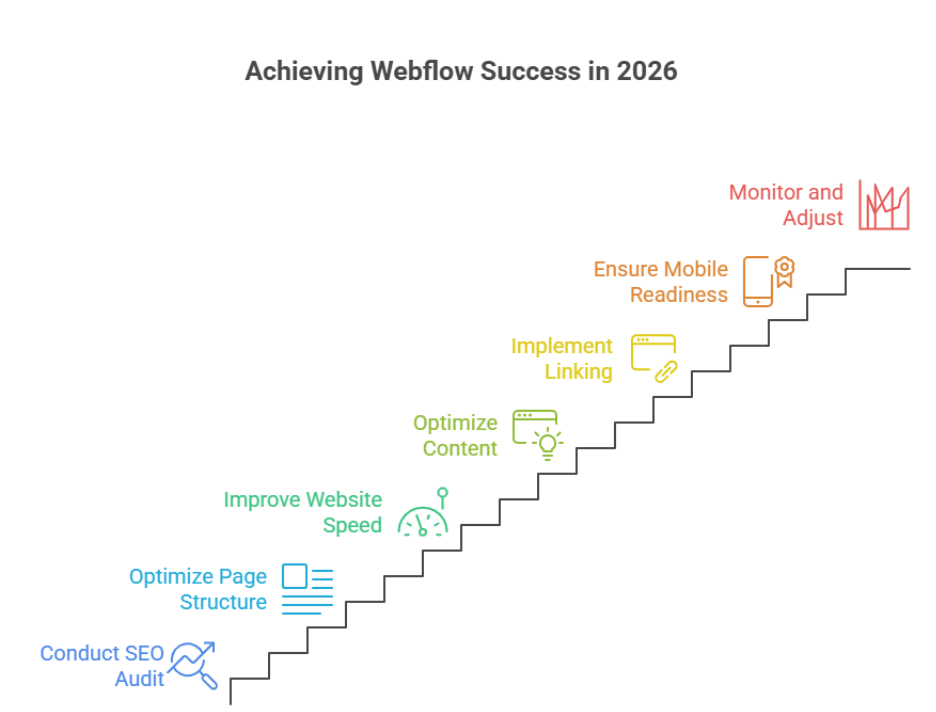
    Step 1: Conduct an SEO Audit of Your Page on Your Website 

    Before making any changes, assess the current performance of each page on your website. Identify issues such as duplicate content issues, slow load times, and missing meta tags. This audit helps pinpoint areas where optimization can improve your visibility and help search engines to crawl your site efficiently. 

    Step 2: Optimize Page Structure and Headings 

    Ensure each page is structured logically with clear H1, H2, and H3 headings. Properly structured headings not only improve readability for visitors but also allow search engines to crawl and understand your content hierarchy. Avoid duplicate content issues by ensuring each heading and section is unique. 

    Step 3: Improve Website Speed and Largest Contentful Paint 

    Page speed is a critical ranking factor and directly impacts user experience. Focus on improving the largest contentful paint (LCP) by optimizing images, minimizing scripts, and leveraging caching. Faster pages help convert visitors into customers and reduce bounce rates. 

    Step 4: Optimize Content for SEO and User Intent 

    Create and optimize content that aligns with your audience’s search intent. Use targeted keywords naturally within headings, paragraphs, and meta descriptions. For B2B SaaS companies, this means delivering informative, solution-driven content that guides potential clients through your service offerings. 

    Step 5: Implement Internal and External Linking 

    Internal links guide both users and search engines to discover related content across your site. Additionally, include authoritative external links where relevant. Proper linking strategies can reduce duplicate content issues and help search engines to crawl your site more efficiently. 

    Step 6: Ensure Mobile and Technical SEO Readiness 

    With the majority of users accessing websites via mobile devices, responsive design is essential. Check for broken links, XML sitemaps, robots.txt configuration, and structured data implementation. These technical elements improve the overall SEO performance of your page on your website. 

    Step 7: Monitor, Analyze, and Adjust 

    SEO is an ongoing process. Regularly monitor metrics like organic traffic, bounce rates, and conversions to see how your optimizations perform. Continuous adjustments ensure that your site not only attracts visitors but also converts visitors into customers effectively. 

    Conclusion 

    Optimizing your Webflow website for 2026 is not just about launching a visually appealing site it’s about creating a platform that performs, engages, and converts. By implementing a structured Webflow SEO workflow, enhancing UX, monitoring core web vitals like largest contentful paint, and addressing duplicate content issues, you ensure that search engines can crawl your content efficiently while delivering a seamless experience to your visitors. Regular audits, content optimization, and post-launch maintenance are essential steps to keep your site competitive, especially for B2B SaaS companies looking to convert visitors into customers consistently. 

    Taking a strategic, step-by-step approach from SEO audits to technical readiness and content optimization ensures your Webflow website remains high-performing, discoverable, and aligned with evolving web standards. 

    Now here’s a question to consider: If you want your Webflow site to perform at its peak and drive real business results, why not reach out to Integriti Studio today?

    Frequently Asked Questions (Webflow Best Practices To Carry Into 2026)

    What are the most important Webflow best practices for 2026?

    In 2026, the most important Webflow best practices focus on performance, clean structure, accessibility, and SEO. Websites must load fast, follow proper layout hierarchy, and deliver a smooth user experience across all devices.

    Is Webflow still good for SEO in 2026?

    Yes. Webflow remains a strong platform for SEO in 2026 due to its clean code output, fast hosting, and built-in SEO tools. Proper use of headings, CMS structure, and metadata is essential for strong rankings.

    Why is page speed critical for Webflow websites in 2026?

    Search engines place greater emphasis on user experience. Slow-loading Webflow sites can lose traffic and rankings. Optimized images, minimal animations, and efficient layouts are key best practices.

    How will AI impact Webflow workflows in 2026?

    AI will support Webflow workflows through content planning, design suggestions, automation, and performance testing. However, strategic decisions and quality control will still rely on human expertise.

  • What Will Separate Average Webflow Sites From Great Ones In 2026

    What Will Separate Average Webflow Sites From Great Ones In 2026

    What Will Separate Average Webflow Sites From Great Ones In 2026

    Why do some Webflow sites feel seamless and intuitive, while others leave visitors frustrated and disengaged? The difference often isn’t in the platform itself it’s in the choices behind design, development, and ongoing maintenance. By 2026, the standards for high-performing Webflow websites will rise dramatically, driven by factors like page speed, SEO optimization, accessible layouts, UX-focused interfaces, and the intelligent use of AI in workflows.

    By 2026, great Webflow sites will stand out through faster performance, SEO-friendly structure, intuitive UX, accessible layouts, and polished animations. Strategic AI use, professional development, and ongoing optimization will boost conversion and brand credibility, while average sites lag due to poor design, slow workflows, and lack of maintenance.

    Professional development and expert support are no longer optional. Investing in well-structured semantic code, smooth animations, and thoughtful interaction design ensures your brand communicates credibility while boosting conversion rates. Even small improvements like optimizing layouts for accessibility or refining micro-interactions can impact performance and user satisfaction. Typical professional development packages start from a few thousand dollars but deliver measurable ROI through higher engagement, faster loading times, and stronger brand presence.

    This blog will explore what separates average Webflow sites from truly great ones in 2026. You’ll learn which web design decisions matter most, how to leverage AI and modern workflows, and why ongoing optimization, support, and UX enhancements are critical to keeping your website competitive in the evolving digital landscape.

    AI and UX Trends Shaping Webflow Sites in 2026

    AI and UX Trends Shaping Webflow Sites in 2026

    By 2026, high-performing Webflow websites will rely on the seamless integration of AI and UX. These trends will shape how users interact with modern websites, improve conversion rates, and create immersive digital experiences that build trust. Whether your website is built for SaaS, ecommerce, or a portfolio, following structured steps ensures measurable results.

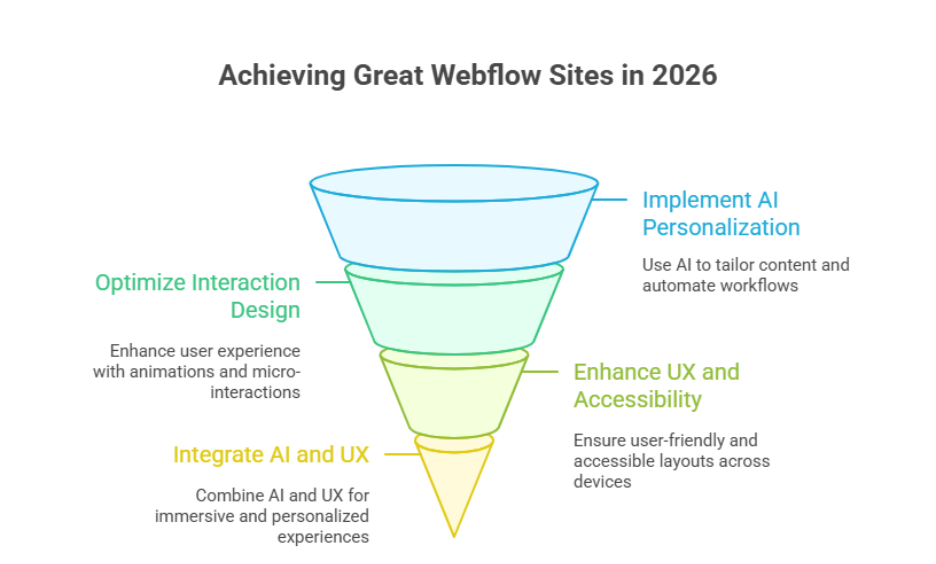
    Step 1: Implement AI-Driven Personalization and Automation

    • Use AI tools to tailor content dynamically based on user behavior.
    • Automate workflows in Webflow CMS items, like updating content or managing SEO for search engines.
    • Track analytics to measure engagement, scroll behavior, and conversion rates.

    Step 2: Optimize Interaction and Motion Design

    • Add scroll-triggered animations, micro-interactions, and motion design to guide users seamlessly.
    • Align UI elements with your brand and design systems for a cohesive experience.
    • Ensure minimalism and typography choices enhance readability and accessibility.

    Step 3: Enhance UX and Accessibility

    • Test navigation and layouts for accessibility compliance.
    • Focus on user experience that keeps visitors engaged across all devices.
    • Combine immersive visuals with Webflow SEO best practices for discoverability.

    Step 4: Integrate AI and UX for Next-Generation Websites

    • Build AI-ready frameworks to deliver personalized digital experiences.
    • Collaborate with Webflow agencies or internal teams to align design and development.
    • Use automation and analytics to continuously improve performance, creating high-performing websites that convert and scale.

    Key Webflow Features That Drive Great Web Design

    CMS Items and Dynamic Content

    Webflow’s CMS allows digital teams to manage content efficiently through CMS items. Dynamic templates ensure consistency across pages, while supporting good design and technical SEO best practices, including answer engine optimization (AEO). This enables scalable websites that deliver measurable business impact.

    Drag-and-Drop Design and Aesthetics

    The drag and drop interface empowers teams to create visually compelling layouts without coding. By combining flexibility with design aesthetics, designers can implement grids, motion, and typography that enhance user engagement, all without sacrificing performance.

    Technical Capabilities for SEO and Performance

    Webflow’s platform offers robust technical SEO tools, semantic code, and fast hosting. Features like optimized headings, images, and integrations with large language models support enterprise-level speed and search visibility, helping sites achieve measurable business impact.

    Integrating Design and Business Goals

    By leveraging CMS, drag-and-drop design, and technical capabilities together, Webflow enables web solutions that balance creativity with performance. This approach turns websites from novelty to necessity, ensuring brands stay ahead of the curve heading into 2026.

    Conclusion

    As we’ve explored, the gap between average and great Webflow sites in 2026 will be defined by deliberate choices in design, development, and ongoing optimization. High-performing websites seamlessly combine AI-driven personalization, thoughtful UX, accessible layouts, and technical SEO practices all supported by professional development and well-structured workflows. Features like CMS items, drag-and-drop design, and advanced motion and interaction elements allow digital teams to create web solutions that are visually compelling, scalable, and measurable.

    Investing in these capabilities ensures that your website not only engages users but also drives conversion, strengthens brand credibility, and remains competitive in a rapidly evolving digital landscape. Small improvements optimizing accessibility, refining micro-interactions, or integrating AI frameworks can deliver a measurable business impact that far outweighs the initial investment.

    if you want a website built to these standards, why not contact Integriti Studio and see how they can transform your Webflow site into a high-performing, future-ready platform?

    Frequently Asked Questions (What Will Separate Average Webflow Sites From Great Ones In 2026)

    What is the future of Webflow?

    The future of Webflow looks strong, focusing on AI-driven design, seamless UX, and scalable CMS capabilities. By 2026, it will empower businesses to build high-performing, visually compelling websites without heavy coding, integrating advanced SEO, automation, and interactive features that keep brands competitive in the evolving digital landscape.

    What are the web design trends in 2026?

    Web design trends in 2026 will emphasize AI-driven personalization, immersive UX, and seamless interaction design. Minimalism, accessible layouts, dynamic motion, and bold typography will dominate, while integration with analytics and automation ensures high-performing, conversion-focused websites that deliver measurable business impact across devices and platforms.

    Is Webflow still relevant in 2025?

    Yes, Webflow remains highly relevant in 2025. Its no-code platform enables designers and digital teams to create high-performing, visually compelling websites with CMS flexibility, advanced interaction design, and SEO optimization. Webflow continues to attract businesses seeking scalable, modern website solutions without heavy coding.

    What are the statistics for Webflow in 2025?

    Yes Webflow has significant usage and continued growth in 2025. It powers around 493,000+ active websites and holds about 1.2% of the CMS market share (0.8% of all sites globally). Its adoption has increased year‑over‑year, showing steady expansion as designers, enterprises, and companies leverage the platform for modern web design.

  • How To Prepare Your Shopify Store For 2026 Growth

    How To Prepare Your Shopify Store For 2026 Growth

    Why do some businesses see consistent growth on Shopify, while others struggle to scale despite having similar products and budgets? The difference often lies in how a Shopify store is built, optimized, and maintained over time, especially as expectations rise heading into 2026.

    Preparing your store for 2026 growth means optimizing performance, improving product pages, using professional design, and planning scalable marketing strategies. Focus on speed, mobile experience, automation, and data-driven decisions to build trust, retain customers, and support long-term ecommerce growth.

    Website performance is influenced by multiple factors, including design structure, page speed, checkout flow, mobile optimization for mobile devices, and how well product pages guide a shopper toward confidence. A professionally developed store focuses on usability, clear meta structure, strong keyword targeting, and a smooth shopping experience that helps build trust and reduce abandoned cart issues. Strategic use of apps, email marketing, smart bundle offers, and limited-time discount campaigns also play a role in growing a loyal customer base.

    From a practical perspective, many businesses invest anywhere from a few hundred dollars for basic setup to several thousand for a fully optimized, professional store with ongoing support, an investment that directly impacts long-term ecommerce performance.

    This guide explains how to prepare your Shopify store in 2026, covering development decisions, performance improvements, marketing alignment, and scalability strategies to help your online store grow sustainably.

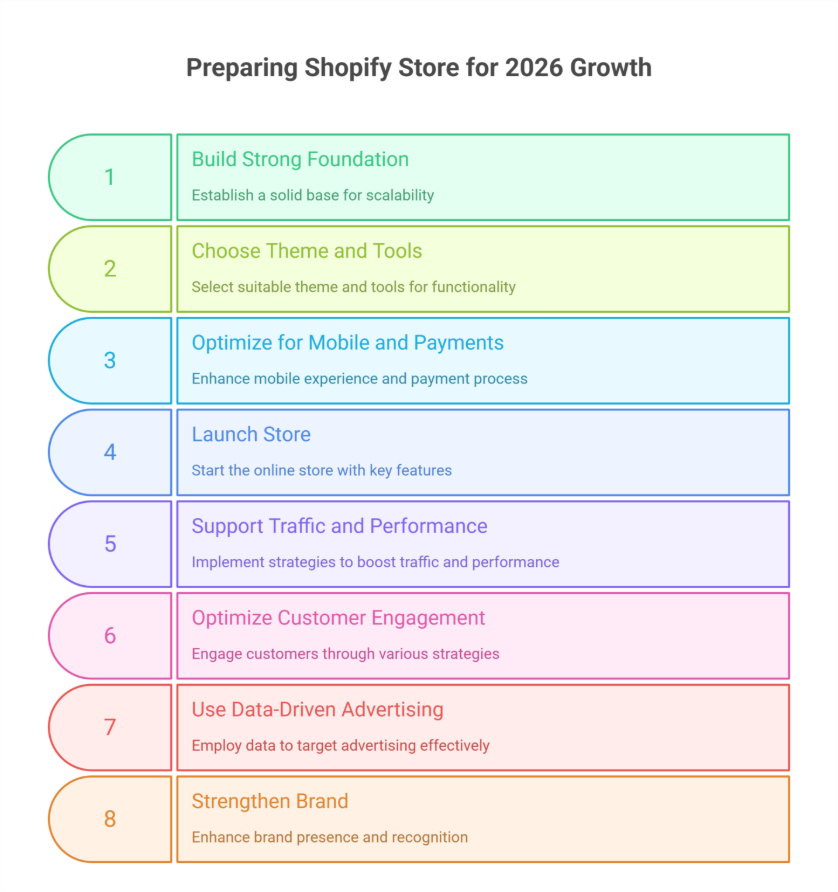
    Build a Professional Shopify Store Foundation for 2026 Growth

    Build a Professional Shopify Store Foundation for 2026 Growth

    Before trying to grow your Shopify store, focus on building a strong foundation. Early decisions in store setup, store design, and platform configuration determine long-term scalability, performance, and growth potential. A solid base prevents costly redesigns and technical issues later.

    Choosing the Right Structure, Theme, and Tools

    Selecting a suitable theme and store builder is essential. Your theme should be fast, flexible, and optimized for conversions. Integrating the right tools ensures your professional store can handle traffic, sales, and evolving online business needs without compromising speed or user experience.

    Optimizing for Mobile and Payments

    Most shoppers now use mobile devices. Optimizing your store for mobile and streamlining Shopify payments enhances the shopping experience, reduces cart abandonment, and increases order value. Mobile-first design is crucial for higher conversion in 2026.

    From Launch to First Sales

    Whether you’re starting an online store or planning to launch your store, clear pricing, free shipping, and trust signals are key. Using a free trial allows you to refine your store setup, create your store, and test early marketing strategies before going live.

    Supporting Traffic and Long-Term Performance

    A professional setup enables better traffic to your store and supports growth strategies. Features like loyalty programs, early access offers, and bundle promotions help create urgency, increase Shopify sales, and ensure sustainable growth over time.

    Smart Marketing Strategies to Grow Your Shopify Store Long Term

    Growing a Shopify store sustainably requires more than a great product or polished design. To achieve long-term growth, you need a strategic approach that drives online sales, encourages repeat visits, and strengthens customer loyalty. Implementing Shopify solutions and targeted marketing campaigns can transform your e-commerce store from a temporary setup into an essential store for your audience.

    Optimize Customer Engagement to Keep Shoppers Coming Back

    Engaged customers are more likely to return, increasing online sales and building lifetime value. Focus on:

    • Email marketing campaigns: Send personalized recommendations, promotions, and back to your store reminders to keep your audience engaged.
    • Abandoned cart recovery: Automate messages for making your store irresistible and recovering lost sales.
    • Loyalty programs: Reward repeat buyers to strengthen retention and promote long-term growth.

    Use Data-Driven Advertising for Targeted Reach

    Smart solutions allow you to track user behavior and optimize ad spend. Key strategies include:

    • Paid social campaigns: Platforms like Facebook, Instagram, or TikTok help you reach new audiences efficiently.
    • Retargeting ads: Bring visitors back to your store who didn’t convert the first time.
    • A/B testing campaigns: Experiment with messaging, creatives, and offers to maximize ROI.

    Strengthen Your Brand and Online Presence

    A strong brand creates trust, drives recognition, and increases online sales. Focus on:

    • Consistent messaging and visuals across your e-commerce store.
    • SEO optimization for product pages to capture organic traffic.
    • Content marketing, like blogs, guides, or videos, to educate your audience.

    Conclusion

    Preparing your Shopify store for 2026 growth requires a combination of strategic planning, professional design, and data-driven marketing. By building a strong foundation, choosing the right Shopify theme and tools, optimizing for mobile and payments, and implementing smart Shopify solutions, you can improve your Shopify performance, increase online sales, and achieve long-term growth. Engaging customers through email marketing, loyalty programs, and personalized campaigns ensures repeat visits, while data-driven advertising and strong branding make your store an essential store for your audience.

    Investing in professional setup and scalable strategies from store setup to marketing turns your e-commerce store into a trusted, high-converting destination. Small choices like bundle offers, free shipping, or early access campaigns can have a significant impact on Shopify sales and Shopify growth, making your store competitive in 2026 and beyond.

    So, as you plan your next steps to grow your Shopify store, consider this: are you ready to start a successful Shopify journey, or will you leave your growth to chance?

    Why not contact Integriti Studio today and see how they can help your store scale smartly in 2026?

    FAQs

    How do I grow my Shopify store?

    To grow your Shopify store, focus on optimizing product listings, improving site speed, and enhancing UX. Use email marketing, abandoned cart recovery, and social media campaigns to drive traffic. Leverage analytics to track performance, implement SEO strategies, and consider AI-powered personalization to boost conversions and customer loyalty.

    Is Shopify really 1 dollar a month?

    No, Shopify’s standard plans are not $1 per month. While Shopify occasionally offers limited-time promotions or trial periods for around $1, the regular pricing starts higher, depending on the plan. Businesses should review current plan details to understand actual costs, features, and transaction fees.

    Where will Shopify be in 5 years?

    In five years, Shopify is likely to evolve as a leading global e-commerce platform, emphasizing AI-driven personalization, automation, and seamless omnichannel experiences. It will focus on faster, high-performing stores, advanced analytics, and integrations with emerging technologies, helping businesses scale efficiently and stay competitive in digital commerce.

    How much does Shopify take from a $100 sale?

    Shopify’s fees on a $100 sale depend on your plan and payment method. Using Shopify Payments, the platform charges 2.9% + 30¢ on the Basic plan, meaning about $3.20. Third-party payment gateways add extra transaction fees, increasing the total deduction from each sale.

  • Building Loyalty Programs With Shopify Apps 

    Summary

    A well-structured Shopify loyalty program or loyalty system can turn first-time customers into lifelong brand advocates. With Shopify’s ecosystem, you can easily launch points-based rewards, referral programs, and VIP tiers using third-party loyalty apps, loyalty and reward apps, or app for Shopify—no complex development required.

    Why loyalty matters in eCommerce

    • Customer retention and customer loyalty are cheaper than acquiring new customers. Loyalty programs:
    • Increase repeat purchases, repeat business, and repeat sales
    • Improve customer lifetime value and average order value
    • Encourage word-of-mouth referrals and boost customer engagement
    • Strengthen emotional connection with your brand and improve customer experience

    Shopify merchants benefit from Shopify loyalty apps, app built for Shopify, and loyalty platform that sync seamlessly with store data, customer behavior, POS system, marketing flows, and purchase history.

    Top Shopify loyalty apps to consider

    • Smile.io – Create points, referral, and VIP programs with flexible rules, points earned, and loyalty points.
    • LoyaltyLion – Offers advanced segmentation, integration with Klaviyo, and tiered rewards for loyalty program members.
    • Yotpo Loyalty & Rewards – Combines reviews, referrals, loyalty and rewards, and positive reviews in one ecosystem.
    • Growave – Ideal for stores looking for an all-in-one solution with wishlists, referral programs, and reviews.

    These loyalty and reward apps often include email reminders, on-site widgets, and reward dashboards to create a loyalty experience that boosts customer engagement.

    Tips for successful implementation

    • Start simple: Launch a loyalty program or robust loyalty program with one program—like points for purchases—before layering more.
    • Brand it: Customize the loyalty interface, custom loyalty, or membership program to match your brand’s design and tone.
    • Promote it: Highlight your program during checkout, on product pages or Shopify store, and via email.
    • Reward strategically: Offer rewards, perk, or free products that motivate behavior—free shipping, discounts, early access, or points-based rewards.

    Track performance regularly to see what’s driving engagement, boosting customer loyalty, and refine accordingly.

    Final outcome

    By using a loyalty app tailored to your Shopify store’s goals, program for your Shopify store, or program for your store, you can create a scalable, branded customer retention system that grows with you. Loyalty isn’t just a feature—it’s a growth strategy, loyalty that pays, and loyalty programs are designed to build customer loyalty, increase customer retention, and improve customer engagement online and in-store.

    Need help choosing or setting up a Shopify loyalty app, Shopify loyalty program, or loyalty program app?
    Integriti Studio can help you design a reward program, loyalty rewards program, or loyalty platform that keeps customers coming back.

    ????Talk loyalty with us

  • How To Integrate Third-Party CRMs With Shopify 

    Summary

    Integrating a CRM or crm system, customer relationship management platform, or integrated crm with your Shopify store allows Shopify store owners and Shopify merchants to centralize customer data, personalize communication, and automate sales workflows. Whether you’re using HubSpot, Zoho CRM, Salesforce, or another popular crm platform, Shopify supports seamless third-party integrations and Shopify third-party integration through apps, third-party apps, and APIs.

    Choose the right CRM for your business

    Before integrating, assess your Shopify store needs:

    • HubSpot is great for email automation, marketing tools, and inbound marketing.
    • Zoho CRM and crms like Zoho are ideal for small-to-medium businesses seeking affordability.
    • Salesforce or crms like Salesforce works well for enterprise-level automation, reporting, and analytics tools.

    Ensure the crm integration supports eCommerce workflows like abandoned cart follow-ups, segmentation, and lifecycle tracking for your online store or Shopify plus store.

    Integration methods: apps, APIs, and middleware

    You can connect CRMs using:

    • Shopify apps like HubSpot Integration by ShopSync, MESA, or Zapier for no-code syncing, allowing Shopify CRM integration and custom integration.
    • Native integrations available in the Shopify App Store or offered by crm platforms allow connect your crm directly from the Shopify app.
    • Custom API solutions for businesses with specific workflows or larger teams ensure crm system integration works seamlessly.

    Apps and integrations typically sync data from Shopify including contacts, orders, and customer behavior in real-time, enabling integration with Shopify, Shopify to QuickBooks, and other systems with Shopify.

    Map data and test workflows

    Once connected:

    • Map fields between Shopify and your crm (e.g., email, name, purchase history) to maximize your Shopify data flows.
    • Automate workflows like follow-up emails, sales rep notifications, lead scoring, and automated tasks using crm tools or crm software.
    • Test thoroughly before going live—ensure tags, lists, segments, and built-in crm options populate correctly.

    Final outcome

    With a properly integrated crm, you can engage Shopify customers more intelligently, reduce manual tasks, and nurture leads into loyal buyers. The right setup ensures you never miss a sales opportunity while maintaining a 360° view of each customer and running a successful Shopify store.

    Need help connecting your CRM to Shopify, integrating third-party apps, or planning integrations for your business?
    Integriti Studio can help you choose a crm, plan a custom integration, and integrate with Shopify for growth.

    ????Lets talk integrations

  • Setting  Up Automated Abandoned Cart Recovery Emails 

    Summary

    Abandoned carts or abandoned a cart are one of the biggest missed opportunities in eCommerce but they’re also one of the easiest to recover. With the right tools, abandoned cart recovery system, and strategy, Shopify store owners or Shopify merchants can automatically remind customers of abandoned items, forgotten items, or customer abandoned carts and bring them back to complete their purchase.

    Why cart recovery emails matter

    Up to 70% of online shopping carts are abandoned. Reasons range from high shipping costs to distractions, indecision, or a customer leaving in the cart. Abandoned cart recovery emails or abandoned cart email campaigns give you a second chance to close the sale and often deliver higher ROI than regular marketing emails.

    Tools to automate your recovery emails

    Shopify offers native abandoned cart features, but third-party tools allow for deeper customization, automated email flows, and performance tracking. Top options include:

    • Shopify Email – Simple and free option to send basic abandoned cart emails and automated abandoned cart.
    • Klaviyo – Advanced segmentation, abandoned cart flow, multi-step abandoned cart email sequence, and A/B testing.
    • Omnisend – Includes SMS, push notifications, and email in a single automation or email flow.
    • Privy – Combines cart recovery emails with popups and on-site conversion tools.

    These tools let you personalize messages based on cart contents, abandoned items, timing, and customer behavior, improving recovery efforts and abandoned cart recovery strategy.

    Best practices for recovery emails

    • Send 2–3 follow-ups: Space them out (e.g., 1 hour, 12 hours, 24 hours) for effective abandoned cart emails and cart recovery strategy.
    • Use personalization: Mention the product to their cart, product image, total value, or specific abandoned items.
    • Offer incentives: Include a discount or free shipping offer or free shipping thresholds if appropriate.
    • Create urgency: Use phrases like “Items in your cart are selling fast” to inspire immediate action.
    • Optimize subject lines: Keep email subject line short, clear, and curiosity-driven to increase recovery rates.

    Include a clear CTA or call-to-action that brings users directly back to their cart for checkout recovery.

    Final outcome

    Automated abandoned cart emails are a low-effort, high-impact addition to your Shopify store’s email marketing, email automation, and conversion strategy. They help you recover revenue you’ve already worked to earn—without lifting a finger after setup, sending abandoned cart emails manually, or monitoring every abandoned checkout.

    Want to maximize your email automations, abandoned cart campaigns, and abandoned cart recovery strategy?
    Integriti Studio can help you design automated abandoned cart email flows, abandoned cart email best practices, and email strategy that actually convert.

    ????Lets get your sales back

  • Creating High-Converting Shopify Landing Pages Without Code 

    Summary

    Shopify store owners or Shopify merchants can now design visually engaging, conversion-focused, high-converting Shopify landing pages without touching a single line of code. With intuitive drag-and-drop page builder apps, Shopify page builder, and strategic page design and content placement, it’s easier than ever to build high-performance landing pages, product page templates, or dedicated landing pages that drive sales, convert visitors, promote products, or capture leads—no developer or coding needed.

    Use drag-and-drop builders like PageFly or Shogun

    Apps like PageFly, Shogun, and GemPages allow you to:

    • Build fully responsive layouts with pre-made landing page templates.
    • Add custom elements like countdown timers, trust badges, video blocks, or optimized page sections for high-converting pages.
    • Optimize your Shopify landing page for mobile and desktop without separate editing, using Shopify’s built-in page editor.

    These tools integrate seamlessly with your Shopify theme and Shopify admin.

    Follow landing page best practices

    To boost conversion rates and high conversion rates, focus on:

    • A compelling headline that communicates value and aligns with high-converting Shopify landing page best practices.
    • One clear call-to-action (CTA)—no distractions.
    • Social proof, such as reviews, ratings, or logos of featured partners.
    • Limited-time offers or urgency-based visuals to convert visitors.
    • Product visuals that are high-resolution and relevant to your Shopify store or product page.

    Remember: less is more. Avoid clutter and focus on guiding the user to take action on the landing page for Shopify.

    Optimize with built-in analytics

    • Many page builder apps offer A/B testing, Shopify landing page performance tracking, and conversion tracking. Use these to:
    • Test headline variations, page design adjustments, or CTA button placements on Shopify landing pages.
    • Monitor bounce rate, clicks, scroll depth, and page performance metrics.
    • Make data-driven updates that increase engagement, page conversions, and results over time.

    Final outcome

    With the right page builder and conversion-focused design, you can launch high-performing Shopify landing pages without hiring a developer. These standalone web pages can be reused across campaigns, pages without coding, and updated quickly—saving time and driving results.

    Need help building optimized Shopify landing pages?
    Integriti Studio can help you set up, design, and launch high-converting Shopify landing pages, create a high-converting Shopify landing page, and optimize their landing pages to convert visitors.

    ????Lets build your next high-impact page

  • Blog Post Structure For Readability and SEO 

    Summary

    A well-structured blog post or well-structured blog not only keeps readers engaged but also signals relevance, structure, and clarity to search engines. Structuring your content for both readability and SEO increases dwell time, reduces bounce rate, and improves your chances of ranking well on Google search results.

    Use clear, keyword-optimized headings

    Break your blog into sections using H2s and H3s that include relevant keywords naturally. This helps:

    • Search engines understand your content hierarchy and enhances SEO performance.
    • Readers skim and navigate with ease, improving readability and reader engagement.
    • Enhance relevance in featured snippets, search previews, and meta description for better SEO optimization.

    Write short paragraphs and scannable content

    Avoid long blocks of text. Instead:

    • Keep paragraphs to 2–4 lines max to improve readability score.
    • Use bullet points or numbered lists for steps, tips, takeaways, or main points.
    • Highlight important words or phrases in bold for emphasis and to guide readers.

    This format boosts mobile readability, content quality, and user engagement throughout your blog.

    Don’t forget the intro and conclusion

    Your introduction should:

    • Hook the reader within the first 2–3 sentences and clearly state what the post will cover.
    • Include a variation of your primary keyword and structure your blog content for SEO best practices.

    Your conclusion should:

    • Summarize key takeaways and maintain reader attention.
    • End with a call-to-action—subscribe, share, or contact—to improve conversion and provide structured blog post guidance.

    Final outcome

    A blog post with strong structure and blog post structure ranks better, reads easier, and drives action. By combining SEO-friendly elements, internal linking, clear structure, subheadings, concise paragraphs, and clean formatting, you create content that performs across both human and algorithmic audiences.

    Need help structuring blog content that ranks and converts?
    Integriti Studio offers strategy-backed content services to structure your blog, improve readability, enhance SEO optimization, and create posts with quality content and content depth.

    ????Lets plan your next high performing blog post

  • How to write persuasive CTAs that actually convert 

    Summary

    A Call-to-Action (CTA) or call to action button is the most critical conversion point on any website or landing page or piece of content. A well-crafted CTA moves users from interest to action—whether it’s making a purchase, subscribing, downloading, or taking a specific action. Here’s how to make your ctas more compelling and effective.

    What makes a CTA persuasive?

    • A strong CTA combines clarity, urgency, and value. Avoid generic ctas or vague phrases like “Click here” and instead:
    • Use action verbs or action words: “Download,” “Start,” “Get,” “Join.”
    • Show immediate value with cta offers: “Get your free trial” or “Download the checklist.”
    • Add urgency or exclusivity to create a sense of urgency: “Limited spots left” or “Today only.”

    CTA placement matters

    Where you place your CTA impacts its success:

    • Above the fold for primary cta or main action (e.g., signup).
    • Mid-content to catch users as interest builds for secondary cta.
    • End of page/blog for other ctas that convert (e.g., share, read more).

    Pro tip: Repeat your CTA in multiple cta buttons or multiple places without overwhelming the user.

    A/B testing your CTAs

    Even minor changes in cta copy, wording, button text, or size can impact conversions and conversion rate optimization. Use tools like Google Optimize or Hotjar to:

    • Test different CTA copies (e.g., “Try it free” vs “Start your trial”)
    • Analyze clicks, click-through rate, and scroll depth
    • Iterate based on performance data to optimize ctas

    Final outcome

    Persuasive ctas are short but powerful—they guide your users toward a clear cta, compelling call to action, or desired action with clarity and confidence. Done right, they can dramatically improve your conversion rate without changing anything else on the page or website.

    Want ctas that don’t just sound good but work?
    Integriti Studio helps brands design high-converting digital experiences, creating a cta, compelling cta copy, and ctas that drive action.

    ????lets build your next CTA strategy

  • Writing Headlines That Drive Clicks And Rank On Google

    Summary

    A strong headline is the difference between a scroll-past and a click. But in SEO and search engine optimization, a great headline must also satisfy search intent, include relevant keywords, and consider search volume. Here’s how to strike a balance between Google visibility, ranking well, and human engagement.

    What makes a headline rank?

    Google evaluates headlines (or title tags) for relevance and clarity in search engine results. To improve your ranking potential:

    • Include your primary keyword near the beginning.
    • Avoid clickbait match the content’s intent and target audience.
    • Keep it within 60 characters to avoid truncation in search results page and search console.

    What makes a headline clickable?

    While SEO gets you visibility and helps you rank high, compelling wording earns the click. Consider these elements:

    • Clarity: Users should know exactly what they’ll get.
    • Curiosity: Use power words or pose questions that make readers want to learn more.
    • Value: Promise a specific benefit, solution, or insight to drive people to your site.

    Examples:

    ❌ “Marketing Tips You Should Know”

    ✅ “7 Marketing Tips to Double Your Leads in 30 Days”

    Balancing SEO and engagement

    • Use headline analyzers (like CoSchedule, Google keyword planner, or Sharethrough) to score your headlines for structure, emotional headlines, and higher click-through rates. Also:
    • Test variations on different platforms (email, blog, socials, social media content) to get more clicks.
    • Don’t keyword-stuff optimize headlines for readability and create headlines that drive traffic.

    Final outcome

    High-performing headlines are equal parts strategy and psychology. When you optimize headlines and titles for both search engines and humans, your content gets found, appears in search results, drives clicks, and results in Google traffic, longer dwell time, and better performance overall.

    Need high-performing copy that actually ranks?
    Integriti Studio helps brands craft SEO content that converts and write better headlines for higher click-through rates.

    ???? Lets improve your headlines