Metafields in Shopify allow you to store and display custom information beyond Shopify’s default fields. Whether it’s product specs, size charts, care instructions, or downloadable guides, metafields let you tailor Shopify product pages for a richer shopping experience and improve the appearance of your Shopify store.
Why use metafields?
Shopify’s standard product fields (like title, price, and product description) are often not enough to meet unique business needs. Metafields in Shopify let you:
Add custom content that enhances product storytelling or product details
Control where and how information appears on your online store or product page template
Keep backend data structured for apps, filters, automation, or internal tracking
Improve flexibility across different product types, product categories, or product attributes
How to add metafields
You can add metafields using Shopify Admin, Shopify Admin panel, built-in settings (available on all plans), or via a metafield management app. Here’s the basic approach using Shopify Admin:
Go to Settings → Custom data or custom data fields
Select the resource type (e.g., Products, Variants, Collections)
Click “Add definition” to create a metafield definition, select a metafield type, and name your field (e.g., Fabric Composition, care instructions, or product specifications)
Save and go to any Shopify product page, product template, or single product template in the backend to add values to your metafields or add extra information
Use your theme editor, theme customization, online store 2.0 theme, or Liquid code to display metafields on the frontend
Example: A “Fabric Composition” metafield can show up below the product description only for apparel items and provide conversion-boosting detail to your product listings.
Use cases for metafields
Display nutritional info or product care instructions for food or apparel products
Add size charts per category metafields (e.g., footwear, shirts)
Show technical specifications for electronics or product attributes
Include downloadable PDFs like manuals or care guides
Add embedded videos or extra product details unique to each product
Final outcome
Using metafields empowers your Shopify store to deliver customized, high-converting Shopify product pages that feel tailored and informative. Metafields can help improve the customer experience, give you more control over information in metafields, and make the online store more flexible. Metafields allow you to add custom data fields, add specialized information, and display metafields on your product pages. They also let developers and marketers create custom content, add extra product details, or customize the functionality and appearance of your Shopify product using Shopify Admin or Liquid code.
Want to customize your Shopify product pages with metafields? Integriti Studio helps brands create advanced Shopify experiences with structured data, product metafields, and stunning design.
Switching from WooCommerce to Shopify can simplify store management, improve performance, and unlock new growth features but the migration process needs careful planning. This guide outlines the key considerations, steps, and potential pitfalls when moving a WooCommerce store to Shopify or performing a WooCommerce to Shopify migration.
Why migrate to Shopify?
While WooCommerce offers flexibility through WordPress, Shopify provides a fully hosted, scalable ecommerce platform that handles updates, security, and payments out of the box. Key reasons store owners choose to switch from WooCommerce to Shopify include:
Easier setup and maintenance of a new Shopify store
Faster load times and improved reliability for an online store
Built-in SEO and sales tools for ecommerce
Access to powerful apps, Shopify app store, and integrations
What gets migrated—and what doesn’t?
A typical WooCommerce to Shopify migration includes:
✅ Products, variants, images, SKUs, and categories (collections) ✅ Customer data and order history from WooCommerce ✅ Blog posts and static pages (with some formatting cleanup)
❌ Plugins, themes, or custom code—Shopify uses its own ecosystem and Shopify theme ❌ Checkout flows—these must be rebuilt on Shopify using Shopify customization or Shopify API
Tools like Matrixify or LitExtension can automate much of the data migration, import data from WooCommerce, or move from WooCommerce with a migration app, but manual QA is still essential to ensure data transfer accuracy.
Key steps to migrate smoothly
Backup everything: Export data from WooCommerce, including store data, products from WooCommerce, and reviews from WooCommerce
Set up your Shopify store: Choose a Shopify theme, install key apps, and configure collections or product options
Migrate data: Use a migration tool, migration service, or hire a Shopify expert to migrate your WooCommerce store, migrate your WooCommerce, and import your data to Shopify
Review SEO and URLs: Set up 301 redirects from old WooCommerce URLs to corresponding Shopify URLs
Test before going live: Review product listings, variants, payment flow, mobile responsiveness, and integrations
Final outcome
Migrating to Shopify can dramatically improve store performance and management if done right. With clean data from your WooCommerce store, optimized URLs, and thoughtful setup in a new Shopify store, you’ll retain search rankings while unlocking Shopify’s growth potential. Platforms like WooCommerce and Shopify allow seamless migrations, and full migration with careful planning ensures every step of the migration preserves customer support, store data, and order history.
Planning a platform migration? Integriti Studio handles full-service migration from WooCommerce to Shopify seamlessly, securely, and using apps to help with the entire migration.
Custom fields also known as metafields—let you display additional product information beyond Shopify’s default options on your Shopify product pages. Whether you want to show care instructions, ingredients, dimensions, or compatibility notes, adding custom fields to your Shopify product helps create richer, more informative product pages in Shopify.
Why use custom fields?
Default Shopify product pages are limited to basic details like title, description, and variants. With custom fields in Shopify, you can:
Enhance the buying experience with extra info or custom text
Organize technical or niche product data, product options, or custom product details
Improve SEO by targeting long-tail queries
Display unique features without cluttering the main description
They’re especially useful for stores with complex, high-detail products, and fields to your Shopify product pages can allow product personalization or adding custom text boxes for engraving, personalized text, or custom product forms.
Adding custom fields in Shopify
Here’s a step-by-step overview to add custom field in Shopify or fields to Shopify product pages:
Go to Settings → Custom data in your Shopify admin
Select Products, then click Add definition to create a new custom field or add a custom text field
Choose your content type (e.g., text field, number, file) and name your field (e.g., “Fabric Care” or “Compatibility Notes”)
Save and return to a Shopify product or Shopify product admin page to enter custom values under the new field
To display the field on your storefront, you’ll need to edit code, use a product template, or use a Shopify theme that supports dynamic sources and custom fields via theme customization.
Displaying fields on the storefront
For Online Store 2.0 themes: Use the theme editor’s dynamic source option to bind metafields or fields in Shopify product to specific product sections
For older themes: Insert Liquid code in your product.liquid, main-product.liquid, or product page template to manually render the custom field values
Apps: Shopify apps for no-code custom fields like Metafields Guru or Custom Fields by Bonify offer a no-code experience and extended customization options
Final outcome
Custom fields give you more flexibility to inform and convert visitors. Custom fields to your Shopify product or fields to the Shopify product allow unlimited custom product details, personalized text, or advanced custom fields. Done right, they improve the user experience, make your product pages in Shopify more informative, and elevate product personalization.
Need help structuring or styling Shopify custom fields in Shopify step 2 or adding fields to Shopify product pages? Integriti Studio can help you create fully customized, conversion-driven product pages and custom fields in Shopify without touching liquid files or coding.
Shopify’s default notification emails like order confirmations and shipping updates play a key role in customer experience for every Shopify store. Customizing Shopify email templates helps reinforce your brand, improve communication, and build trust from the very first interaction. These email templates in Shopify are designed specifically for Shopify and can be a cornerstone of your email marketing strategy.
Why customize email templates?
Email notifications are one of the few touchpoints every customer interacts with. Instead of sending out generic messages, branded and tailored templates help you:
Strengthen your brand identity with custom colors, fonts, and logos in email body or html email templates
Improve clarity and tone to match your voice across different email communication
Add upsell links, FAQs, or helpful resources to your email content
Maintain consistency across post-purchase communication, every email, and Shopify email notifications
Even minor adjustments in Liquid code or CSS can make your store feel more premium and personal.
Where to find Shopify email templates
Shopify provides a wide range of editable email templates for various store actions and notification templates:
Go to Settings → Notifications in your Shopify admin panel
Click on any template (e.g., “Order confirmation email” or shipping confirmation)
You’ll see editable HTML and Shopify’s Liquid templating language—the structure Shopify uses for dynamic content, template language, and every line of code
Tips for customizing templates
Start small: Change brand colors, add your logo, and adjust copy to reflect your tone of voice.
Use Liquid variables wisely: Shopify’s Liquid code enables dynamic content (like {{ customer.first_name }}) without breaking the layout.
Preview before sending: Always test your changes with the “Preview” and “Send test email” options for a specific email.
Stay responsive: Ensure your design works well on both desktop and mobile across email clients.
If you’re not confident editing code directly, apps like Klaviyo or OrderlyEmails offer visual builders with advanced customization features and customizable templates, enabling email automation and effective email marketing.
Final outcome
Customized email templates transform post-purchase communication into an extension of your brand. A little effort goes a long way in making your store memorable, improving email marketing, and creating a seamless Shopify customization experience.
Need help designing on-brand Shopify emails that convert? Integriti Studio can create and implement custom email templates using Shopify themes, Shopify’s Liquid, and Shopify customization features to elevate every customer touchpoint. Start your free trial or consult Shopify experts to customize your Shopify and master Shopify email marketing for your Shopify Plus store.
Returns and exchanges are an inevitable part of running an online store or Shopify store but how you manage returns and exchanges can make or break customer loyalty. Tools and apps like Returnly, Loop Returns, AfterShip Returns Center, or ReturnLogic simplify and streamline the post-purchase experience, creating a branded experience and turning a potential pain point into a brand-building opportunity for ecommerce brands.
Why returns matter
A seamless returns process builds trust, encourages repeat purchases, and increases overall customer satisfaction. Shoppers are more likely to buy if they know returns are easy. But manually managing returns can overwhelm your customer support team, create hours of manual work, and frustrate your customers.
That’s where return management apps and platforms like Returnly, Loop, AfterShip, Return Rabbit, Narvar, or ReturnGo come in as a comprehensive solution or return management platform specifically designed for businesses to manage every return efficiently.
Key features of Returnly
Here’s how Returnly (and similar apps) help optimize the return experience and streamline your return process with automation features and automated workflows:
Self-service returns portal: Allows customers to start returns or exchange items through a self-service portal without contacting support.
Exchange-first approach: Customers can shop for a replacement, and customers can exchange before shipping the original item back—helping retain revenue and improve customer satisfaction.
Automated approvals: Set rules for which products are eligible and automatically send approvals or reject returns, reducing manual intervention.
Prepaid return labels and label generation: Streamline logistics, order fulfilment, and reduce hours of manual work.
Real-time tracking and tracking updates: Keep both you and the customer informed through every step of the return process, integrating with global carriers and ecommerce platforms like Shopify.
Many apps also integrate directly with Shopify, Shopify Plus, or popular ecommerce platforms, ensuring inventory management, accurate stock, order tracking, and order fulfilment stay in sync.
How to implement it
Choose a returns app or management solution: Start with Returnly or browse alternatives in the Shopify App Store for apps like Returnly.
Customize your return rules: Set your policies, time windows, and approval conditions based on your business needs.
Brand your returns portal: Create a seamless branded experience that matches the look and feel of your store.
Train your team: Ensure support agents understand the system and automation features, even if most of it runs on autopilot.
Final outcome
Automated return systems reduce friction, enhance efficiency, save time for everyone, and improve customer experience while building customer confidence, loyalty, and trust in your Shopify merchants.
Need help choosing the right return management software or setting up a return management system? Integriti Studio can integrate the perfect app, streamline your post-purchase experience, and provide actionable insights through data-driven workflows for your ecommerce business.
Shopify Flow is a powerful automation tool designed for Shopify Plus merchants that helps Shopify businesses streamline everyday tasks without writing code. From managing inventory and inventory levels to tagging VIP customers, Flow frees up your time so you can focus on growing your business.
What is Shopify Flow?
Shopify Flow is a visual workflow builder and automation platform that lets you automate actions across your Shopify store, apps, and business processes. It uses a simple trigger-condition-action logic—so when something happens (a trigger), Flow checks for specific conditions and executes appropriate actions based on that. It integrates seamlessly with apps like Klaviyo, Gorgias, LoyaltyLion, or ReConvert, making it a powerful automation solution for your e-commerce store.
Example: When an order is placed by a repeat customer → If the total is over $200 → Then tag them as VIP, or automatically adds them to customer segmentation for workflow automation.
Tasks you can automate with Flow
Here are just a few of the many automation capabilities Shopify Flow can handle:
Customer segmentation: Tag customers based on first-time, high-spending, or repeat behavior.
Inventory management: Hide out-of-stock products, reorder products, or notify team members about inventory levels.
Order routing and fulfillment: Send orders from specific regions to different warehouses or flag high-risk orders for manual intervention.
Loyalty triggers: Apply rewards, discount codes, or emails to customers after specific milestones.
Fraud prevention: Flag risky orders before processing.
You can also connect Flow with apps like Klaviyo, Gorgias, LoyaltyLion, or ReConvert for even more advanced workflows using custom triggers and actions or workflow templates.
How to get started
Go to the Shopify App Store and install Shopify Flow (free for Shopify Plus stores).
Choose a template or start a new workflow from scratch.
Select a trigger (e.g., order created, customer signed up).
Add conditions and actions based on your business needs to automate repetitive tasks or automate your store.
Test the workflow to ensure it works before enabling it live. No coding required—just logic and clicks.
Final outcome
With Shopify Flow, you can eliminate repetitive tasks, reduce errors, automate your Shopify store, and run your store smarter. It’s like hiring a virtual assistant that never sleeps.
Want help setting up smart automation flows or custom workflow automation? Integriti Studio can build the perfect workflows using Shopify Flow for your Shopify store and e-commerce business.
Preparing Your Wordpress Website For Long-Term Changes After 2025
Why do some WordPress websites struggle with performance while others thrive? The answer often lies in the combination of underlying factors influencing website performance, from outdated plugins to poorly configured caching and slow page load times. If you want your WordPress site to remain competitive after 2025, understanding these elements is crucial.
To prepare your WordPress website for long-term changes after 2025, focus on regular updates to the WordPress core, plugins, and themes, implement strong website maintenance practices, optimize page load and user experience, and use professional development strategies. This ensures security, SEO performance, and a reliable online presence.
Professional development and careful attention to your WordPress core, plugins and themes, and page builders are no longer optional they directly impact your user experience, SEO, and the ability to keep your site secure from data loss or broken links. Even a live site with basic optimization can see significant gains with proper maintenance, including regular backups, security plugins, and performance optimization measures. For reference, professional WordPress maintenance and updates can range from a few hundred to over a thousand dollars annually, depending on the complexity of your website.
This comprehensive guide will walk you through everything needed to prepare your WordPress website for long-term success. You will learn how to update WordPress safely, manage plugins, enhance user experience, and implement website maintenance strategies that ensure your online presence remains strong well beyond 2025.
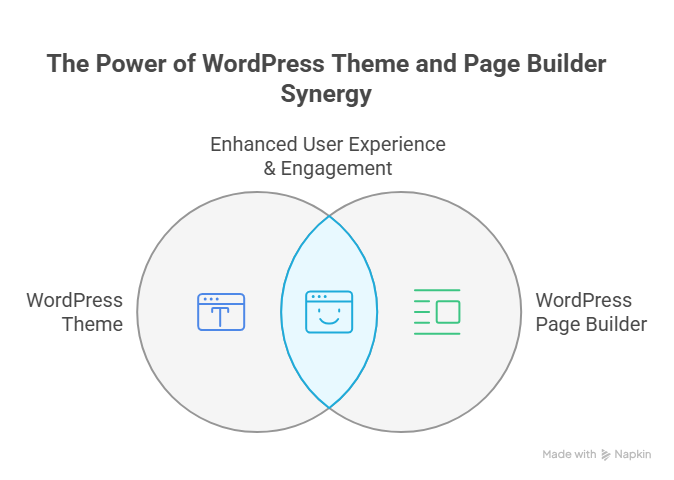
Choosing The Right WordPress Theme And Page Builder
Understand Theme Compatibility And Design Trends
Choosing a WordPress theme that aligns with the latest WordPress version and current design trends is crucial. Compatibility ensures smooth integration with plugins and avoids security risks or compatibility issues. A flexible theme also helps future-proof your WordPress website for 2025 and beyond, supporting long-term success.
Evaluate Page Builder Features And Flexibility
Selecting the right page builder simplifies content management while minimizing custom coding. Look for builders that integrate with the WordPress dashboard, support backup plugin workflows, and enable safe testing in maintenance mode. This ensures your WordPress speed and functionality remain consistent as your site grows.
Plan For Updates And Regular Maintenance
Even a strong theme and builder require consistent WordPress maintenance. Updating core WordPress, plugins, and themes while keeping a copy of your website is essential to prevent data loss. Proper WordPress backup routines and expert WordPress practices ensure your website remains secure, fast, and ready for long-term success.
Balance Design, Performance, And Future-Proofing
The ideal combination of theme and page builder should optimize user experience, WordPress powers, and WordPress speed while allowing flexibility for major updates. By planning ahead, you can future-proof your WordPress site, ensuring it stays secure, visually appealing, and functional well into 2025 and beyond.
Essential Steps To Maintain Your WordPress Website Effectively
Maintaining aWordPress website effectively is crucial for long-term success. Website owners who prioritize regular maintenance in 2025 can avoid downtime or data loss, improve WordPress speed, and keep up with evolving design trends. Below, we explain in steps how to maintain your WordPress site efficiently.
Step 1: Back Up Your Site Regularly
Before making any updates, always create a copy of your website. Regular WordPress backup ensures that in case of errors, hacks, or server issues, your site can be restored quickly. Use a reliable backup plugin to automate this process. Keeping multiple backups stored in secure locations is essential to protect your long-term success.
Step 2: Update WordPress Core, Themes, and Plugins
Keeping WordPress core updated is critical for security and performance. Update WordPress core and your WordPress theme regularly to prevent security risks and compatibility issues with plugins. Using maintenance mode while updating prevents visitors from experiencing a broken site. Always ensure your WordPress dashboard reflects the latest updates and check your WordPress version before applying major changes.
Step 3: Optimize WordPress Speed
WordPress speed directly affects user experience and search rankings. Optimize your site by implementing caching, compressing images, and reviewing your hosting environment. Keep your WordPress site fast across mobile devices by testing page load times and minimizing unnecessary scripts.
Step 4: Secure Your WordPress Site
Security is key to protecting your dedicated WordPress site. Limit access to your WordPress dashboard, use strong passwords, enable SSL, and monitor for potential security risks. Regular core WordPress updates and a proactive approach will help ensure your WordPress powers a safe browsing experience.
Step 5: Maintain Content and Design Trends
Updating your content and staying aligned with modern design trends helps website owners engage visitors effectively. Content management should include refreshing old posts, optimizing SEO, and ensuring your WordPress theme is visually appealing and responsive on mobile devices.
Step 6 : Test and Plan for Long-Term Success
Regular testing of site functionality, forms, and checkout processes ensures your website might perform smoothly under all scenarios. Keeping a log of updates, backups, and changes supports long-term success and allows website owners to plan future improvements confidently.
Step 7: Leverage Expert WordPress Support
While many tasks can be handled without coding knowledge, partnering with an expert WordPress developer can help with WordPress installation, theme customization, and major updates. This ensures your site remains secure, optimized, and ready to stay ahead in 2025.
Conclusion
Preparing your WordPress website for long-term changes after 2025 requires more than occasional updates. By carefully managing the WordPress core, themes, plugins, and page builders, implementing consistent backups, optimizing speed, maintaining security, and staying aligned with design trends, website owners can ensure long-term success. Regular testing, proactive maintenance, and leveraging expert support make your WordPress site resilient, fast, and future-ready.
With these strategies, your website won’t just survive it will thrive, providing a secure, seamless, and engaging experience for your visitors well beyond 2025. Are you ready to make your WordPress site future-proof, or should you contact Integriti Studio to handle it for you?
Frequently Asked Questions (Preparing Your Wordpress Website For Long-Term Changes After 2025)
How do you make changes to your WordPress website?
To make changes to your WordPress website, log in to your WordPress dashboard, navigate to the section you want to edit (Pages, Posts, Appearance, or Plugins), make the desired changes using the editor or customizer, then save or publish your updates to reflect them live.
How to redesign an existing WordPress website?
To redesign an existing WordPress website, start by backing up your site, then choose a new theme or page builder. Update your layout, colors, and content as needed. Test functionality, responsiveness, and plugins, then launch the redesigned site while ensuring SEO and performance remain intact.
What steps would you take to update or maintain a WordPress website?
To update or maintain a WordPress website, regularly back up your site, update WordPress core, themes, and plugins, check for broken links, optimize performance, monitor security, and review content for accuracy. Testing changes before publishing ensures smooth functionality and long-term website stability.
How do you stay current with the latest developments and updates to WordPress?
To stay current with WordPress updates, regularly follow the official WordPress blog, subscribe to newsletters, join WordPress forums and communities, attend webinars or WordCamps, and monitor plugin and theme developer updates. Testing new features on a staging site also helps understand changes before applying them live.
Webflow In 2026 What Designers and Businesses Should Plan For
Why do some websites convert better than others, even when they use the same website builders? The difference often comes down to factors influencing website performance: site speed, responsive layout, optimized SEO, clean integration, and the overall user experience. For designers and businesses preparing for 2026, understanding these factors is crucial to creating a scalable, high-performing Webflow site that drives measurable results.
Webflow in 2026 will demand a focus on scalable web design, seamless integration, and optimized user experience. Designers and businesses should prioritize professional development, leverage Webflow agencies for advanced projects, and invest in support, maintenance, and SEO to ensure high-performing Webflow sites that drive conversions and long-term growth.
Investing in professional development ensures you or your team can leverage the full potential of Webflow, from building landing pages that convert to crafting brand identity-driven web design. A small investment in skilled support, regular updates, and proper maintenance ranging from a few hundred to a few thousand dollars annually can prevent costly rebuilds, improve conversion, and save time over the long term.
This blog explores what designers, Webflow agencies, and businesses should plan for in 2026. You will learn how using Webflow effectively can enhance SaaS websites, B2B platforms, and marketing initiatives, while practical tips on setup, animation, HubSpot integration, and professional support demonstrate how smart web development choices support long-term business success.
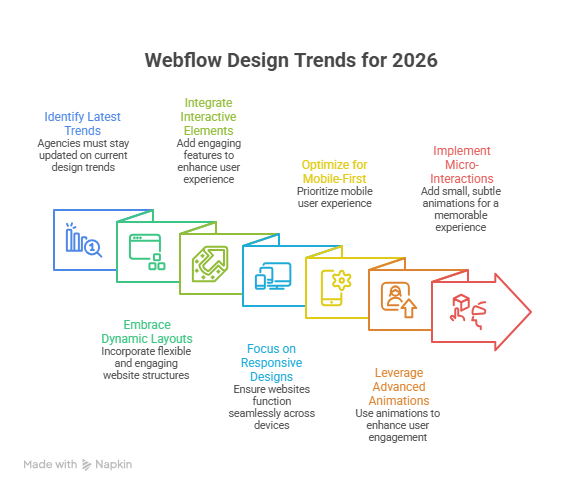
Webflow Design Trends Every Agency Should Follow In 2026
Minimalist and Interactive Design
A minimalist design continues to dominate Webflow in 2026, emphasizing clean layouts, whitespace, and intuitive navigation. When paired with interactive websites, it creates engaging web experiences that capture attention without overwhelming visitors. Agencies leveraging technical Webflow features can implement subtle animations, hover effects, and dynamic interactions, ensuring Webflow websites feel modern, polished, and conversion-focused.
UX and UI Optimization
Strong UX design and UI refinement are essential for measurable results. Webflow has become a go-to platform for agencies because it allows seamless integration of analytics, core web vitals, and CRO tools. Optimized UX improves visitor retention and conversions, while intuitive UI simplifies website management for clients, marketers, and content teams, enhancing overall performance.
Scalable and Custom Development
As enterprise brands and B2B SaaS clients demand more complex websites, custom development within Webflow development becomes critical. Creating custom websites ensures projects are scalable, maintainable, and tailored to client needs. Agencies that combine templates with bespoke design deliver measurable results while reducing development time and supporting long-term growth.
Ecommerce and Enterprise Solutions
With the growth of Webflow enterprise partner programs, agencies can build ecommerce and high-value custom websites for enterprise clients. Modern Webflow websites support secure integration, robust analytics, and optimized performance. By focusing on speed, usability, and conversion, top Webflow agencies ensure every website project meets client objectives and long-term business goals.
Community and Knowledge Sharing
The Webflow community remains an invaluable resource for design agencies and development agencies. From free starter plan templates to detailed case studies, connecting with peers helps teams adopt the best Webflow design practices, solve technical challenges, and deliver high-quality website design and UX design across modern websites.
Best Webflow Approach To UI And Web Design
Strategic UI Planning
Webflow has become the go-to platform for creating interactive, responsive, and polished web experiences.
Focus on UI that drives engagement and conversion through thoughtful layout and navigation.
Ensure the site is built for scale, allowing growth and updates without redesign.
Align UI elements with business goals and brand identity.
Optimize UI for desktop, tablet, and mobile devices.
Thoughtful Web Design Integration
Combine web design with interactive elements and micro-animations to enhance UX without distractions.
Prioritize readability and strategic use of whitespace in layouts.
Ensure modern websites remain visually appealing, fast, and functional.
Make designs adaptable to future updates or additional features.
Choosing the Right Webflow Agency
If you are looking for a Webflow partner, choose an agency with both creative and technical expertise.
Agencies that offer ongoing support and support and maintenance ensure your site stays secure, optimized, and updated.
Verify if the agency can unlock additional features through custom Webflow development.
Confirm the agency’s experience in building scalable Webflow sites that meet long-term business objectives.
Aligning Web Design With Business Goals
Focus on user experience and measurable outcomes such as CRO and engagement.
Ensure your Webflow site aligns with your brand and supports marketing or sales objectives.
Partner with agencies to build Webflow sites built for scale and reliable performance.
Ongoing support and maintenance help maintain long-term site functionality and growth.
Conclusion
As Webflow in 2026 evolves, designers, businesses, and Webflow agencies must focus on creating scalable, high-performing websites that combine thoughtful UI, engaging web design, and robust technical development. Following trends like minimalist and interactive design, UX and UI optimization, and custom development ensures your website projects are not only visually appealing but also conversion-focused and maintainable over the long term.
Partnering with the right Webflow agency can help you unlock additional features, provide ongoing support, and maintain support and maintenance, making sure your site stays built for scale while aligning perfectly with your brand and business objectives. By investing in professional development, leveraging the Webflow community, and applying best practices, businesses can future-proof their Webflow sites while driving measurable results.
Whether you’re building SaaS websites, B2B platforms, or enterprise projects, a thoughtful approach to webflow development and strategic design and development is key to staying competitive in 2026.
If you want a professional team to help implement these strategies efficiently, why not contact Integriti Studio and see how they can elevate your Webflow projects?
Frequently Asked Questions (Webflow In 2026 What Designers and Businesses Should Plan For)
What is the future of Webflow?
Webflow’s future looks strong and growing as it evolves beyond simple site building into an AI‑powered, no‑code/low‑code web and digital experience platform. It’s gaining enterprise adoption, deeper automation, design freedom, and tool integrations, positioning itself as a major player in modern web development and no‑code innovation.
What are the web design trends for 2026?
Web design trends for 2026 AI-driven personalization, dark mode focus, immersive 3D, micro-interactions, voice UI, minimalist layouts, accessibility emphasis, fast load speeds, bold typography, and dynamic storytelling.
Are Webflow designers in demand?
Yes Webflow designers are in demand in 2025–26 because businesses increasingly want custom, responsive websites without heavy coding, boosting opportunities for freelancers and full‑time roles. Salaries and freelance rates are strong, and Webflow usage and job growth continue rising in the web design market.
Are Webflow designers in demand?
Yes Webflow designers are in high demand in 2026 due to no-code adoption, fast prototyping, client preference for customizable sites, and businesses seeking scalable, visually rich web experiences.
WordPress Features That Will Matter More In 2026 Than Ever Before
Why does website performance vary so widely even when businesses use the same WordPress platform? The difference is rarely accidental. As you move toward 2026, the success of a WordPress site depends on how well performance factors SEO, optimization, responsive design, plugin quality, and clean integration are handled from the start. WordPress still dominates the web, but expectations around speed, stability, and scalability have changed since 2025.
In 2026, WordPress features that matter most include AI-driven workflows, faster core performance, improved SEO tools, smarter plugins, and cleaner integrations. These advancements help every site owner and developer build secure, responsive WordPress sites that scale efficiently and remain competitive in a rapidly evolving ecosystem.
You need professional WordPress development to keep pace with rapid changes in the WordPress core, evolving PHP requirements, and the growing role of AI in content, automation, and workflow efficiency. A skilled developer understands how updates such as WordPress 6.9 and the upcoming 7.0 phase align with Gutenberg, Phase 3 collaboration, and third-party ecosystem improvements. For a site owner, investing a few hundred to a few thousand annually in proper support, plugins, maintenance, and optimization often prevents costly rebuilds later.
This blog breaks down the new features, features like smarter plugins, cleaner workflows, and future-ready integration shaping WordPress in 2026 and how you can prepare your WordPress site to grow confidently.
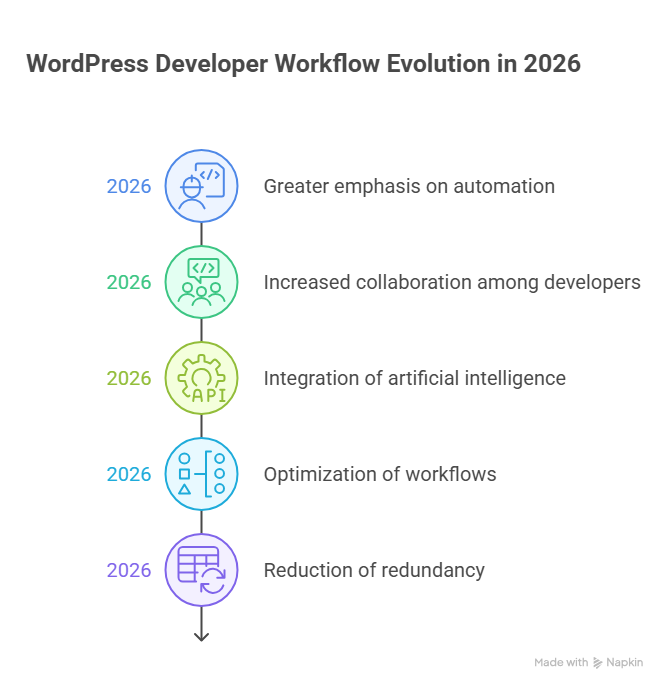
Developer Workflow Evolution In WordPress In 2026
Step 1: Understanding the Release Cycle
The first step for developers is understanding WordPress’s release strategy. WordPress in 2026 emphasizes predictability and stability, following a return to three major updates per year. Developers should know when the three major releases in 2026 will arrive and start planning for WordPress 7.0 early. This structured release approach ensures smoother upgrades and reduces downtime or compatibility issues for any WordPress website.
Step 2: Preparing the Development Environment
The next step is to prepare a future-ready development environment. This ensures that every WordPress project is compatible with the latest PHP version and WordPress versions. Features introduced in WordPress 6.8 and introduced in WordPress 6.9, like the Abilities API, improve permission handling and workflow efficiency. Integrating hosting solutions such as WP Engine or WordPress VIP also ensures stability and performance for enterprise-grade projects.
Step 3: Embracing Collaboration
Modern workflows no longer rely on solo development. New collaboration features and real-time collaboration tools within the WordPress admin and block editor allow multiple team members developers, designers, and editors to work simultaneously. These real-time collaboration features reduce conflicts, speed up development, and make content creation more efficient for larger teams.
Step 4: Adopting Full Site Editing
Full site editing has become a core part of modern WordPress workflows. Developers now focus on backend structure and template setup, while content teams manage layouts and content independently. This reduces reliance on heavy page builder tools and enhances the user experience. Optimizing plugins and themes to work seamlessly with full site editing ensures consistent performance across the site.
Step 5: Leveraging APIs and Headless Architecture
For advanced projects, developers are increasingly using headless WordPress and the Abilities API. These tools allow decoupling of frontend and backend, while improving access control and security. This approach represents modern WordPress development and is ideal for enterprise clients or WordPress ecommerce websites requiring scalability and high performance.
Step 6: Streamlining Plugins and Themes
The focus in 2026 is on quality, not quantity, within the WordPress ecosystem. Carefully vetted WordPress plugins, optimized plugins and themes, and tested third-party plugins ensure stable and fast performance. This step is particularly important for WooCommerce and WordPress ecommerce websites, where plugin conflicts can directly impact the speed of WordPress and user experience.
Step 7: Focusing on Performance, Security, and AI
Modern workflows emphasize performance and security alongside development. Built-in performance optimization measures, robust WordPress security standards, and AI-powered features such as the WordPress AI client assist developers in debugging and site maintenance. These advancements make workflows faster, more secure, and scalable.
Step 8: Optimizing Admin and Dashboard Workflows
Enhanced WordPress admin and WordPress dashboard workflows simplify daily operations and content management. Editors and developers can easily manage updates, publishing, and monitoring, improving efficiency for larger teams and reducing bottlenecks in project delivery.
Major WordPress 7.0 Features Shaping Developer Workflow
WordPress 7.0 introduces major WordPress updates that are transforming WordPress workflows for developers and site owners alike. These enhancements reflect the growth of WordPress, focusing on collaboration, customization, performance, and security. Understanding these features helps teams optimize processes, maintain current WordPress sites, and leverage trends shaping the platform’s future.
Enhanced Real-Time Collaboration Features
WordPress 7.0’s real-time collaboration features allow multiple users to work on the same content simultaneously. Changes appear instantly across all sessions, reducing the need for manual version control and minimizing conflicts. This is especially valuable for agencies managing many WordPress websites, where coordinated editing by teams of developers and site owners is common. By streamlining content creation, these features make WordPress more productive for both small teams and large organizations.
Streamlined WordPress Themes and Customization
The update introduces significant improvements to WordPress themes, including block-based templates and live editing capabilities. Developers can now create highly flexible designs faster, while site owners can easily modify layouts without extensive coding knowledge. These enhancements are important for WordPress users seeking modern, responsive designs and reflect how WordPress is headed toward more intuitive, design-focused workflows. The platform now supports more dynamic styling, making it easier to maintain brand consistency across multiple projects.
Strengthened Security and Maintenance Tools
Security continues to be a top priority in WordPress 7.0. The update includes improvements in security plugins and automated processes that help protect websites from vulnerabilities. By following best practices such as regularly backing up your site and monitoring in-progress features developers and site owners can safeguard their websites against threats. These updates reinforce why WordPress offers reliable protection and emphasize the importance of keeping current WordPress versions updated.
Developer-Focused Performance Enhancements
WordPress 7.0 streamlines workflows for developers through performance improvements and simplified update WordPress processes. Enhanced APIs and faster asset loading allow developers to build more efficient websites, reducing time spent on manual configuration. These tools support trends shaping modern web development, showing how WordPress might continue evolving to meet enterprise and agency demands. By making development faster and more predictable, WordPress enables teams to focus on creative solutions rather than repetitive tasks.
In-Progress Features and Future Directions
Beyond immediate improvements, WordPress 7.0 introduces in-progress features that hint at future capabilities. AI-assisted content tools, advanced media library management, and expanded multi-site support are examples of part of WordPress’ forward-thinking roadmap. Understanding these emerging tools helps developers and site owners plan ahead, ensuring they stay aligned with how WordPress is building toward more intelligent, collaborative, and efficient workflows. Observing these innovations today prepares teams for tomorrow’s demands.
Conclusion
WordPress 7.0 represents a pivotal moment in the platform’s evolution, offering major WordPress features that are transforming WordPress workflows for both developers and site owners. From real-time collaboration features to improved WordPress themes, strengthened security plugins, and forward-looking in-progress features, this release reflects the growth of WordPress and the trends shaping its future.
By embracing these advancements, teams can streamline development, enhance performance, and maintain current WordPress sites more efficiently. Investing in optimized workflows, quality plugins and themes, and modern tools like full site editing and headless architecture ensures websites remain competitive, scalable, and secure.
For developers and site owners, staying proactive regularly backing up your site, monitoring updates, and leveraging AI-driven features will be essential as WordPress is headed toward increasingly intelligent and collaborative solutions. Ultimately, WordPress offers the flexibility and innovation needed to build modern websites that meet the demands of 2026 and beyond, empowering teams to grow confidently while reducing risk and inefficiency.
Frequently Asked Questions (WordPress Features That Will Matter More In 2026 Than Ever Before )
What is the future of WordPress?
The future of WordPress remains strong due to its open-source foundation, massive global community, and continuous innovation. With improvements in the block editor, performance, security, and AI integrations, WordPress will continue powering blogs, business websites, and enterprise platforms for years ahead.
Is WordPress worth learning in 2026?
Yes WordPress is worth learning in 2026 due to its huge ecosystem, flexible CMS, widespread use, strong plugin support, and demand for custom websites and e-commerce skills.
How much does WordPress pay for 1000 views?
On WordPress, earnings per 1,000 views vary widely based on your monetization method, niche, audience location, and ad network. For basic ad revenue (like AdSense), you might see roughly $1 – $8 per 1,000 pageviews, while high-value niches or premium ad networks can push that higher.
Why are people moving away from WordPress?
Many people are moving away from WordPress because security risks, plugin bloat, and slow performance make maintenance harder, especially for non-technical users. Other platforms offer simpler interfaces, faster speed, fewer updates, and built-in features, so businesses choose easier, modern alternatives.
What Shopify Store Owners Should Stop Doing In 2026
Why do some Shopify stores generate high sales while others struggle, even when selling similar products? The answer often lies in factors influencing website performance: slow checkout, poorly optimized product pages, lack of SEO, and a disjointed shopping experience. For Shopify store owners preparing for 2026, identifying and eliminating these issues is crucial to improving conversion, retaining shoppers, and building a scalable online store.
Shopify store owners in 2026should stop relying on slow checkout processes, neglecting SEO, overloading product pages, and using too many apps that complicate the shopping experience. Prioritizing optimization, mobile conversion, and seamless integration ensures a scalable Shopify store that drives sales, improves conversion rates, and builds long-term trust.
Investing in professional development allows you to stay ahead of platform updates, leverage integration tools effectively, and optimize your Shopify store for mobile and desktop users. A small investment in skilled support, ongoing maintenance, and design optimization ranging from a few hundred to a few thousand dollars annually can improve conversion rates, prevent costly rebuilds, and enhance customer trust.
This blog will explore the common Shopify store mistakes to avoid in 2026, from checkout friction and poorly designed product pages to missed SEO opportunities. You will also learn practical strategies to enhance your shopping experience, optimize analytics, and make smart decisions that support long-term Shopify success.
Shopify Store Mistakes Every Owner Should Avoid In 2026
Many Shopify store owners fail to prioritize the mobile experience, even though a significant portion of shopify sales in 2026 will come from mobile devices. A store slow to load or a complicated checkout can drastically reduce conversion and frustrate customers. Optimizing your landing pages and Shopify store’s SEO ensures a seamless shopping experience that drives engagement, repeat purchases, and long-term growth.
Overloading Your Store With Many Apps
While the Shopify app store offers countless tools, using many apps at once can slow down the Shopify backend, cause conflicts, and create a confusing shopping experience. Carefully selecting apps that support business goals without overwhelming the store ensures smoother operations, better customer retention, and more efficient management for shopify businesses.
Poor Theme Selection and Custom Development
Choosing the wrong Shopify theme or poorly executing custom Shopify development can harm shopify growth and user engagement. A Shopify theme should be responsive, fast, and compatible with advanced solutions like headless commerce or Shopify Plus. This prevents costly redesigns and ensures a shopify store is built for scale and future-proof.
Neglecting Analytics, Paid Ads, and Marketing Integration
Many shopify merchants overlook analytics or fail to integrate marketing tools, leading to missed opportunities to improve conversion rate, lifetime value, and customer loyalty. Tracking Shopify traffic, analyzing product pages, and using tools like Klaviyo helps optimize campaigns, enhance customer experience, and boost shopify sales effectively.
Failing to Focus on Customer Retention and Loyalty
Even big brands know that retaining existing customers is more cost-effective than constantly acquiring new ones. Ignoring customer retention strategies such as loyalty programs, personalized messaging, and reward badges reduces repeat purchases and limits shopify store growth. Focusing on what customers want ensures stronger long-term growth.
Overlooking Performance and Scalability
A shopify store’s performance and ability to scale are critical for shopify success. Slow-loading sites, unoptimized backend, or poorly planned custom Shopify development can hinder traffic and sales. Leveraging solutions like Shopify Oxygen or headless commerce ensures your store remains scalable, fast, and capable of handling growth in 2026 and beyond.
Choosing The Right Shopify Theme And App Integration
Step 1: Select a High-Converting Shopify Theme
Choose a Shopify theme that aligns with your brand and marketing goals.
Prioritize mobile-first design since sales come from mobile devices.
Ensure fast load times to boost shopify traffic and conversion.
Check compatibility with advanced features like Shopify Oxygen or headless commerce.
Step 2: Plan Your App Integration Carefully
Avoid adding too many apps, which can slow your Shopify backend.
Select apps that enhance the shopping experience, customer loyalty, and help increase sales.
Use shopping assistants or marketing automation tools to improve retention.
Regularly review installed apps to prevent redundancy and optimize performance.
Step 3: Optimize for Performance and Usability
Minimize unnecessary scripts and plugins to maintain speed.
Implement caching, CDNs, and optimized media to improve site load times.
Track shopify traffic and customer behavior to refine user experience.
Focus on features that deliver measurable improvements in conversion and customer retention.
Step 4: Balance Functionality With Long-Term Growth
Integrate apps and features that scale with your business and the headless commerce market.
Ensure your Shopify website is built for scale and future expansion.
Plan for integrations with platforms like physical retail to expand sales channels.
Avoid costly mistakes by maintaining a clean Shopify backend and regular audits.
Step 5: Monitor, Adjust, and Improve
Use analytics tools to monitor shopify traffic and sales performance.
Adjust apps, theme settings, and Shopify store’s SEO for ongoing optimization.
Continuously focus on improving customer experience to enhance customer loyalty.
Invest in periodic support and maintenance to sustain Shopify success in 2026 and beyond.
Conclusion
Avoiding common Shopify storemistakes is essential for Shopify store owners aiming for success in 2026 and beyond. From slow checkout processes and poorly optimized product pages to overloading apps and neglecting Shopify store’s SEO, these missteps can reduce conversion, frustrate shoppers, and limit long-term growth.
By selecting a high-converting Shopify theme, planning app integration carefully, optimizing performance, and focusing on customer retention, you create a scalable Shopify website that drives sales, builds customer loyalty, and improves shopify traffic. Leveraging solutions like Shopify Oxygen and headless commerce, combined with ongoing support and maintenance, ensures your store stays competitive and prepared for evolving e-commerce trends for 2026.
Investing in professional development, analytics, and automation tools helps Shopify merchants make data-driven decisions, refine the shopping experience, and avoid costly mistakes that can derail growth. Small investments in skilled support, app management, and periodic audits often prevent major issues while boosting overall performance.
For store owners serious about growth: are you confident your Shopify store is fully optimized, or is it time to contact Integriti Studio to audit and elevate your store’s performance?
Frequently Asked Questions (What Shopify Store Owners Should Stop Doing In 2026)
What are the challenges of Shopify store owners?
Shopify store owners face challenges like intense competition, rising ad costs, low conversion rates, technical limitations, app dependency, inventory management issues, and maintaining consistent customer retention.
Is drop shipping dead in 2026?
No dropshipping isn’t dead in 2026. It’s still a growing part of ecommerce with billions in sales, but the old “just pick cheap products and run ads” method no longer works. Success now needs brand focus, reliable suppliers, fast shipping, and smart marketing.
Why do so many Shopify stores fail?
Many Shopify stores fail due to poor product research, weak branding, low traffic quality, and unrealistic expectations. Store owners often rely on ads without optimization, ignore customer experience, and underestimate costs. Success requires strategy, testing, patience, and consistent improvement, not quick wins.
Where will Shopify be in 10 years?
In 10 years, Shopify will be a global commerce platform powering billions in sales, with deeper AI tools, expanded global payments and logistics, and stronger small-business ecosystems.