Category: io

  • The CIO’s Guide to AI Tokenomics: Controlling Cost at Scale

    The CIO’s Guide to AI Tokenomics: Controlling Cost at Scale


    For the last two years, the question CIOs faced about AI was whether it could work. That question is settled. The models are capable, the use cases are proven, and nearly every enterprise has something in production or close to it.

    As enterprises expand their AI development efforts and push autonomous AI agents into real workflows, the volume of model calls, and the cost behind them, is climbing faster than most budgets anticipated.

    A harder question has taken its place, and it’s the one that will separate the organizations that scale AI from the ones that quietly pull back: what does it actually cost, and what does it return?

    This is AI tokenomics. Every prompt, every query, every model call consumes tokens, and every token has a price. At pilot scale, nobody notices. A few hundred dollars a month is a rounding error. But AI usage doesn’t stay at pilot scale. It spreads across teams, embeds into workflows, and starts running thousands of times a day. Those invisible per-token costs compound into a number large enough to erase the value the AI was supposed to create. Plenty of CIOs are discovering this the hard way, in a cloud bill that arrived without warning.

    Controlling it isn’t about using less AI. It’s about governing the economics of AI the same way you’d govern any other major operating expense. That comes down to five disciplines.


    1. Visibility

    You cannot control what you cannot see. The first failure in AI cost management is that most organizations have no idea what their AI actually costs, broken down by team, by use case, or by workflow. The spend shows up as a single opaque line on a cloud invoice, impossible to question or optimize.

    Real visibility means tracking consumption at the level where decisions get made. Which workflows are the heaviest consumers. Which teams are driving spend. Which use cases cost more than they return. Without this, every other discipline is guesswork. With it, the expensive outliers become obvious, and they are almost always a small number of workflows quietly consuming a disproportionate share.

    2. Accountability

    Once you can see the spend, someone has to own it. In most enterprises, AI costs sit in a shared pool that belongs to no one, which means no one is motivated to control them. Spend that belongs to everyone gets managed by nobody.

    Accountability means assigning AI consumption to the teams and leaders who generate it, the same way you’d assign any budget. When a team sees its own AI spend and owns it, behavior changes. Workflows get optimized. Wasteful patterns get questioned. The goal isn’t to punish usage, it’s to make the cost of AI visible to the people in a position to manage it.


    3. Model Routing

    This is where the largest savings usually hide. The instinct, when AI matters, is to send every task to the most capable and most expensive model available. It works, but it’s the equivalent of hiring your most senior engineer to reset passwords.

    Most tasks don’t need the flagship. A simple classification, a short summary, a routine extraction, these can run on a smaller, cheaper, faster model with no loss in quality. Model routing means matching each workload to the right model by cost and capability, reserving the expensive models for the work that genuinely requires them. Done well, it can cut AI costs substantially without touching output quality. It is the single highest-leverage move in AI tokenomics, and the one most organizations haven’t made.

    This matters even more as autonomous AI agents enter production, since a single agent can chain dozens of model calls to complete one task, multiplying cost in ways a simple prompt never would.

    4. Value Proofing

    Cost is only half the equation. The point of governing tokenomics isn’t to spend as little as possible, it’s to ensure every dollar spent returns more than it consumes. A workflow that costs more to run than the value it produces should be caught and either fixed or retired.

    Value proofing means measuring return, not just spend. For each significant use case, what is it actually saving or generating against what it costs to run? This is how AI earns its place in the budget, and how a CIO defends that budget to the board. It’s also how you avoid the trap of impressive-looking AI that is quietly running at a loss.

    5. Skills Development

    All of this requires people who understand it. Tokenomics is a new discipline, and the teams running your AI need the skills to monitor consumption, route models intelligently, and reason about cost and value together. Without that capability in-house, cost control defaults to hope.

    Investing in these skills is what makes the other four disciplines sustainable. It turns cost management from a one-time cleanup into an ongoing capability that scales with your AI footprint.

    The shift this requires

    The uncomfortable truth is that most enterprises are still treating AI cost as an afterthought, a surprise to be dealt with when the bill arrives, rather than a system to be designed. That worked when AI was a pilot. It breaks the moment AI becomes infrastructure.

    The CIOs who scale AI successfully won’t be the ones who deployed the most or moved the fastest. They’ll be the ones who can account for every dollar their AI spends and every dollar it returns. Capability was the hard part of the last two years. Economics is the hard part of the next two.

    For enterprises investing in AI development services and AI integration across their systems, cost governance isn’t a constraint on ambition. It’s what makes ambition sustainable.

    AI that no one can account for doesn’t get scaled. It gets cut. The difference is whether you built the discipline to govern it before the bill forced the conversation.


  • Build vs Buy in the AI Era: How to Decide Without Regretting It Later

    Build vs Buy in the AI Era: How to Decide Without Regretting It Later

    Every enterprise leadership team eventually walks into a board meeting holding the same slide: should we build our own AI, or buy an existing platform? In 2026, that decision carries more weight than ever. Worldwide AI spending is forecast to reach $2.59 trillion this year, a 47% jump year-over-year, according to Gartner. Yet the return on all that investment remains stubbornly elusive.

    The most cited warning comes from MIT. Its State of AI in Business 2025 report, published by the NANDA initiative, found that roughly 95% of enterprise generative-AI pilots delivered no measurable impact on the bottom line with only about 5% reaching production with real value. (It’s worth noting some analysts have questioned the study’s methodology, so treat the figure as a directional signal rather than gospel.) Crucially, the report concluded the divide wasn’t caused by model quality. It came down to how organizations approached deployment and whether they integrated AI into real workflows or bolted on generic tools.

    That single insight reframes the build-vs-buy question entirely. This is not a technology decision. It is a strategy decision. And getting it wrong is expensive in both directions.

    The Two Ways to Get It Wrong

    Enterprise AI failures cluster around two opposite mistakes.

    Over-buying means adopting generic, off-the-shelf tools that demo beautifully but prove brittle in production. They don’t learn your workflows, don’t respect your data model, and don’t move the metrics that matter. The result is high adoption, low transformation.

    Over-building is the reverse: rebuilding commodity capabilities transcription, generic chatbots, standard document extraction from scratch when a mature vendor product already does it well. The cost is staggering, and not just upfront. Custom AI platforms typically carry annual maintenance of 20–30% of the original build cost, before accounting for the scarce, expensive ML talent required to keep them running.

    A Framework: Buy, Boost, or Build

    MIT Sloan popularized a more useful lens than a simple binary: buy, boost, or build.

    Buy when the capability is commoditized and speed matters. General-purpose copilots, standard OCR, and mature vendor platforms rarely justify a ground-up build. If a competitor could purchase the same tool tomorrow, it is not your competitive moat.

    Build when AI is central to your differentiation when the capability depends on proprietary data no vendor can replicate, or when data sovereignty, regulatory control, and deep workflow integration are non-negotiable.

    Boost the path most enterprises actually land on when a vendor platform gets you 70% of the way, and you add the proprietary layer on top: custom retrieval, workflow logic, evaluation, integrations, and human-in-the-loop controls. Buy the foundation, build the differentiator.

    Five Questions That Decide It

    For any given initiative, the decision comes down to five factors, scored workflow by workflow rather than once for the whole organization:

    1. Capability — do we have the internal talent to build and, more importantly, maintain this?
    2. Complexity — is this a standard use case or genuinely proprietary?
    3. Criticality — how central is this to our competitive position?
    4. Time-to-value — can we afford a six-to-twelve-month build, or do we need results this quarter?
    5. Lock-in risk — does buying route us permanently into one vendor’s ecosystem?

    The most common error is treating build-vs-buy as a single, binary call made once. It isn’t. A mature enterprise will buy commodity layers, boost vendor platforms for edge cases, and build only the handful of capabilities that define its market position.

    The Way Forward

    The organizations pulling ahead in 2026 are not the ones spending the most, nor the ones with the largest in-house AI teams. They are the ones asking the right question for each workflow and then executing with secure architecture, clear ROI metrics, and the discipline to integrate AI into how work actually gets done.

    The regret rarely comes from choosing build or buy. It comes from choosing without a framework.

    Ready to Make the Right Call?

    Explore our AI services: See how Integriti’s AI & Automation Solutions help enterprises architect the right build, buy, or hybrid strategy and integrate AI into workflows that deliver measurable ROI.

    Talk to our team: Facing a build-vs-buy decision right now? Book a free 30-minute consultation and walk away with a clear decision framework for your top-priority use case.

  • Canada’s AI Paradox: What’s Really Stopping Canadian Companies from Adopting AI?

    Canada’s AI Paradox: What’s Really Stopping Canadian Companies from Adopting AI?

    Canada presents one of the most puzzling contradictions in the global technology landscape. The country helped pioneer modern deep learning, hosts world-class research institutes, and maintains one of the deepest AI talent pools anywhere. Yet enterprise AI adoption continues to trail its potential leaving measurable productivity gains on the table for organizations across both Canada and the United States.

    The data illustrates the paradox clearly. According to Statistics Canada’s Q2 2026 Canadian Survey on Business Conditions, 19.2% of Canadian businesses now use AI to produce goods or deliver services triple the rate recorded in 2024.

    That progress puts Canada roughly on par with U.S. adoption rates of 17–20% reported by the U.S. Census Bureau. However, 40% of Canadian businesses still report that AI is simply not relevant to their operations while the Business Development Bank of Canada finds that 97% of SMEs that adopted AI report tangible benefits.

    Article content

    If AI delivers this consistently for adopters, what explains the hesitation? Five structural pain points stand out.

    1.     The AI Skills and Talent Gap

    Research from the Future Skills Centre identifies the top barrier cited by Canadian employers: difficulty sourcing professionals with the expertise to integrate AI into production environments. The irony is stark Canada is home to more than 140,000 AI professionals. The talent exists, but it remains concentrated in research hubs and large technology firms rather than distributed across the mid-market. This structural mismatch explains why staff augmentation and partner-led implementation have become the fastest, lowest-risk paths to enterprise AI adoption.

    2. Cybersecurity, Privacy, and Data Governance

    In the latest Statistics Canada survey, cybersecurity and privacy concerns rank as the leading barrier limiting AI use cited by 30% of businesses with 100 or more employees. The concern is legitimate: large language models and machine learning pipelines introduce new attack surfaces, data residency questions, and compliance obligations. But in practice, this risk is an architecture problem, not an adoption blocker. Secure API design, role-based access controls, encryption in transit and at rest, and governance frameworks embedded from day one convert AI risk into a manageable engineering discipline.

    3. Cost and Total Cost of Ownership

    Cost pressure lands hardest where growth should be happening. Statistics Canada found that cost limits AI use for 15.1% of businesses with 20–99 employees significantly more than for smaller firms. Mid-sized organizations are too complex for off-the-shelf consumer tools but hesitant to fund enterprise-scale transformation. The solution is not a larger budget; it is a phased roadmap that targets high-ROI workflows first intelligent document processing, payroll automation, legacy system integration and scales based on validated returns.

    4. The “Imagination Gap” and the Missing Business Case

    RBC researchers describe an “imagination gap”: leaders who believe in AI’s macro-level importance but cannot map it onto their own operations. The Future Skills Centre reinforces the finding nearly three-quarters of Canadian businesses struggle to identify a business case for AI. The most successful deployments rarely begin with a moonshot. They begin with a single high-friction process manual data entry, reconciliation errors, slow reporting cycles and automate it end-to-end.

    5. The Governance and ROI Gap

    IBM’s 2026 Institute for Business Value study exposes a widening “control gap”: 90% of Canadian CEOs say they are embedding AI across multiple workflows, yet only 43% of AI initiatives delivered their expected ROI over the past two years. Adoption is outpacing oversight. Without architecture-led delivery, MLOps discipline, and measurable KPIs, AI becomes expensive experimentation. With them, it becomes durable digital transformation.

    The Way Forward

    None of these pain points is fundamentally a technology problem. They are strategy, talent, and execution problems and all of them are solvable. The organizations pulling ahead in North America are not those with the largest AI budgets. They are the ones that start with a clearly scoped use case, secure architecture, and access to the right engineering expertise.

    The paradox ends the moment a business stops asking whether AI is relevant — and starts asking where.

    Ready to Move from AI Hesitation to AI Advantage?

    Explore our AI services: Discover how Integriti’s AI & Automation Solutions help enterprises convert complex challenges into measurable growth from intelligent automation to full-scale AI implementation.

    Talk to our team: Have a specific challenge in mind? Book a free 30-minute consultation and walk away with a practical AI adoption roadmap for your organization.

  • Enterprise Agentic AI: Foundation Before Agents

    Enterprise Agentic AI: Foundation Before Agents

    Every boardroom conversation in 2026 seems to circle back to one word: agents. Autonomous systems that don’t just answer questions but plan, decide, and act on their own. The excitement is justified and so is the caution.

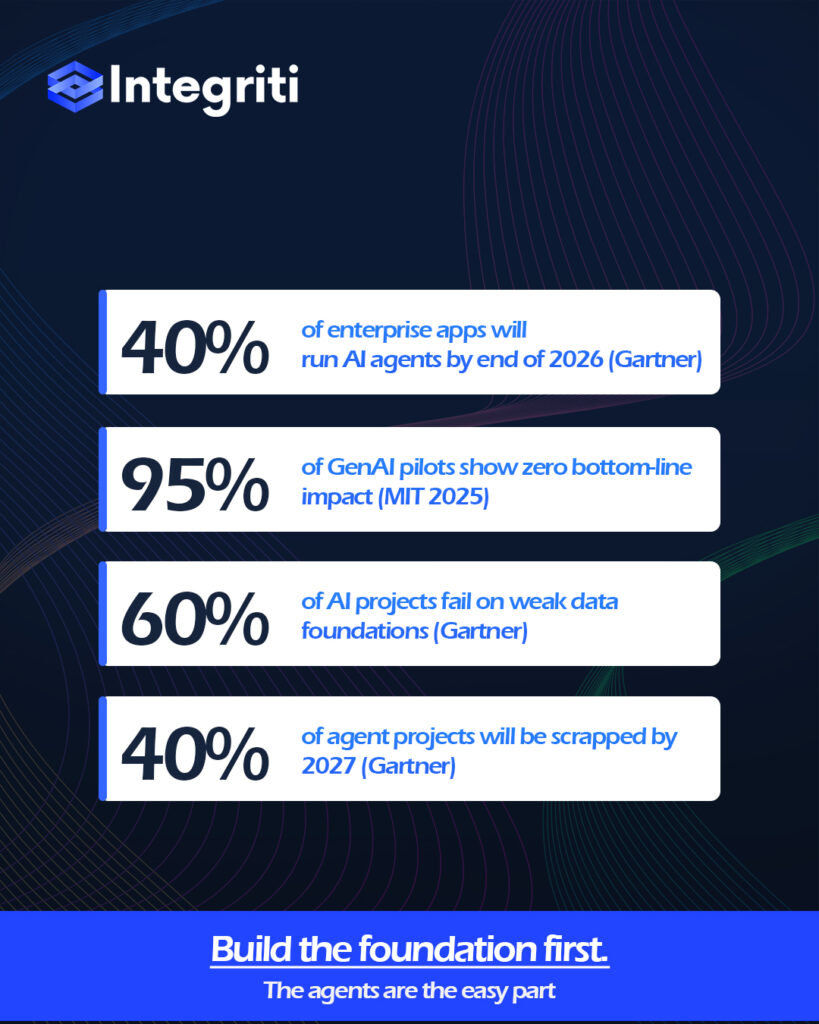
    Gartner expects 40% of enterprise applications to embed task-specific AI agents by the end of 2026, up from less than 5% a year earlier. Yet the same analysts warn that more than 40% of agentic AI projects will be cancelled by the end of 2027, undone by escalating costs, unclear business value, and weak risk controls. Both numbers are true at once. The gap between them is where most organizations will either win or quietly waste their budgets.

    The Uncomfortable Data

    The most sobering signal comes from MIT. Its 2025 State of AI in Business report found that roughly 95% of enterprise generative-AI pilots delivered no measurable impact on the bottom line. The failures, researchers noted, were rarely about the model. They were about brittle workflows, missing feedback loops, and data that was never ready for production.

    That last point is the quiet killer. Gartner predicts 60% of AI projects will be abandoned through 2026 because organizations lack AI-ready data — and 63% of organizations either lack the right data-management practices or are unsure whether they have them. Informatica’s 2025 CDO survey ranked data quality and readiness as the number-one obstacle to AI success.

    The pattern is unmistakable: agents fail not because the intelligence is weak, but because the foundation beneath them is.

    → See how we assess data readiness before any agent goes live 

    Why Agents Amplify Your Weaknesses

    A chatbot that retrieves a wrong answer is an inconvenience. An autonomous agent that acts on bad data — approving an invoice, adjusting inventory, escalating a case — turns that inconvenience into a business consequence. Autonomy raises the stakes of every flaw already living in your environment.

    This is why “foundation before agents” isn’t a slogan it’s a sequence. Before deploying autonomous systems, three things have to be in place:

    • Clean, governed, accessible data. McKinsey’s 2025 research found organizations reporting significant returns from AI were markedly more likely to have redesigned their end-to-end data workflows before choosing models.
    • Clear ownership and guardrails. Gartner’s 2026 Hype Cycle flagged agentic-AI governance, security, and cost discipline as defining concerns emerging early — not afterthoughts.
    • A defined outcome. The winning 5% in MIT’s study consistently started with a measurable business problem, not a flashy demo.

    Start Where the Foundation Is Strongest

    The encouraging news is that adoption intent is real, and disciplined teams are pulling ahead.

    Gartner’s 2026 CIO survey found only 17% of organizations have deployed AI agents so far, but more than 60% expect to within two years the most aggressive adoption curve of any emerging technology measured.

    The organizations in that leading 17% rarely started with the most glamorous use case. They started where their data was cleanest, their workflows best understood, and their success metrics clearest often in the back office, where MIT found returns were highest. They treated agents as accountable systems with defined responsibilities, not as magic layered on top of legacy chaos.

    → Talk to our team about a governed agentic-AI roadmap

    The Takeaway

    Agentic AI will reshape enterprise operations over the next decade — Gartner’s best-case scenario has it driving roughly 30% of enterprise application software revenue, more than $450 billion, by 2035. But that future belongs to the companies that resist the temptation to rush.

    The question worth asking in your next planning session isn’t

    “which agent should we build first?”

    It’s “is our foundation ready to be trusted with autonomy?”

    Get that answer right, and the agents will follow. Get it wrong, and you risk joining the 40% of projects quietly shut down by 2027.

    Build the foundation first. The agents are the easy part.

  • Most Globally In-Demand Programming Languages, 2021.

    How do you choose a programming language from the plethora of options available?

    Mastering a new programming language can help you advance further in your career or switch careers completely. But you might be wondering how to make the right choice. After all, you will likely have to invest your time and money to learn it. The sheer number of programming languages out there does not help the situation either. This decision will likely involve several considerations like your past knowledge and coding skills, the difficulty level of a language, and your reasons for learning a new language in the first place.

    Another thing you should keep in mind while deciding on a programming language is employers’ demand. If you are aiming to work for big tech giants, then we suggest prioritizing programming languages that have earned their stripes. In fact, in our blog on most In-Demand web frameworks for 2021, we helped you choose the “right” framework by highlighting the needs of your potential employers. Following the similar approach here, we will be sharing In Demand programming languages for the year.

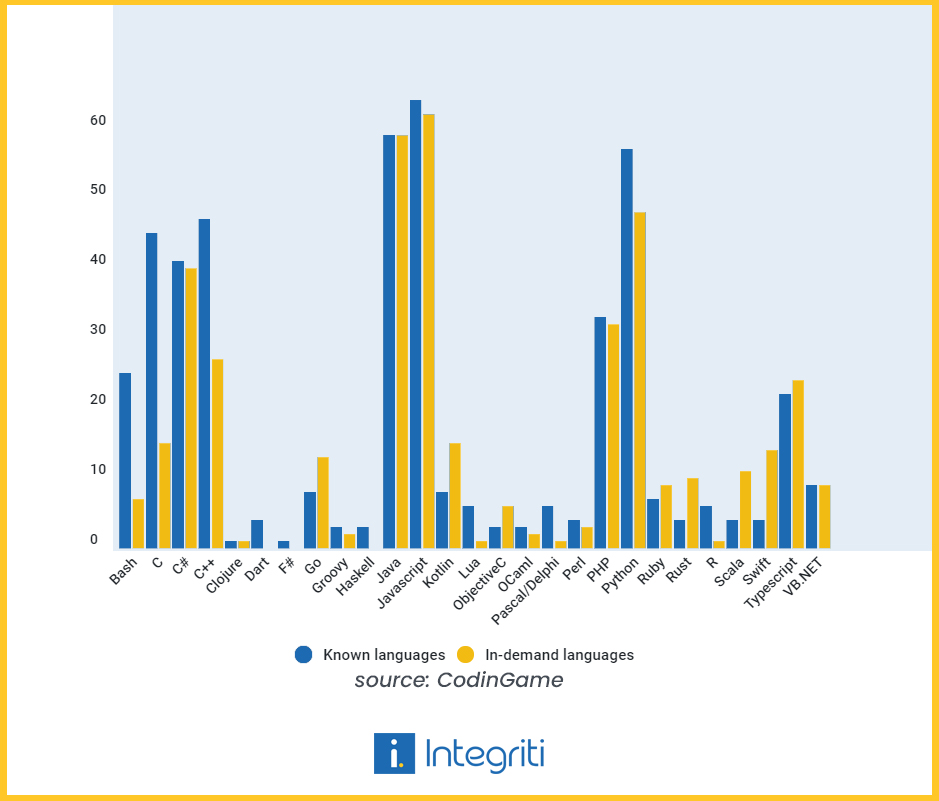
    A recent survey by CodinGame sheds light on the popularity of programming languages and their demand by employers. According to the results, more than half of the programmers knew how to code in JavaScript, Java, and Python. These three continue to be the most widely used programming languages in the world.

    A survey about most in demand programming languages

    On the demand side, results showed that close to 60% of the tech recruiters were on the lookout for professionals working with JavaScript and Java. These findings signal that the programmers and employers are in sync at least when it comes to these two languages. However, the same cannot be said for other languages like C, Python, etc. The demand for these languages is less than their popularity among programmers. For example, 57% of developers code in Python, but only 48% of companies need Python development. This gap is even bigger for C. 45.1% of programmers code in C however only 15.4% of companies require C development.

    These insights highlight how most tech companies favor 4 programming languages: JavaScript, Java, Python, and C#. In our opinion, it’s better to stick with JavaScript as it’s the most popular programming language for a reason. As a matter of fact, JavaScript development also made it to our list of Top Ten Tech skills in Canada for 2021! Most companies developing web UIs need to interface with JavaScript. Moreover, with the introduction of NodeJS, it’s also being used to develop server-side applications as well. If you want to learn a lesser-known language to stand out, then consider TypeScript. This past October, TypeScript was named among the fastest-growing languages in GitHub’s Octoverse Report. The results also showed a small shortage for this language as 24% of companies needed TypeScript development but only 22% of developers knew it.

    The survey overall highlights the dominance of few major programming languages like Java, JavaScript, and Python. The results also suggest a surplus of developers dealing with Python and C. For these developers, it would be better to switch to other languages to improve their job prospects in this competitive environment.

  • Nokia’s Bold Move: Discover the Benefits of Rebranding Your Business

    Image Source: Pexels

    As a business owner, you understand the importance of staying current and relevant. But what happens when your brand no longer resonates with your audience or fails to reflect your company’s values? This is where rebranding comes in. In this article, we’ll explore the benefits of rebranding, strategies for success, and a case study on Nokia’s bold move to rebrand.

    Why Rebranding is Important for Businesses?

    Rebranding your business can seem like a daunting task, but it’s essential for staying competitive in today’s fast-paced market. A rebrand can breathe new life into your business and help you connect with your target audience in a more meaningful way. It can also help you stand out from your competitors and differentiate your brand in a crowded marketplace.

    Additionally, rebranding can help you stay in line with your company’s values and mission. As your business grows and evolves, it’s natural for your brand to evolve as well. A rebrand can reflect these changes and help you communicate your positioning effectively.

    Rebranding Strategies and How to Choose the Right One for Your Business

    When it comes to rebranding, there are several strategies to consider. Some businesses may choose to completely overhaul their brand, while others may opt for a more subtle refresh. Here are a few rebranding strategies to consider:

    Complete Overhaul

    A complete overhaul involves changing all aspects of your brand, from your logo and website to your messaging and marketing materials. This strategy is best for businesses that need a complete rebrand or are starting from scratch.

    Evolution

    An evolution involves making small changes to your brand over time. This strategy is best for businesses that want to stay current but don’t want to completely change their brand identity.

    Targeted Refresh

    A targeted refresh involves making targeted changes to specific aspects of your brand, such as updating your logo or changing your messaging. This strategy is best for businesses that want to make small changes to their brand without completely overhauling it.

    When choosing a rebranding strategy, it’s important to consider your business goals, target audience, and budget. A complete overhaul may be more expensive and time-consuming, but it can have a bigger impact. A targeted refresh may be more cost-effective and quicker, but it may not have as big of an impact.

    To elaborate further, let’s look at a rebrand by one of the oldest tech giants.

    Case Study: Nokia’s Bold Move to Rebrand

    In 2014, Nokia underwent a major rebrand. The company had recently sold its mobile phone business to Microsoft and wanted to focus on its remaining business units: Nokia Networks and Nokia Technologies.

    The new branding focused on the idea of “human technology” and reflected the company’s commitment to innovation and technology that improves people’s lives. The new logo featured a more modern and streamlined design, and the company’s visual identity was updated to reflect the new brand message.

    The rebrand was a success, and Nokia’s stock price increased by 75% in the first year after the rebrand. The company’s renewed focus on innovation and technology helped it stay competitive in a crowded marketplace.

    Image Source: The Verge

    Fast forward a few years, and the tech giant redesigned its logo to announce that the company has left its mobile manufacturing division far behind.

    The new Nokia logo, launched on February 26th is reflective of the repositioning of the brand i.e. a focus on networks and industrial digitalisation.

    Examples of Successful Rebrands

    There are countless examples of successful rebrands, from Apple’s iconic logo to Coca-Cola’s “Taste the Feeling” campaign. Here are a few more examples of successful rebrands:

    • Starbucks

    In 2011, Starbucks underwent a major rebrand. The new logo removed the company name and focused on the iconic mermaid logo. The new logo was designed to reflect the company’s commitment to sustainability and its focus on coffee.

    • Airbnb

    In 2014, Airbnb underwent a complete rebrand. The new logo and branding focused on the idea of “belonging” and reflected the company’s commitment to creating a sense of community for its users.

    • Old Spice

    In 2010, Old Spice underwent a targeted refresh. The new marketing campaign, “The Man Your Man Could Smell Like,” was a huge success and helped the brand connect with a younger audience.

    Common Mistakes to Avoid During Rebranding

    Rebranding can be a tricky process, and there are several common mistakes to avoid. Here are a few mistakes to watch out for:

    1. Not Doing Your Research

    Before undergoing a rebrand, it’s important to do your research. This includes researching your target audience, competitors, and market trends. Failing to do your research can result in a rebrand that doesn’t resonate with your target audience or isn’t competitive in the marketplace.

    1. Changing Too Much, Too Quickly

    While a complete overhaul can be effective, changing too much too quickly can be jarring for your audience. It’s important to balance the need for change with the need to maintain consistency and familiarity.

    1. Failing to Communicate the Rebrand

    A successful rebrand requires effective communication. Failing to communicate the rebrand to your audience can result in confusion and a loss of trust.

    1. Tips for Creating a Strong Rebranding Strategy

    Creating a strong rebranding strategy requires careful planning and execution. Here are a few tips for creating a successful rebrand:

    1. Set Clear Goals

    Before undergoing a rebrand, it’s important to set clear goals. This includes defining your target audience, identifying your unique selling proposition, and establishing key performance indicators.

    1. Develop a Clear Brand Message and Identity

    A successful rebrand requires a clear brand message and identity. This includes a clear brand voice, messaging, and visual identity that reflects your company’s values and mission.

    1. Involve Your Team

    Rebranding is a team effort, and it’s important to involve your team in the process. This includes getting feedback from employees, involving key stakeholders, and ensuring everyone is on board with the rebrand.

    Image Source: Tailor Brands

    Importance of a Clear Brand Message and Identity

    A clear brand message and identity are essential for a successful rebrand. Your brand message and identity should reflect your company’s values and mission and resonate with your target audience. A clear brand message and identity can also help you stand out from your competitors and differentiate your brand in a crowded marketplace.

    How to Measure the Success of Your Rebranding Efforts

    Measuring the success of your rebranding efforts is essential for determining the effectiveness of your strategy. Here are a few metrics to consider:

    Brand Awareness

    Brand awareness measures how familiar your target audience is with your brand. This can be measured through surveys or social media analytics.

    Engagement

    Engagement measures how much your target audience is interacting with your brand. This can be measured through social media analytics or website traffic data.

    Sales

    Sales are the ultimate metric for measuring the success of your rebrand. This includes tracking sales before and after the rebrand and monitoring changes in customer behavior.

    Conclusion and Final Thoughts

    Rebranding can be a powerful tool for staying relevant and competitive in today’s market. Whether you’re considering a complete overhaul or a targeted refresh, it’s important to take the time to develop a strong rebranding strategy that reflects your company’s values and resonates with your target audience.

    Remember to involve your team in the process, communicate the rebrand to your audience, and measure the success of your efforts. And don’t be afraid to take bold steps, like Nokia did, to differentiate your brand and stay ahead of the competition.

  • Press Release: Integriti Group Rebrands

    On 17 Oct 2022, we are happy to announce to you the launch of the new Integriti logo and website as part of the ongoing evolution of our company’s brand.

    The main image of Integriti Group unveils a brand new look blog post

    ‍

    Following the breakout growth of our digital marketing and software development services over the past year, our team has been busy updating our visual identity to reflect our new capabilities and the vision of engineering growth for our clients.

    We believe that in today’s globally interconnected world and with the rise of digital transformation, enterprises need smart technology solutions to achieve operational efficiency, business growth, and competitive disruption. Not only do they require flexible solutions but also visionary partners like Integriti that can speak their language.

    Today, we’re proud to be a trusted partner of leading organizations and to have delivered successful outcomes in a variety of projects ranging from designing an enterprise knowledge-sharing system to developing a large e-commerce platform. Complementing our industry-leading software development expertise, we provide UX/UI design and content marketing through our high-performing and results-driven marketing team, also known as “Magnetic Marketing”.

    With Integriti embarking on a new journey and providing more exciting solutions, we believe this is the right time to create a new brand look that allows us to tell our multi-service story better. We also want our brand to be reflective of our promise of seamless communication, real collaboration, and cultural alignment with our clients.

    The New Integriti Has Arrived.

    Our challenge was to honor Integriti’s identity while making the new branding reflective of the company’s growth. We have retained the “i” in Integriti from the older logo and have created a more vibrant, bold, and modern design. Without going far from the old identity, our new logo successfully communicates our growth-oriented spirit and our varied range of services.

    Brand Elements

    “i” for Integriti

    Our brand mark, the “i” in Integriti represents order, trust, and stability which is why it is the center of attention in the logo design. Itis reflective of not only the integrity with which we serve our clients but also embodies our penchant for innovation.

    Color Palette and Gradient

    A gradient represents a direction of maximum change. We have used colour gradient comprising of blue and purple to reflect our two major services of Software development and Digital marketing respectively.

    Font Changes

    We wanted our font choice to be more dynamic, bold, and modern. Without straining too far away from the old identity, we have selected a more symmetrical Sans Serif font to blend in with our overall branding.

    Revamping our website

    We have also revamped our website according to the new brand identity and are continuously working to improve the user experience. The new site offers informative content on our services in a more clean and organized layout to ensure a positive user journey. The new brand identity and website are designed to further elevate Integriti as we continue to provide leading-edge digital solutions for our current and upcoming customers.

  • Secrets of performance-oriented frontend development

    When a web page takes longer than three seconds to load, 40% of visitors leave, increasing the bounce rate.

    Similarly, a slow mobile app would also have poor performance and irritate consumers. After a few tries, the customer will remove your application and download a more user-friendly one.

    The ease of use and user-friendliness of your specific digital solution have a direct impact on the performance of the app. If compromised, it degrades the user experience and lessens the likelihood that users will engage frequently or stay connected to the app or website over time.

    On the other hand, developing a web or mobile app with front-end performance in mind increases the chance that your product will succeed. As a result, your priority should be to create an app or website that loads quickly, is SEO-friendly, performs well, and is well-designed.

    Here are a few secrets that can help you build up your performance-oriented front-end development.

    Optimize Images & Use WebP

    Images are a crucial component of web pages. Considering they increase user engagement, 93.7% of websites on the internet employ at least one image file format.

    The drawback of using images is that, unless they are optimized, they have a negative impact on the front-end loading time. However, there are various approaches to optimizing images:

    Use AVIF or WebP

    Compared to previous formats like JPEG and PNG, using modern image formats like WebP and AVIF shows better performance. When compared to JPEG and PNG, WebP is between 25% and 35% smaller. AVIF is 20% and 50% smaller than WebP and JPEG, respectively.

    The browser support is the drawback, though. WebP acquired browser support only recently, so older versions may not support it. In contrast, Chrome and Opera are the only browsers that support AVIF. As a result, you must utilize the <picture> element in native HTML with fallback support.

    Serve images of the right dimensions.

    Using responsive images is another approach to speed up a website’s performance and cut down on image delivery time. Mobile and tablet devices account for more than 50% of all traffic. The frontend loading time could be further reduced by scaling the image to popular device dimensions and serving it using a srcset.

    There are numerous other methods you can use to speed up the frontend loading time through image optimization in addition to picking the right format and dimensions. Additional recommended best practices are:

    • Use of progressive JPEGs.
    • Use of HTTP/2 instead of HTTP/1.1.
    • Use of image sets.
    • Image Compression
    • Serve smaller images to users on slow connections.

    Compress Files & Use CDNs

    Building a lightweight front end for your web or mobile solution is made much easier with the use of content delivery networks, or CDNs. These web directories have a successful global network. Your app will load more quickly if you use files hosted on CDNs since you can use the cached versions of the files from the closest servers. It enables you to quickly serve more users while preventing bottlenecks.

    Compressing the files to be used comes next after using common files from CDNs. Every file, including documents, images (JPEG, PNG), videos, audio clips, and presentations, can be compressed to enhance the functionality of your application. There are many compression tools available on the market that might be deployed for this.

    Once you’ve completed these two steps, your website or application will be much more responsive to consumer inquiries.

    Bundle & Minify Assets

    Two different performance improvements you may use in a web app are bundling and minification. By minimizing the amount of the requested static assets and decreasing the number of server requests, bundling and minification combined enhance performance.

    Multiple files are combined into one file by bundling. The quantity of server requests required to render an online asset, such as a web page, is decreased via bundling. Numerous unique bundles made expressly for CSS, JavaScript, etc. are possible. Having fewer files means that the browser will make fewer HTTP requests to the server or to the service that hosts your application. As a result, first-page performance is enhanced.

    Code that has undergone minification has unnecessary characters removed without affecting functionality. As a result, the size of the requested assets is significantly reduced (such as CSS, images, and JavaScript files). One of the most frequent side effects of minification is the reduction of variable names to one character, as well as the removal of comments and extraneous whitespace.

    Bundling and minification mainly speed up the first page request load time. After a web page has been requested, the web browser caches the static assets (JavaScript, CSS, and images). Therefore, bundling and minification don’t enhance performance when the same page, or pages, on the same site, are requested with the same assets. If bundling and minification aren’t used and the expires header isn’t set correctly on the assets, then the browser’s freshness heuristics mark the assets stale after some days. The browser also requires a validation request for each asset. Bundling and minification in this situation increase performance even after the initial page request.

    Use Caching and prefetching

    Pre-fetching and caching are two essential tools for front-end web performance. Pre-fetching involves pre-loading resources such as images, scripts, and stylesheets so that they can be delivered to the user more quickly. Caching, on the other hand, involves storing assets on the user’s device so that they don’t have to be requested from the server every time the user visits the site.

    Both of these techniques have a huge impact on website performance and user experience. By pre-loading resources and caching assets, sites can load faster and be more responsive, leading to improved performance and better user experience. Additionally, pre-fetching and caching can reduce the burden on the server, which can help to keep costs down and make sites more resilient.

    So if you want to improve your site’s performance and user experience, be sure to take advantage of pre-fetching and caching.

    Reduce The Number Of Server Calls.

    Generally speaking, the more requests your front end sends to the server, the longer it takes to load. This is due to the fact that sending any request to the server demands full communication before the page can be rendered. There are several approaches you may take to cut down on the number of server requests required to load the website.

    One of the simplest ways to cut down on server calls is to use CSS Sprites. Sprite loads a single image file combined using a collection of images rather than ten separate images to the site. The background image and background-position CSS properties can be used to display the desired image segment. By doing this, you’re minimizing the number of server requests necessary.

    Reducing third-party plugins is also important as they make up a large number of external requests and cutting down on them will boost your application’s loading speed. Preventing broken links to files that don’t exist can also help.

    You might also consider server-side rendering to accelerate the application’s initial load time.

    Making the initial move is never easy. The future, however, belongs to those who aren’t scared to innovate and redefine conventional approaches. You can ensure that your website loads quickly and offers a positive user experience by using these web performance optimization approaches. Just be sure to keep everything simple, smart, and seamless. And keep in mind that you only have 15 seconds to make an impact!

    First impressions of apps and websites are based on their user interface (UI) and front-end. The ease of use, seamless navigation, and fast loading are just a few of the elements that determine whether a user will use your digital product again. Therefore, it’s crucial to consider a web solution’s performance efficiency, whether it’s an App or an e-commerce website. You will be able to do so by using the advice we’ve provided above.

    ‍

  • Serverless Architecture

    Serverless computing, also referred to as simply Serverless, is a famed topic of the software architecture world. The biggest cloud-providing platforms like Amazon, Google and Microsoft are continuing to invest heavily and research on this type of architecture. Serverless is a cloud computing code execution model where a certain cloud provider takes over responsibility for servers running along with computing resources management. To put it in a simple view, there are no physical or virtual servers to manage, because they are automatically deployed in the cloud by the third-party vendors. Some of the famous serverless providers are AWS Lambda, GCP Functions and Azure Functions.

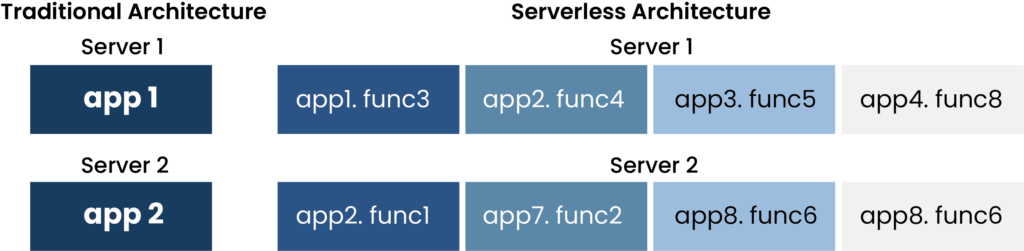
    The main difference between the traditional and serverless architecture can be schematically seen in diagram 1.

    A diagram which shows the Traditional vs serverless architecture.
    Diagram 1: Traditional Vs. Serverless

    Components of the serverless application are:

    Functions

    Functions are what imply business and application logic. They execute code for certain actions. There can be multiple functions working as a composite function. Sometimes they may be triggered or self-initiated when a condition is met. This process is hidden from the user. The user creates a program code, specifies needed dependencies and uploads it. The provider then provides the computing environment.

    Backends

    This unit allows the development to shift backend regular functions from data storage to the cloud, managing latency of the architecture and dependencies deepening. It also aids with functionalities like Simple Notification Service (SNS), Simple Queue Service (SQS), kinesis for streaming data, data warehouse queries, batch data cloud dataflow and event grids.  

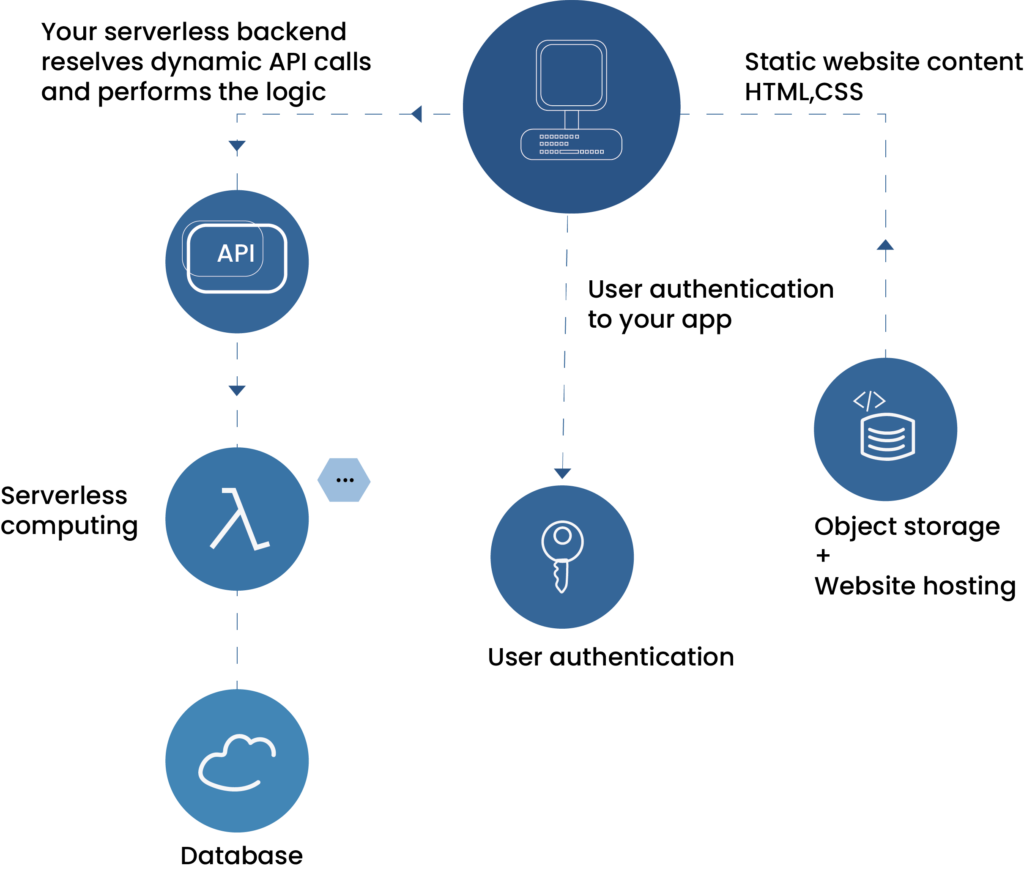
    Here is how a serverless setup looks like.

    Image shows serverless states
    Diagram 2: Serverless State

    When we talk about Serverless, it is primarily defined by two different but overlapping areas: “Backend as a Service” (BaaS) and “Function as a Service” (FaaS). BaaS and FaaS are related in their operational attributes and are frequently used together. Let’s find out what each of these scopes encompasses.

    BaaS

    This term is used to describe applications that significantly or fully incorporate third-party, cloud hosted applications and services to manage server-side logic and state. These are typically rich client applications like single page web apps or mobile apps that use the vast ecosystem of cloud accessible databases (e.g., Firebase), authentication services (AWS Cognito) and so on.

    FaaS

    This term is used to describe applications where server-side logic is written by developer but unlike mainstream architectures, its run-in stateless computer containers are event-triggered, ephemeral and managed by a third party. Containers specify OS and software configurations. Regarding uptime, the container keeps working until the current job is executed and destroyed. It can host any microservice and app and there are no timeout restrictions.

    Faas, replaces the click-processing physical server with something that does not need a provisional server nor a related app. The only code that needs to change when moving to FaaS is the main method, also called startup code. Handlers which manage message listener interfaces are also changed in the method signature.

    Deployment is very different from traditional systems. The code is uploaded to the FaaS provider and then the provider instantiates VM’s and manager process. Horizontal scaling is completely automatic, elastic and managed by the provider. If the system needs to process a hundred requests in parallel, computer containers come into play. They execute the functions and are created and destroyed purely driven by runtime need. Functions in FaaS are typically triggered by event types defined by the provider. Such event types include S3 (file/object) updates and Kinesis. They may also be triggered as a response to inbound HTTP requests via API gateway. However, this is an uncommon use of configuration from within the same cloud environment.

    When working in an instance-bound state or a machine state, there may be some restrictions posing to FaaS. Like data that is stored in variables or local disk. Such storage is available but there is no guarantee that such a state persists across multiple invocations and more strongly there should be no assumption made that state from one invocation of a function will be available to another invocation of the same function. This is the reason why FaaS are often described as stateless. But this may not a correct techical assessment. Rather it is appropriate to say that any state of a FaaS function that is required to be persistent needs to be externalized outside of the FaaS function instance. Any function will typically make use of a database, a cross app cache like Redis or a network file/object store to store state across requests or to provide further input necessary to handle a request.  

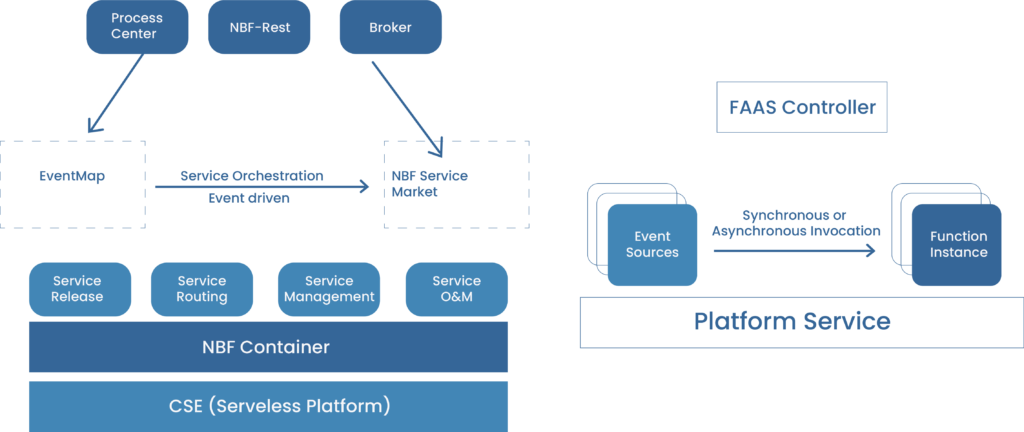
    New-retail business framework (NBF) is an open framework developed by the supply chain infrastructure technology team for new retail services. A serverless system like FaaS helps NBF achieve industry standard practices, load balancing and long-term sustainability. Diagram 3 shows how NBF works in conjunction with FaaS.

    Image about NBF-FaaS Architecture
    Diagram 3: NBF-FaaS Architecture

    Event Sources Function is an event driven set. Function Instances provide functions or microservices. The FaaS Controller manages function control services such as API Gateway or Backend for Front (BFF). Platform Service Functions relay on platform services such as privilege management API’s and OSS. Cloud Service Engine (CSE) provides dynamic scaling capabilities which rapidly adapt to different resources needs during on and off-peak hours. CSE optimizes container cold, hot start performance and serverless O&M tools such as logging, monitoring and link tracking. NBF containers use Open Service Gateway Initiative (OSGI) architecture and provide complete bundle lifecycle management, including load, start, unmount and delete as well as isolation and communication. The whole platform capabilities result in services release which allows for quick release of a function or to bundle as a service, service routing which includes polymorphism, degradation and moke routing, service management with service vision control and service start/stop and lastly the service O&M for serverless services, hybrid deployment, phased release, disaster recovery.

    Lastly the important concept to grasp is bundle communication. Bundles are able to utilize container capabilities such as Spring context hosting and AOP by using the import mechanism provided by containers. For example:

                  org.springframework       org.apache.commons.logging         org.aopalliance       org.aspectj    

    ‍
    The NBF containers create an independent sandbox for each bundle which ensures code level bundle isolation from time of loading thus preventing class and resource conflicts among bundles. They manage bundle context globally and provide plug-in hosting. This sums up how FaaS works and conjoins.

  • Shopify Plus: Is it Worth the Investment for Large-scale E-commerce?

    Shopify Plus: Is it Worth the Investment for Large-scale E-commerce?

    Picture background
    Shopify Plus: Is itWorth the Investment for Large-scale E-commerce?

    ‍

    In the world ofe-commerce, where competition is fierce and customer expectations are everevolving, choosing the right platform for your online store is a criticaldecision. For large-scale e-commerce businesses, scalability, flexibility, andperformance are paramount. Shopify Plus, the enterprise-level version of thepopular Shopify platform, has emerged as a compelling choice for businesseslooking to take their operations to the next level.

    But is it worth theinvestment? Let’s delve into the key considerations to help you determinewhether Shopify Plus is the right fit for your large-scale e-commerce venture.


    UnderstandingShopify Plus

    Before we assess itsworth, let’s first understand what Shopify Plus brings to the table:

    • Scalability: Shopify Plus is designed to handle high-volumesales and traffic, making it suitable for large e-commerce stores experiencingrapid growth.
    • Customization: It offers extensive customization options,including access to the platform’s source code, allowing businesses to tailortheir online stores to their unique needs.
    • RobustInfrastructure: Shopify Plusincludes features like unlimited bandwidth, automated backups, andenterprise-grade security, ensuring reliability and protection of your onlineassets.
    • DedicatedSupport: Users of Shopify Plusreceive dedicated support, which can be crucial for resolving issues promptlyand efficiently.
    • Multi-Channel Selling: With Shopify Plus, you can easily expand yourpresence across various sales channels, including social media andmarketplaces.

    Now, let’s dive intothe factors that can help you determine whether investing in Shopify Plus isjustified for your large-scale e-commerce business:

    • SalesVolume: Shopify Plus is mostcost-effective for businesses with significant sales volumes. If you’reprocessing a substantial number of transactions each month, the platform’sfixed pricing model can be advantageous.
    •  CustomizationNeeds: If your businessrequires extensive customization, Shopify Plus provides the flexibility tocreate a tailored online shopping experience. Evaluate the extent ofcustomization you need and whether it justifies the additional cost.
    • Performanceand Reliability: Consider yourcurrent and projected website traffic. If you’ve experienced website slowdownsor outages due to high traffic, Shopify Plus can provide the performance andreliability you need to prevent such issues.
    • GlobalExpansion: If your e-commercebusiness is expanding internationally, Shopify Plus offers multi-language andmulti-currency support, simplifying the process of reaching global markets.
    • DedicatedSupport: Assess the importanceof dedicated support. For large-scale operations, having a responsive supportteam can be invaluable in resolving technical issues and improving the overallcustomer experience.
    • TotalCost of Ownership: Calculatethe total cost of ownership, factoring in the platform’s subscription cost,development and customization expenses, and potential third-party app costs.Ensure that the benefits outweigh the investment.
    • CompetitiveAdvantage: Consider how ShopifyPlus can give you a competitive edge in your niche. Are the features itprovides essential for staying ahead of your competitors?

    Conclusion

    Shopify Plus isundoubtedly a powerful platform with a range of features tailored to meet theneeds of large-scale e-commerce businesses. However, whether it’s worth theinvestment depends on your specific circumstances and goals. Carefully evaluateyour sales volume, customization requirements, performance needs, and growthplans to determine if Shopify Plus aligns with your business strategy.

    In many cases, the benefitsof Shopify Plus, including scalability, customization, and dedicated support,can outweigh the costs, making it a sound investment for large-scale e-commerceventures committed to delivering exceptional online shopping experiences.Ultimately, the decision should be based on a thorough analysis of yourbusiness’s unique requirements and long-term objectives.