Author: admin

  • Why Webflow Sites Started Competing With Custom Code in 2025

    Why Webflow Sites Started Competing With Custom Code in 2025

    Why Webflow Sites Started Competing With Custom Code in 2025

    Why do some websites outperform others despite using similar platforms? The difference often comes down to factors influencing website performance, from coding quality and clean CSS to optimized content management and seamless third-party integrations. As a startup or growing business, you might assume that a custom website built for a few hundred dollars is enough but without professional development, ongoing support, and thoughtful maintenance, hidden costs often accumulate, affecting speed, SEO, and user experience.

    Webflow sites started competing with custom code in 2025 because they combine no-code efficiency with advanced customization, AI-assisted tools, and scalable workflows. Businesses and developers realized that Webflow offered faster deployment, easier maintenance, and strong SEO performance, making it a cost-effective, professional alternative to fully coded custom websites.

    Webflow sites in 2025 have emerged as a compelling alternative to custom code, offering a no-code, user-friendly builder that balances customization with efficiency. Developers now recognize that leveraging Webflow’s platform, coupled with AI-assisted tools and scalable workflows, can deliver sophisticated animations, integrations, and content management capabilities previously reserved for traditional coding. Good design, robust support, and adherence to best practices are no longer optional—they’re critical to long-term success.

    This blog will explore why Webflow started competing with custom code in 2025, examining performance factors, the real value of professional development, and strategic use cases for startups. You’ll also see how making the right choice between Webflow and custom coding can impact scalability, SEO, and overall web development workflows.

    Why Startups Choose Webflow in 2025 Strategically
    Why Startups Choose Webflow in 2025 Strategically

    Startups in 2025 are increasingly turning to Webflow as a strategic alternative to fully custom development. The platform offers a unique combination of speed, scalability, and flexibility, allowing emerging businesses to launch professional websites without compromising on design, functionality, or long-term growth potential. Understanding why startups are making this shift requires a closer look at the benefits Webflow brings compared to traditional custom coding approaches.

    Speed and Efficiency in Web Development

    One of the primary reasons startups choose Webflow in 2025 is the speed at which websites can be launched. Unlike fully custom development, which may require extensive coding and debugging, Webflow’s visual interface allows teams to build functional, responsive sites quickly. Webflow generates clean code and semantic code automatically, reducing errors while ensuring compatibility with SEO best practices. For startups, this means faster time-to-market and the ability to iterate quickly based on user feedback.

    Scalability Without Compromising Quality

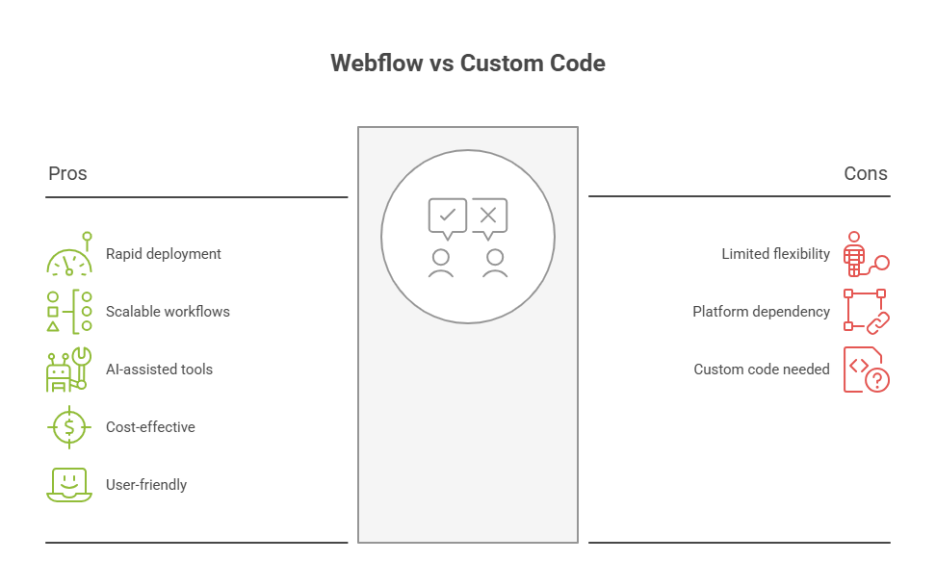
    Scalability is another critical factor. Webflow remains a strong choice for startups that anticipate rapid growth. Webflow’s platform allows for advanced features, complex functionalities, and integration with third-party tools without the need to rebuild the site from scratch. Startups can add custom code or implement custom business logic where necessary, ensuring the site grows alongside the business. Compared to platforms like Webflow vs custom code, Webflow often reduces long-term maintenance costs while maintaining flexibility.

    Balance Between Design and Development

    Webflow is great for bridging the gap between design and development. Startups can leverage Webflow University resources to train in webflow development or collaborate with webflow experts to create custom layouts. The platform gives startups the ability to maintain clean code while implementing advanced features, animations, and AI site builder tools without writing a line of code.

    Strategic Decision: Webflow vs Custom

    Choosing the right choice between Webflow and custom development comes down to balancing budget, timeline, and functionality. While fully custom sites offer ultimate flexibility, they are often resource-intensive. Webflow in 2025 gives startups the ability to build custom websites, add custom code selectively, and maintain semantic code all while avoiding platform limitations.

    Long-Term Value and Maintenance

    Startups also benefit from Webflow’s sustainable approach to web development. The platform provides ongoing updates, reliable hosting, and analytics tools to monitor site performance. Webflow gives teams insights to optimize workflows, maintain scalability, and future-proof their digital presence critical considerations for businesses planning long-term growth.

    Webflow vs Custom Code: 2025 Developer Comparison Insights

    As the web development landscape evolves in 2025, businesses and developers are increasingly evaluating whether to invest in fully custom code or switch to Webflow. Understanding the practical differences, benefits, and limitations of each approach is essential for making informed decisions that align with business needs, scalability, and long-term performance.

    Speed and Efficiency for Designers and Developers

    • Rapid Development: Webflow is a visual web development platform that allows designers and developers to build responsive sites faster than traditional coding.
    • Clean Code Generation: Webflow generates clean, semantic code automatically, reducing errors and ensuring compatibility with SEO and performance optimization best practices.
    • Visual Control: Webflow allows teams to manage layouts, animations, and styling visually while still providing the option to add custom code where necessary.

    Integration and Third-Party Tools

    • Seamless Connections: Webflow provides integration with third-party tools like CRMs, analytics, and marketing platforms, simplifying workflows for startups and enterprises.
    • Custom Content Types: While fully custom development allows complete control over data structures, Webflow users can create custom content types and easily add dynamic content through its CMS features.

    Cost, Maintenance, and Scalability

    • Total Cost of Ownership: Deciding between Webflow and custom solutions often comes down to long-term costs. Custom development may require more technical resources, dedicated maintenance, and custom SLAs, which can lead to unexpected costs.
    • Sustainable Scalability: Webflow pages are optimized to handle millions of users, with scalable hosting and reliable performance, making the platform helpful for startups building growth-focused digital products.

    Flexibility vs Platform Limitations

    • Custom Code Advantage: Fully custom sites offer complete flexibility for complex functionalities and unique business logic.
    • Webflow Advantage: Webflow is a visual web development builder that simplifies most tasks, from the basics to advanced features, and allows designers and developers to focus on user experience and workflow optimization.

    Best Fit for Your Business

    • Startups and SMEs: For businesses seeking speed, reduced maintenance, and integrated tools like analytics, Webflow provides a practical solution without sacrificing scalability.
    • Enterprises with Unique Needs: Companies requiring highly customized solutions may benefit from custom code, provided they have the technical resources to manage development and ongoing updates.

    Conclusion

    In 2025, Webflow sites proved they could compete with fully custom code by combining speed, scalability, and flexibility with professional-grade design and development capabilities. Startups and growing businesses found that leveraging Webflow’s visual platform, AI-assisted tools, and clean code generation enabled faster launches, easier maintenance, and optimized performance. Compared to traditional custom development, Webflow reduces long-term costs, simplifies integrations with third-party tools, and allows selective addition of custom code, making it a practical, scalable choice for businesses aiming for sustainable growth.

    Deciding between Webflow and custom code ultimately depends on your business needs, technical resources, and long-term goals. For startups, Webflow provides a strategic, cost-effective solution that balances efficiency, design, and advanced functionality. Meanwhile, enterprises with highly specific requirements may still benefit from fully custom development, provided they can manage the associated complexity and costs. Curious which approach Webflow or custom code would maximize your growth? Why not ask Integriti Studio?

    Frequently Asked Questions (Why Webflow Sites Started Competing With Custom Code in 2025)

    Is Webflow still relevant in 2025?

    Yes Webflow remains highly relevant in 2025. Its no‑code visual development, responsive design, CMS capabilities, and AI-assisted features make it essential for designers, freelancers, and businesses. With growing adoption and continued updates, Webflow stays a strong tool for modern web design and development.

    Does Webflow allow custom code?

    Yes Webflow allows custom code. Designers can embed HTML, CSS, and JavaScript directly into pages or the site’s header/footer, enabling advanced functionality beyond the visual builder. This flexibility makes Webflow suitable for both no‑code users and developers needing custom, dynamic web solutions.

    Who does Webflow compete with?

    Webflow competes with platforms like Wix, Squarespace, WordPress, Shopify, and Bubble. It stands out for visual no‑code development and CMS flexibility, but these competitors offer alternative solutions for website building, e‑commerce, and app development, targeting both beginners and professional designers.

    What is the difference between Webflow and custom website?

    The difference between Webflow and a custom website is that Webflow uses a visual, no‑code platform with templates and built-in CMS, enabling faster development, while a custom website is coded from scratch, offering full control, unique features, and optimization, but requires more time, skill, and maintenance.
  • What Webflow Designers Had to Unlearn in 2025

    What Webflow Designers Had to Unlearn in 2025

    What Webflow Designers Had to Unlearn in 2025

    Why do some websites scale smoothly while others stall even when built on the same tools? The answer often lies not in the platform, but in the assumptions behind how it’s used. In 2025, many webflow professionals realized that success required unlearning habits that once felt efficient but no longer supported performance, scalability, or long-term growth.

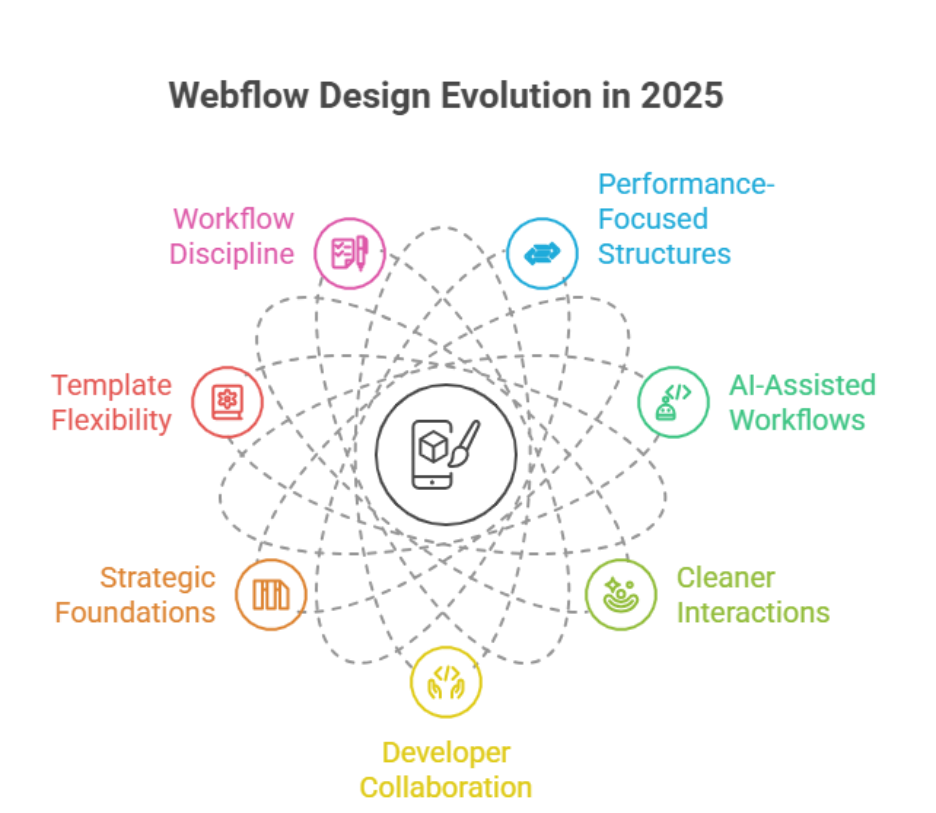
    In 2025, Webflow designers had to unlearn over-reliance on templates, visual-only decisions, and quick builds without scalability. They shifted toward performance-focused structures, AI-assisted workflows, cleaner interactions, and closer collaboration with developers to deliver websites that support long-term business growth.

    Website performance is influenced by multiple factors: clean structure, optimized interactions, thoughtful animations, and how well ai-driven workflows are integrated. When these elements are handled without professional oversight, even visually impressive work can result in slow load times, poor conversions, and difficult maintenance. A skilled designer working alongside a developer understands that strong web design is not just about aesthetics it’s about systems, consistency, and measurable outcomes.

    Businesses also began to recognize the real cost of shortcuts. A website priced at $500–$800 may look acceptable initially, but without proper support, updates, and optimization, it often demands costly fixes later. Strategic development, ongoing maintenance, and informed decision-making deliver far greater value over time.

    This blog explores what webflow designers had to unlearn in 2025, how expectations changed, and which smarter design and development choices are shaping more sustainable digital results moving forward.

    Webflow in 2025 Taught Startups Smarter Web Design Choices Toward 2026

    Webflow in 2025 Taught Startups Smarter Web Design Choices Toward 2026

    Startups Moved From Speed-First Builds to Strategic Foundations

    For many early-stage companies, speed was once the main decision driver. Launch fast, adjust later. Webflow in 2025 challenged that mindset. Startups learned that rushed execution often created long-term inefficiencies especially when structure, scalability, and performance were ignored. Modern web design decisions began focusing on systems rather than screens, ensuring that early choices would not block future expansion.

    Templates Became a Starting Point, Not a Strategy

    A common lesson was understanding the role of a template. While templates helped accelerate launches, startups realized they should never dictate architecture. Over-customized templates frequently led to bloated layouts and inconsistent logic. Instead, teams adopted cleaner frameworks that supported flexibility, maintainability, and measurable outcomes as the business evolved.

    Workflow Discipline Defined Sustainable Growth

    Another major shift was the importance of a documented workflow. Startups stopped treating design and deployment as isolated tasks. Clear workflows improved collaboration, reduced rework, and created repeatable processes that could scale. This operational clarity directly influenced performance, stability, and long-term cost control especially when web design decisions aligned with business goals.

    Designing With 2026 in Mind

    By the end of 2025, a forward-looking startup no longer asked what worked now, but what would still work in 2026. The lesson was clear: smarter web design choices are those that anticipate growth, not just launch dates.

    Conclusion

    The lessons from Webflow in 2025 highlight that effective web design goes beyond aesthetics or speed it requires strategic thinking, disciplined workflows, and collaboration between designers and developers. Startups and businesses learned to move away from over-reliance on templates, rushed builds, and purely visual decisions, instead prioritizing scalable structures, AI-assisted workflows, and performance-driven design.

    Investing in professional development, ongoing maintenance, and thoughtful design choices ensures websites not only launch successfully but continue to support growth into 2026 and beyond. Ultimately, the key takeaway for anyone learning Webflow in 2025 is that unlearning outdated habits is as important as adopting new tools and strategies delivering websites that are faster, cleaner, and more resilient for the long term.

    Struggling to implement these smarter design strategies on your website? Why not contact Integriti Studio and get expert guidance today?

    Frequently Asked Questions (What Webflow Designers Had to Unlearn in 2025)

    Is Webflow still relevant in 2025?

    Yes Webflow is still relevant in 2025. It’s widely used for professional, responsive, no‑code website design, with growing market adoption, advanced features, and strong performance and SEO tools. Its role in no‑code/AI‑assisted web development keeps it valuable for designers and businesses.

    Do professional web designers use Webflow?

    Yes, professional web designers use Webflow for client projects, startups, and agency work. Its visual no‑code interface, responsive design capabilities, CMS integration, and fast prototyping make it ideal for delivering polished, scalable websites efficiently, while still allowing custom code for advanced functionality.

    Is Webflow still popular?

    Yes Webflow is still popular in 2025. It powers millions of websites globally, has a growing user base, and continues increasing its market share among CMS platforms. Designers, freelancers, and businesses still choose it for no‑code, responsive web design and visual development.

    Are Webflow designers in demand?

    Yes Webflow designers are in demand in 2025. Businesses, agencies, and startups increasingly hire Webflow pros for fast, responsive, and custom websites. Job openings and freelance gigs continue growing as Webflow adoption rises, especially in no‑code development and digital design roles.

  • Webflow in 2026: Which 2025 Trends Will Shape Client Expectations

    Webflow in 2026: Which 2025 Trends Will Shape Client Expectations

    Webflow in 2026: Which 2025 Trends Will Shape Client Expectations

    Why do some Webflow websites outperform others, even when built on the same platform? The answer lies in multiple factors influencing website performance clean code, intuitive interface, optimized UX, AI-driven personalization, and seamless workflow integration. Businesses that overlook professional development, ongoing support, or design maintenance often face slower load times, lower conversions, and missed opportunities for SEO optimization.

    Webflow in 2026 will be shaped by 2025 trends like AI-driven personalization, minimalism-focused layouts, improved UX/UI, and accessibility. Clients will expect faster performance, seamless interfaces, real-time analytics, and professional design support. Prioritizing SEO, animation, and data-driven workflows will be essential to meet these evolving expectations.

    Investing in professional design and development can transform how users interact with your website. A well-crafted layout, minimalism-focused UI, and subtle animation improve user experience, while AI tools and analytics help you optimize content in real-time. Even small investments often starting from a few hundred dollars per month for maintenance, updates, and support can deliver measurable ROI and scalable results.

    This blog explores how Webflow in 2026 will evolve, highlighting which 2025 trends continue to shape client expectations. You’ll learn how AI-driven tools, modern design trends, accessibility, and minimalism transform web design, how interface and UX choices influence engagement, and why prioritizing professional support is crucial for long-term success. By the end, you’ll have actionable insights to plan, optimize, and scale your Webflow projects with confidence.

    How AI-Driven Minimalism Transforms Webflow UX in 2026

    How AI-Driven Minimalism Transforms Webflow UX in 2026

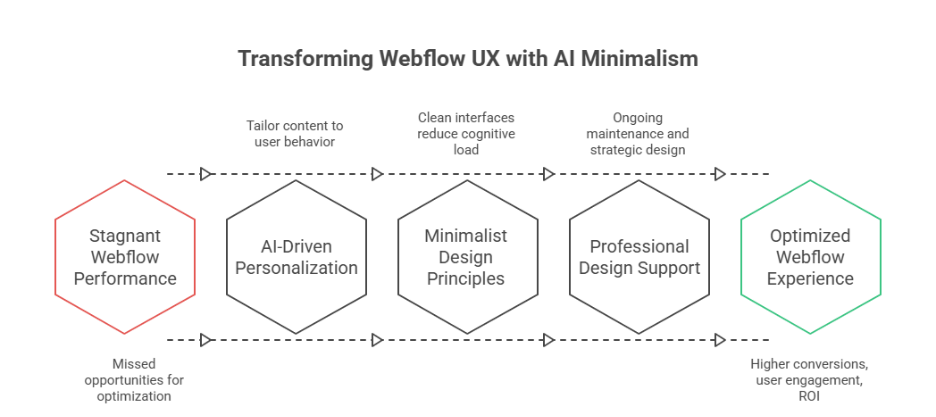
    As Webflow continues to evolve, 2026 marks a pivotal shift where AI-driven layouts and minimalism converge to redefine user experience. Businesses heading into 2026 must understand how these innovations impact website design, usability, and customer expectations while streamlining workflows through no-code solutions.

    The Role of AI in Modern Web Design

    AI is changing how designers approach modern web interfaces. From homepage structures to adaptive content, ai-powered tools enable personalization that caters to individual users, helping users navigate sites seamlessly. By analyzing behavior and interaction patterns, AI can optimize visualization and interactive elements, creating intuitive digital experiences that align with brand identity.

    Personalized Layouts for Better Usability

    AI-driven layouts allow adaptive content placement, guiding users to key sections and improving usability. Elements like dynamic menus, voice and chat interfaces, and context-aware calls-to-action ensure the site loads faster and responds to user intent. This approach also guides users toward meaningful actions, enhancing engagement.

    Minimalism Meets AI for Seamless Experiences

    Minimalism paired with AI ensures that design is not only aesthetic but functional. Clean interfaces reduce cognitive load while ai-powered personalization delivers content seamlessly. This trend addresses customer expectations for speed, clarity, and efficiency, making website design more intuitive.

    Integrating Interactive Elements Without Clutter

    Using subtle interactive elements like hover effects, micro-animations, or adaptive content sections enhances engagement without overwhelming users. AI assists in predicting which elements improve conversion, aligning web design trends with trends for 2026.

    Real-Time Personalization and Analytics

    AI tools provide insights through API integrations and dashboards, offering real-time visualization of user behavior. By continuously adapting layouts, 2026 highlight is the ability to deliver personalization that evolves with user interactions, ensuring digital experiences remain relevant and efficient.

    Preparing for What’s Next

    As designers explore trends of 2026, AI-driven minimalism will dominate modern web projects. Focusing on usability, brand identity, and seamless experiences ensures your website design aligns with customer expectations, while ai-powered layouts and no-code tools make scaling and adaptation more efficient.

    AI-Driven Personalization Shapes Minimalism in Web Design 

    AI-driven personalization is revolutionizing modern web design, particularly in platforms like Webflow. By combining minimalism with intelligent automation, businesses can deliver higher conversion rates, streamlined interfaces, and digital experiences that resonate with users. Below is a detailed breakdown of how this approach works:

    Personalization Based on User Behavior

    • Based on behavior: AI monitors user interactions and adapts content dynamically, instead of static layouts, ensuring every visit feels tailored.
    • Scroll-based engagement: Features like scrollytelling guide users through content naturally, improving retention and usability.
    • AI-assisted recommendations: Personalized suggestions for products, articles, or services enhance engagement while respecting user intent.

    Minimalism Meets Strategic Design

    • Fewer resources: Minimalist layouts reduce clutter and optimize performance, allowing pages to load faster without sacrificing impact.
    • Bold type and bold colors: Selective use of bold type or bold colors emphasizes key messages while maintaining a clean interface.
    • Maximalist elements only when needed: Interactive or decorative elements are used sparingly, preserving focus and efficiency.

    Leveraging AI-Powered Tools for Optimization

    • AI-powered tools analyze user behavior and provide actionable insights for UX, interface, and content optimization.
    • Real-time adjustments improve higher conversion rates by presenting content tailored to individual preferences.
    • Integrations support ownership and privacy concerns, ensuring compliance with data privacy standards.

    Benefits for Businesses and Users

    • Personalized, minimalist design creates a seamless experience that reduces cognitive load.
    • Businesses achieve higher conversion rates and measurable ROI with optimized, AI-assisted layouts.
    • Users enjoy interactive, scroll-based experiences that feel intuitive, engaging, and relevant.

    Conclusion

    Webflow in 2026 is set to redefine client expectations by blending AI-driven personalization with minimalist design principles. Businesses that prioritize usability, clean interfaces, and seamless workflows will see measurable improvements in conversion rates, user engagement, and long-term ROI. By leveraging AI-powered tools, scroll-based interactions, and adaptive layouts, you can create digital experiences that feel intuitive, responsive, and tailored to each visitor.

    Investing in professional development, ongoing maintenance, and strategic design ensures your Webflow projects not only meet customer expectations but also stay ahead of web design trends heading into 2026. Minimalism combined with intelligent personalization simplifies navigation, guides users naturally, and delivers content based on behavior, while respecting data privacy and ownership concerns. The result is a modern, scalable, and efficient website design that resonates with users and supports your brand identity.

    As you plan your next Webflow project, consider how AI-driven minimalism and personalization can transform your homepage, layout, and overall UX.

    Do you know if your current Webflow setup is fully optimized for AI-driven personalization or should you contact Integriti Studio to find out?

    Frequently Asked Questions (Webflow in 2026: Which 2025 Trends Will Shape Client Expectations)

    What are the web development trends for 2026?

    AI‑driven development and personalization will dominate, while Progressive Web Apps (PWAs), Web3/blockchain, low‑code/no‑code platforms, serverless and edge computing, WebAssembly high‑performance apps, and strong cybersecurity/zero‑trust design will shape fast, scalable, and secure web experiences.

    Should I learn Webflow in 2025?

    Yes, learning Webflow in 2025 is a smart move. Its visual development approach, combined with AI-powered design tools, allows faster, responsive, and professional website creation without heavy coding. Webflow skills are in high demand for modern web design, startups, and freelance opportunities.

    What is the future of Webflow?

    The future of Webflow looks strong and evolving: it will grow with AI‑powered design and automation, expand enterprise and no‑code adoption, boost market share, and offer powerful visual tools for both creators and businesses—bridging design ease with professional web capabilities.

    What are the latest trends in web design?

    AI‑powered personalization, 3D and immersive visuals, motion micro‑interactions, minimalist clarity with bold typography, adaptive dark/light themes, voice UI integration, and spatial layering depth are shaping modern sites for 2026. These trends focus on engagement, accessibility, and clear, dynamic user experiences.

  • What Shopify Merchants Stopped Doing In 2025 and Why it Worked

    What Shopify Merchants Stopped Doing In 2025 and Why it Worked

    What Shopify Merchants Stopped Doing In 2025 and Why it Worked

    Why do some Shopify stores convert effortlessly while others struggle despite using the same platform? The answer often lies in factors influencing website performance, from clean code and optimized APIs to seamless integrations and thoughtful design. For you as a merchant, understanding these elements is crucial—not just for immediate sales, but for long-term ecommerce growth.

    In 2025, Shopify merchants stopped relying on outdated plugins, ignoring professional development, and skipping regular maintenance. By focusing on clean code, AI-powered tools, API and GraphQL integrations, and thoughtful design, merchants improved website performance, boosted conversions, and ensured their Shopify stores remained scalable, secure, and future-ready.

    In 2025, many Shopify merchants realized that relying on outdated tools or skipping professional development was costing them more than it saved. Investing in expert support, regular maintenance, and smart design choices often requires a modest budget typically ranging from a few hundred to a few thousand dollars but the returns in speed, conversion, and reliability are significant. Incorporating AI, modern API connections, and robust authentication processes has also become a game-changer for Shopify stores aiming to scale efficiently.

    This blog will explore what Shopify merchants stopped doing in 2025 and why it worked. You’ll learn how small but strategic changes covering design, integrations, maintenance, and development can transform your store’s performance. By the end, you’ll understand actionable insights that can help your Shopify store thrive into 2026 and beyond.

    Why Shopify merchants stopped using outdated tools in 2025

    Why Shopify merchants stopped using outdated tools in 2025

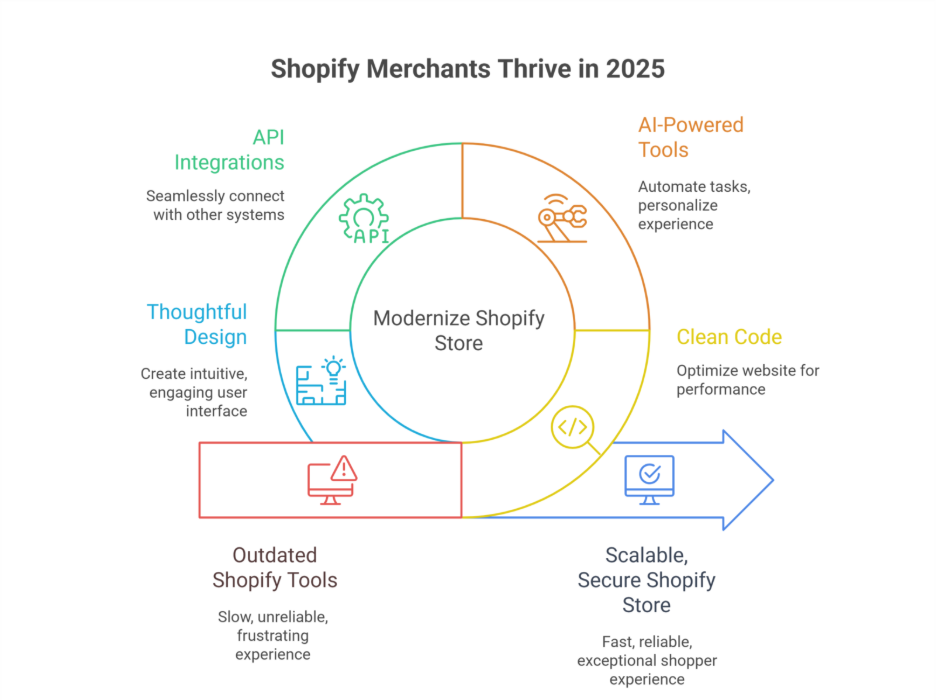
    In 2025, many Shopify merchants realized that continuing to rely on outdated tools and legacy systems was holding back growth, slowing conversion, and negatively impacting the shopper experience. For ecommerce brands aiming to scale efficiently, embracing modern integrations, APIs, and updated platform capabilities became essential.

    The Limitations of Outdated Tools

    Outdated Shopify apps and plugins often stop working properly with the new Shopify updates. Merchants using rest API connections or older GraphQL implementations found that their integrations caused slow checkouts, reporting errors in the admin dashboard, and unreliable automation processes. This not only reduced conversion but also created frustration for the shopper and the internal team managing the store.

    Impact on Shopify Brands and Store Performance

    Shopify merchants generated lower engagement when relying on tools that lacked proper support or weren’t optimized for 2025 ecommerce trends. Slow integrations, broken public apps, and outdated analytics meant brands couldn’t personalize the customer experience effectively or track critical metrics during peak sales events like Black Friday and Cyber Monday (BFCM sales).

    Moving Towards Modern Integrations

    Merchants began to migrate to solutions that leveraged updated APIs, GraphQL, and Shopify’s latest features. Using new Shopify apps from the Shopify App Store enabled better automation, improved checkout flows, and smoother admin management. Salesforce and email marketing integrations, combined with TikTok and LinkedIn tools, helped merchants stay ahead of the trend and boost conversion.

    Benefits of Updated APIs and GraphQL

    Modern APIs allow seamless integration between a Shopify store and external systems, whether for CRM, analytics, or marketing automation. Using Shopify rest and GraphQL APIs ensures that the store’s data syncs in real time, improving personalization, automation, and ultimately customer satisfaction. Shopify developers now recommend building with these technologies to future-proof stores for 2026.

    Why 2025 Was a Turning Point

    By stopping the use of legacy tools, Shopify merchants generated measurable improvements in ecommerce efficiency, conversion rates, and operational stability. The combination of updated APIs, integration of automation tools, and support from Shopify developers allowed stores to remain agile, handle BFCM sales efficiently, and offer a superior shopper experience.

    2025 trends merchants followed to succeed on LinkedIn

    In 2025, Shopify merchants leveraged LinkedIn strategically to grow their brand presence, connect with e-commerce professionals, and increase conversion. Key trends emerged that helped merchants optimize their workflow, customer data, and overall selling strategy.

    Prioritizing Professional Networking and Brand Selling

    • Focused on LinkedIn as a platform for B2B connections and thought leadership.
    • Shared success stories of brand selling and selling online to establish credibility.
    • Engaged with industry-wide discussions to stay ahead of market disruption.

    Leveraging Customer Data and Authentication

    • Used customer data insights to personalize messaging and target the right audience.
    • Implemented proper authentication and security measures to maintain trust.
    • Ensured that integrations with rest endpoints and APIs still work seamlessly.

    Optimizing Workflow and Store Performance

    • Streamlined internal workflow to respond faster to leads generated via LinkedIn.
    • Identified which tools to stop using to remove inefficiencies.
    • Focused on boosting average order value by highlighting relevant products to connections.

    Compliance and Strategic Insights

    • Monitored tax compliance and legal requirements for cross-border selling.
    • Analyzed LinkedIn analytics to understand what content resonated with e-commerce brands.
    • Shared insights to inspire many stores to adapt similar strategies.

    Conclusion

    In 2025, Shopify merchants achieved significant growth by reevaluating their tools, strategies, and workflows. By stopping the use of outdated plugins, embracing modern APIs and GraphQL integrations, and investing in professional development and thoughtful design, merchants improved website performance, boosted conversions, and future-proofed their stores for 2026.

    Leveraging LinkedIn strategically also proved essential—merchants optimized their workflow, used customer data effectively, ensured proper authentication, and shared insights that positioned their brands ahead of industry-wide trends. From streamlining admin processes to enhancing checkout experiences and increasing average order value, these deliberate changes highlighted the real value of proactive ecommerce management.

    Ultimately, success in 2025 wasn’t about adding more tools—it was about using the right tools wisely, stopping what no longer worked, and aligning technology, design, and strategy to deliver an exceptional shopper experience. By adopting these insights, you can ensure your Shopify store remains agile, scalable, and ready to thrive in 2026 and beyond. Ready to stop using outdated tools and see how your Shopify store can truly thrive why not ask Integriti Studio how?

    Frequently Asked Questions (What Shopify Merchants Stopped Doing In 2025 and Why it Worked)

    Is Shopify still relevant in 2025?

    Yes Shopify is still highly relevant in 2025: it powers millions of stores globally, continues innovating with AI, mobile‑first commerce, and robust security, and integrates deeply with social and omnichannel selling tools. Its ecosystem and scalability keep it central to modern e‑commerce

    Why do most Shopify stores fail?

    Most Shopify stores fail due to poor product-market fit, weak marketing, and lack of differentiation. Common issues include inadequate traffic, low conversion rates, poor user experience, and underestimating operational costs. Even with Shopify’s tools, success requires strategy, consistent promotion, and strong customer engagement.

    Why has Shopify dropped so much?

    Shopify dropped mainly due to slowing e-commerce growth after the pandemic boom, high earlier valuations, and investor concerns about profitability. Rising competition, higher operating costs, and cautious market sentiment toward tech stocks also contributed to volatility, even though Shopify’s long-term fundamentals remain strong.

    What is Shopify and how does it work in 2025?

    Shopify is a cloud-based e-commerce platform that lets businesses create, manage, and scale online stores. In 2025, it works with built-in AI tools, secure hosting, payment processing, and app integrations, enabling merchants to sell across websites, social media, and global marketplaces from one dashboard.

  • Setting up Shopify Markets: Sell internationally with ease 

    Summary

    Shopify Markets is a built-in feature that empowers Shopify merchants to sell globally and internationally by localizing their Shopify store for different regions. From currency conversions to language settings, international payments, international taxes, and tax compliance, it helps streamline international expansion—all from a single Shopify admin dashboard.

    Why Shopify Markets matters

    • Selling internationally or internationally isn’t just about accepting payments. With Shopify Markets, you can:
    • Create tailored and localized shopping experiences for every region
    • Offer local currencies, Shopify payments, and payment methods for international customers
    • Automatically handle duties, import taxes, and compliance
    • Launch country-specific domains, international domains, or subfolders for SEO, ensuring a seamless shopping experience for global customers

    How to get started with Shopify Markets

    1. Enable Shopify Markets
      Go to Settings → Markets in your Shopify admin and activate the feature. You’ll see your primary market (usually your home country) and can add new international markets manually.
    2. Add regions or countries
      Start by grouping different countries or regions (like “Europe” or “Asia-Pacific”) or selecting a new market where you plan to sell internationally. Shopify Markets allows merchants to target multiple markets in one store.
    3. Customize each market
      For every region or market, you can configure:

    Currency and pricing (including rounding rules) for local currencies

    Language preferences to localize your store and adapt content for every region

    Product availability

    Localized domains, international Shopify store URLs, or subfolders to create a single Shopify store that serves multiple markets

    1. Set up duties and taxes
      Enable tax-inclusive pricing, configure duties and import taxes to be calculated at checkout for international orders, and Shopify handles this via Global-e integration for Plus users, or via manual setups for standard plans.

    Final outcome

    With Shopify Markets, expanding your Shopify store to different markets and selling internationally is no longer a logistical nightmare. You can sell globally while offering localized shopping experiences, currency adaptation, and seamless checkout for international visitors—all without needing third-party apps or multiple storefronts.

    Ready to go global with Shopify?
    Let Integriti Studio help you configure Shopify Markets the right way—from pricing and compliance to international shipping, global commerce, and managing international customers.

    ????Start your international setup

  • Using interactions and animations in Webflow to enhance UX

    Summary

    Webflow’s built-in interactions and animations allow designers to bring Webflow websites and projects to life—without writing a single line of code. When used strategically, these tools create intuitive, delightful user experiences (UX) that guide users, improve UX design, reinforce brand identity, and boost user engagement. Webflow interactions allow designers to create complex animations, motion design, and interactive experiences that optimize user attention while reducing cognitive load.

    Types of interactions to consider

    Webflow offers multiple interaction triggers, including:

    • Scroll-based animations: Fade in content, parallax effects, scroll-triggered animations, progress indicators, or page load animations.
    • Hover states: Highlight buttons, reveal tooltips, animate cards, or simple hover effects on elements like CTAs.
    • Page load interactions: Create hero animations, intro sequences, or multi-step animations.
    • Click/hover toggles: Expand menus, switch content tabs, or trigger click interactions.

    These animations and interactions help reduce friction, direct user attention, and create a sense of polish, professionalism, and immersive design for engaging and interactive websites.

    Best practices for animation

    Keep it purposeful: Don’t animate for the sake of it. Every motion, animation, or custom animation should serve a function—whether it’s drawing focus, confirming an action, or guiding users through elements on the page.

    Optimize for performance: Use easing, duration, and delay settings carefully. Avoid animations that slow the site, create excessive cognitive load, or distract users. Tools like Webflow interactions and the interactions panel make it easier to optimize animations across devices.

    Stay on-brand: Animations should match the tone and personality of your visual identity. Subtle, smooth transitions often feel more refined and enhance your website’s UI design.

    Final outcome

    Thoughtfully crafted interactions in Webflow enhance user experience (UX) by making your site more dynamic, engaging, and interactive. From microinteractions to scroll-based animations and web animations, Webflow allows designers to create dynamic, visually appealing, and immersive interactive experiences. Using interactions and animations strategically creates a sense of polish and professionalism while improving UX.

    Need help bringing your Webflow project to life with stunning interactions and advanced animation techniques?
    Integriti Studio specializes in motion-driven design, webflow UX, and creating complex animations that elevate every click, scroll, and hover interaction.

    ????Lets build something interactive

  • Embedding third-party forms and CRMs into Webflow 

    Summary

    Webflow offers native form capabilities, but integrating third-party form tools, CRM platforms, or advanced form builders can unlock powerful form functionality such as lead scoring, marketing automation, multi-step forms, conditional logic, or custom pipelines. Whether you’re using HubSpot forms, Mailchimp, Salesforce, Typeform, JotForm, Formstack, or Airtable forms, embedding them into Webflow is a seamless process when done right. Embedding third-party forms directly into your Webflow site improves form experience, captures user data, and automates workflows.

    Identify the right embed method

    Most third-party platforms provide one of the following embed options:

    • HTML embed codes
    • Iframe snippets
    • JavaScript-based integrations or APIs

    In Webflow, these can be added using the built-in Embed component. Simply copy the code from your third-party tool or CRM and paste it inside Webflow’s embed block. Webflow allows you to create dynamic Webflow forms, connect your Webflow site to external platforms, and embed forms with webflow efficiently.

    Common use cases

    • CRM integrations (e.g., HubSpot, Zoho CRM): Embed lead capture forms that sync directly to your CRM, connect Webflow, and automate leads and customer data in real-time.
    • Survey tools (e.g., Typeform, Google Forms): Collect feedback or data in a visually engaging way with interactive forms and form fields.
    • Email marketing (e.g., Mailchimp, Klaviyo): Connect subscribers to automation sequences instantly and manage email notifications and form submissions.

    Styling & responsiveness tips

    • Use Webflow’s built-in styling tools, CSS, or custom code for the form wrapper to maintain brand consistency. Forms within Webflow can be customized for user experience, error messages, file uploads, drag-and-drop capabilities, and interactive notifications.
    • If the form appears inside an iframe, CSS customization may be limited—consider tools that allow embedded styling and form integration within your Webflow site.
    • Always test responsiveness across devices and screen sizes to ensure proper display and functionality.

    Final outcome

    Embedding third-party forms, CRMs, or advanced form tools into Webflow empowers your Webflow site to capture, manage, and automate leads without compromising on design. With just a few clicks, you can turn static contact forms into a conversion machine, create powerful form workflows, and improve the submission process.

    Need help integrating a CRM, marketing automation, or advanced form builder in Webflow?
    Integriti Studio can assist with seamless integration, embed third-party forms, and powerful lead workflows tailored to your business.

    ????Get in touch

  • Setting up multilingual websites in Webflow

    Summary

    Creating a multilingual website in Webflow allows you to serve diverse audiences, expand your global reach, and provide localized user experiences. Since Webflow doesn’t natively support multilingual sites, you’ll need to rely on third-party integrations or manual structuring techniques to deliver multilingual content in multiple languages. Webflow allows you to create a multilingual webflow website or a multi-language website in Webflow, giving flexibility for localization and multilingual SEO.

    Choose your translation method

    There are two primary approaches to adding multiple languages in Webflow:

    Third-party tools
    Services like Weglot, Polyflow, or Linguana integrate seamlessly with Webflow to handle translation, language switching, and automatic SEO optimization. These tools offer:

    • Language switchers out-of-the-box to create a multi-language website in Webflow
    • Auto or manual translation workflows for every language and translated languages
    • Hreflang and subdirectory support for multilingual SEO, enabling Google to easily index different language versions

    Manual duplication

    Duplicate pages, CMS collections, or templates for each language and create a custom language switcher. This gives you full control but requires more maintenance. You can add multiple languages manually and structure every page for a multi-language website, making your Webflow project fully localized.

    Implementation tips

    • Plan your structure: Decide whether you’ll use subdirectories (e.g., /fr/, /es/) or separate domains. Tools like Weglot handle this for you automatically and support multiple languages and locales.
    • Design for flexibility: Text expansion in some languages (like German or Arabic) may affect layout. Leave enough padding and use auto-sizing where possible. Webflow allows designers to customize your Webflow language elements across multiple pages for a smooth experience.
    • SEO considerations: Use hreflang tags, update meta titles/descriptions per language, and submit each language version to Google Search Console. Optimize multilingual content for search engines using multilingual SEO features provided by Weglot or Polyflow.
    • Test thoroughly: Ensure language switchers work across all pages and devices. Also, review translated content for cultural relevance and user experience.

    Final outcome

    Whether using a plugin like Weglot or Polyflow, or a manual setup, a well-executed multilingual site in Webflow boosts accessibility and ensures global users feel at home with your content. Webflow creators can quickly and easily build a multilingual webflow website or multi-language website, ensuring your site is optimized for multilingual SEO and website localization.

    Need help building or optimizing your multilingual site in Webflow?
    Integriti Studio can set up a smooth, scalable structure tailored for international audiences, ensuring your webflow site is ready to support multiple languages and language options.

    ????Lets go Global

  • How to add Lottie animations to Webflow websites 

    Summary

    Lottie animations are lightweight, JSON-based animations that scale beautifully and load quickly. Webflow offers native support for Lottie, making it easy to enhance user interactions with professional-grade motion graphics—without writing a single line of code. Webflow’s native Lottie integration allows developers and designers to add Lottie animations directly to a Webflow project for interactive animations and improved user experience.

    Why use Lottie in Webflow

    • Lightweight compared to GIFs or video
    • Fully scalable with no quality loss
    • Interactive and trigger-based playback for scroll animations and hover/click effects
    • Works seamlessly across modern browsers
    • JSON-based animations are vector-based, much lighter than traditional GIFs or video, without sacrificing performance

    Step-by-step integration process

    1. Export your Lottie file
      Use Adobe After Effects with the Bodymovin plugin to export your animation as a .json file. Using the Bodymovin plugin ensures your Lottie JSON file is compatible with Webflow. Alternatively, download free animations from lottiefiles.com or Lottie library. Lottiefiles offers thousands of free, custom Lottie animations ready for Webflow integration.
    2. Upload to Webflow
      In the Webflow Designer, go to the “Assets” panel and click Upload to add your .json Lottie file. Webflow allows you to manage assets and Lottie files like any other Webflow element.
    3. Add the Lottie element
      Drag a Lottie Animation element from the Webflow Elements panel onto your canvas. Link it to the uploaded Lottie JSON file from your assets. You can also embed JSON-based animations using the embed element if needed.
    4. Choose animation behavior
      In the Lottie settings panel, define how the animation plays:

    Scroll-based: Plays as the user scrolls
    Loop: Repeats continuously
    Hover/click trigger: Starts on interaction
    Set the Lottie playback to control which portion of the animation is triggered, enabling animations in real-time tied to Webflow interactions.

    1. Style and position
      Treat your Lottie animation like any other Webflow element. You can add padding, margins, position it with Flex or Grid, and set width/height for responsiveness. Lottie animations enhance UI, layout, and user scroll interactions, allowing complex animations without code-based animation.

    Final outcome

    With just a few clicks, Lottie animations in Webflow bring your site to life—adding delight, clarity, and motion without slowing down your pages. Webflow is the ability to create interactive animations that make your website stand out. Lottie animations are rendered efficiently, interactive, and vector-based, ensuring smooth performance across all devices.

    Want your Webflow site to move with meaning?
    Integriti Studio creates interactive, animation-driven experiences and Webflow websites that leave a lasting impression. Using Lottie animations in Webflow lets you integrate custom Lottie animations, create Lottie sections, and animate your Lottie JSON files with powerful features of using Lottie.

    ????Lets animate vision

  • Creating responsive layouts in Webflow using Flexbox and Grid 

    Summary

    Webflow gives you powerful layout tools—Flexbox and CSS Grid—that allow for pixel-perfect, responsive design without writing code. Learning when and how to use each helps ensure your site adapts beautifully across all screen sizes. Webflow provides responsive design features that make your Webflow website adaptive for desktop, tablet, and mobile devices.

    Why layout responsiveness matters

    • Ensures a seamless experience on desktop, tablet, and mobile device
    • Reduces bounce rates and improves usability and user experience
      Makes future edits faster with consistent structure
    • Offers full control over content alignment, spacing, and layout control

    Flexbox vs Grid: When and how to use

    1. Use Flexbox for directional alignment
      Flexbox is ideal when you need to arrange elements in a row or column. It’s great for:

    Horizontal nav menus and navigation
    Feature boxes
    CTA sections with text and button
    Use the “Align” and “Justify” settings to control placement, spacing, and alignment within container elements. Learn how to use Flexbox to enable flexbox for one-dimensional layouts.

    1. Use Grid for multi-directional layouts
      CSS Grid gives you control over both rows and columns. It’s best for:

    Gallery layouts
    Team member profiles
    Blog or product cards
    Grid lets you define repeatable areas, columns and rows, column gaps, and responsive behaviors using fractional units (fr). Grid adapts dynamically and supports two-dimensional layouts, ideal for creating complex layout sections.

    1. Stack and reflow for breakpoints
      Use Webflow’s visual breakpoints to preview and adjust layouts for each screen size. Flex and Grid settings can be independently tweaked at each level. Responsive layouts remain consistent across all devices. Media queries can be used if needed for further customization.
    2. Combine both for complex designs
      You can nest Flex inside Grid (and vice versa) to manage complex sections—for example, use Grid for layout and Flex for content inside each container element. This technique allows for flexible layouts and intricate layouts in modern web design.

    Final outcome

    Responsive layouts built with Flexbox and Grid give you clean, adaptive designs that look great on any device. Done right, they also reduce the need for duplicate elements or media queries. Creating responsive websites in Webflow with proper grid settings and flexbox offers essential tools for building responsive Webflow pages.

    Want expertly built layouts in Webflow?
    At Integriti Studio, we craft flexible, future-proof designs that scale with your content, brand, and web design skills. Focus on creating responsive Webflow sites without the need for additional coding.

    ???? Lets design smarter