A client’s WordPress homepage appeared to load slowly—even with strong performance scores and solid page speed metrics. Integriti Studio traced the issue to an Airlift plugin setting related to JavaScript deferral and executing JavaScript on user interaction. Here’s how the delay was identified and resolved to restore a smooth, immediate user experience and better Core Web Vitals.
Issue Background:
Although tools like BlogVault, PageSpeed Insights, and GTMetrix are commonly used for web performance testing, BlogVault showed excellent performance stats (94%+) for this WordPress site. However, users noticed a lag before any primary content appeared on the homepage during the initial page load. GTMetrix failed to complete its analysis, and the client became concerned about website speed, first impressions, conversion impact, and bounce rates despite effective caching.
Diagnosis:
Performance looked fine on paper — fast scores, minimal page size, reduced HTTP request count, optimized cache behavior, and no obvious render-blocking warnings.
Visual lag persisted — the homepage page content didn’t visibly load until a mouse movement or user interacts with the site, indicating page rendering and JavaScript execution delays.
Plugin culprit identified — Airlift’s “Execute JavaScript on user interaction” toggle, designed to defer non-essential JavaScript files, was the likely cause of the page load bottleneck affecting the main thread.
Dashboard mismatch — Even though the setting appeared turned off in the plugin dashboard, it was still affecting behavior, a common issue when multiple plugins or automation-based optimization tools are involved.
Resolution Steps:
Disable Airlift temporarily
Confirmed that turning off the WordPress plugin resolved the rendering delays, isolating the root cause without downtime or breaking your site.
Deep dive into plugin settings
Reviewed Airlift’s plugin settings, caching strategies, and JavaScript execution rules, and found the problematic toggle visually disabled—but still active behind the scenes.
Vendor support collaboration
Contacted BlogVault/Airlift support to report the UI discrepancy, exclusion behavior, and ensure the setting was fully deactivated across all URLs and cache layers.
Final validation
Once the bug was addressed, page content began loading immediately without requiring interaction, restoring proper page rendering, smoother experience, and better user experience across desktop and mobile cache.
Final Outcome:
The homepage now loads instantly, delivering a polished and responsive first impression with improved load times and site loads behavior. The issue—caused by a hidden plugin behavior tied to JavaScript deferral—highlighted the importance of troubleshooting beyond surface-level metrics, always testing real user experience, and validating performance with developer tools, not just scores.
Experiencing invisible delays or inconsistent load behavior on your WordPress site, even with cache plugins, CDN setups, or tools like WP Rocket, LiteSpeed Cache, or Cloudflare?
Integriti Studio can help uncover hidden blockers, optimize JavaScript code, CSS delivery, caching strategies, and ensure faster pages without breaking functionality—improving SEO, conversions, and overall website speed.
For WooCommerce stores handling high-volume, serialized products, or custom order workflows, searching orders by serial numbers, order number, or sequential order number in the WordPress dashboard can significantly improve order management. Integriti Studio implemented a custom WooCommerce solution to make manually entered serial numbers searchable in the backend—without changing how the WooCommerce store manages existing orders, order IDs, or default WooCommerce order numbers.
This approach works within WooCommerce admin order search and remains compatible with custom order numbers, metadata, and future WooCommerce plugin updates.
Issue Background:
A WooCommerce store owner needed to find existing orders using serial numbers added manually via custom order metadata. While these serial numbers existed in the WordPress database and were tied to WooCommerce orders, WooCommerce’s native order search did not return any results—even with exact number matches.
This limitation affected backend workflows, order references, and traceability for high order volumes where searching by order number alone was inefficient.
Diagnosis:
WooCommerce’s default admin order search only checks standard fields such as order ID, order number, customer name, and email within WooCommerce.
Serial numbers were stored as custom meta fields and metadata, which are not indexed or included in WooCommerce order search by default.
Even formatted or bracketed searches like [131003846], sequential formats, or specific number queries failed because the custom metadata was not registered within WooCommerce’s admin search process.
This behavior is consistent across WooCommerce sites, regardless of sequential order numbers plugins, prefixes, suffixes, or custom order number formats.
Resolution Steps:
Tested Search Behavior
The team tested multiple query formats, including serial numbers, order number length variations, and formatted values, confirming that the data existed in the WordPress database but was not searchable in the WooCommerce dashboard.
Mapped Relevant Meta Keys
All custom order metadata fields where serial numbers might be stored were identified. These meta keys were then mapped and registered so WooCommerce admin search could include them when searching orders using serial numbers, custom order numbers, or related identifiers.
This solution remains compatible with WooCommerce order search, HPOS, and does not interfere with plugins used for sequential order numbers, prefixes, or custom starting numbers.
Verified the Fix
After implementing the mapping, searching for serial number 131003846 within WooCommerce successfully returned the correct order. Store admins could now search orders using serial numbers, metadata, or custom references directly from the backend.
Recommended Admin Tools
While not required for the fix, the team noted that admin-focused plugins like Dashify or other WooCommerce plugins could further enhance order search UX, CSV exports, invoice handling, and dashboard usability in the future.
Final Outcome:
WooCommerce’s admin interface now supports searching orders by serial numbers stored in custom meta fields. This enhancement makes backend order management faster, more reliable, and scalable—especially for WooCommerce stores handling serialized products, custom order numbers, or large volumes of existing orders.
The solution works within WooCommerce, remains plugin-compatible, and improves operational efficiency without altering how orders are created, formatted, or displayed on the front end.
Custom post types in WordPress—such as “Team Members” or “Attorneys”—often rely on modular content blocks, cards, or widgets like Credentials, Education, Court Admissions, or other custom fields. When these sections are empty, they can clutter the front-end display and negatively impact visibility, UX, and SEO for a WordPress site.
To solve this, Integriti Studio implemented a lightweight, content-based solution using JavaScript and PHP to hide empty content cards automatically. This flexible implementation works without plugins, avoids manual editing in the post editor, and keeps WordPress templates clean and scalable across custom post types.
Issue Background:
A WordPress site built with custom post types was displaying empty content cards on individual profile pages. Even when no data existed in custom fields or ACF fields, cards like “Court Admissions” still appeared on the front end. This created blank sections, unnecessary layout clutter, and confusion for users browsing the WordPress content.
The challenge wasn’t just to hide one empty section—but to conditionally hide any empty card across templates without hardcoding logic for every custom post or CPT layout.
The Goal:
Automatically detect and hide empty content areas in WordPress custom post types—without using a plugin, shortcode, checkbox, or manual condition for each card—while keeping the solution reusable, lightweight, and SEO-friendly.
Diagnosis:
The site used modular HTML .card elements to display custom content blocks
Each card rendered by default, regardless of whether custom fields contained data
Manually editing every WordPress template or array condition was not scalable
A dynamic, front-end solution was needed to manage visibility and hide empty content
This approach also needed to work with different categories, taxonomies, and future content-based layouts.
Resolution Steps:
1. Scoped the solution to the Custom Post Type
Using PHP, the JavaScript file was enqueued only on relevant custom post type templates (such as Attorneys or Team Members). This avoided unnecessary script loading on unrelated WordPress posts, widgets, sidebars, or search results and kept performance optimized.
2. Wrote lightweight JavaScript
On page load, the script checks each .card element and evaluates its text content. If the content is empty or contains only whitespace, the card is hidden from display.
js
CopyEdit
document.addEventListener(‘DOMContentLoaded’, function () { const cards = document.querySelectorAll(‘.card’); cards.forEach(card => { if (!card.textContent.trim()) { card.style.display = ‘none’; } }); });
This JavaScript-based solution works seamlessly with WordPress themes, REST API-driven content, Elementor layouts, and custom HTML structures—without affecting the editor experience.
3. Scalable and flexible implementation
The logic can be easily extended to hide specific content blocks, manage conditional visibility, or support additional selectors. It also integrates well with ACF, custom fields, accordions, widgets, and future WordPress functionality.
Final Outcome:
Empty content cards—such as unused Court Admissions, credentials, or education sections—were automatically removed from the front-end display. The result was a cleaner, more professional layout with improved usability, reduced clutter, and better content control across custom post types.
This reusable solution now applies to multiple WordPress templates, categories, and CPT-driven pages without relying on third-party plugins or manual editing.
Shopify in 2025 the updates that quietly changed ecommerce
Why do some ecommerce brands grow steadily while others struggle, even on the same platform? The difference is rarely the tool itself—it’s how you use it. In 2025, Shopify introduced a series of quiet but meaningful changes that reshaped how modern ecommerce businesses operate, scale, and compete. These updates didn’t arrive with noise, yet their impact on performance, flexibility, and long-term growth has been significant.
Shopify in 2025 introduced subtle yet powerful updates that improved ecommerce performance, flexibility, and scalability. These changes focused on smarter workflows, better platform stability, and future-ready features, helping businesses build sustainable growth without complexity while adapting to modern commerce demands.
Website success today is influenced by far more than themes or apps. Factors like clean development, fast-loading experiences, reliable integrations, and thoughtful architecture directly affect how users engage and convert. Professional development ensures your Shopify setup is not only functional but built to evolve, especially as ecommerce demands become more complex in 2025. Good design, ongoing support, and consistent maintenance often deliver more value than flashy features—especially when even a basic monthly investment compared to enterprise-level builds can shape results.
This blog explores howShopify evolved in 2025, the role of ai in shaping smarter ecommerce decisions, and why these updates matter for sustainable digital commerce. You’ll learn what changed, why it matters, and how the right approach helps future-proof your business in 2025 and beyond.
Shopify in 2025: Quiet Updates Reshaping Modern Ecommerce
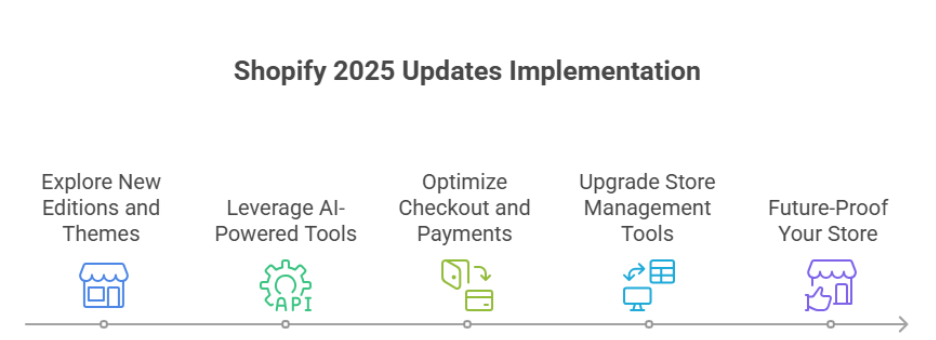
In 2025, Shopify quietly rolled out updates that improve efficiency, automation, and user experience. These changes help merchants scale and optimize their stores without complicated processes. Here’s a step-by-step breakdown.
Step 1: Explore Shopify’s New Editions and Themes
What’s new: Shopify editions and new themes provide modern, flexible storefronts.
Why it matters: Faster, visually appealing stores improve customer experience and reduce bounce rates.
Pro tip: Choose themes that balance design with speed for higher conversions.
Step 2: Leverage AI-Powered Tools
Shopify’s AI and the AI store builder help automate tasks like content creation, personalized recommendations, and product descriptions.
Impact: Saves time, reduces errors, and allows merchants to use Shopify more efficiently.
Pro tip: Test AI-generated suggestions but keep human oversight for brand voice.
Step 3: Optimize Checkout and Payments
Shopify Payments and updated checkout flows streamline the process and reduce abandoned carts.
Shop Pay improvements make transactions faster and smoother.
Pro tip: Monitor average order value and conversion metrics after implementing checkout updates.
Step 4: Upgrade Store Management Tools
POS upgrades and admin dashboard improvements simplify daily operations.
Refund processes are faster, and analytics are easier to track.
Certified Shopify Plus merchants can access scalable B2B commerce workflows.
Step 5: Future-Proof Your Store for 2026
Shopify evolves continuously with AI-driven automation, better storefront builders, and industry-aligned tools.
Merchants who use Shopify efficiently now will be ready for higher conversions and growth in the next year.
Are Shopify 2025 updates quietly holding back growth?
Even as Shopify continues to evolve in 2025, some updates may unintentionally limit growth for merchants who aren’t leveraging them effectively. Understanding these subtle limitations is key for ecommerce brands seeking to scale without unnecessary friction.
Checkout Flows – Efficiency vs. Complexity
Checkout upgrades introduced in Shopify have streamlined the purchasing process, but merchants must evaluate whether their current setup maximizes efficiency. Complex apps or workarounds can slow down checkout, increasing friction for customers. Implementing smart checkout flows ensures fewer abandoned carts while maintaining fast, secure transactions.
Onboarding and Store Setup – Time Matters
For new merchants or ecommerce companies expanding into new markets, Shopify’s onboarding and setup process is fast but sometimes requires workarounds to achieve full functionality. Missing these nuances may prevent merchants from leveraging the latest features like headless commerce or advanced personalization.
Performance and Core Web Vitals
Even with core web vitals improvements in Shopify, stores may underperform if themes or integrations aren’t optimized. Slow loading times or poorly coded apps can limit conversion potential without compromising the user experience.
Long-Term Growth Avoiding Hidden Barriers
While Shopify introduced helpful features in 2025, growth can still be unintentionally restricted if updates aren’t fully leveraged. Strategic planning, automation, and thoughtful use of personalization help merchants launch a store, improve UX, and scale without losing momentum.
Conclusion
The updates Shopify introduced in 2025 quietly reshaped ecommerce, offering tools and features that improve efficiency, automation, and scalability. However, these changes alone do not guarantee growth how you use Shopify, optimize checkout flows, leverage AI-powered tools, and maintain strong core web vitals directly impacts results.
Merchants who actively explore new Shopify editions and themes, streamline onboarding, and implement thoughtful workflows can reduce friction, improve customer experience, and achieve higher conversions. At the same time, overlooking these subtle updates or relying on workarounds may unintentionally hold growth back, even on a leading ecommerce platform.
Ultimately, success in Shopify 2025 depends on a strategic, proactive approach: combining smart use of technology, personalization, and professional development to launch a store, optimize performance, and scale without stress. By understanding and applying these quiet updates effectively, your business can stay competitive, future-proof operations, and position itself for long-term growth in 2026 and beyond.
Want expert guidance on leveraging Shopify 2025 updates for your business? Contact Integriti Studio today to get started.
Frequently Asked Questions (Shopify in 2025 the updates that quietly changed ecommerce)
Is Shopify still relevant in 2025?
Yes, Shopify remains highly relevant in 2025. Continuous updates, AI-powered tools, and enhanced e-commerce features help businesses streamline operations, optimize user experience, and scale efficiently. Brands that leverage Shopify’s integrations, analytics, and customizable workflows maintain a competitive edge in an evolving digital marketplace.
What is Shopify and how does it work in 2025?
Shopify in 2025 is a comprehensive e-commerce platform that enables businesses to create, manage, and scale online stores. It works by combining AI-driven tools, customizable themes, secure payment gateways, and seamless integrations, allowing merchants to optimize workflows, manage products, and enhance user experience efficiently.
What is the outlook for Shopify in 2025?
The outlook for Shopify in 2025 is strong, driven by AI-powered tools, enhanced integrations, and improved scalability for merchants. Businesses using Shopify can expect streamlined operations, better analytics, and more efficient workflows, positioning the platform as a leading solution for both new and established e-commerce ventures.
Why are businesses moving from Drupal to Shopify in 2025?
In 2025, businesses are moving from Drupal to Shopify for faster setup, user-friendly management, and superior e-commerce capabilities. Shopify’s AI tools, seamless integrations, and scalable workflows make online store management easier, while Drupal’s complexity and maintenance demands push site owners toward a more efficient, growth-focused platform.
Humans are wired for stories and narrative. Unlike plain information or features, stories evoke emotions, create emotional connection, leave a lasting impression, and resonate on a personal level. The power of storytelling lies in its ability to build trust and connect with your target audience. In marketing, storytelling in marketing bridges the gap between what you sell and why it matters—helping audiences relate, foster brand loyalty, and buy into your brand narrative and brand identity.
Key Elements of a Good Marketing Story
A compelling marketing story and effective storytelling approach typically includes:
A relatable character (often your customer or user-generated content)
A conflict or pain points that they face Your products or services as the solution
A transformation or outcome that paints a better future
The best compelling stories don’t focus on the brand—they focus on the customer’s journey and how the brand supports it through a narrative that resonates.
Types of Stories You Can Use
Different storytelling strategy formats can be used across marketing channels and digital marketing:
Customer success stories and testimonials
Behind-the-scenes narratives about your team or process
Origin stories that show how your brand started
Problem-solution frameworks in landing pages or emails
Use-case stories that walk readers through real-life scenarios
Making Your Story Stick
To master the art of storytelling and create meaningful connections:
Use conversational, human language
Anchor stories in real problems and outcomes
Include visual storytelling or interactive content where possible
End with a clear takeaway or CTA
At Integriti Studio, we believe the importance of storytelling in marketing remains central to all marketing efforts. Whether we’re writing a landing page, an email sequence, or a case study, our focus is on crafting a brand’s story that builds trust and loyalty, connects on a deeper level, and leaves a lasting impact—one story at a time.
A WooCommerce store on WordPress experienced a critical backend crash due to a failed database migration in the Shipping & Tax plugin, along with outdated Stripe checkout settings that affected the checkout page and payment gateway flow. Automated tax calculation was also limited to Virginia, impacting the overall checkout process. Integriti Studio diagnosed and resolved these WooCommerce checkout issues, restoring a stable, compliant WooCommerce store and improving the checkout experience.
Issue Overview
The WooCommerce site faced three major checkout problems affecting order processing and failed payments:
A stuck database migration from the WooCommerce Shipping & Tax plugin triggered a critical error message in the system status, blocking admin access.
Stripe was still using the legacy Stripe checkout experience instead of the modern WooCommerce Stripe checkout flow.
Automated sales tax and tax rate calculation only worked for Virginia due to misconfigured tax settings and services connection.
What We Found
???? Migration failure
The WooCommerce Shipping plugin’s database migration was stuck, causing plugin conflicts and preventing access to order details and failed orders in WooCommerce admin.
???? Outdated checkout
Stripe checkout settings were tied to an older payment method version, affecting the checkout flow and overall WooCommerce payment performance.
???? Limited tax coverage
Automated tax calculation via WooCommerce Services and Jetpack was misconfigured, so taxes weren’t dynamically calculated beyond VA.
What We Fixed
✅ Restored access with patch
We temporarily bypassed the error using WooCommerce troubleshooting tools to access the dashboard. A plugin update later resolved the migration issue without downtime.
✅ Upgraded Stripe checkout
Enabled the modern Stripe checkout interface within WooCommerce settings and tested the checkout process in sandbox mode to ensure smooth checkout and order confirmation.
✅ Expanded tax calculation
Verified Jetpack and WooCommerce Services were active, enabled automated taxes, configured tax settings, and activated geolocation for accurate tax calculation across multiple states.
Result
The WooCommerce storefront now runs smoothly with:
A resolved database migration and healthy WooCommerce system status
Modernized Stripe checkout and optimized checkout page
Correct automated tax handling and tax calculation for nationwide sales
Struggling with WooCommerce plugin errors, checkout problems, or payment gateway issues? Let Integriti Studio help you fix WooCommerce checkout errors, troubleshoot plugin conflicts, modernize Stripe checkout, and optimize your tax setup. Let’s stabilize your WooCommerce checkout flow and improve your store’s performance.
Webflow in 2025 What Changed for Designers and Teams
Why do some websites built in 2025 outperform others, even when using the same tools like WordPress or Webflow? The difference often lies in how teams leverage modern platforms to optimize performance, ensure SEO readiness, and deliver a seamless user experience. For designers and teams, Webflow in 2025 is no longer just a visual builder it’s a full-fledged environment that combines no-code flexibility with production-ready capabilities. Real-time collaboration, built-in animations, clean code, and a responsive layout framework allow you to maintain creative control while scaling efficiently.
In 2025, Webflow transformed for designers and teams by combining no-code flexibility with production-ready features. Real-time collaboration, built-in animations, responsive layouts, and clean code streamline workflows, while AI assistants, Figma integration, and scalable Webflow CMS enable faster, SEO-optimized websites with full creative control.
Professional development and thoughtful maintenance have become crucial. A well-planned Webflow CMS structure or optimized landing pages can mean the difference between a slow, clunky site and a high-converting digital asset. Even basic support packages now often start around a few hundred dollars monthly, reflecting the true value of design, optimization, and ongoing updates.
This blog will explore what changed in Webflow for designers and teams in 2025, including workflow improvements, AI assistant integration, advanced SEO strategies, Figma-to-Webflow design translation, and tips to maximize creative control while keeping your projects production-ready.
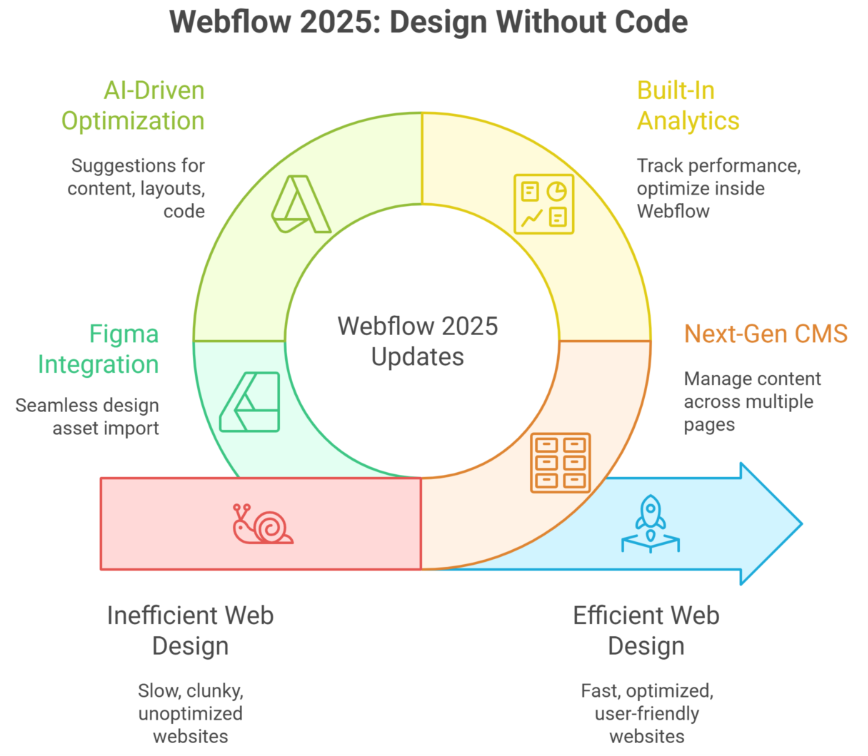
Next-Gen CMS and Built-In Analytics Optimize Webflow
Webflow’s 2025 updates have redefined how designers and developers manage dynamic content and analyze performance. By combining a next-gen CMS with built-in analytics, teams can now build, optimize, and personalize websites without coding, while maintaining full design freedom and efficiency.
Streamlined CMS for Scalable Webflow Sites
Webflow’s CMS now allows marketing teams and developers to manage multiple CMS items effortlessly. From blogs to product pages, each CMS content block can be structured with a consistent design system, ensuring responsive websites that maintain visual consistency. Integrations like Figma to Webflow translation make importing design assets seamless, enabling designers to move from prototype to live site without losing fidelity.
Managing Multiple CMS Items Efficiently
Managing multiple CMS items is simplified with Webflow Canvas, where designers can see real-time previews of each item in context. This approach reduces errors, improves content workflows, and ensures every piece of content aligns with the site’s overall layout and brand standards.
Built-In Analytics for Data-Driven Decisions
With Webflow Analyze, teams can track core metrics like Core Web Vitals, user behavior, and SEO performance directly within the site builder. This enables marketing teams to make informed decisions, personalize content, and continuously optimize Webflow sites for higher conversions. Unlike relying on external analytics tools, built-in reporting saves time and ensures data accuracy.
Leveraging AI Tools for Performance
Webflow’s AI tools can now suggest optimizations for CMS content, responsive layouts, and even custom code snippets. These enhancements help teams reduce manual work while maintaining design freedom and keeping sites production-ready.
What’s New in Webflow 2025
The Webflow Conf 2025 highlighted several new features, including:
Advanced features for personalization and user segmentation
Enhanced design freedom for designers and developers
Seamless integration of webflow university tutorials for rapid learning
New tools for optimizing multi-page responsive websites
Pros and Cons of Webflow CMS
Pros:
Complete design freedom
Scalable CMS with personalization options
Real-time analytics through Webflow Analyze
Efficient Figma to Webflow workflows
Cons of Webflow:
Some advanced features may require familiarity with custom code
Managing multiple webflow accounts can be complex for larger teams
Slight learning curve for non-technical marketing teams
Webflow in 2025: Key Features for Designers’ Success
Next-Gen CMS enables seamless management of content and design across multiple pages.
Built-in CMS supports dynamic content like blogs, portfolios, and e-commerce items.
Built-in analytics allows designers to track performance and optimize websites inside Webflow without third-party tools.
Reduced back-and-forth between designers and developers for faster project delivery.
Websites without writing code can be created using the visual website builder and visual web development platform.
CSS Grid and enhanced layout options enable precise, responsive, and scalable designs.
Custom Webflow components allow tailored solutions for enterprise and client-specific projects.
Additional features like animations, interactive elements, and AI-driven suggestions improve engagement and workflow efficiency.
Efficient handling of multiple projects simultaneously for agency and enterprise teams.
Content and design remain fully integrated, ensuring design consistency across next-gen CMS structures.
2025 updates bring enhanced key features for creative freedom, scalability, and production-ready websites.
Conclusion
Webflow in 2025 has evolved from a simple visual website builder into a robust visual web development platform that empowers designers and teams to create responsive websites efficiently. With next-gen CMS, built-in analytics, AI-driven optimization, and seamless Figma to Webflow workflows, teams can manage multiple projects, maintain creative control, and ensure high-performing, SEO-optimized websites without writing code. Features like CSS Grid, interactive components, and real-time previews streamline collaboration, reduce the back-and-forth between designers and developers, and enable scalable, production-ready solutions. Whether for enterprise teams or marketing-driven projects, Webflow’s 2025 updates provide the tools needed to deliver exceptional web experiences.
Now, here’s a practical question for users to explore:
How would you structure a multi-page Webflow site using next-gen CMS and built-in analytics to optimize both user experience and SEO performance across multiple projects?
Frequently Asked Questions (Webflow in 2025 What Changed for Designers and Teams )
Should I learn Webflow in 2025?
Yes, learning Webflow in 2025 is a smart move for designers and agencies. It enables faster development, clean production-ready code, strong SEO control, and real-time collaboration. Webflow is especially valuable for building high-performance marketing websites without heavy reliance on developers.
What is the web design trend in 2025?
In 2025, web design trends include immersive 3D and AR elements, micro-interactions and motion UI, AI-assisted design and personalization, minimalist yet dynamic layouts, dark mode options, voice-activated interfaces, and accessibility-first, performance-focused sites that load fast and engage users deeply.
What is the future of Webflow?
The future of Webflow in 2025 is strong, as it evolves into a full no-code production platform. With AI-assisted design, enhanced CMS capabilities, faster performance, real-time collaboration, and seamless integration with marketing and eCommerce tools, Webflow empowers designers and teams to build scalable, high-quality websites efficiently.
Is web design still in demand in 2025?
Yes, web design is still in high demand in 2025. Businesses, eCommerce, and digital platforms need engaging, fast, and accessible websites. Demand is driven by AI-enhanced experiences, mobile-first design, SEO optimization, and interactive interfaces, making skilled web designers essential for modern digital growth.
Why do some WordPress sites thrive while others struggle to deliver results? Performance is not accidental; it depends on factors like server reliability, plugin efficiency, theme choices, and overall workflow. For businesses navigating WordPress in 2025, understanding these elements is essential to avoid unnecessary loss and ensure a platform that supports growth.
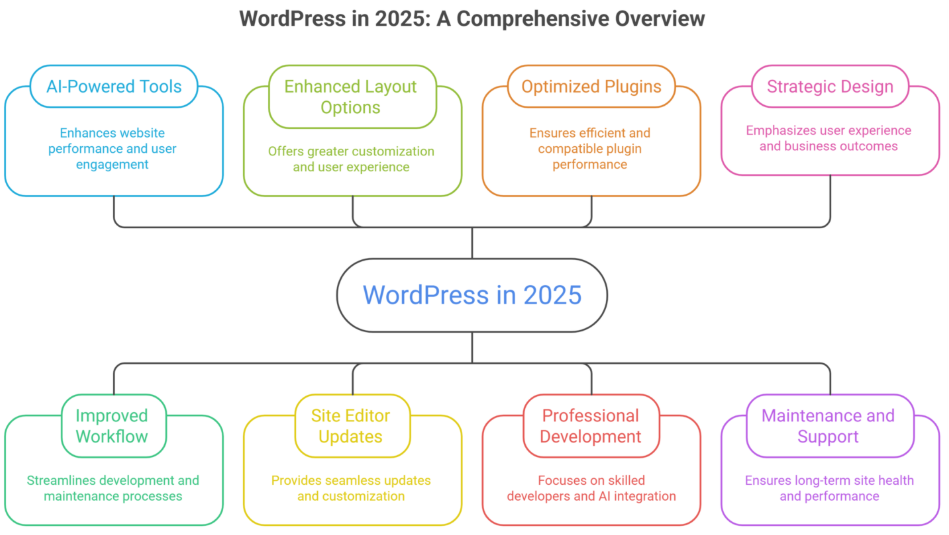
WordPress in 2025 introduced AI-powered tools, improved workflow, and enhanced layout options, helping websites perform better and engage users. Wins include seamless site editor updates and optimized plugins, while misses involve occasional compatibility issues. Key lessons highlight professional development, maintenance, and strategic design for long-term success.
Professional development remains a key differentiator. Investing in skilled developers allows you to leverage AI-powered features, optimize coding standards like PHP, and maintain seamless updates using tools like Gutenberg and the site editor. A well-trained team ensures that design, layout, and user experience are not compromised, turning technical wins into measurable business outcomes.
Good design, thoughtful support, and consistent maintenance translate into real value, higher engagement, faster load times, better caching, and streamlined workflow. Even small projects can range from a few hundred to several thousand dollars, depending on customizations, plugins, and built-in features, reflecting the actual costs behind a high-performing WordPress site.
Key Changes in WordPress 2025 Every Developer Should Know
WordPress in 2025 continues to evolve, introducing features and workflows that developers need to understand to stay ahead. Here’s a structured overview:
WordPress 6.9 and Core Updates
WordPress 6.9 launched with enhanced global styles, better CSS customization, and smoother full site editing.
WordPress core improvements improve page load speed, reduce plugin conflicts, and make sites easier to manage.
Size presets in WordPress 6.9 and radius presets allow faster design adjustments for developers and designers.
Full Site Editing and Block Themes
Full site editing expands customization, letting developers control headers, footers, and layouts via the site editor.
Block themes and block patterns streamline web development, offering pre-built design sections that simplify workflow.
Accordion block and other new blocks enhance WordPress web development capabilities for dynamic content.
Headless WordPress and API Integrations
Headless WordPress enables developers to build decoupled websites, integrating with modern frameworks for faster performance.
New APIs allow seamless integration with AI tools, third-party apps, and website builder extensions.
Improves flexibility for WordPress hosting and multi-platform deployment.
Developer Tools and Workflow Enhancements
WordPress developer blogs now share updates on best practices, new WordPress 6.9 features, and the future of WordPress trends.
Playground environments and testing tools allow developers to experiment safely without affecting live sites.
Streamlined WordPress development reduces friction, making updates and design iterations faster.
What’s Next for WordPress in 2025 and Beyond
Continued evolution towards headless architectures and AI-powered web development.
Enhanced block themes, global styles, and improved page load performance.
Developers should prepare for WordPress 7.0, focusing on flexibility, scalability, and modern workflows.
WordPress 2025: Year in Review and Recommendations
WordPress in 2025 introduced key updates, AI-driven tools, and workflow improvements that impacted development, design, and maintenance. Understanding these changes helps you optimize your website strategy and make informed decisions for the future.
Key WordPress Development Wins
WordPress Development saw improved workflows with AI tools and collaborative editing. Integration with Shopify and Webflow enhanced cross-platform compatibility, while custom CSS and updated APIs made it easier for developers to create personalized, high-performing websites.
Design Improvements and User Experience
WordPress Design gained new blocks and border radius size presets, improving layout flexibility. Real-time previews and collaborative editing enhanced the user experience, while optimized core web vitals ensured faster loading and smoother navigation.
Maintenance and Performance Enhancements
WordPress Maintenance became more proactive with automated updates and better plugin compatibility. Built-in caching and AI-powered monitoring help maintain site health and performance, making long-term upkeep simpler and more efficient.
Cross-Platform and Strategic Recommendations
Integration with Shopify and Webflow platforms expands e-commerce and multi-site management. Investing in training, AI tools, and optimized workflows allows businesses to leverage the WordPress ecosystem effectively and prepare for future releases.
Conclusion
WordPress in 2025 has proven that success depends on understanding both its opportunities and challenges. AI-powered tools, improved workflows, full site editing, and enhanced layouts are clear wins, while plugin conflicts and compatibility issues highlight areas requiring careful attention. Key lessons emphasize professional development, strategic design, and proactive maintenance to ensure your website remains high-performing, user-friendly, and future-ready.
By leveraging WordPress Development, WordPress Design, and WordPress Maintenance, along with integrations across Shopify and Webflow, businesses can build scalable, cross-platform websites that drive engagement and improve overall performance. Adopting these best practices and preparing for future updates ensures your website continues to evolve with the platform, delivering measurable results over time.
Ready to transform your WordPress site and maximize its potential? Contact Integriti Studio today to discuss how our expert team can enhance your website, streamline workflows, and help you achieve long-term success. What’s the first improvement you’d like to see on your site?
FAQs
What is the scope of WordPress in 2025?
The scope of WordPress in 2025 is strong and expanding. It powers a large share of websites, supports AI integrations, e-commerce, and custom development, and remains in demand for businesses, freelancers, and agencies due to its flexibility, scalability, and cost-effectiveness across industries.
What is the future of WordPress?
The future of WordPress is promising, with continued focus on AI-powered tools, performance optimization, and full-site editing. It will remain a leading platform for content, e-commerce, and custom websites, supported by a massive global community, open-source innovation, and ongoing adaptability to modern web standards.
How much does WordPress pay for 1000 views?
WordPress does not pay for 1,000 views directly. Income depends on how you monetize your site, such as ads, affiliates, or sponsorships. With ad networks like Google AdSense, 1,000 views usually earn around $1–$5, varying by niche, traffic quality, and visitor location.
How to build a WordPress website in 2025?
To build a WordPress website in 2025, choose reliable hosting, install WordPress, and select a lightweight theme. Use block or AI-powered editors for design, install essential plugins for SEO, security, and performance, then create optimized content and test responsiveness before launching.
Why do some WordPress sites thrive while others struggle to deliver results? Website performance isn’t accidental it’s shaped by multiple factors, from server host reliability and theme choices to plugin efficiency and workflow optimization. For businesses navigating WordPress in 2025, understanding these elements is critical to avoid unnecessary loss and ensure a platform that supports growth.
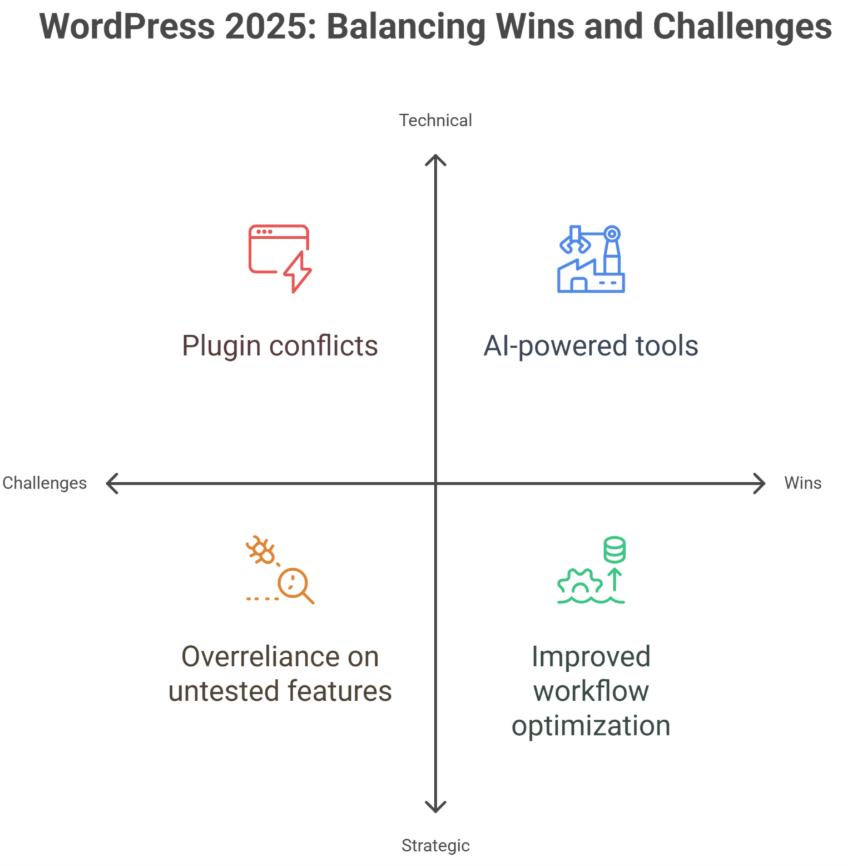
WordPress 2025 shows significant wins with AI-powered tools, improved workflow, and enhanced UI, helping websites perform better and engage users. Misses include plugin conflicts, theme limitations, and occasional update issues. Key hard lessons emphasize professional development, proper maintenance, and strategic design to ensure long-term site success.
Professional development plays a pivotal role. Investing in skilled developers and designers allows you to leverage the latest AI-generated tools, optimize coding standards, and maintain seamless updates without breaking your site. Good design, thoughtful support, and consistent maintenance translate into tangible business value higher engagement, better SEO ranking, and improved conversion rates. Even small projects can see pricing ranging from a few hundred to several thousand dollars depending on customization and premium plugin usage, reflecting the real costs behind quality WordPress sites.
This blog will provide a detailed WordPress 2025 review, highlighting wins, misses, and hard lessons learned. You’ll explore technical insights, workflow improvements, AI tools, and platform updates, along with actionable guidance to help you make informed decisions that evolve your website strategy and maximize long-term success.
Challenges and Hard Lessons for Smart WordPress Decisions
Navigating WordPress in 2025 requires understanding both its strengths and challenges. While WordPress continues to dominate the CMS market and remains a preferred website builder, businesses face hurdles that can impact performance, user experience, and growth.
Plugin and Theme Bloat
Excessive plugins or heavy themes create bloat, slowing down websites and increasing friction during updates.
Gutenberg blocks and block editor offer flexibility, but poor implementation can hurt UI and site performance.
Workflow and Maintenance
Regular backup routines and security updates are essential to prevent data loss or costly rebuilds.
AI tools and AI-generated websites can improve workflow, but oversight from a skilled designer or developer is critical.
Adapting to Trends
WordPress in 2025 must align with social media apps, mobile apps, and AI-driven solutions to stay competitive.
Overreliance on untested features can create friction and interface issues despite potential engagement gains.
Strategic Lessons
Balancing flexibility with performance ensures smoother WooCommerce setups and better cache efficiency.
Observing market share and CMS trends helps predict which features will remain relevant and reduce rebuild needs.
Advantages and Smart Wins in WordPress 2025
WordPress in 2025 continues to dominate as a flexible and powerful platform. Its enhancements in workflow, AI tools, and maintenance practices offer tangible benefits for businesses and developers. Here’s a step-by-step breakdown of the advantages and smart wins:
Step 1: Enhance Functionality and Usability
Leverage WordPress Development to build dynamic, responsive websites that adapt to user needs. Improved WordPressDesign and AI-powered tools simplify layouts and enhance usability, reducing friction for both teams and visitors. Integrations with e-commerce platforms, Shopify Development, and Webflow Development further extend functionality.
Step 2: Optimize Maintenance and Ownership
Regular WordPress Maintenance ensures smooth plugin and theme updates, minimizing downtime and technical issues. Businesses gain better ownership of their websites, allowing customization without dependency on external providers. Complementary Webflow Maintenance and Shopify Support make cross-platform management seamless and efficient.
Step 3: Invest in Scalability and Long-Term Value
Investing in modern WordPress Development prepares websites for growth, supporting both startups and enterprise-scale operations. Enhanced graphic design, layout options, and AI tools improve engagement and make the site more adaptable. Smarter workflows and integrated suites reduce cumbersome processes and maximize ROI.
Step 4: Achieve Cross-Platform Efficiency
Integration with Shopify Design and Webflow Design expands capabilities and ensures consistent layout and usability across platforms. Reducing friction between platforms streamlines development, saves time, and allows you to focus on strategy, marketing, and user experience.
Conclusion
WordPress 2025 demonstrates that success is not accidental—it comes from understanding the platform’s strengths, addressing its challenges, and making strategic, informed decisions. While AI-powered tools, improved workflows, and enhanced UI represent major wins, businesses must remain mindful of plugin conflicts, theme limitations, and maintenance demands.
Professional development, thoughtful design, and consistent upkeep remain critical for long-term success. By leveraging WordPress Development, Design, and Maintenance effectively—and integrating complementary platforms like Shopify and Webflow—businesses can achieve scalability, better usability, and reduced friction across workflows.
Want to transform your website with smart WordPress solutions and AI-powered design? Contact Integriti studio today to discuss how we can help your business thrive, streamline workflows, and maximize long-term results. What’s the first improvement you’d like to see on your site?
Yes, WordPress remains in demand in 2025. Its flexibility, extensive plugin ecosystem, and AI-powered tools make it ideal for businesses, bloggers, and e-commerce sites. While newer platforms exist, WordPress continues to thrive due to ease of use, scalability, and a large developer community supporting constant innovation.
Is WordPress difficult to learn?
WordPress is generally easy to learn, especially for beginners. Its intuitive dashboard, drag-and-drop editors, and extensive tutorials simplify website creation. Advanced customization or development may require coding knowledge, but most users can build and manage functional sites quickly without deep technical skills.
How much does WordPress pay for 1000 views?
WordPress itself doesn’t pay for views. Earnings depend on monetization methods like ads, affiliate links, or sponsored content. For example, using Google AdSense, 1,000 views (CPM) typically earn $1–$5, but rates vary by niche, audience location, and engagement. WordPress only provides the platform.
Can I learn WordPress in 3 days?
You can learn WordPress basics in 3 days, including site setup, themes, and plugins. However, mastering advanced features like custom coding, SEO optimization, or e-commerce integration requires more time. Three days is enough to start building functional sites, but expertise develops with practice and experience.
How To Use Responsive Web Design for Your Ecommerce Store in 2025: A Future-Proof Guide
Picture this-A customer browses your Shopify store on their mobile device while waiting for their coffee. Your product images load instantly, buttons are thumb-friendly, and checkout takes fewer taps than ordering a latte. By the time their name is called, they’ve bought two items and tagged your brand on Instagram.
This isn’t just convenience it’s 2025’s make-or-break standard for ecommerce website, user experience, and website performance. With mobile shoppers projected to drive 75% of global web traffic by next year (Statista), responsive web design, responsive website, and responsive site are no longer optional. For Integriti’s clients, it’s the secret weapon turning casual browsers into loyal buyers. Let’s unpack how to future-proof any site, whether it’s a Shopify store, WordPress, or online store, today.
Discover more
Why 2025 Demands a Mobile-First Overhaul (Hint: It’s Not Just Phones)
Google’s 2024 “Mobile-First Evolution” update made one thing clear: Sites not optimized for all screen size, different screen sizes, screen size and resolution, and smaller screens will vanish from search results. But “responsive” in 2025 means more than fitting different devices—it’s about anticipating how, where, and why people shop:
73% of shoppers abandon sites that feel “clunky” on their device (Baymard Institute)
AI-driven layouts, layout, and design ensures now adjust to ambient light, user grip patterns, and fluid grid requirements
Voice commerce is exploding, with 45% of Gen Z using smart speakers to shop (Adobe)
5 Game-Changing Responsive Web Design Best Practices, principles of responsive web design, and responsive techniques for 2025
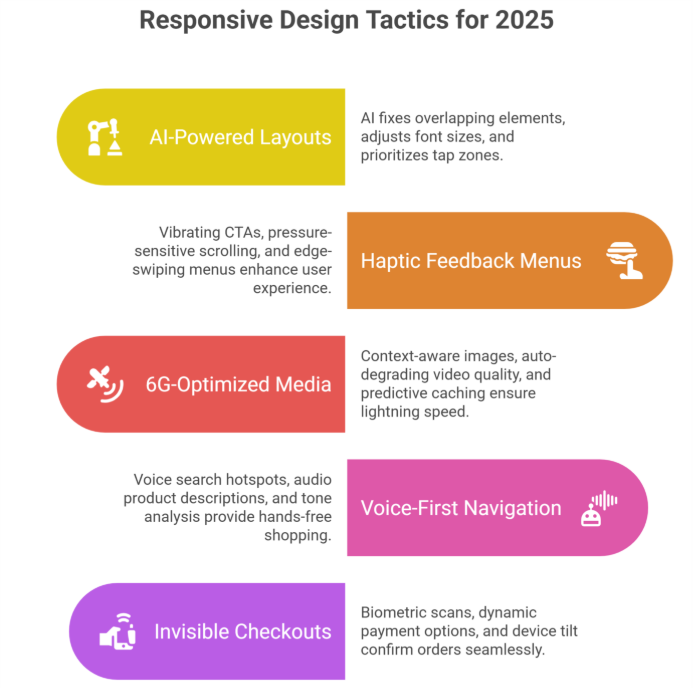
AI-Powered “Self-Healing” Layouts
Forget manual tweaks. Tools like Google’s Auto-RWD now:
Fix overlapping elements in real-time
Adjust font size, use relative units, and adapt to different screen sizes based on reading distance (hello, smartwatches!)
Prioritize “tap zones” for left- vs. right-handed users
2:Haptic Feedback Menus That Guide Thumbs
The 2025 shopper expects tactile responses:
Vibrating CTAs confirm button presses
Pressure-sensitive scrolling (light vs. hard swipes
Edge-swiping menus inspired by TikTok’s UX
3:6G-Optimized Media That Loads in 0.2 Seconds
With 6G rolling out globally, shoppers expect lightning speed:
Context-aware responsive images, images and other media, flexible images, and pixel-perfect visuals (show winter coats if local temp drops)
Auto-degrading video quality during spotty connections
Predictive caching that pre-loads products you’ll likely view
4:Voice-First Navigation for Hands-Free Shopping
“Hey Shopify, find eco-friendly yoga mats under $50”:
Voice-search hotspots in headers, specific design areas, and style guide sections
Audio product descriptions for accessibility
Tone-analysis suggesting items based on vocal stress cues
5:“Invisible” Checkouts That Feel Like Magic
2025’s gold standard? Checkouts that:
Auto-fill details via biometric scans (no more typing CVV codes)
Offer dynamic payment options, design choice, and device-friendly methods (Apple Pay on iOS, GPay on Android)
Use device tilt to confirm orders (tilt right = purchase)
The Hidden Costs of Outdated Responsive Web Design, importance of responsive design, and modern web development (And How to Avoid Them)
PSA: Google’s 2025 Core Web Vitals, website experience, and website that works requirements will penalize sites that:
Take >0.5 seconds to respond to taps
Lack foldable/flexible screen size and different devices support
Ignore “ambient commerce” (shopping via AR glasses, car dashboards)
Scary Stat: 81% of shoppers distrust sites that fail basic mobile-first design, mobile version, and desktop and mobile tests (McKinsey).
Your 3-Step 2025 Responsive Web Design Checklist, design principles, and responsive design best practices
1:Audit Ruthlessly
Test on emerging devices: Samsung Rollable Phones, Meta VR headsets, tablet, and browser types
Simulate 6G speeds with Cloudflare’s new testing suite
Track “rage clicks” (frustrated multiple taps) via Hotjar
2:Prioritize Profit-Boosting Fixes
First: Checkout flow & core product pages, web pages, and creating a website
Then: Blog/media layouts, design work, and design tips
Invest in AI tools that auto-adapt to new website versions, desktop and mobile devices
Train staff on anticipatory design, thoughtful design, and “adapt to different screen sizes” principles
“But Wait—My Desktop Traffic Still Matters!”
Here’s the kicker: 2025’s best-performing websites use device-agnostic design:
Desktops get keyboard shortcuts (Ctrl + “/” opens search)
Tablets activate stylus hover menus
TVs show 3D product zooms during ads
3 RWD Myths Debunked (Stop Believing These!)
“Mobile-first means mobile-only”
→ Truth: 2025’s RWD is context-aware. Your site should:
Enlarge buttons in cold weather (gloves!)
Simplify layouts, website looks, and design ensures during peak commute hours
“All devices get the same content”
→ Truth: Smart RWD delivers tailored experiences:
Show video demos on Wi-Fi
Display text summaries on cellular
“Shopify handles it automatically”
→ Truth: Shopify provides tools, not strategy.
Need help with Shopify website design and development, website design, design and development, and design services? Integriti’s team of Shopify website designers are your best bet!
Click here for Shopify support and maintenance
How to Future-Proof Any Site (Shopify or Not)
Test on 2025’s devices (not just iPhones):
Meta Quest VR headsets
BMW’s in-car browsers
Samsung’s Flex In & Out laptops
Adopt AI-powered RWD tools, use responsive, and modern web solutions:
Adobe Firefly: Auto-generates responsive images
Google’s Aurora: Predicts different devices trends (e.g., surge in AR shopping)
Audit quarterly:
67% of websites break after adding new features (WebAIM)
The Bottom Line
Responsive web design, make your website responsive, building a responsive site, and building a website are non-negotiable for every website, online store, ecommerce website, or Shopify store. The difference? Shopify gives you a head start; other platforms require more heavy lifting.
Here’s the kicker: 58% of shoppers won’t recommend brands with poor mobile phone, tablet, or mobile device experiences (2024 Moz data). In 2025, shoppers won’t just prefer responsive websites they’ll demand them. But with Integriti’s RWD solutions, creating a website, and design work, you’re not just keeping up. You’re staying 10 steps ahead.
Claim your spot with Integriti
Frequently Asked Questions (How To Use Responsive Web Design for Your Ecommerce Store in A Future Proof Guide)
What is responsive web design (RWD)?
Responsive web design ensures your ecommerce store automatically adjusts its layout, images, and content to fit any screen size mobile, tablet, or desktop providing a seamless shopping experience.
Why is RWD important for ecommerce stores?
RWD improves user experience, increases conversion rates, and boosts SEO rankings since Google prioritizes mobile-friendly websites. It also future-proofs your store as devices and screen sizes continue to evolve.
How do I implement RWD for my store?
Use flexible grids, fluid images, and CSS media queries. Start with a mobile-first approach, then progressively enhance for larger screens. Test across devices to ensure smooth functionality and navigation.
Which platforms support responsive ecommerce design?
Most modern ecommerce platforms Shopify, WooCommerce, BigCommerce, and Magento offer responsive themes or templates. You can also customize them further for unique branding and functionality.