Category: Studioblogs

  • Website Building Made Easy    Top 3 Website Builders of 2025

    Website Building Made Easy Top 3 Website Builders of 2025

    Website Building Made Easy Top 3 Website Builders of 2025

    Even the most tech-savvy people cannot take on the difficult process of building a website from scratch. Finding the perfect balance of form and function requires effort. However, you can streamline the process and spare yourself a ton of labor by using AI website builders driven by AI. These easy-to-use website builder tools help you create a website quickly while also providing options to customize your website.

    With tools like ChatGPT, creating a professional website that truly represents your identity and vision is now a reality. These website maker innovations have made website building accessible to individuals with any level of technical skill. For small business owners or individuals working on their own, these tools offer a simple and efficient way to establish online presence, grow your business, and build a business website.

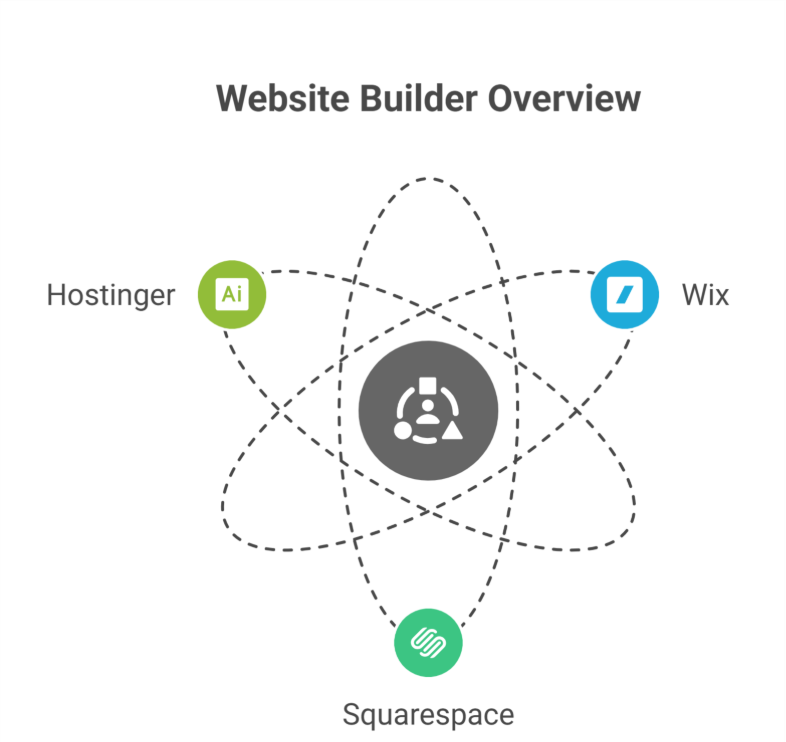
    Our Top 3 Picks

    1. Wix– A comprehensive solution for your website
    1. Squarespace – Most suitable for creative businesses
    1. Hostinger– Ideal for logo and copy generation

    Wix

    Wix is quite a popular website builder and it’s also well known for its intuitive and easy-to-navigate interface. It has a pretty wide variety of website templates, which is great. You don’t actually need to have a background in coding to create your own website.

    Wix offers nearly all the tools to help you create a website if you’re in search of the best website builder. With its intuitive editor X interface, you can choose from hundreds of customizable templates to establish professional-looking sites. Your site can be made more versatile and user-friendly with the help of a variety of drag-and-drop builder tools, widgets, and mobile solutions. The robust ecommerce features make it simple for businesses to create an online store, offer subscriptions, and sell digital downloads. On top of that, your site will always be accessible with exceptional uptime.

    Pros

    • Intuitive and easy-to-use website builder interface

    • A variety of widgets to improve efficiency

    • Customizable templates for various sectors and use cases

    • Powerful mobile website creation resources

    • Extensive online stores customization possibilities and robust ecommerce capabilities

    • Reliable uptime combined with exceptional customer support

    • Extensive business options include selling digital downloads.
    • AI-powered site design tools to help you create professional websites

    • Free plan offered

    Cons

    • Third-party applications can help boost analytics

    • Once atemplate is selected, it cannot be used again

    Who should use this?

    The free tier is just one more perk of Wix’s robust, business website-friendly features. Despite having to put up with some annoying on-site adverts and missing out on some paid features, Wix is still the greatest choice for users who want to build a website without paying a dime every month.

    Hostinger

    Hostinger’s site builder is always evolving with new features and updates that distinguish it in a competitive industry. Its drag-and-drop capability makes it simple to create visually appealing websites and fully functional online stores. Notable additions include a built-in logo generator, a free SSL certificate, and a photo repository for uploaded photographs. However, it is important to mention that the free website plan is not available.

    Pros

    • An intuitive website creator featuring a drag-and-drop interface

    • Smart AI website builder tools that optimize the design workflow

    • Consistent availability to ensure the seamless operation of your website

    • Effortlessly build your brand with the built-in logo maker

    • Free SSL certificate included

    • Efficient picture archive for organizing images

    • Unlimited storage and bandwidth with all subscriptions

    • Enhanced value through integration with Hostinger web hosting

    Cons

    • You can’t change the templates once chosen

    • Limited photo editing options

    • No free website plan available

    Who should use this?

    Hostinger has a great array of AI-powered website builder solutions. For example, you can select “entertainment” or “small business” as your category, and the builder will do the rest. SEO tools, website copywriting, heatmap analytics, and custom site designs are all included. Hostinger is ideal for those looking to create a professional website with ample support and marketing tools.

    Squarespace

    Squarespace is the go-to website builder for creating professional websites. It streamlines website building for visually attractive results. Their vast collection of website templates is optimized for mobile devices, making them perfect for any audience.

    Squarespace offers advanced coding possibilities, robust blogging, and ecommerce solutions, delivering everything a small business needs to create an online store.

    Pros

    • Elegant, mobile-friendly layouts for professional-looking sites

    • Fluid Engine makes website building simple

    • Comprehensive e-commerce solutions for selling products and digital downloads.
    • Freedom to incorporate one’s own code for extensive personalization
    • Content management tools for blogs that allow users to schedule posts
    • Detailed statistics to monitor your development and helpful assistance to accompany it
    • Obtain an SSL certificate for your website at no cost.
    • With every plan, you get unlimited storage and data transfers.

    Cons

    • Once selected, templates cannot be altered

    • Free plan is not available.  
    • Does not provide customer service over phone.

    Who should use this?

    Squarespace is ideal for those who want a custom website. With customizable templates, advanced SEO tools, and drag-and-drop builder tools, you can build a website that reflects your business goals and online presence. 

    How to choose a website builder that best fits your needs
    How to choose a website builder that best fits your needs

    Here are key factors to consider:

    • Simplify the process by selecting an intuitive website builder.

    • Seek customizable templates that match your brand’s aesthetic. 

    • Ensure mobile-responsive templates for users on mobile devices.

    • Use built-in SEO tools to improve your search results.

    • Read reviews to check support responsiveness.

    • Compare prices including domain name, web hosting, and other fees.

    • Use free trials or money-back guarantees to test your site builder before committing. 

    Frequently Asked Questions (Website Building Made Easy Top 3 Website Builders of 2025)

    What is the easiest way to build a website in 2025?

    The easiest way to build a website in 2025 is by using AI-powered website builders like Wix ADI, Shopify Magic, or WordPress AI tools. These platforms offer quick setup, ready-made templates, drag-and-drop design, and automated content creation, making website building simple even for complete beginners.

    Which is the easiest website builder?

    The easiest website builder is Wix ADI because it uses AI to create a complete site within minutes. You just answer a few questions, and the tool designs layouts, pages, and content automatically. Its drag-and-drop editor makes customization simple, even for users with zero technical or design skills.

    What is the #1 website builder?

    The #1 website builder is Wix because it offers powerful design freedom, an easy drag-and-drop editor, hundreds of templates, and strong AI tools for quick site creation. It suits beginners and professionals, supports eCommerce, and provides reliable performance, making it the top all-round website builder.

    Is website design still a good business in 2025?

    Yes, website design is still a good business in 2025 because every company needs a strong online presence, and demand for modern, mobile-friendly, and high-converting sites keeps growing. Even with AI tools, businesses still rely on designers for strategy, branding, customization, and professional-quality user experiences.

  • Why SMEs Should Consider Outsourcing Marketing Operations

    Why SMEs Should Consider Outsourcing Marketing Operations

    WHY SMES SHOULD CONSIDER OUTSOURCING MARKETING OPERATIONS

    ‍In the dynamic world of business, small businesses and small and medium-sized enterprises (SMEs) face unique challenges and opportunities. While SMEs often possess the agility and innovation to compete in their industries, they may lack the resources and expertise to execute comprehensive marketing strategies effectively. This is where outsourcing marketing for small businesses can be a game-changer, enabling SMEs to optimize resources, access specialized marketing professionals, and amplify their market presence. Let’s delve into why delegating marketing operations and outsourcing marketing tasks can empower SMEs to thrive and grow.

    The Landscape of SMEs: Challenges and Opportunities

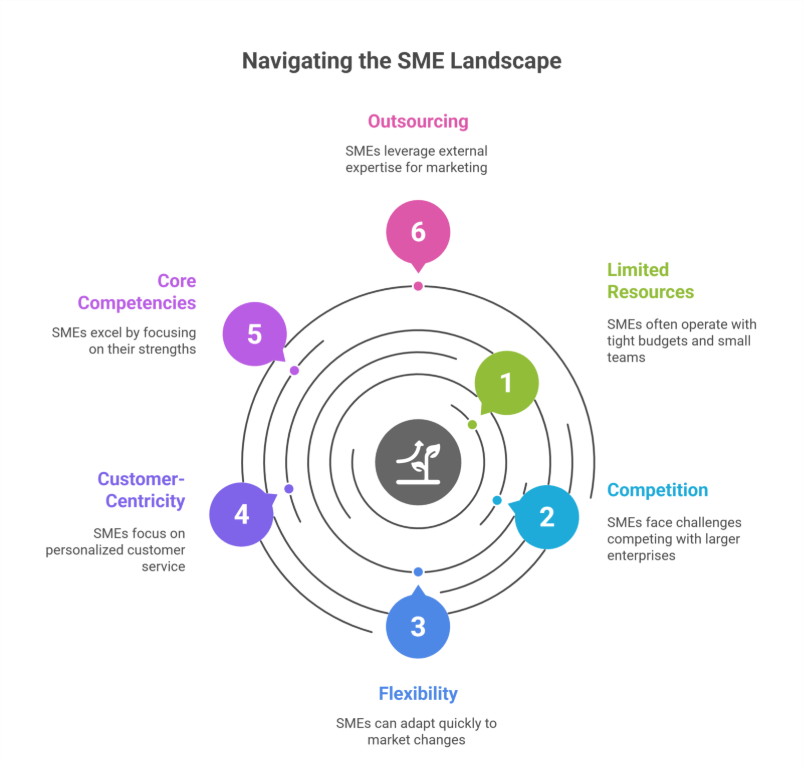
    SMEs play a vital role in the economy, driving innovation and job creation. However, they often operate with limited budgets and lean teams, making it challenging to allocate internal resources for robust marketing activities. Competing against larger enterprises with established brand recognition and extensive marketing budgets can further exacerbate the challenges faced by SMEs.

    On the flip side, SMEs possess inherent strengths such as flexibility, adaptability, and customer-centric approaches. Leveraging these strengths through strategic marketing strategies can unlock growth opportunities and establish a strong foothold in competitive markets.

    Focus on Core Competencies: Excel in Your Expertise

    Focus on Core Competencies: Excel in Your Expertise

    For SMEs, focusing on core business activities is essential for sustainable growth. By outsourcing marketing operations to experienced professionals or digital marketing agencies, SME owners and teams can dedicate their time and energy to driving business development, innovation, and customer satisfaction. This streamlined approach allows SMEs to excel in what they do best while leaving complex marketing tasks in capable hands.

    Outsourcing marketing encompasses a range of marketing services, including digital marketing, content marketing, email marketing, social media management, search engine optimization (SEO), marketing campaigns, advertising, and more. By partnering with specialized marketing agencies or freelancers, SMEs gain access to a diverse skill set without the overhead costs of building an in-house marketing team or outsourced marketing department.

    Resource Optimization: Maximize Efficiency and Cost-Effectiveness

    One of the primary reasons SMEs choose to outsource your marketing is resource optimization. Rather than investing in infrastructure, training, and overhead costs associated with hiring and training an in-house team, outsourcing offers a cost-effective solution. SMEs pay for specific services or campaigns based on their immediate marketing needs and budget constraints.

    Moreover, outsourcing allows scalability, letting SMEs ramp up or down marketing efforts based on market dynamics and business goals. Whether launching a new product, expanding into new markets, or running seasonal marketing campaigns, outsourcing offers flexibility without long-term commitments.

    Enhanced Agility: Adapt and Thrive in Competitive Markets

    Agility is a cornerstone of SME success. In rapidly changing markets, the ability to pivot marketing strategies quickly can make all the difference. Outsourced marketing efforts empower SMEs to adapt to market trends, consumer behaviors, and competitor actions efficiently.

    By leveraging external expertise and industry insights, SMEs can stay ahead of the curve and capitalize on emerging opportunities. Whether implementing new technologies, experimenting with innovative marketing techniques or marketing tactics, or optimizing conversion funnels, outsourced marketing services enable SMEs to thrive in dynamic environments.

    Building Strategic Partnerships: Access to Specialized Skills and Networks

    Collaborating with outsourced marketing partners goes beyond transactional services—it fosters strategic partnerships. Trusted agencies or freelancers become extensions of the SME’s team, sharing insights, refining strategies, and driving collective growth objectives.

    These partnerships offer access to specialized skills, cutting-edge technologies, and expansive networks that may otherwise be inaccessible to SMEs operating independently. From data analytics and market research to creative design and campaign execution, partnering with an outsourced marketing team opens doors to new possibilities and helps small businesses achieve their marketing goals.

    Let’s Make it Interactive: Visualize Your SME’s Growth Trajectory

    Take a moment to visualize your SME’s growth trajectory with outsourcing marketing activities. Envision reallocating time and resources towards innovation, customer engagement, and business expansion. How would partnering with marketing partners or a digital marketing agency transform your overall marketing strategy and overall business performance?

    Take Action: Embrace Outsourcing for Sustainable Growth

    Now that you understand the benefits, it’s time to take action. Research reputable marketing agencies, freelancers, or outsourced marketing services specializing in marketing for your small business solutions. Schedule consultations to discuss your business objectives, challenges, and growth aspirations.

    Empower your SME with the strategic advantage of outsourcing marketing operations. Embrace agility, optimize resources, and position your small business for sustainable growth and success in competitive markets.

    Frequently Asked Questions (Why SMEs Should Consider Outsourcing Marketing Operations)

    What are the benefits of outsourcing marketing?

    Outsourcing marketing provides access to specialized skills, advanced tools, and industry expertise without the cost of an in-house team. It allows businesses to focus on core operations, optimize resources, scale campaigns flexibly, stay agile in changing markets, and achieve more effective, results-driven marketing outcomes.

    Why is marketing important for small businesses?

    Marketing is crucial for small businesses to build brand awareness, attract and retain customers, and compete effectively in their market. It helps showcase products or services, drive sales, establish credibility, and foster customer loyalty, ultimately supporting growth, profitability, and long-term business success.

    Why do companies prefer to use outsourcing?

    Companies prefer outsourcing to access specialized expertise, reduce operational costs, and improve efficiency. It allows businesses to focus on core activities, scale services as needed, leverage advanced tools and technologies, and maintain flexibility in dynamic markets, ultimately enhancing productivity and achieving better business outcomes.

    What is outsourcing in marketing?

    Outsourcing in marketing is the practice of hiring external experts, agencies, or freelancers to handle marketing tasks and strategies. It provides businesses with specialized skills, advanced tools, and industry knowledge, enabling cost-effective, scalable, and efficient marketing while allowing the company to focus on its core operations.

  • Why Your E-Commerce Business Needs WooCommerce Development Services Today

    Why Your E-Commerce Business Needs WooCommerce Development Services Today

    Why Your E-Commerce Business Needs WooCommerce Development Services Today

    E-commerce businesses must offer customers a very seamless shopping experience in the rapidly growing digital marketplace while also standing out in a totally crowded market. One product that has entirely transformed how businesses function is WooCommerce, a very dynamic and highly customizable platform built on top of WordPress (ecommerce platform). But why would your business wish to invest highly in WooCommerce website development services (woocommerce development services, ecommerce development)? Let’s explore the specifics.

    What is WooCommerce?

    WooCommerce is particularly an open-source e-commerce extension for WordPress that allows businesses to completely transform their websites into highly functional e-commerce sites (ecommerce website). Since its launch in 2011, WooCommerce, has become quite a popular e-commerce platform, that has ran millions of online stores worldwide (online store, ecommerce site). Because of its high scalability, flexibility, and an extensive range of customizable options, it has become quite a solution for companies of all sizes (businesses of all sizes, scalable, scalability).

    Whether you’re an enterprise looking for a very specialized solutions or a small business owner trying to expand your company online (online business), WooCommerce offers quite a range of WooCommerce development services (custom woocommerce development services, woocommerce solutions) to meet your needs.

    The Benefits of WooCommerce for E-Commerce Businesses

    The Benefits of WooCommerce for E-Commerce Businesses

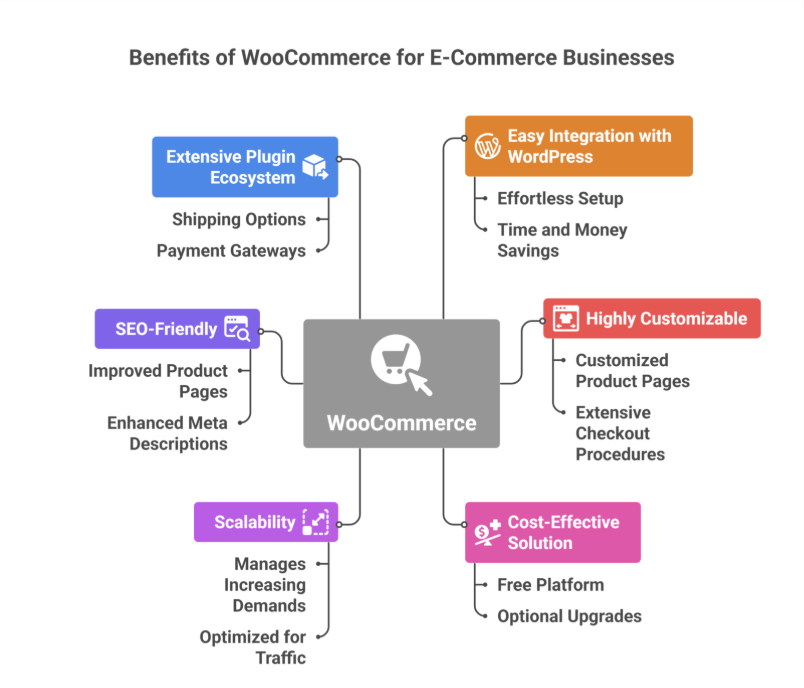
    1. Easy Integration with WordPress

    WordPress, quite a widely used content management system (CMS) worldwide, connects easily with WooCommerce (plugin for wordpress, wordpress plugin). Unlike building an e-commerce website from scratch, particularly adding WooCommerce to an already-existing WordPress website is effortless and saves a lot of time and money (wordpress site, built on wordpress).

    2. Highly Customizable

    Custom WooCommerce development services allow companies to customize their online stores to reflect their personal brand identity (customization, customized solutions, brand identity). With features like customized product pages and extensive checkout procedures, the platform provides you the freedom to design a shopping experience that caters to your target market (shopping experience, customer experience).

    3. Cost-Effective Solution

    WooCommerce is a free e-commerce platform (woocommerce is free), compared to some that require hefty subscription fees. It is still a cost-effective choice for enterprises, particularly those who are just getting started, even though quality upgrades or development services may incur additional fees (development needs).

    4. Scalability

    WooCommerce can grow alongside your business (business grows). The platform effectively manages increasing demands, regardless of how many products you have—ten or a thousand. You can make sure your store stays optimized regardless of traffic and merchandise grow with professional WooCommerce development (expert woocommerce development, optimize).

    5. SEO-Friendly

    For your online store to draw in organic traffic, search engine optimization, or SEO, is essential. You may improve product pages, meta descriptions, and URLs to rank higher in search results via WooCommerce’s integration with WordPress, which ensures access to a variety of SEO tools (website design, long-term success).

    6. Extensive Plugin and Extension Ecosystem

    With the help of WooCommerce’s comprehensive plugin and extension library (woocommerce plugins, plugin development), you can include features like shipping options, payment gateways (payment gateway), and advanced analytics. WooCommerce website development services can be used to further improve these plugins, guaranteeing smooth operation catered to your company’s requirements (functionality, best practices).

    Why Invest in WooCommerce Development Services?

    1. Enhanced User Experience

    A well-designed e-commerce store (e-commerce store) is essential for retaining clients. Expert WooCommerce development service providers (expert woocommerce developers, woocommerce experts) know how to maximize your store’s performance, guaranteeing smooth checkout, quick load times, and easy navigation (support and maintenance).

    2. Custom Features for Unique Needs

    Every company has different objectives. You can incorporate certain features like foreign support, complex search filters, or audience-specific recommendations with custom WooCommerce development services (custom solutions, tailor specific needs).

    3. Mobile Optimization

    Since a growing number of consumers are constantly shopping on mobile devices, it is essential to have a store that is properly optimized for mobile (mobile responsiveness). By ensuring that your store functions highly and looks attractive on all screen sizes, WooCommerce developers can highly enhance the user experience (woocommerce developers, skilled woocommerce).

    4. Integration with Third-Party Tools

    Third-party technologies are crucial for digital e-commerce for marketing, analytics, and customer service. Because WooCommerce is open-source, it integrates easily with programs like CRM systems, MailChimp, and Google Analytics (seamless integration with third-party). These integrations can be further tailored by skilled developers to fit your company operations (creating a plugin).

    Choosing the Right WooCommerce Development Partner

    The performance and success of your store can be greatly impacted by investing in professional development services. What to look for in a development partner for WooCommerce:

    1. Expertise and Experience

    Inspect the developers’ history of successfully finishing WooCommerce tasks (experienced woocommerce developers). Analyze portfolios, case studies, and customer recommendations to evaluate their experience level (development company).

    2. Understanding of Business Needs

    An ideal partner will take the time to understand the goals of your business (business needs) and tailor their solutions accordingly. Look for developers who respect communication and teamwork throughout the entire project (customer satisfaction).

    3. Post-Launch Support

    E-commerce websites need constant maintenance and updates. To handle technical problems and maintain the functionality of your business after launch, pick a development partner that provides post-launch support (support and maintenance).

    Real-World Applications of WooCommerce

    Businesses across industries have leveraged WooCommerce to create unique online stores:

    • Retail: WooCommerce enables small businesses to provide an extensive range of products at low setup costs (woocommerce store, ecommerce business).
    • Subscription Services: Companies can provide subscription-based business models for recurring income with the appropriate extensions.
    • Digital Products: Software and eBooks are among the digital products that WooCommerce makes easy to market.
    • Service-Based Enterprises: Companies may partially incorporate customer service tools and reservation systems straight into their WooCommerce websites (woocommerce plugin development).

    Is WooCommerce Right for Your Business?

    Despite its many advantages, WooCommerce might not be the very best option for every company. Here are a few considerations:

    • Budget: Although WooCommerce is totally free, you should factor in some extra costs for development services, plugins, and hosting (vps hosting).
    • Technical Expertise: Setting up and constantly maintaining a WooCommerce store requires a certain level of expertise in technology. This process can be made very simple with expert WooCommerce development (experienced woocommerce). 
    • Business Scale: WooCommerce is highly suited for small to medium-sized businesses, however it can also service large corporations with the right customization (choose woocommerce, reasons to choose).

    Businesses looking to establish a strong online presence in the competitive marketplace of e-commerce today would be wise to invest sufficiently in WooCommerce website development services (wordpress, ecommerce solutions). WooCommerce’s highly unmatched adaptability satisfies a variety of business goals, including scalability, customization, and mobile and SEO optimization (customize, tailor). You may fully utilize the platform and create an online store that attracts and engages a lot of clients by collaborating with highly knowledgeable developers (development company, woocommerce development company).

    Want your business to be seen and heard online? Explore our Services
     

    Frequently Asked Questions (Why Your E-Commerce Business Needs WooCommerce Development Services Today)

    What is the purpose of WooCommerce?

    WooCommerce is a powerful WordPress plugin designed to turn a website into a fully functional online store. It allows businesses to sell products and services, manage inventory, handle payments, and customize the shopping experience. Its flexibility makes it ideal for small to large e-commerce businesses.

    Do you need a developer for WooCommerce?

    You don’t always need a developer for WooCommerce, as it’s user-friendly and offers many ready-made themes and plugins. However, a developer is helpful for advanced customizations, integrating complex features, optimizing performance, or ensuring security, especially for larger stores or unique business requirements.

    Why is web development important for business?

    Web development is crucial for businesses because it establishes an online presence, builds credibility, and attracts customers. A well-designed website improves user experience, boosts sales, supports marketing efforts, and enables businesses to compete effectively. It also allows easy communication, engagement, and growth in the digital marketplace.

    What are the needs for successful eCommerce?

    Successful eCommerce requires a user-friendly website, secure payment systems, and reliable inventory management. Effective marketing, fast shipping, and excellent customer service are essential. Additionally, mobile optimization, analytics, and personalized experiences help attract and retain customers, driving growth and long-term business success.


  • WordPress Development: Custom vs. Off-the-Shelf Solutions

    WordPress Development: Custom vs. Off-the-Shelf Solutions

    WordPress Development: Custom vs. Off-the-Shelf Solutions

    When it comes to building your business related WordPress website using WordPress themes, one of the very major challenges you’ll face is to choose either between the custom development or the off-the-shelf solutions. Each option particularly has its own advantages and drawbacks, and the better choice will depend on your business needs, budget, and the long-term goals. This blog totally explores the major differences between the two approaches to help you make a very informed decision while using WordPress for website development and improving your online presence.

    Understanding Off-the-Shelf Solutions

    What Are Off-the-Shelf Solutions?

    Off-the-shelf solutions are specifically pre-built themes, templates and plugins, and third-party tools that are quite easily available or can be purchased. These options are designed to meet totally different variety of customer needs and are quite easy to install and setup, making them ideal for people building a website with minimal initial investment.

    Benefits of Off-the-Shelf Solutions

    Benefits of Off-the-Shelf Solutions

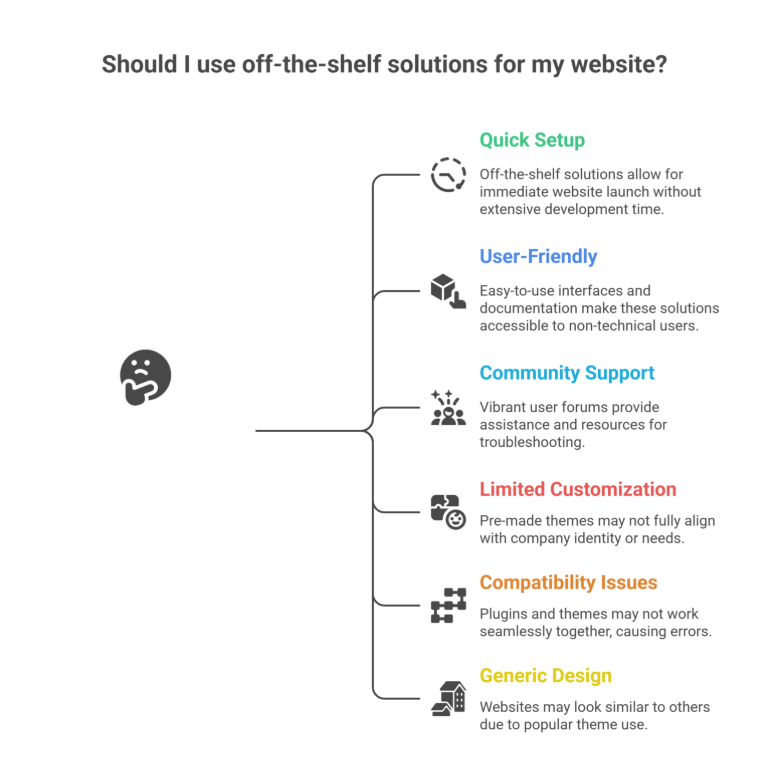
    • Quick Setup: Since all these pre-built WordPress solutions are quite easy to use instantly, you may launch your very own website right away without having to spend quite a lot of time and effort in developing it using custom code.
    • User-Friendly: Even a non-technical user can utilize a template or pre-built platforms because they frequently include easy drag-and-drop builders and comprehensive documentation, offering a user-friendly experience.
    • Large Community Support: The Well-known themes and plugins frequently have quite vibrant user forums and communities that offer helpful assistance and resources for troubleshooting, especially when dealing with performance issues, vulnerability, or integration problems.

    Drawbacks of Off-the-Shelf Solutions

    While off-the-shelf WordPress solutions are quite convenient, they come with some limitations:

    • Limited Customization: It’s quite possible that pre-made themes don’t always highly suit the identity or needs of your company or brand, especially when you need tailored solutions.
    • Compatibility Issues: Some plugins and themes might not always function highly together, causing errors in functionality.
    • Generic Design: Your website is more likely to seem like others if you use a very popular template or premium themes.

    Exploring Custom WordPress Development

    What Is Custom WordPress Development?

    Custom WordPress development basically means creating a website that is especially suited to your company’s personal requirements. Professionals providing Custom WordPress Development, custom web development, or working at a development company or WordPress web design agency, handle this particular procedure using unique code and custom solutions.

    Benefits of Custom Development

    • Unique Design: Since a customized website is created from the very scratch, it will accurately represent your brand identity and set you quite apart from the competition.
    • Tailored Functionality: You can incorporate particular unique features and functions that are quite essential to your company’s operations through the custom-built development that is fully tailored to your business.
    • Scalability: Because the custom-built websites are made to always grow with your business, adding new features or expanding your website as your business grows will be very simpler, ensuring long-term scalability and long-term growth.
    • Enhanced Performance: Custom websites frequently load quite faster and offer a much better user experience by removing the unnecessary code and focusing on your specific needs and requirements.
    • SEO Optimization: By including specific SEO guidelines directly into the website’s design, developers can highly increase the site’s exposure in the search engine results and help you optimize your content management system.

    Drawbacks of Custom Development

    Despite its advantages, custom development has some challenges:

    • Higher Initial Cost: Because the custom development takes much more time and experience than off-the-shelf options, it may require a higher initial investment.
    • Longer Development Time: If you need a new website launched very quickly, it might not be the very best option to build it from scratch.
    • Dependence on Developers: For immediate updates and frequent ongoing maintenance, you might require continuous assistance from a WordPress design or Shopify Services agency or developers.

    Key Factors to Consider While Choosing Between the Custom and Off-the-Shelf Solutions

    1. Budget

    It can be highly convenient to use off-the-shelf alternatives if you have limited budgets. Custom development, on the other hand, provides long-term advantages and greater alignment with your business objectives.

    2. Business Goals

    Custom development is best for companies who need special features, custom themes, or have certain branding needs. Simpler websites with conventional features are more suitable for off-the-shelf themes.

    3. Timeline

    Off-the-shelf options are more practical if you need to start your website rapidly. Although custom development takes longer, the end product is a website that is precisely customized to meet your unique requirements.

    4. Scalability

    Consider your future growth and success plans. Custom websites are more scalable, while off-the-shelf systems might require extensive modification or rebuilding.

    How Professional Services Can Help

    Working with experienced professionals helps guarantee an effortless process, regardless of whether you decide to use off-the-shelf solutions or custom creation. Experts in both strategies are available through WordPress Development, Shopify Development, Shopify Design, Webflow Services, and other web solutions, enabling you to maximize the benefits of your selected solution. A WordPress web design agency can also offer assistance, support, and improvements.

    Conclusion

    Your specific business needs, financial limitations, and goals will determine whether you choose custom vs off-the-shelf WordPress solutions. Custom development provides more flexibility, scalability, and a customized user experience, even while off-the-shelf alternatives are quicker to adopt and less expensive. You can make a highly informed choice that supports your business goals by being aware of the benefits and drawbacks of each strategy. To achieve an optimal outcome, think about collaborating with a Custom WordPress Development Services Company to ensure your website meets your expectations and delivers long-term value in a competitive digital landscape.

    Frequently Asked Questions (WordPress Development: Custom vs. Off-the-Shelf Solutions) 

    What is the difference between custom software and off-the-shelf solutions?

    Custom software is built specifically for your business needs, offering unique features, full control, and scalability. Off-the-shelf solutions are pre-made, affordable, and quick to deploy but come with limited customization and may not fit every requirement perfectly. The choice depends on budget, goals, and flexibility needs.

    What is the difference between custom and WordPress?

    Custom development creates a fully tailored website built from scratch to match unique business needs, design, and functionality. WordPress uses pre-built themes, plugins, and templates, making it faster and more affordable but less specialized. Custom sites offer flexibility, while WordPress offers convenience and ease of use.

    What is the advantage of developing your own software over using custom of the shelf software cots?

    Developing your own software offers complete control, tailored features, stronger scalability, and better integration with your workflows. Unlike off-the-shelf COTS software, it avoids unnecessary features, reduces long-term limitations, and supports unique business processes. Though costlier upfront, it delivers higher efficiency and competitive advantage over time.

    Do nearly 75% of all websites use WordPress?

    No, nearly 75% of all websites do not use WordPress. Currently, WordPress powers around 43–45% of all websites. It remains the most popular content management system, but other platforms like Shopify, Wix, and custom-built sites also hold significant market share.


  • AI & SEO Strategies: What Even Big Brands Must Consider In 2025

    AI & SEO Strategies: What Even Big Brands Must Consider In 2025

    AI & SEO Strategies: What Even Big Brands Must Consider In 2025

    The field of search engine optimization (SEO) is always changing on and off, and as artificial intelligence (AI) becomes highly popular in search engines, brands need to start reconsidering their approaches. Businesses of all sizes must use AI-driven SEO as we move toward 2025 in order to preserve visibility, raise rankings, and highly improve user experience. Unlike traditional SEOAI SEO can help brands enhance their brand visibility and optimize search results efficiently.

    We’ll look at the most important AI-powered SEO tactics in this blog, as well as what even the largest firms need to think about in order to remain highly competitive and maintain brand authority in the AI search landscape.

    AI & SEO Strategies: What Even Big Brands Must Consider In 2025

    The Role of AI in SEO

    AI has highly transformed how search engines rank contentSearch engines are now much better able to interpret user intent due to machine learning algorithms very quickly like Google’s RankBrain and BERT. AI facilitates the automation of high optimization strategies, the analysis of huge volumes of data, and the early and accurate prediction of search trends, helping improve search visibility.

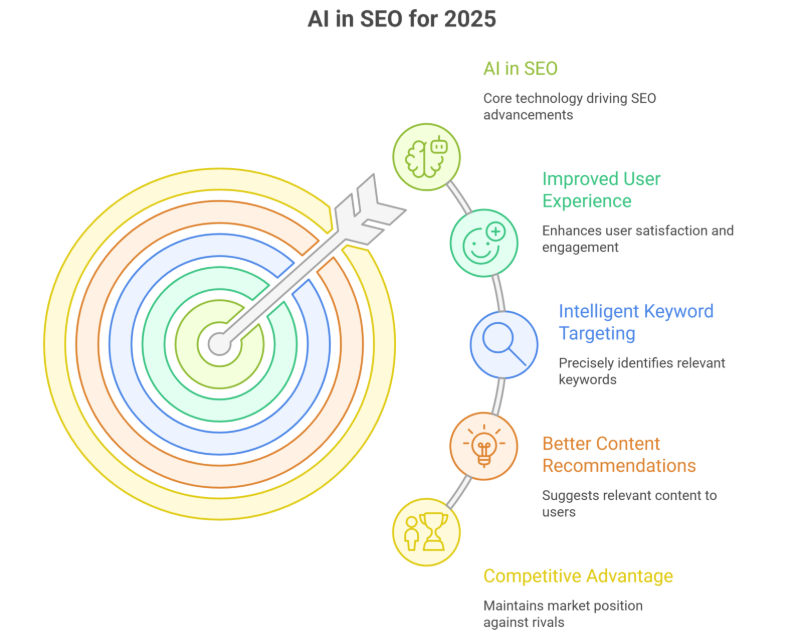
    Businesses can highly benefit from improved user experience, much more intelligent keyword research, and much better content marketing recommendations by leveraging AI for SEO. Mostly ignoring AI-powered SEO tactics could cause you to lag behind rivals who are already using these highly advanced AI tools.

    AI-Powered SEO Strategies for 2025

    1. AI-Generated Content Optimization

    Content creation is becoming much quicker and more effective due to easy-to-access AI platforms like ChatGPT, Jasper, and Copy.ai. But depending only on content produced by AI models can be dangerous. Original, superior content that offers users genuine value is given priority by search engines.

    How Brands Can Adapt:

    • When creating content, use AI as a tool, not a substitute.

    • Make very certain that information produced by AI is always fact-checked and tweaked to add quite a human touch.

    • Focus on EEAT (Experience, Expertise, Authoritativeness, Trustworthiness) to highly improve credibility and brand-specific authority.

    1. Voice Search Optimization

    Voice search’s rise with millions of people utilizing smart assistants like Google Assistant, Alexa, and Siri every day makes AI-driven search crucial. Voice queries are typically longer-tail and more conversational.

    How Brands Can Adapt:

    • Optimize content for natural language queries.

    • Focus on long-tail keywords and question-based phrases.

    • Ensure websites are mobile-friendly and load quickly for seamless AI search results.

    1. AI and Predictive Search Analytics

    Predictive analytics using AI help brands understand future search trends. Predictive SEO uses AI-driven insights to suggest keywords before they become popular.

    How Brands Can Adapt:

    • Utilize AI SEO tools like Clearscope and SurferSEO for keyword insights.

    • Monitor emerging trends and optimize content proactively to maximize organic reach.

    • Focus on semantic search to align with how audiences are asking queries.

    1. Enhanced User Experience with AI

    User experience (UX) is becoming quite a higher priority in Google’s algorithm. Rankings are highly impacted by metrics such as mobile usability, Core Web Vitals, and page speed.

    How Brands Can Adapt:

    • Improve relationship with customers by highly utilizing AI-powered chatbots.

    • Websites should be optimized for quick loading times and easy navigation to enhance brand awareness.

    • Highly personalize content based on user behavior with frequent AI recommendations.

    1. AI-Powered Image & Video SEO

    Visual content plays a critical role in search engine resultsAI-powered image and video recognition help search engines understand and categorize media better.

    How Brands Can Adapt:

    • Optimize images with structured data and alt text.

    • Use AI-generated captions and transcriptions for videos.

    • Leverage AI tools like Google Vision API to enhance AI search visibility.

    1. Automation in SEO Strategies

    High AI-driven automation saves a lot of time by handling repetitive SEO tasks like keyword tracking, backlink analysis, and frequent site audits.

    How Brands Can Adapt:

    • Implement AI-powered SEO tools like SEMrush, Ahrefs, and Moz.

    • Automate technical SEO audits to fix site errors quickly.

    • Set up AI-based A/B testing to improve website performance.

    1. Local SEO and AI-Driven Personalization

    Local SEO is essential for companies that have physical locations. AI assists in highly customized local search results according to user behavior, location, and previous searches.

    How Brands Can Adapt:

    • Make sure your website is optimized for local search phrases and Google My Business (GMB).

    • Utilize geotargeting driven by AI to customize user experiences.

    • Ensure NAP (Name, Address, Phone) consistency across all platforms to reinforce brand’s AI presence.

    1. AI and Mobile-First Indexing

    Google now highly prioritizes mobile-friendly sites in search engine resultsAI tools help businesses optimize their mobile experience effectively.

    How Brands Can Adapt:

    • Assure uniformity of NAP (Name, Address, Phone) on all platforms.

    • Make good use of mobile testing solutions powered by AI, such as Google’s Mobile-Friendly Test.

    • Improve mobile site speed with AI-based caching and unique compression techniques.

    1. AI-Powered Backlink Analysis

    Backlinks remain a crucial ranking factor, and AI makes backlink efforts more efficient by identifying high-quality opportunities.

    How Brands Can Adapt:

    • Use AI backlink analysis tools to track and disavow toxic links.

    • Leverage AI for content outreach and automated backlink suggestions.

    • Prioritize quality over quantity in link-building efforts to boost brand authority.

    1. Evolving Search Algorithms and AI

    Google is increasingly using AI to update its algorithms. Brands need to stay ahead of the curve by staying very up-to-date with AI-powered search innovations.

    How Brands Can Adapt:

    • Stay updated with Google’s latest AI-driven changes.

    • Adapt content strategies based on AI-generated insights.

    • Continuously refine on-page and technical SEO practices.

    The Future of AI in SEO

    AI will drive SEO in the future. Artificial intelligence will continue to influence search engine results through automation, content customization, and real-time analytics. Companies may find it very difficult to stay competitive if they don’t incorporate AI into their SEO plans.

    Key Takeaways:

    • The way search engines interpret and rank material is changing due to AI.

    • To remain relevant, businesses need to use AI-driven SEO tools and strategies.

    • It’s crucial to give user experience, technical SEO, and excellent content top priority.

    • In 2025, staying way ahead of algorithm upgrades driven by AI will be crucial.

    • Brands can highly raise their search engine ranks, increase organic search traffic, and improve user experience by highly utilizing AI SEO tactics. To produce content that genuinely connects with people, it is very crucial to strike a balance between AI automation and human creativity.

    Meta Description:

    Find out the best AI-powered SEO tactics that all major firms need to implement by 2025. Learn how AI is improving digital marketing, influencing search rankings, and boosting brand visibility.

    Frequently Asked Questions (AI & SEO Strategies: What Even Big Brands Must Consider In 2025)

    How is AI changing SEO in 2025?

    AI is making SEO more personalized, predictive, and intent-driven. Search engines analyze user behavior, context, and real-time data to deliver smarter results. Brands must use AI tools, automation, and advanced content optimization to stay competitive and maintain strong search visibility.

    Why should big brands adopt AI-driven SEO?

    AI-driven SEO helps big brands gain faster insights, improve keyword targeting, and deliver personalized content at scale. It enhances rankings, boosts efficiency, and reduces competitive pressure. AI also streamlines large-content management, making overall SEO performance stronger and more consistent.

    What role does machine learning play in modern SEO?

    Machine learning predicts user intent, identifies search patterns, and evaluates content quality. In 2025, ML-driven algorithms prioritize relevance, engagement, and behavior signals. This helps brands make data-informed SEO decisions and optimize content for better visibility across multiple search environments.

    How can AI improve content quality for SEO?

    AI tools identify content gaps, enhance readability, and recommend topic clusters. Real-time editors improve tone, structure, and keyword optimization while reducing plagiarism. This results in higher-quality, search-friendly content that aligns with user intent and improves overall ranking potential.

  • Migrating From Magento to Shopify Successfully

    Migrating From Magento to Shopify Successfully

    Migrating From Magento to Shopify Successfully

    Introduction

    Migrating completely from Magento to Shopify is a very decisive move. Only for businesses seeking a very user friendly, highly scalable, and cost effective eCommerce solution. While Magento is known for its high flexibility and customization. It often requires quite extensive technical expertise to manage properly. On the other hand, Shopify offers a highly intuitive platform with built in tools. Making it ideal for merchants looking for high efficiency and growth.

    A successful migration requires careful planning to highly ensure data integrity, SEO rankings, and very smooth functionality. In this blog, we will walk you through the very essential steps to migrate from Magento to Shopify. That too without disrupting even a fraction of your online business.

    Why Migrate from Magento to Shopify?

    Before jumping into the migration process, it is highly crucial to understand why businesses choose to switch from Magento to Shopify:

    • Ease of Use : Shopify has a highly intuitive and beginner friendly interface as compared to Magento.
    • Lower Maintenance Costs:  Shopify pretty much eliminates the need for highly extensive development and hosting management.
    • Scalability:  Shopify’s cloud based infrastructure quite supports businesses of all sizes without the need for any additional servers or maintenance.
    • App Ecosystem: Shopify has a vast app store for extending functionality without custom development.
    • Security & Reliability: Shopify handles security, updates, and hosting, reducing the burden on store owners.

    Pre-Migration Considerations

    1. Analyze Your Current Magento Store

    Before migrating, audit your current Magento store to understand what needs to be transferred. Key elements include:

    • Products & Categories
    • Customer Data
    • Order History
    • Website Content (pages, blogs, policies, etc.)
    • SEO Elements (meta titles, descriptions, URLs)
    2. Choose the Right Shopify Plan

    Shopify offers multiple plans. Including Basic Shopify and Advanced Shopify. If you run a large scale store, Shopify Plus can also be an option. Select a plan based on your business needs and budget.

    3. Backup Your Magento Store

    Before proceeding with migration, always create a full backup of your Magento database to prevent data loss. Export the entire important data including products, customers, orders, and CSV file imports for a smooth data migration.

    Step by Step Complete Guide to Migrating from Magento to Shopify

    1. Set Up Your Shopify Store

    Once you’ve chosen your plan, set up your Shopify store by:

    • Registering a domain (or connecting your existing one)
    • Selecting a theme that quite perfectly aligns with your brand
    • Configuring general settings such as currency, tax rules, and payment gateways
    2. Use an Automated Migration Tool

    Manual data migration can be highly time consuming and prone to errors. Consider using helpful tools like Cart2Cart, LitExtension, or Matrixify. This will completely automate the process. These tools help transfer:

    • Products and categories
    • Customers and orders
    • CMS pages and blog posts
    3. Manually Review & Clean Up Data

    Once the migration is complete, review your data in Shopify to ensure everything has transferred correctly. Look for:

    • Missing product descriptions or images
    • Incorrect pricing or stock levels
    • SEO settings like URLs and metadata
    4. Redesign Your Store for Shopify

    Since Magento themes cannot be directly transferred, you’ll need to choose a Shopify theme or build a custom design. A Shopify website designer or Shopify design agency can help create a visually appealing and optimized store.

    5. Reconfigure Essential Apps & Integrations

    Shopify offers various apps to replace Magento’s extensions. Ensure that your Shopify store has the necessary apps for:

    • Email marketing
    • Inventory management
    • Analytics and reporting
    • Customer support (Live chat, Helpdesk)
    6. Test Your Store Thoroughly

    Before making your Shopify store live, conduct thorough testing:

    • Check product pages and categories
    • Verify payment and checkout processes
    • Test website speed and mobile responsiveness
    • Ensure customer accounts and order history are intact
    7. Set Up 301 Redirects

    To prevent broken links and maintain SEO rankings, set up 301 redirects for all important URLs. Shopify allows you to redirect old Magento URLs to new ones, ensuring a smooth transition without losing search engine rankings.

    8. Launch Your Shopify Store

    Once everything is in place it will be time to go live! Before officially launching:

    • Announce the migration to customers via email and social media
    • Monitor performance and fix any post-launch issues
    • Keep an eye on analytics to track sales and traffic

    Post-Migration Tips

    1. Monitor Website Performance

    Use tools like Google Analytics and Shopify’s built-in reports to track performance post-migration. Pay attention to traffic fluctuations, conversion rates, and new store functionality.

    2. Optimize SEO & Content

    To maintain and improve SEO rankings:

    • Update meta descriptions and page titles
    • Submit a completely new sitemap to Google Search Console
    • Optimize product pages with relevant keywords
    3. Train Your Team on Shopify

    If your team is used to Magento, they might need some time to get quite familiar with Shopify’s admin interface. Provide training and resources to ensure a very smooth transition.

    4. Engage with Customers

    Keep customers informed about the changes and offer assistance if they face issues. Ensure smooth communication through:

    • FAQs about the new store
    • Live chat support
    • Promotional offers to welcome them to the new platform

    Conclusion

    Migrating from Magento to Shopify can be a total game changer for your entire business. Making store management easier while highly improving user experience. With proper planning, the right migration tools, and thorough testing, you can transition quite smoothly without losing data or customers.

    Following this Magento to Shopify migration checklist and step-by-step guide will help ensure a very successful and hassle free migration process.

    Want your business to be seen and heard online? Explore our Services
     

    Frequently Asked Questions (Migrating From Magento to Shopify Successfully)

    Why should I migrate from Magento to Shopify?

    Shopify offers a highly user-friendly, scalable, and cost-effective eCommerce solution. Unlike Magento, which requires extensive technical knowledge, Shopify simplifies store management with built-in tools, making it ideal for businesses aiming for growth with less complexity.

    Will I lose my SEO rankings during migration?

    Not necessarily. By carefully redirecting old Magento URLs to Shopify URLs and preserving meta titles, descriptions, and alt tags, you can maintain most of your SEO value. Proper planning is crucial.

    How long does the migration take?

    The timeline depends on store size and complexity. Small stores may migrate in 1–2 weeks, while larger stores with thousands of products and custom functionalities could take 4–8 weeks.

    Can I migrate all my data automatically?

    Many tools and apps can automate migration of products, customers, and orders. However, some custom data or extensions may require manual adjustments.

  • AI-Powered Social Strategies: Using Machine Learning to Optimize Campaigns

    AI-Powered Social Strategies: Using Machine Learning to Optimize Campaigns

    AI-POWERED SOCIAL STRATEGIES: USING MACHINE LEARNING TO OPTIMIZE CAMPAIGNS

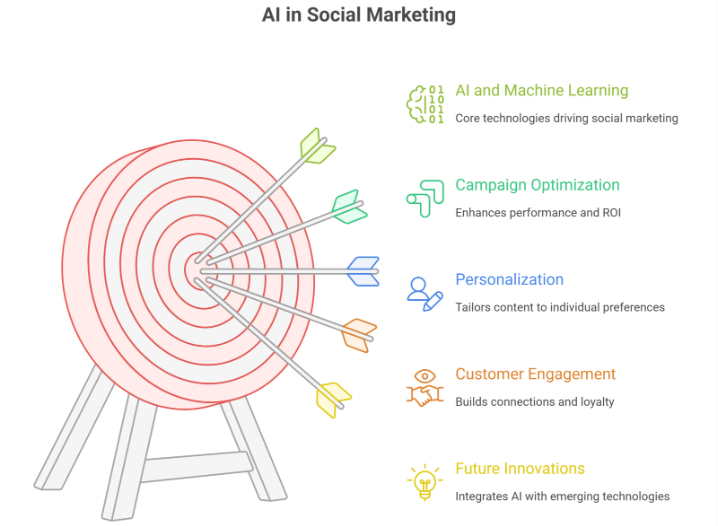
    In the ever-evolving landscape of digital marketing, harnessing the power of artificial intelligence (AI) and machine learning (ML) is not just a competitive advantage it’s a game-changer. Imagine having a marketing assistant that learns from data, predicts trends, and optimizes campaigns in real-time. This is the promise of AI-powered social strategies, where advanced ai algorithms transform data into actionable insights, driving unparalleled results and ROI. By leveraging ai tools and ai content creation tools, marketers can refine their marketing campaigns and social media campaigns for maximum efficiency.

    The Rise of AI in Social Marketing: Where Data Meets Creativity

    The Rise of AI in Social Marketing: Where Data Meets Creativity

    AI isn’t just a buzzword it’s a catalyst for innovation. Picture this: a brand leveraging ai in social media marketing to analyze vast amounts of social media content and social data, from audience demographics to content engagement patterns. By understanding user behavior and social media trends, marketers can craft hyper-personalized campaigns that speak directly to individual preferences. Marketing teams can now integrate ai and machine learning to create personalized campaigns that enhance engagement and conversion rates.

    Imagine using ai to predict emerging trends and consumer behaviors. By staying ahead of the curve, brands can adapt their marketing strategies proactively, ensuring relevance and maximizing impact. Advanced ai allows marketers to optimize campaigns by analyzing ad campaigns, social media advertising, and social media platforms for performance improvement.

    Personalization at Scale: From Segments to Individuals

    Gone are the days of generic messaging. AI enables hyper-personalization, where every interaction feels tailored to the individual. By leveraging ai-driven content, social media content, and ai writing tools, marketers can personalize content strategies and email campaigns at scale. Picture a dynamic content strategy that adapts in real-time based on user preferences, powered by ai. By analyzing historical data and behavioral signals, AI can deliver targeted content that speaks directly to each customer’s interests and needs.

    Imagine an e-commerce site that recommends products based on past purchases, browsing history, and even sentiment analysis of social media posts. By leveraging AI-powered personalization, brands can create seamless, intuitive experiences that foster customer loyalty and drive conversions. Marketers can use ai to automate marketing efforts and social media management, improving user experience and creating personalized campaigns.

    Optimizing Campaign Performance: From Insights to Action

    One of AI’s most significant contributions is its ability to optimize campaign performance. Imagine automating routine tasks like A/B testing, content generation, and ad placement optimization. AI-powered algorithms can analyze analytics, marketing content, and marketing campaigns in real-time, identifying patterns and making data-driven decisions to improve outcomes.

    Consider a scenario where AI predicts the optimal times to post social media posts based on audience behavior. By leveraging machine learning algorithms analyze audience insights, marketers can allocate budget effectively, ensuring maximum ROI across various channels. AI allows marketers to optimize campaigns, enhance engagement strategies, and integrate ai into their marketing platform for better results.

    Enhancing Customer Engagement: Where Automation Meets Authenticity

    AI doesn’t replace human creativity it amplifies it. Picture chatbots powered by ai that provide instant customer support, resolving queries and guiding purchase decisions 24/7. By automating repetitive tasks, brands free up resources to focus on creating social media content and building genuine connections with their audience.

    Imagine using AI to analyze customer feedback and sentiment across social media platforms. By listening to the voice of the customer, brands can respond proactively, addressing concerns and celebrating successes in real-time. AI in social media marketing enables marketing teams to create personalized campaigns, optimize email marketing, and leverage ai tools for social listening and content creation.

    The Future of AI in Social Marketing: Innovations on the Horizon

    As AI continues to evolve, the possibilities are limitless. Imagine integrating AI with augmented reality (AR), allowing customers to visualize products in their own space before making a purchase. Picture predictive analytics that anticipate market shifts and consumer preferences, empowering brands to pivot with agility. AI adoption in marketing ensures marketers can harness ai technologies, ai features, and ai algorithms to stay ahead in trends in marketing.

    In the realm of influencer marketing, AI can match brands with the most relevant influencers based on audience demographics and engagement metrics. By leveraging ai and machine learning, brands can forge authentic partnerships that resonate with their target audience. AI and machine learning are transforming social media strategy, social media advertising, and programmatic advertising, enabling marketing innovation and engagement strategies.

    Embracing AI-Powered Social Strategies: From Concept to Execution

    Embracing AI in social marketing isn’t just about technology—it’s a mindset shift. Picture a future where data fuels creativity, where algorithms optimize performance, and where customer relationships are cultivated at scale. AI can help marketers refine their campaigns, use ai responsibly, and learn how ai offers insights to improve marketing efforts across social media channels.

    As brands navigate this transformative landscape, the key lies in collaboration bringing together data scientists, marketers, and creatives to harness the full potential of ai. By embracing experimentation and continuous learning, brands can unlock new possibilities, driving innovation, engagement, and growth in the age of ai-powered social marketing and the future of social media marketing.

    Frequently Asked Questions (AI-Powered Social Strategies: Using Machine Learning to Optimize Campaigns)

    What is an example of AI optimization?

    An example of AI optimization is using machine learning algorithms to improve supply chain efficiency. AI can analyze historical data, predict demand, and optimize inventory levels, reducing costs and delivery times. This allows businesses to make smarter decisions and streamline operations for better overall performance.

    How do social networks use AI to improve advertising?

    Social networks use AI to analyze user behavior, preferences, and engagement patterns. This enables them to target ads more precisely, predict which content will resonate, and optimize ad placement and timing. As a result, advertisers reach the right audience, increasing conversion rates and overall campaign effectiveness.

    What role does artificial intelligence (AI) play in improving the efficiency of social media marketing campaigns?

    AI enhances social media marketing efficiency by analyzing user data, predicting trends, and personalizing content. It automates tasks like scheduling, audience targeting, and ad optimization, ensuring campaigns reach the right users at the right time, increasing engagement, conversions, and overall return on investment.

    What are 7 types of AI?

    The seven types of AI are: Narrow AI, General AI, Superintelligent AI, Reactive Machines, Limited Memory AI, Theory of Mind AI, and Self-Aware AI. These categories range from task-specific intelligence to advanced systems capable of understanding, learning, and potentially surpassing human cognitive abilities.

  • Beyond Vanity Metrics: Unveiling the Real ROI of Social Media Marketing

    Beyond Vanity Metrics: Unveiling the Real ROI of Social Media Marketing

    BEYOND VANITY METRICS: UNVEILING THE REAL ROI OF SOCIAL MEDIA MARKETING

    In the world of social media marketing, it’s easy to get caught up in the allure of vanity metrics likes, shares, and follower counts. However, true social media roi and social media success isn’t just about visibility; it’s about tangible, measurable returns on investment (ROI). Today, we’ll delve into the real roi of social media, exploring how brands are leveraging marketing strategies, social media analytics, and data-driven tracking metrics that matter to drive meaningful business outcomes and connect social media efforts to real business growth.

    Imagine a clothing brand that meticulously tracks their social media campaigns using google analytics and advanced analytics tools. By analyzing conversion rates, customer acquisition cost, and new customer acquisition alongside metrics like click-through rate, they discover that their Instagram ads targeting a specific audience segment generated a 20% increase in online sales compared to traditional print advertising. This actionable insight enables them to allocate resources more effectively, maximizing marketing roi and revenue generated.

    Consider a tech startup that uses social listening tools to monitor online conversations about their products. By identifying pain points, addressing customer concerns in real-time, and tracking meaningful engagement, they strengthen customer relationships and improve brand perception. As a result, customer retention rates soar, translating into measurable lifetime value and long-term ROI, reflecting real growth.

    Now, let’s explore how brands are moving beyond vanity metrics to unlock the real ROI of social media marketing and measuring social media roi:

    BEYOND VANITY METRICS: UNVEILING THE REAL ROI OF SOCIAL MEDIA MARKETING

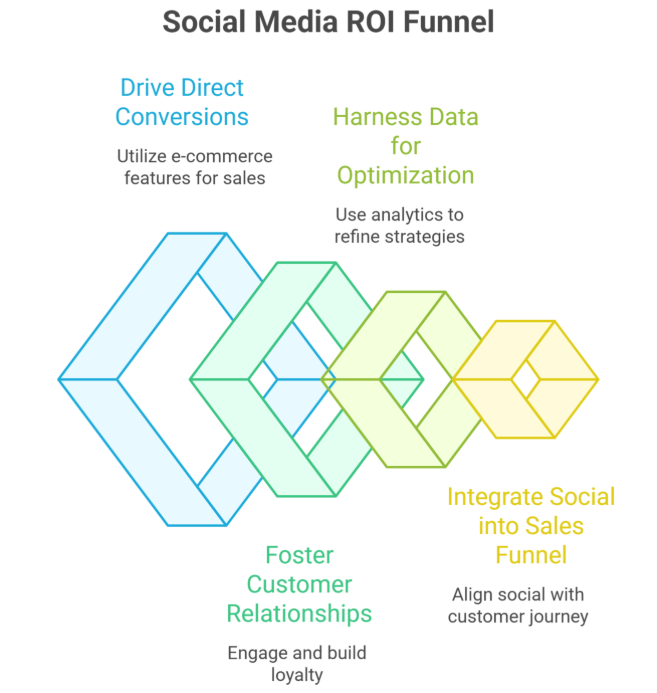
    1. Driving Direct Conversions

    Gone are the days when social media was solely a brand awareness tool. Today, platforms like Instagram and Facebook offer robust e-commerce functionalities, allowing users to discover, explore, and purchase products without leaving the app. Brands are leveraging these direct purchasing features to drive conversions and measure social media roi more effectively, making sure metrics like impression, click-through, and acquisition cost contribute to positive ROI.

    Imagine a beauty brand that integrates Instagram Shopping into their social media strategy. By tagging products in posts and stories, they create a seamless shopping experience for their followers. As a result, they see a significant uptick in online sales directly attributed to their social media efforts, demonstrating clear roi metrics and measurable business results.

    2. Fostering Customer Relationships

    Social media isn’t just a broadcast channel; it’s a two-way conversation. Brands that prioritize engagement rate, meaningful metrics, and relationship-building see tangible returns in customer loyalty and advocacy, contributing to the real impact and actual business growth.

    Take the example of a restaurant that actively engages with customers on Twitter. By responding to reviews, sharing user-generated content, and running interactive polls, they foster a sense of community and loyalty among their followers. This investment in relationships translates into repeat business, positive word-of-mouth referrals, and measurable roi data—key indicators of social media roi and business outcomes.

    3. Harnessing Data for Optimization

    Data is the cornerstone of effective social media marketing. Brands that leverage analytics tools, track metrics such as likes, and experiment with marketing campaigns to optimize social media analytics can improve metrics that reveal meaningful ROI.

    Consider a fitness app that uses A/B testing to refine their ad copy and visuals on Facebook. By experimenting with different messaging strategies, they identify the most compelling approach that resonates with their target audience. This iterative optimization process leads to improved click-through rates, app downloads, and new customer acquisition, directly impacting roi calculation and marketing roi.

    4. Integrating Social into the Sales Funnel

    Successful brands understand that social platforms play a crucial role at every stage of the customer journey. By integrating social into the sales funnel from awareness to consideration to conversion and tracking social media, brands can attribute specific metrics to each stage and measure overall ROI more accurately, connecting your social activity to real business results.

    Imagine a travel agency that runs a Facebook campaign targeting users who have expressed interest in vacation destinations. By retargeting these users with personalized offers, testimonials, and email marketing follow-ups, they drive qualified leads through the sales funnel, resulting in bookings, revenue generated, and positive marketing ROI directly attributable to their social media’s real roi.

    Conclusion: Unlocking the True Value of Social Media Marketing

    In conclusion, the real ROI of social media marketing extends beyond surface-level metrics like follower count, vanity metrics like likes, and metrics such as likes. Brands that focus on driving direct conversions, fostering customer relationships, harnessing data for optimization, and integrating social into the sales funnel see meaningful metrics, truly meaningful ROI, and tangible returns on their investment.

    As we navigate the evolving landscape of digital marketing, let’s shift our focus from vanity metrics to metrics that actually matter, marketing activities that drive real business, and actionable metrics that reveal the true social media ROI. By adopting data-driven strategies, tracking metrics that matter, prioritizing engagement and conversion, and discovering how to measure social effectively, brands can unveil the real roi of social media marketing and maximize the impact of their digital presence, moving beyond vanity metrics to actual business growth.

    Frequently Asked Questions (Beyond Vanity Metrics Unveiling the Real ROI of Social Media Marketing)

    What are vanity metrics in social media?

    Vanity metrics in social media are superficial measurements like likes, followers, or shares that appear impressive but don’t reflect real business impact. They don’t indicate engagement quality, conversions, or ROI, making them less useful for assessing the true effectiveness of marketing campaigns.

    What is the ROI on social media marketing?

    ROI on social media marketing measures the return generated from social media efforts compared to the investment made. It evaluates campaign effectiveness by tracking metrics like conversions, sales, lead generation, and engagement, helping businesses determine the financial impact and optimize strategies for better results.

    How to prove ROI on social media?

    To prove ROI on social media, track key metrics such as conversions, sales, leads, and website traffic generated from campaigns. Compare these results to the cost of advertising, tools, and resources used. Using analytics and attribution models helps demonstrate the tangible financial impact of social media efforts.

    What is the 50 30 20 rule for social media marketing?

    The 50-30-20 rule for social media marketing suggests allocating content strategy as follows: 50% valuable, educational, or informative content; 30% engaging or entertaining posts to build community; and 20% promotional content to drive sales or conversions, ensuring a balanced and effective social media presence.

  • Building Omnichannel Experiences: Integrating Social Media Into a Seamless Customer Journey

    Building Omnichannel Experiences: Integrating Social Media Into a Seamless Customer Journey

    BUILDING OMNICHANNEL EXPERIENCES: INTEGRATING SOCIAL MEDIA INTO A SEAMLESS CUSTOMER JOURNEY

    Hey there, digital explorers! In the exciting world of B2C marketing, let’s dive into how you can turbocharge your customer journey by integrating social media into every step. Buckle up for a thrilling ride where we combine creativity with technology to create seamless, engaging experiences across multiple channels.

    Social Media Safari: Discover and Engage

    First stop: the wild and wonderful world of social media discovery! Imagine Instagram as your virtual fashion runway. Brands strut their stuff with stunning visuals and product tags that let you shop right from your feed. It’s like window shopping, but without leaving your couch!

    Picture this: a cosmetics brand dazzling you with makeup tutorials on TikTok. You’re hooked by the fun, engaging content and inspired to try their latest lip kit. With just a few taps, you’re on their website, ready to make your beauty dreams come true.

    Smooth Sailing to Checkout

    Helloooo, shoppers! Social media isn’t just for likes—it’s your ticket to a seamless path to purchase. Ever browsed Facebook and stumbled upon an ad for the perfect gadget you’ve been eyeing? Click, and you’re whisked away to a personalized shopping experience, complete with exclusive deals just for you.

    Let’s say you’re into fitness. A sports brand sends you a personalized offer via Messenger, tailored to your workout style. Before you know it, you’re hitting “checkout” and gearing up for your next adventure—all thanks to a smooth, social media-powered journey.

    Customer Care Carnival: Support and Relationships

    Need a helping hand? Social media has your back! Imagine tweeting a question to your favorite tech brand and getting a lightning-fast response. They’re not just solving problems—they’re building relationships one tweet at a time.

    Think of Twitter as your direct line to VIP customer service. Brands showcase their dedication to satisfaction by resolving issues publicly and turning frowns into virtual high-fives. It’s customer care with a personal touch!

    Join the UGC Party: User-Generated Content Magic

    Lights, camera, action! Social media is the stage where user-generated content (UGC) steals the spotlight. Brands throw a virtual party, inviting customers to share their stories and star in their campaigns.

    Imagine a travel agency hosting a TikTok challenge. You and fellow adventurers post your epic travel moments with a special hashtag. Suddenly, your story goes viral, inspiring others to embark on their own journeys. It’s not just content—it’s a community coming together to share the joy of exploration.

    Conclusion: Unleash Your Social Side for Epic Omnichannel Adventures!

    Ready to embark on your omnichannel adventure? Integrate social media into your customer journey and watch the magic unfold. From discovery to checkout, from support to storytelling, social media is your secret weapon for building fun, interactive experiences that keep customers coming back for more.

    As you navigate the digital landscape, remember to infuse creativity and authenticity into every interaction. Your customers aren’t just followers—they’re co-stars in your brand’s blockbuster story. So, let’s raise the curtain and let your social media journey begin!

  • Building Shopify App (2025): Tools, APIs & Best Practices

    Building Shopify App (2025): Tools, APIs & Best Practices

    Building Shopify App (2025): Tools, APIs & Best Practices

    Introduction

    Shopify, a well-known e-commerce platform, offers a free seamless experience to sell online. With the high demand for custom functionalities, creating apps and building your app in Shopify has gained pretty significant traction. Whether you want to extend Shopify’s capabilitiesintegrate with Shopify’s ecosystem, or create a totally unique feature for store owners, developing a Shopify app can completely change your business game.

    We will explore pretty much everything you need to know about building a Shopify app in 2025, including the common essential toolsrobust toolsShopify APIs, and very best practices to ensure a highly smooth development process, helping you improve user experienceidentify and resolve issues, and add new features based on specific business requirements.

    Building Shopify App (2025): Tools, APIs & Best Practices

    What is a Shopify App?

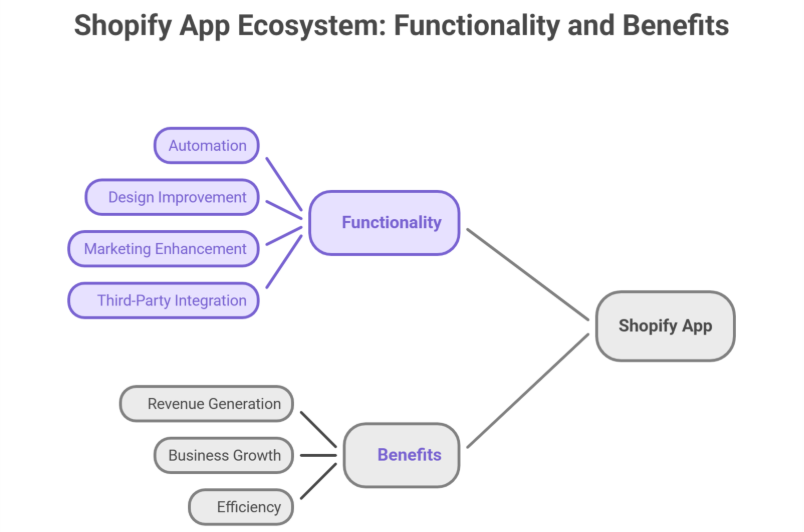
    A Shopify app is a software solution. It provides additional high functionality to store owners. These apps can:

    • Completely automate processes like inventory management and order fulfillment.

    • Highly improve your app for Shopify store design and user experience.

    • Enhance marketing and sales strategies.

    • Connect third-party services with Shopify stores, supporting multiple storefronts.

    There are two types of Shopify apps:

    • Public Apps: Readily available on the Shopify App Store. Accessible to all merchants.

    • Custom Apps: Built for a specific store and not listed publicly, supporting custom Shopify app solutions and specific business requirements.

    Why Develop a Shopify App?

    With thousands of businesses using Shopify, there is a growing demand for scalable Shopify apps that enhance Shopify store functionality. Some key benefits of shopify app development services include:

    • Revenue Generation: Developers can monetize your app, via subscriptions, one-time charges, or other monetizing your app requires methods.

    • Business Growth: Agencies and freelancers can offer Shopify development services through development services or creating a robust app for clients.

    • Automation & Efficiency: Store owners save a lot of time by automating repetitive tasks, improving app functions and app performance.

    Essential Tools for Shopify App Development

    Complete development of a Shopify app requires the right set of tools. Here are some must-have resources for a Shopify developer:

    1. Shopify CLI (Command Line Interface)
      The Shopify CLI pretty much simplifies shopify development, automating common tasks like authentication, project setup, app setup, and quick testing.

    2. Shopify Partners Dashboard
      Before you start coding, register as a Shopify Partner to gain access to dashboard, development tools, API keys, and local development environments.

    3. Shopify API
      The Shopify API is the backbone of creating a Shopify app. Allowing apps to interact totally with store data. The key APIs include:

    • Admin API – Manages Shopify admin, store data, products, and orders.

    • Storefront API – Enables custom storefront experiences.

    • GraphQL API – Allows efficient API calls with minimal requests.

    1. Ngrok
      Since Shopify requires a secure HTTPS connection, Ngrok provides an easy way to expose your backend local development server to the web.

    2. React & Polaris UI Framework
      For building user-friendly interfaces, Shopify provides Shopify’s Polaris design system, a UI framework designed for Shopify apps. Using React ensures smooth performance for app using JavaScript.

    How to Develop a Shopify App

    1. Set Up Your Development Environment
      Install Node.js and Shopify CLI on your system.
      Register your app in the Shopify Partners Dashboard to get API keys.
      Use Ngrok to create a secure tunnel for local development.

    2. Choose Your App Type

    • Embedded Apps: Run inside the Shopify admin panel using Shopify App Bridge.

    • Standalone Apps: Operate independently but still interact with Shopify stores via Shopify APIs.

    1. Authenticate Your App
      Authentication is a very crucial step in shopify app development. Use OAuth 2.0 to securely connect with Shopify stores, ensuring security best practices.

    2. Utilize Shopify APIs
      Use the Admin API to fetch product and order data.
      Leverage the Storefront API for customizing front-end experiences.
      Optimize API calls using GraphQL for faster app performance.

    3. Develop the App’s Features
      Implement app functionality based on business requirements.
      Use webhooks to trigger real-time updates when sudden changes occur in the store.
      Ensure the app is mobile-friendly for merchants using Shopify on their phones.

    4. Test the App
      Run tests in a Shopify development store before deployment.
      Use Shopify CLI’s dev mode to test real-time updates.
      Monitor app performanceAPI calls, and error logs to ensure smooth functionality.

    5. Deploy & Launch
      Host the app on a reliable platform like Heroku or AWS.
      Submit your public apps for review if listed on the Shopify App Store.
      Provide detailed documentation and support for users, helping achieve a successful launch.

    Best Practices for Shopify App Development

    1. Focus on Performance
      Optimize API calls to reduce server load.
      Minimize unnecessary background processes and implement cache for better response times.

    2. Ensure Data Security
      Use OAuth authentication to protect store data.
      Encrypt sensitive customer information and implement SSL certificates.

    3. Follow Shopify’s Design Guidelines
      Use Shopify Polaris for a consistent UI/UX experience.
      Ensure a clean, intuitive design that aligns with Shopify store design standards.
      Keep forms and navigation elements simple to improve user experience.

    4. Make Your App Scalable
      Use microservices architecture for flexibility.
      Optimize database queries for handling large stores.
      Support multi-language and multi-currency features for scalable apps targeting Shopify Plus merchants.

    5. Provide Excellent Documentation & Support
      Offer clear installation and app setup guides.
      Include troubleshooting steps for common issues and provide highly responsive customer support to resolve queries.

    Common Challenges in Shopify App Development & How to Overcome Them

    1. API Rate Limits
      Shopify imposes API rate limits, which can slow down requests. To avoid this:
      Use GraphQL API for optimized data fetching.
      Implement request queuing to prevent exceeding limits.

    2. Handling Webhooks Efficiently
      Webhooks are essential for real-time updates, but mismanagement can lead to performance issues.
      Use a message queue like RabbitMQ to handle incoming webhook requests.
      Ensure webhook retries for failed responses.

    3. App Approval Process
      If you’re launching public apps, you must pass Shopify’s approval process.
      Follow Shopify App Store requirements strictly.
      Test your app thoroughly before submission to avoid common pitfalls.

    Conclusion

    Developing a Shopify app in 2025 presents very exciting opportunities for Shopify development. By leveraging the right tools like Shopify CLI, APIs, React, Polaris, and following best practices for Shopify app development, you can create a robust, scalable Shopify app that enhances store data access, improves user experience, and supports automation.

    Whether you’re building a Shopify app for personal use or launching on the Shopify App Store, structured development processes and focusing on Shopify app best practices will set you up for a successful launch and long-term growth.

    Want your business to be seen and heard online? Explore our Services
     

    Frequently Asked Questions (Building Shopify App (2025): Tools, APIs & Best Practices)

    What is Shopify and how does it work in 2025?

    Shopify is a leading e-commerce platform that allows businesses to create, manage, and scale online stores. In 2025, it works by providing a secure, user-friendly interface, integrating with Shopify APIs, apps, and custom storefronts, automating sales, inventory, and marketing for seamless online business operations.

    How to create a Shopify app step by step?

    To create a Shopify app, first set up your development environment with Node.js, Shopify CLI, and Ngrok. Register your app in the Shopify Partners Dashboard for API keys. Choose app type, implement Shopify APIs, authenticate via OAuth, develop features, test in a development store, then deploy and launch.

    How to create an API in Shopify?

    To create an API in Shopify, register your app in the Shopify Partners Dashboard to get API keys. Choose between Admin API or Storefront API, configure access scopes, implement GraphQL or REST endpoints, authenticate using OAuth 2.0, and test API requests in a development store before deployment.

    How to build a Shopify store step by step?

    To build a Shopify store, first sign up on Shopify and choose a plan. Select a theme, customize the design using Shopify’s Polaris or built-in tools, add products, configure store data like payments and shipping, integrate apps for functionality, test the store, and launch for customers.