Category: Studioblogs

  • Halloween 2026: Shopify Sales Ideas and Store Fixes to Boost Revenue

    Halloween 2026: Shopify Sales Ideas and Store Fixes to Boost Revenue

    Halloween is no longer a niche candy-and-costume holiday. It has become one of the biggest early-season shopping moments of the year, and for online stores, it is a real revenue opportunity. According to the National Retail Federation, US Halloween spending has climbed into record territory, projected at around $13.5 billion for the season, with average per-person spending near $115. A meaningful share of that shopping happens online.

    But here is the part most store owners miss: winning at Halloween takes two things working together. You need the right ideas to attract sales, and a store that is actually ready to capture and convert them. A great promotion means nothing if your site is slow, your checkout leaks customers, or your mobile experience frustrates shoppers at the exact moment they want to buy.

    This guide covers both. First, Shopify Halloween marketing and sales ideas to bring buyers in. Then the store fixes to prepare your Shopify store for the rush. And finally, how to turn that seasonal spike into lasting growth instead of a one-time bump.

    Shopify Halloween Sales Ideas

    These are the Halloween marketing ideas and Shopify Halloween campaign ideas that consistently move the needle for online stores. Pick the few that fit your brand rather than trying all of them.

    Run a themed Halloween sale or flash offer: A limited-time “Spooky Sale” with a clear end date creates urgency. Countdown timers, “ends at midnight” messaging, and a themed discount code (think TREAT15 rather than a generic code) all help. Urgency is what turns browsers into buyers during a seasonal window.

    Build a Halloween gift guide or curated collection: Group relevant products into a themed collection so shoppers do not have to hunt. A “Halloween Picks” or “Spooky Season Favorites” collection makes discovery easy and increases average order value through bundling.

    Create product bundles: Bundle complementary products into a themed set at a slight discount. Bundles raise average order value and feel like better value to the shopper, a win on both sides.

    Use email and SMS to your existing list: Your current customers are your cheapest, highest-converting audience. A short Halloween email sequence (a teaser, the launch, a last-chance reminder) often outperforms chasing new traffic. Tie it to your Shopify flows so it runs automatically.

    Lean into social and user-generated content: Halloween is visual, which makes it ideal for social. Run a themed giveaway, encourage customers to share photos, or post behind-the-scenes content. Costume and seasonal content travels well organically.

    Add seasonal urgency with honest scarcity: “Order by this date for Halloween delivery” is both a genuine service message and a conversion driver. It gives shoppers a real reason to buy now rather than later.

    Offer a themed freebie or add-on: A small free gift, free shipping over a threshold, or a surprise discount at checkout can tip an undecided shopper over the line.

    Fix Your Store Before the Rush

    Here is where most Halloween advice stops, and where you will quietly lose sales if you ignore it. Driving traffic to a store that is not ready is like paying to send customers to a locked door. Before Halloween traffic arrives, here is your holiday season store readiness checklist.

    Store speed: Speed is a sales issue, not a technical one. Research from Google has shown that around 53% of mobile users abandon a site that takes more than three seconds to load, and Akamai and Google studies have found that even a one-second delay can cut conversions by roughly 7%. During a traffic spike, a slow store does not just frustrate shoppers, it costs you orders you already paid to attract. Compress images, remove unused apps, and check your store with Google PageSpeed Insights before the rush.

    Mobile experience: A large and growing share of shopping happens on phones. If your store makes people pinch, zoom, or hunt for the buy button on mobile, they will leave and buy from someone easier. Test your whole flow on an actual phone, from landing page to completed checkout, the way a customer would.

    Checkout and cart abandonment: Checkout is where revenue leaks fastest. Research from the Baymard Institute puts the average cart abandonment rate at around 70%, with surprise extra costs (shipping and fees shown late) the single biggest reason shoppers bail, cited by roughly 48%. Baymard also estimates that optimizing checkout can lift conversions by about 35%. Show shipping costs early, offer guest checkout, keep the flow short, and make sure your payment options are visible and trusted.

    Inventory and fulfillment readiness: Make sure stock levels are accurate, your fulfillment process can handle a spike, and your “order by” dates for Halloween delivery are realistic and clearly stated. Nothing damages trust faster than overselling an item you cannot ship in time.

    Test under load: If you are expecting a real surge (from ads, email, or a campaign), make sure your store and apps can handle the traffic. A store that slows or crashes at peak is the most expensive failure of the season.

    Turn Seasonal Traffic Into Lasting Growth

    This is the step most stores skip, and it is where the real long-term value is. A Halloween spike brings in a wave of new visitors and first-time buyers. If you do nothing, most of them disappear on November 1st. The goal is to keep them.

    Capture, do not just convert: Make sure every new visitor has a reason and a way to stay connected, email sign-up, SMS opt-in, an account. A one-time Halloween buyer you can reach again is worth far more than one you lose.

    Set up post-purchase flows: A simple thank-you and follow-up sequence turns a seasonal buyer into a repeat customer heading into Black Friday and the winter holidays, which are right around the corner.

    Learn from the data: A traffic spike is a free stress test. Watch where people dropped off, which products sold, and which channels delivered. Those insights sharpen your next campaign, and Halloween sits right before the biggest shopping period of the year, so the lessons compound.

    Keep optimizing conversions: The improvements you make for Halloween, faster pages, a cleaner checkout, better mobile, keep working long after October. Seasonal readiness done right becomes year-round performance.

    The bottom line

    A strong Halloween result is not just about clever marketing. It is marketing plus a store that is genuinely ready to convert and keep the customers it attracts. Run the sales ideas that fit your brand, fix the speed, mobile, and checkout issues before the traffic hits, and put something in place to hold onto the buyers you win.

    Do that, and Halloween becomes more than a one-day spike. It becomes the start of your strongest quarter of the year.


  • Is Your Ecommerce Store Ready for AI Shopping Agents?

    Is Your Ecommerce Store Ready for AI Shopping Agents?

    For two decades, ecommerce has been built around one assumption: a human being lands on your store, browses, gets persuaded by your design and copy, and clicks “buy.” Every best practice, every design trend, every conversion tactic has been optimized for that human browser.

    That assumption is breaking.

    A new kind of shopper is arriving, and it doesn’t browse. It doesn’t feel FOMO, doesn’t respond to your retargeting ads, and doesn’t care how beautiful your homepage is. It reads your structured data, compares your products against dozens of competitors in milliseconds, and places the order. This shopper is an AI agent, and whether your store is ready for it is quickly becoming one of the most important questions in ecommerce.

    Here’s what’s actually happening, and what it means for how your store is built.

    What “AI shopping agents” actually means

    Let’s be precise, because the term gets used loosely.

    An AI shopping agent is not a chatbot. A chatbot answers questions and waits for the next human instruction. An agent is goal-oriented: you tell it, “find me the best waterproof hiking boots under $150 in my size,” and it independently research, compares options across multiple stores, evaluates reviews, and in a growing number of cases, completes the purchase, all without further human input.

    The difference matters technically. Chatbots assist with information; agents drive outcomes. And critically, agents don’t shop the way people do. Instead of moving through your site page by page, an agent evaluates many options simultaneously and interacts with your store’s data and APIs rather than your visual interface.

    This is already live, not theoretical. Through 2026, major platforms rolled out agentic shopping features: AI tools that can research products across the web, and “buy for me” style functionality that lets an agent complete a purchase directly, with the human never touching your storefront. At the infrastructure level, an emerging Universal Commerce Protocol, launched by Google in partnership with Shopify, is being positioned as an open standard that lets AI agents read merchant catalogs, pull real-time pricing and inventory, manage carts, and complete checkouts.

    The scale of the projected shift is significant, though worth treating as informed forecasting rather than certainty: analyst figures circulating in the industry suggest agentic AI could influence trillions of dollars in global retail by 2030, with a large share of online shoppers using AI agents by then. Whatever the exact numbers turn out to be, the direction is clear, and it’s already underway.

    Why this breaks stores that were built for humans

    The problem is that most ecommerce stores, and the platforms underneath them, were designed around session-based human interaction. A person arrives, results are ranked, they scroll through product pages, they check out inside a browser flow built to persuade with clicks.

    AI agents generate a completely different pattern. Instead of one sequential journey, they fire multiple requests, evaluate options in parallel, and expect clean, consistent, machine-readable responses. When your backend isn’t built for that, friction appears in ways that are invisible to human visitors but fatal to agents: rate limits that interrupt an agent mid-workflow, inconsistent data formats that break its ability to compare, and authentication timeouts that stop a transaction from completing.

    Put bluntly: an AI agent cannot recommend, or buy, a product it cannot understand. If your product data is messy, incomplete, or locked inside a design that only makes sense to human eyes, you don’t just rank lower. You risk being excluded from the agent’s consideration set entirely, before a human ever sees the options.

    That’s the real stakes here. This isn’t about ranking on page two instead of page one. In agent-driven shopping, there often is no page two. Either you’re in the answer, or you’re invisible.

    The shift: from “get people to visit” to “get agents to recommend”

    The mental model that’s served ecommerce for twenty years, drive traffic, then convert it with design and persuasion, doesn’t map cleanly onto this world.

    The game is changing from “get people to visit your site” to “get AI agents to recommend your products.” That reframes something most merchants treat as a technical chore, product data quality, into a direct revenue driver. Your structured data isn’t back-office housekeeping anymore. It’s your storefront, as far as an agent is concerned.

    This also has an uncomfortable implication for brand loyalty. As shoppers learn to trust their agents’ recommendations, they become more willing to buy whatever the agent suggests, even if they walked in with a different brand in mind. Being the product the agent surfaces is becoming more important than being the brand the customer thought they wanted.

    What “ready” actually means: a technical checklist

    So what makes a store ready? Based on where the technology is heading, readiness comes down to a few concrete, buildable things, not vague “AI strategy.”

    1. Machine-readable product data. This is the foundation, and the single most important step. Every product needs complete, accurate, structured attributes: real specifications, honest descriptions written from real-world detail, correct sizing and variant data, current pricing, and real-time inventory. An agent making a comparison relies entirely on this data being clean and complete. Gaps here are the number one thing that blocks a store from being recommended.

    2. Structured metadata and schema. Beyond the raw product fields, your store needs proper structured data (schema markup) so machines can interpret what each page and product actually is. This is what makes your catalog legible to an agent scanning for the right match.

    3. Clean collections, tags, and taxonomy. Messy, inconsistent categorization confuses both humans and machines. A logical, well-structured product taxonomy helps agents understand relationships between products and surface the right one for a given intent.

    4. Accessible, reliable APIs. Because agents interact through structured requests rather than your interface, your store needs solid API coverage for catalog, cart, checkout, and orders, with consistent response schemas and infrastructure that can handle parallel, automated traffic without rate-limiting legitimate agents out.

    5. Protocol readiness. As open standards like the Universal Commerce Protocol mature, being able to plug into them (or your platform’s equivalent agentic-commerce program) determines whether agents can transact with you directly. On Shopify, this means keeping pace with the platform’s agentic commerce capabilities as they roll out.

    6. A new way to measure. Traditional ecommerce KPIs, sessions, bounce rate, cost-per-click, tell you almost nothing about agentic performance. It’s a different funnel with different signals. Part of being ready is knowing you’ll need to measure visibility and inclusion in agent recommendations, not just human traffic.

    A simple way to test where you stand right now

    You don’t need to wait for a full audit to get a first signal. Three quick checks:

    First, ask an AI tool (like ChatGPT or Google’s AI shopping features) to find products in your category, and see whether your store shows up at all. If it doesn’t, that’s your answer.

    Second, look hard at your product data. Pick your best-selling product and ask honestly: are the attributes complete? Is the description specific and real, or generic filler? Is pricing and inventory accurate and current? If a machine had only this data to go on, would it understand the product well enough to recommend it?

    Third, check whether your platform supports emerging agentic-commerce standards or has solid API coverage for cart, checkout, and orders.

    If those checks make you uncomfortable, that discomfort is useful. It’s far cheaper to fix this now than to discover in a year that agents have been quietly routing around your store.

    The honest takeaway

    There’s a lot of hype in this space, so here’s the grounded version.

    You do not need to panic-buy the newest AI tool, and you do not need a ten-million-dollar custom agent like the largest enterprises are building. For most stores, readiness isn’t exotic. It’s the fundamentals done properly: clean, complete, machine-readable product data; solid structured metadata; a sensible taxonomy; and reliable, accessible infrastructure underneath.

    Which is the quietly reassuring part of all this. The same disciplined foundation that has always made a store fast, trustworthy, and well-built is exactly what makes it legible to AI agents. Stores that cut corners on their data and architecture are the ones that will feel this shift the hardest. Stores built right are already most of the way there.

    The rules of being found are changing. The businesses that treat their product data and infrastructure as a revenue asset, not an afterthought, are the ones AI agents will choose.

    If you’re not sure where your store stands, that’s exactly the kind of thing worth auditing before the gap gets wider.

    Wondering whether your store is built to be found by AI shopping agents? That’s the kind of technical foundation we work on every day. Let’s talk.

  • The Small Business Guide to AI Integration Without Wasting Money

    The Small Business Guide to AI Integration Without Wasting Money

    Most of the money spent on AI right now is being wasted and it’s rarely the technology’s fault.

    The most-cited number of the past year came from an MIT study that found 95% of enterprise generative-AI pilots delivered no measurable impact on the bottom line, with only about 5% creating real value against an estimated $30–40 billion in spending. Looking further ahead, Gartner expects more than 40% of “agentic AI” projects to be scrapped by the end of 2027, and it blames escalating costs, unclear business value, and weak controls not model quality.

    That’s the enterprise picture. A small business has far less margin for that kind of waste, and no analyst deck to hide it in. The good news is that the failures are patterned and avoidable. Here’s how I’d think about integrating AI without lighting money on fire.

    First, understand where the money actually leaks

    Four failure modes account for most wasted AI spend, and none of them require a data-science degree to avoid.

    Chasing the tool instead of the problem. Most stalled projects start with “we should use AI” rather than “we have this specific, expensive problem.” The MIT research is blunt about this: the small share of companies that got value did it by picking one painful, well-defined task and executing it, not by rolling out AI broadly.

    Building when you should be buying: In the same study, the initiatives that succeeded almost always came from purchasing tools and partnering with vendors internal builds failed far more often. For a small business, custom development is the single fastest way to spend six figures on something you could have rented for $30 a seat.

    Pointing AI at the glamorous work: Companies pour budget into sales and marketing AI because it’s visible, but the MIT data shows the highest returns come from unglamorous back-office automation: document processing, data entry, scheduling, support triage.

    Tool sprawl and surprise bills: This is the quiet one. Across organizations, roughly a third or more of software licenses sit unused, and about two-thirds of IT leaders report unexpected charges from consumption-based or AI pricing models. AI tools bill by usage far more than traditional software, which means a “cheap” tool can produce an ugly invoice if nobody’s watching the meter.

    It’s also worth knowing what you’re buying. Gartner estimates that of the thousands of vendors marketing “agentic AI,” only around 130 are building anything genuinely agentic the rest is what analysts politely call “agent washing.” Skepticism is a cost-control tool.

    A sequence that doesn’t waste money

    1. Start with a problem that has a number attached: Before evaluating a single tool, name the task, how many hours or dollars it currently costs, and what “better” would look like. If you can’t measure it today, you won’t be able to prove the AI helped or notice when it doesn’t. Good first candidates are high-volume and repetitive: inbox triage, first-line customer questions, invoice or data entry, drafting routine content.

    2. Buy the boring, proven tool don’t build: For nearly every small business, the right move is a well-supported off-the-shelf product with a monthly subscription you can cancel. Custom builds and bespoke AI transformation engagements are where budgets disappear. Rent before you buy and buy before you build.

    3. Automate the back office before the storefront: Point your first project at internal, low-risk, high-frequency work rather than anything a first-time customer will see. The returns are more reliable, the failure modes are cheaper, and you learn how the tool behaves before it’s talking to your customers.

    4. Time-box the pilot and keep a kill switch: Give any new tool a fixed trial window and a clear success threshold measured against your baseline from step one. If it clears the bar, expand. If it doesn’t, cancel it quickly and without sentiment. The reason 40%+ of projects get scrapped isn’t that cancellation is bad; it’s that too many are allowed to limp along, billing monthly, long after it’s clear they aren’t working.

    5. One tool per job, and watch the meter. Resist the urge to add a new subscription for every shiny feature. Consolidate, audit your stack quarterly, and cancel what nobody uses. For any usage-priced AI tool, set a spending cap or alert on day one this is where “cheap” quietly becomes expensive.

    6. Keep a human on the override: The projects that blow up on risk and cost are usually the ones handed autonomy before anyone defined ownership and rollback. A tool with a clearly defined job and a named person accountable for it is worth more than a more powerful tool nobody owns.

    What realistic success looks like

    Set expectations honestly, because inflated ones are how good tools get killed for the wrong reasons. AI is still early even among adopters: U.S. Census data (via the SBA) shows just 8.8% of small firms using AI in actual production as of August 2025, and JPMorgan Chase Institute transaction data finds only 17.7% have actually paid for an AI tool. You are not late.

    Where it works, the payoff is real but modest per person: small-business owners who use AI commonly report saving several hours a week, with a meaningful share saving six or more though these are self-reported and concentrated in exactly the repetitive tasks above. That’s the honest promise: not a 10x transformation, but a few hours a week reclaimed from drudgery, at a cost you controlled and a result you measured.

    The businesses that waste money on AI and the ones that profit from it are usually running the same tools. The difference is discipline: a real problem, a rented solution, a measured result, and the willingness to cancel. In a market this loud, restraint is the competitive advantage.

  • Why Cultural Fit Matters More Than Ever in Hiring

    Why Cultural Fit Matters More Than Ever in Hiring

    Hiring the right person isn’t just about ticking off skills on a checklist. It’s about finding someone who believes in your mission, shares your values, and can thrive in your company’s environment. That’s where cultural fit comes in—and in 2025, it’s more important than ever.

    As companies continue to adopt flexible work models and build global teams, hiring someone who “fits in” isn’t just a nice-to-have—it’s essential for long-term success.

    What Is Cultural Fit?

    Cultural fit refers to how well a candidate’s values, beliefs, and working style align with your company’s culture. It’s about more than just personality—it’s about shared purpose and compatibility.

    If your company values collaboration, innovation, and ownership, then hiring someone who prefers solo work, fixed routines, and top-down management might cause friction—even if they’re highly skilled.

    Why It Matters in 2025

    The way we work has changed. Remote work, global teams, and shifting expectations have made cultural alignment even more critical. Here’s why cultural fit has become a major factor in successful hiring:

    • Higher Retention: Employees who feel connected to your culture are more likely to stay.
    • Better Performance: Teams with strong cultural alignment collaborate more easily and stay motivated.
    • Faster Onboarding: Culturally aligned employees adapt quicker and start contributing sooner.
    • Improved Morale: A good cultural match leads to less conflict and more cohesion across teams.

    Skills vs. Culture: It’s Not Either/Or

    Some companies fear that prioritizing culture might lead to hiring the wrong person just because “they’re nice.” But hiring for culture doesn’t mean ignoring skills. It means finding someone who has the right skills and can thrive in your environment.

    In fact, the best hires are both technically qualified and culturally aligned.

    A good hire in 2025 should have:

    • The required skill set or potential to grow into the role
    • Alignment with the company’s mission, values, and work style
    • The ability to work effectively with your existing team
    • Adaptability to your specific business and communication style

    Red Flags of a Poor Cultural Fit

    Even the most experienced candidates can be a poor match if they’re not aligned with your company’s ways of working.

    Watch out for these signs:

    • They speak negatively about past team experiences or collaboration
    • They value job titles more than learning or growth
    • They prefer rigid routines in a fast-moving, flexible company
    • They show resistance to feedback or working in a team setting
    • They don’t ask questions about your company culture during the interview

    Sometimes, the lack of interest in how your team works is a clear sign they may not be invested for the long haul.

    How to Assess Cultural Fit During Hiring

    Cultural fit isn’t always obvious from a résumé. That’s why you need a thoughtful hiring process that goes beyond the surface.

    Here are a few ways to do it:

    1. Ask the Right Questions

    Go beyond technical interviews. Include behavioral and situational questions like:

    • “What type of team do you work best in?”
    • “Tell us about a time you had to adapt to a new culture or work environment.”
    • “How do you handle feedback and communication on remote teams?”

    2. Share Your Company Culture Clearly

    Make your company values, expectations, and working style visible during the hiring process. A culture deck, short video, or real employee stories can help candidates self-assess if they’re a good match.

    3. Involve Multiple Team Members

    Let candidates meet future coworkers or other departments. This gives a more complete picture and helps both sides evaluate chemistry and collaboration styles.

    4. Use Culture-Focused Assessments

    Some companies use personality or values assessments—not to reject candidates, but to guide better team alignment and onboarding.

    Cultural Add vs. Cultural Fit

    It’s important to note that cultural fit doesn’t mean hiring people who all think or look the same. That can lead to groupthink or a lack of innovation.

    Instead, aim for “culture add.” This means hiring people who share your values but bring different perspectives and experiences to the table.

    A culture add can:

    • Challenge existing assumptions
    • Contribute to innovation
    • Make your team more inclusive and dynamic
    • Bring in fresh problem-solving approaches

    This balance between alignment and diversity is the sweet spot for strong teams.

    The Cost of Ignoring Cultural Fit

    Hiring someone who doesn’t align with your culture can lead to:

    • Early resignations or quiet quitting
    • Conflict with other team members
    • Low morale across departments
    • Loss of time, money, and training investment

    The cost of a bad hire can go well beyond salary. It impacts team energy, customer satisfaction, and your employer brand.

    Final Thoughts

    In today’s hiring environment, cultural fit isn’t a bonus—it’s a must. When you bring people into your team who understand your mission, share your values, and fit your work style, you’re not just filling a role. You’re building a team that’s stronger, more connected, and more productive.

    So next time you’re hiring, take a step back and ask:
    “Will this person succeed here—not just on paper, but in our world?”

    That answer could make all the difference.

  • What Is RPO and Why Is It the Future of Scalable Hiring?

    What Is RPO and Why Is It the Future of Scalable Hiring?

    Hiring today looks very different than it did a few years ago. With the rise of remote work, global teams, and talent shortages, companies are under pressure to hire faster and smarter. That’s where Recruitment Process Outsourcing (RPO) comes in.

    Whether you’re a fast-growing startup or an enterprise scaling operations globally, RPO can offer the flexibility, efficiency, and expertise your business needs to stay ahead.

    In this blog, we’ll break down what RPO really is, how it works, and why it’s becoming the go-to hiring solution for modern companies.

    What Is RPO?

    RPO stands for Recruitment Process Outsourcing. It’s a hiring model where a company outsources all or part of its recruitment process to an external partner.

    Unlike traditional staffing agencies that fill individual roles, RPO providers take over your entire hiring strategy—from sourcing and screening to interviews, onboarding, and even employer branding.

    RPO is not just a service. It’s a partnership.

    How RPO Works

    When you work with an RPO provider, you’re getting a dedicated recruitment team that works as an extension of your company. This team gets to know your culture, your goals, and your hiring needs—then builds a process that’s completely tailored to you.

    RPO providers typically handle:

    • Creating or refining job descriptions
    • Sourcing candidates across multiple platforms
    • Screening and initial interviews
    • Background checks and reference calls
    • Offer management and negotiation
    • Onboarding support
    • Recruitment data and reporting
    • Employer brand strategy

    You can choose full RPO (for all hiring needs) or project-based RPO (for specific roles or timelines). There’s also hybrid RPO, which mixes in-house hiring with outsourced support.

    Why RPO Is Gaining Popularity

    The business world is changing fast. Companies need talent strategies that are just as flexible and forward-thinking. Here’s why RPO is becoming the future of scalable hiring:

    1. Faster Time to Hire

    Open roles cost money. Every day without a hire slows down your business. RPO providers already have pipelines, platforms, and expertise to move fast.

    • Reduced time spent sourcing
    • Faster screening and interviews
    • Ready access to pre-vetted talent
    • Streamlined hiring steps

    In many cases, RPO partners can fill roles in a fraction of the time it takes internal teams.

    2. Access to Better Talent

    With an RPO provider, you’re not limited to who applies to your job post. These partners proactively reach out to passive candidates, niche professionals, and global talent pools.

    • More diverse, qualified applicants
    • Candidates with strong cultural alignment
    • Better chances of long-term retention
    • Reduced risk of bad hires

    This focus on quality over quantity means better hires—every time.

    3. Scalable and Flexible Hiring

    Whether you’re hiring five people or fifty, RPO scales with your business. That makes it ideal for fast-growing startups, seasonal hiring, or large expansion projects.

    • Easily ramp up or slow down hiring
    • No need to constantly build internal recruiting teams
    • Predictable hiring costs

    This flexibility makes RPO a smart solution for companies with evolving needs.

    4. Cost Savings

    Hiring in-house can be expensive—recruiters, tools, job ads, software, and training add up. RPO reduces these costs by consolidating them into one predictable service fee

    • Lower cost per hire
    • Less overhead and admin burden
    • Avoids hidden expenses from poor hiring

    Many businesses report saving 30–70% on hiring costs after switching to an RPO model.

    5. Improved Candidate Experience

    In a competitive market, your candidate experience matters. RPO teams focus on communication, professionalism, and speed—so candidates feel respected and informed at every stage.

    • Clear updates and timelines
    • Personalized communication
    • Smooth transitions from interview to offer
    • Stronger employer brand

    Happy candidates—even those who don’t get hired—can become future applicants or brand ambassadors.

    RPO vs Traditional Staffing: What’s the Difference?

    While both models support hiring, they’re built for different goals.

    __wf_reserved_inherit

    RPO is ideal for companies that want to build strong teams, not just fill seats.

    Is RPO Right for Your Business?

    You don’t need to be a giant company to benefit from RPO. In fact, many small and mid-sized businesses are now choosing RPO for its flexibility and efficiency.

    RPO might be right for you if:

    • You’re growing fast and need to scale hiring quickly
    • Your internal HR team is stretched too thin
    • You’ve struggled with poor hires or high turnover
    • You want to improve your hiring process and candidate experience
    • You’re hiring across locations or time zones
    • You need better data and reporting around hiring

    Final Thoughts

    Recruitment is no longer just about filling vacancies—it’s about building high-performing teams that drive growth. As hiring becomes more complex, competitive, and global, companies need smarter solutions.

    RPO is that solution.
    It combines strategy, speed, and expertise into one powerful model—designed to help you grow without the guesswork.

    If you’re ready to rethink hiring, save time, and tap into top talent, it might be time to explore Recruitment Process Outsourcing.

  • Top 5 Hiring Mistakes Companies Make—and How to Avoid Them

    Top 5 Hiring Mistakes Companies Make—and How to Avoid Them

    Hiring the right people is one of the most important things a business can do. The right hire can boost productivity, improve team morale, and help you grow faster. But the wrong hire? It can cost time, money, and even hurt your company culture.

    In today’s fast-moving job market, companies can’t afford to make the same old hiring mistakes. Let’s take a closer look at the top five hiring mistakes businesses still make—and more importantly, how to avoid them.

    Mistake #1: Rushing the Hiring Process

    In a rush to fill a role quickly, many companies end up hiring the first “okay” candidate who checks a few boxes. While speed is important, hiring too fast often leads to poor long-term results.

    Why it’s a problem:

    • You may overlook better candidates
    • You don’t get enough time to properly evaluate fit
    • You might end up rehiring for the same role within months

    How to avoid it:

    • Create a clear, structured hiring process with timelines
    • Take time to screen and interview multiple candidates
    • Involve more than one person in the decision-making
    • Plan ahead so you’re not hiring reactively

    The goal is to hire well, not just quickly.

    Mistake #2: Focusing Only on Skills, Not Cultural Fit

    A candidate may look perfect on paper, but that doesn’t mean they’ll thrive in your team. Many companies focus solely on technical skills and ignore whether the person will actually fit into the culture.

    Signs of poor cultural fit:

    • Misalignment with your company values
    • Struggles to work with the team
    • Low engagement or interest in the role
    • Resistance to your work style (e.g., remote, fast-paced, or collaborative)

    How to avoid it:

    • Include behavioral and cultural questions in interviews
    • Let the candidate meet team members or shadow a meeting
    • Talk openly about your company culture during the hiring process
    • Ask: “Would this person thrive here?”

    Hiring someone who aligns with your mission and work style is just as important as their qualifications.

    Mistake #3: Writing Vague or Unrealistic Job Descriptions

    Job descriptions are your first impression—and often your first mistake. Many businesses post vague, outdated, or unrealistic descriptions that confuse or turn off the right candidates.

    Common issues:

    • Too generic or full of jargon
    • A laundry list of skills and tasks that don’t reflect the actual role
    • No mention of company culture, growth opportunities, or values
    • Lack of clarity on what success in the role looks like

    How to avoid it:

    • Write clear, honest, and engaging job descriptions
    • Focus on outcomes—what will the person actually do and achieve?
    • Highlight your company’s culture, benefits, and values
    • Limit “must-haves” to actual requirements

    A good job description attracts the right people and sets clear expectations from day one.

    Mistake #4: Not Having a Structured Interview Process

    Winging interviews may work in movies—but not in real life. Unstructured interviews often lead to biased decisions, missed red flags, and hiring mistakes.

    Risks of unstructured interviews:

    • Inconsistent candidate experience
    • Difficulty comparing candidates fairly
    • Over-reliance on gut feelings
    • Missed opportunities to assess key skills or behaviors

    How to avoid it:

    • Use a structured interview format with predefined questions
    • Align questions with the role and your company’s values
    • Include both technical and behavioral assessments
    • Train your interviewers to evaluate objectively

    Structure helps remove bias and makes your hiring process more fair and effective.

    Mistake #5: Ignoring the Candidate Experience

    Even if you don’t hire someone, their experience still matters. Poor communication, long delays, or impersonal interviews can damage your employer brand—and cause top candidates to walk away.

    Poor candidate experience includes:

    • Long gaps between interview stages
    • No follow-up or feedback after interviews
    • Confusing or disorganized processes
    • Not showing respect for the candidate’s time

    How to avoid it:

    • Communicate clearly and consistently throughout the process
    • Set expectations about timelines and next steps
    • Provide feedback, even if it’s a “no”
    • Treat candidates like people, not just applications

    A great candidate experience builds trust and can lead to future referrals—even from people you don’t hire.

    Final Thoughts

    Hiring mistakes happen—but they’re avoidable. In today’s competitive market, companies that hire with intention, clarity, and care will always come out ahead.

    To recap, here are the top 5 mistakes to avoid:

    1. Rushing the hiring process
    2. Ignoring cultural fit
    3. Writing vague job descriptions
    4. Skipping a structured interview process
    5. Neglecting the candidate experience

    Hiring is more than just filling a seat—it’s about building a team that drives your business forward. Slow down, stay thoughtful, and make each hire count.

  • The Future of Recruitment: Trends Every Business Should Watch

    The Future of Recruitment: Trends Every Business Should Watch

    Recruitment isn’t what it used to be—and that’s a good thing. With changing work cultures, evolving technology, and shifting employee expectations, the way businesses hire is going through a major transformation.

    In 2025, staying ahead in recruitment means more than just posting job ads and screening résumés. Businesses that understand the new trends are the ones attracting the best talent—and keeping them. This blog explores the top recruitment trends every business should keep an eye on.

    Why the Recruitment Landscape Is Changing

    We’ve moved past the era of generic job portals and lengthy hiring processes. Today’s workforce is more diverse, digitally connected, and values-driven. Candidates are looking for more than just a paycheck—they want purpose, flexibility, and growth.

    At the same time, companies need to hire faster, smarter, and more efficiently in a competitive market.

    1. Remote Hiring Is Here to Stay

    The remote work revolution has changed hiring forever. Companies are no longer limited by geography. In fact, remote hiring opens access to global talent pools and helps businesses build more diverse teams.

    What this means for recruiters:

    • Interviews are now mostly virtual
    • Onboarding processes are remote-friendly
    • Time zones and asynchronous work need to be considered
    • Soft skills like communication and self-management matter more than ever

    To stay competitive, businesses must build remote-ready recruitment processes that prioritize clarity, culture, and collaboration.

    2. AI and Automation in Recruitment

    Artificial Intelligence (AI) is reshaping how companies find and filter candidates. While AI won’t replace recruiters, it can make their work faster and more accurate.

    How AI is being used in hiring:

    • Screening résumés and ranking candidates
    • Chatbots for candidate communication
    • Video interview tools that analyze tone, confidence, and communication
    • Predictive analytics to improve hiring decisions

    However, it’s important to keep the human touch. Automated tools should support recruiters—not replace them.

    3. Skills Over Degrees

    More companies are shifting their focus from education to skills. This is especially true in tech, design, and digital roles where portfolios and practical knowledge matter more than formal degrees.

    What to expect:

    • Job descriptions will prioritize skills and outcomes
    • Online certifications and bootcamps will gain more value
    • Tests, case studies, and project-based assessments will become more common
    • Micro-credentials (small, skill-based certificates) will become part of hiring criteria

    ‍

    Hiring for potential, adaptability, and soft skills is becoming just as important as hiring for experience.

    4. Employer Branding Matters

    In a world full of job options, candidates want to know what makes your company different. A strong employer brand can be the deciding factor for top talent.

    Ways to build a strong employer brand:

    • Showcase team stories and culture on your website and social media
    • Be transparent about company values, benefits, and growth opportunities
    • Improve the candidate experience—from first contact to onboarding
    • Collect and display testimonials from current employees

    Remember, your hiring process is a reflection of your brand. Make it memorable—for the right reasons.

    5. DE&I Will Drive Strategy

    Diversity, Equity, and Inclusion (DE&I) is no longer a checkbox—it’s a core business priority. Candidates care deeply about inclusive workplaces, and companies are being held accountable.

    How DE&I is shaping hiring:

    • Inclusive language in job descriptions
    • Blind résumé reviews to reduce bias
    • Structured interviews to ensure fairness
    • Outreach to underrepresented talent communities

    Investing in DE&I not only improves your team—it also enhances innovation, performance, and company reputation.

    6. Faster Hiring Through RPO and Staffing Partners

    The talent market is moving fast, and businesses need to respond quickly. That’s where Recruitment Process Outsourcing (RPO) and staffing partnerships come in.

    Companies are increasingly turning to expert partners to:

    • Reduce time-to-hire
    • Access larger talent pools
    • Scale hiring without straining internal teams
    • Improve quality of hire with pre-vetted candidates

    In 2025, outsourced hiring is no longer just for big companies—it’s a smart solution for businesses of all sizes.

    7. Data-Driven Decision Making

    Recruitment teams are becoming more analytical. Instead of relying on gut feeling, hiring decisions are now backed by data.

    Metrics that matter:

    • Time to fill
    • Cost per hire
    • Quality of hire
    • Source of hire
    • Candidate satisfaction scores

    ‍

    By tracking the right data, companies can continuously improve their recruitment strategy—and reduce costly hiring mistakes.

    8. Employee Referrals and Internal Mobility

    Referrals are still one of the best sources of quality hires. At the same time, companies are focusing more on growing talent from within.

    What this looks like:

    • Encouraging employee referrals with rewards
    • Promoting internal job opportunities
    • Upskilling current employees instead of hiring externally
    • Building career development paths to boost retention

    These approaches not only cut hiring costs but also build loyalty and boost morale.

    Final Thoughts

    The future of recruitment is fast, flexible, and human-centered. From remote hiring and AI to employer branding and diversity, businesses need to embrace change to attract and retain the best people.

    If you’re still relying on old-school methods, now is the time to evolve. The talent market is moving quickly—and the companies that adapt will lead the way.

    Whether you’re a growing startup or an established enterprise, keeping up with recruitment trends isn’t optional—it’s essential.

  • How to Build a High Performing Remote Team in 2025

    How to Build a High Performing Remote Team in 2025

    Remote work is no longer just a trend. It’s the new normal. As we step into 2025, businesses of all sizes are embracing remote teams to access global talent, reduce overheads and offer flexibility to employees. But building a successful remote team is more than just hiring people who work from home. It requires strategy, structure and the right tools.

    In this blog, we’ll walk you through the key steps to building a high-performing remote team in 2025—from hiring to culture to communication.

    Why Remote Teams Are the Future

    Remote work has changed how businesses think about productivity and team building. With better internet access, communication tools and flexible work policies, companies can now hire top talent from anywhere in the world.

    But flexibility doesn’t mean lower standards. In fact, the best remote teams are often more productive, more engaged and more efficient than traditional office teams. If built the right way.

    Step 1: Hire the Right People

    Hiring for a remote team isn’t the same as hiring for an in-office position. You need people who are self-motivated, good communicators and comfortable working independently.

    What to look for in a remote candidate:

    • Strong written and verbal communication skills
    • Self-discipline and time management
    • Experience with remote tools like Slack, Zoom, or Asana
    • Ability to work across different time zones
    • Problem-solving and decision-making skills without micromanagement

    Use structured interviews and practical tests to evaluate candidates’ remote-readiness. It’s also helpful to assess cultural fit and values, especially in a distributed setup.

    Step 2: Set Clear Expectations from Day One

    When team members are not in the same room, miscommunication can happen easily. That’s why clarity is key.

    Be clear about:

    • Working hours and availability
    • Project timelines and deadlines
    • Communication norms (e.g. when to use email vs chat)
    • Performance metrics and goals

    Create a remote employee handbook or onboarding guide. It helps new hires understand your processes and feel aligned with the team early on.

    Step 3: Use the Right Technology

    In 2025, remote work tools are smarter and more advanced than ever. Use them wisely to enable collaboration and track progress.

    Must-have tools for remote teams:

    • Communication: Slack, Microsoft Teams, Zoom
    • Project management: Trello, Asana, Monday.com
    • Document sharing: Google Workspace, Notion, Dropbox
    • Time tracking: Hubstaff, Clockify, Toggl
    • Feedback & engagement: Officevibe, 15Five, Lattice

    Make sure everyone on the team is trained on how to use these tools effectively. The goal is not to overload people with apps—but to make collaboration smooth.

    Step 4: Build a Strong Remote Culture

    One of the biggest challenges in remote teams is building a sense of belonging. People can feel disconnected if culture is ignored.

    Tips to create a great remote culture:

    • Schedule regular team check-ins and one-on-one meetings
    • Celebrate small wins, birthdays and milestones
    • Encourage casual conversations (e.g. virtual coffee breaks)
    • Be transparent about company goals and updates
    • Offer personal development opportunities

    A strong culture helps reduce turnover and increases trust across the team.

    Step 5: Focus on Outcomes, Not Hours

    Remote work offers flexibility—but with that comes the need to trust your team. Instead of tracking hours, focus on results.

    Define clear goals and measure performance based on output. This gives employees more ownership and makes them feel empowered to deliver their best.

    Managers should avoid micromanaging and instead offer support, mentorship and accountability.

    Step 6: Support Mental Health and Work-Life Balance

    Burnout can be real in remote environments, especially when work blends into personal life. Leaders need to be proactive about employee well-being.

    Ways to support your team:

    • Promote regular breaks and time off
    • Offer wellness programs or mental health days
    • Encourage flexible schedules where possible
    • Set boundaries around after-hours communication

    When employees feel cared for, they’re more likely to stay motivated and loyal.

    Step 7: Keep Evolving

    The way we work remotely is always changing. What worked last year may not work today. Stay open to feedback and adjust your processes regularly.

    • Run anonymous surveys to check team satisfaction
    • Ask for feedback after major projects or team changes
    • Revisit your tools and systems every quarter

    A high-performing remote team is one that’s continuously learning and improving.

    Final Thoughts

    Building a high-performing remote team in 2025 isn’t about copying office life—it’s about creating a new kind of workplace. One that values trust, flexibility, communication and culture.

    Whether you’re building your first remote team or scaling an existing one, remember that your people are your biggest asset. Hire with intention, lead with empathy and always keep evolving.

  • Should a Small Business Build With AI in 2026? An Honest Take

    Should a Small Business Build With AI in 2026? An Honest Take

    Every vendor, every conference, and every trending post is telling you the same thing right now: adopt AI or fall behind. Some of that is true. A lot of it is noise designed to sell you something.

    So here’s the honest version. In 2026, the question is no longer “should my business use AI?” you almost certainly already do, even if only through the tools baked into your email, your accounting software, or your storefront. The real question is sharper and more expensive to get wrong:

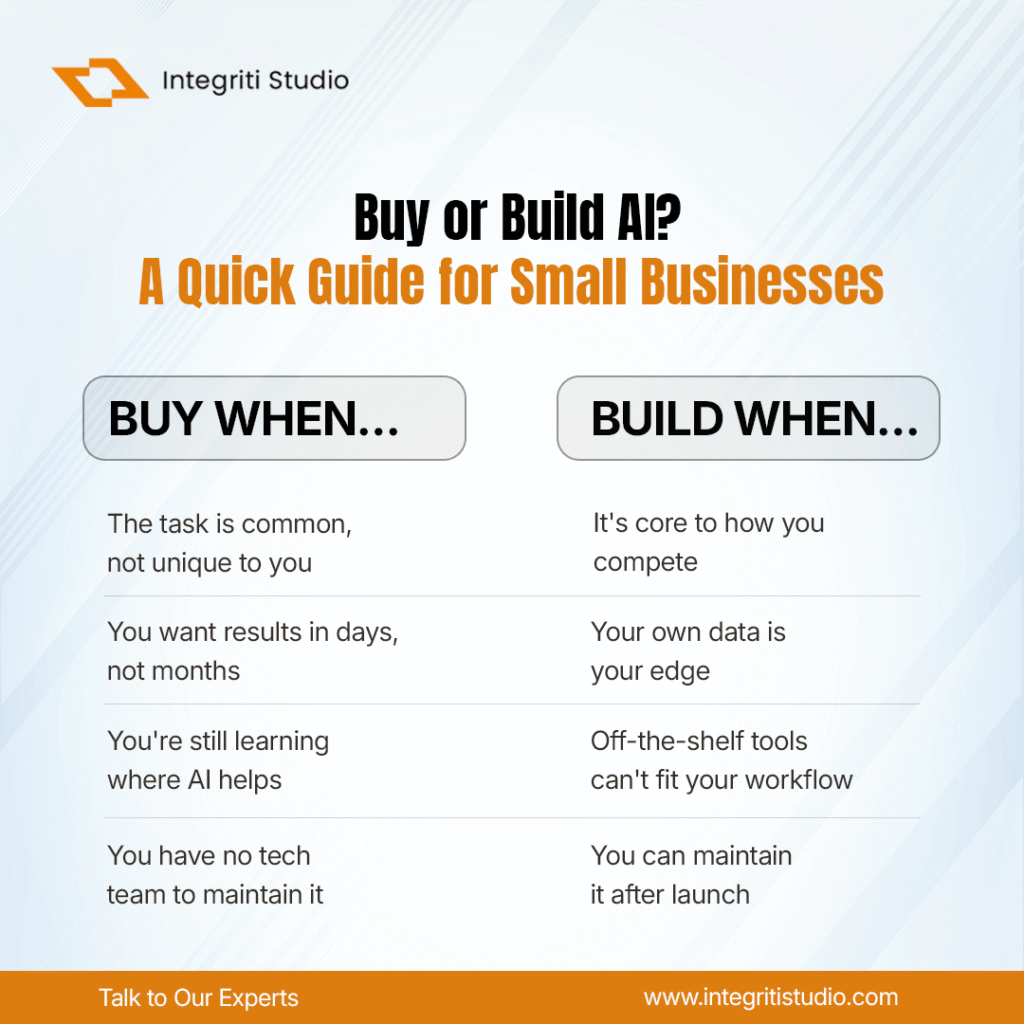
    Should you build your own AI, or simply buy what already exists?

    This guide answers that in plain language. No jargon left unexplained, no promises that AI will magically fix your business, and no invented statistics just how to think about the decision when you’re the one signing the checks.

    First, what “build with AI” actually means

    “Building with AI” gets thrown around loosely, so let’s separate it into three concrete paths. Almost every small business decision falls into one of them.

    1. Buy off-the-shelf (use it as-is). You subscribe to a tool that already has AI inside it an AI writing assistant, a chatbot for your website, AI-powered analytics in your e-commerce platform. You don’t build anything. You configure and use.

    2. Build custom (make something of your own). You create an AI-powered tool tailored to your business for example, a customer-support assistant trained on your product manuals, or an internal tool that reads your invoices and sorts them automatically. This usually means combining an existing AI “engine” (a model accessed through an API) with your own data and workflow logic.

    3. The hybrid path (buy the engine, build the wrapper). This is where most serious work actually lands in 2026. You don’t train an AI model from scratch almost no small business should. Instead, you rent a ready-made model from a provider and build a thin, custom layer around it: your data, your rules, your interface. You get customization without the cost of building the hard part.

    A quick technical note that saves a lot of confusion: when people say a small business is “building AI,” they almost never mean training a model from zero. Training a large model requires enormous data, computing power, and specialized talent that’s out of reach and unnecessary for nearly all small businesses. “Building” today means assembling connecting existing models to your specific data and processes.

    When Buying is the Right Call

    Lean toward buying an existing tool when:

    • The task is common, not unique to you. Writing product descriptions, drafting emails, summarizing calls, basic customer chat thousands of businesses need these, so good tools already exist. Building your own would be reinventing the wheel.
    • You want results in days, not months. Off-the-shelf tools deploy fast.
    • You’re still learning where AI helps. If you don’t yet know which tasks are worth automating, buying lets you experiment cheaply before committing.
    • You don’t have technical staff or a reliable partner. Buying shifts the maintenance burden onto the vendor.

    The recurring wisdom across the industry in 2026 is worth repeating: buy to learn, build to differentiate. Start by buying tools to discover where AI genuinely moves the needle for you and only consider building once you’ve found a spot where a custom solution would give you an edge competitors can’t copy.

    When Building is Worth it

    Building starts to make sense when:

    • The AI touches how you compete, not just how you operate: If it’s core to your product or your unique advantage, owning it matters. If it’s a background efficiency, buying is usually smarter.
    • Your data is your edge: If you have proprietary information years of customer history, specialized documents, unique operational data a custom tool built on that data can do things no generic product can.
    • Off-the-shelf tools can’t fit your workflow: When you’ve genuinely outgrown what vendors offer, and the misfit is costing you real money.
    • You have the means to maintain it: This is the one people underestimate more on that next.

    Not sure whether your business should buy or build? We help small businesses cut through the AI hype and find the handful of use cases actually worth the investment before you spend a dollar on the wrong thing.

    Book a free 30-minute AI strategy call

    The Technical Realities Non-Technical Owners Should Know

    This is the part most sales pitches skip. If you are going to build AI, walk in knowing these four truths.

    1. AI is only as good as your data: A custom AI tool learns from the information you give it. If your data is messy, incomplete, or scattered across ten places, the AI’s output will be unreliable sometimes confidently wrong. Cleaning and organizing your data is often the biggest, least glamorous part of the job.

    2. The great demo trap is real: AI tools are remarkably easy to get to a working demo and remarkably hard to make reliable for every real-world case. A prototype that dazzles in a meeting may handle only the easy 80% of situations. The last 20% the edge cases, the exceptions, the “what happens when a customer types something weird” is where most of the real cost and time lives. Budget for it.

    3. It’s not set it and forget it: AI tools need ongoing attention: models get updated, your data changes, and outputs need monitoring, so quality doesn’t quietly drift. Maintenance is a real, recurring cost not a one-time build.

    4. Governance is not optional: Who checks the AI’s answers? What happens when it makes a mistake in front of a customer? How is customer data handled and protected? These aren’t advanced concerns. These are day-one questions, especially as data and AI regulations continue to evolve. Have a human-review plan before you go live.

    A note on figures: you’ll see a lot of confident statistics online about AI success rates, ROI, and adoption. Treat them cautiously many trace back to marketing material rather than independent research, and the field moves fast. Base your decision on your own numbers and a small, measurable pilot, not on someone else’s headline stat.

    The clearest trend in 2026 isn’t “AI replaces everything.” It’s practical, targeted adoption businesses picking three or four specific, repetitive tasks and applying AI precisely to those, rather than chasing a grand transformation. For retail and e-commerce specifically, the highest-return uses keep showing up in the same places: product discovery and recommendations, personalized customer experiences, and AI-assisted customer service.

    If you want to see where operators are actually placing their bets rather than reading about it — this is exactly the focus of eTail Boston 2026, happening August 10–12, 2026 at the Sheraton Boston, Massachusetts.

    Organized by Worldwide Business Research, it’s one of the longer-running U.S. e-commerce and omnichannel retail conferences, and the 2026 agenda leans heavily into AI-driven personalization, customer experience, and omnichannel growth with a practical, case-study bent rather than high-level theory. For a small business weighing how far to go with AI, events like this are a low-risk way to pressure-test your thinking against real operators before you invest.

    The Bottom Line

    The businesses that win against AI in 2026 won’t be the ones that spent the most or moved the fastest. They’ll be the ones that were honest about what they actually needed and disciplined about ignoring the rest.

    Ready to make a confident, no-hype AI decision for your business? Whether you should buy, build, or start with a small pilot we’ll help you map the right path for your goals, budget, and data. No jargon, no pressure.

    Get your free AI readiness assessment fill out the form and talk to our team

  • When to Start with a Project vs. When to Rent a Team

    When to Start with a Project vs. When to Rent a Team

    When your business needs software built, a website redesigned, a data system cleaned up, or any other technical work delivered, you eventually face a fork in the road. You can hire a vendor to deliver a defined project, or you can rent a dedicated team that works as an extension of your business for as long as you need them.

    These are not just two pricing options. They are two different operating models, and choosing the wrong one is one of the most common and most expensive mistakes small businesses make with technical work. Pick “project” when you need an ongoing team, and you’ll pay for a series of disconnected engagements that never build momentum. Pick “team” when all you needed was one clear deliverable, and you’ll burn cash at a capacity you don’t have the work to fill.

    This guide explains both models in plain terms, shows you the signals that point to each one, and gives you a decision framework you can apply to your own situation, no engineering background required.

    The two models, defined

    Model 1: Start with a project (fixed-scope engagement)

    You hire a vendor to deliver a specific, agreed-upon outcome: a mobile app, a website, an integration between two systems, a reporting dashboard. The scope, timeline, and price are defined up front. When the deliverable is done and accepted, the engagement ends.

    This is often structured as fixed-price (one agreed number for the whole scope) or milestone-based (you pay in stages as pieces are completed).

    In one sentence: you’re buying a result.

    Model 2: Rent a team (dedicated team or staff augmentation)

    You bring on a group of professionals developers, designers, a project lead who work on your behalf on an ongoing basis. You direct the priorities. The team stays with you across many tasks and evolving needs, typically billed as a monthly retainer or on a time-and-materials basis (you pay for the hours or days worked).

    There is a related variant worth naming: staff augmentation, where you add one or two specialists to your existing team to fill a skills gap, versus a full dedicated team that can operate more independently. Both fall under “renting a team.”

    In one sentence: you’re buying capacity and continuity.

    How they actually differ

    The models diverge across a few dimensions that matter to a business owner far more than the technical details:

    DimensionStart with a ProjectRent a Team
    What you buyA defined deliverableOngoing capacity
    Who controls scopeMostly the vendor, against a fixed specMostly you, week to week
    Cost predictabilityHigh for the agreed scope; changes cost extraPredictable monthly spend, but open-ended over time
    Flexibility to change directionLow changes trigger renegotiationHigh reprioritizes as you learn
    Best when requirements areWell understood and stableEvolving or uncertain
    Your management effortLower (vendor manages delivery)Higher (you help steer priorities)
    Ends whenThe deliverable is acceptedYou decide to stop


    The single most useful lens here is certainty of requirements. Fixed-scope projects reward you when you already know exactly what you want. Dedicated teams reward you when the work keeps shifting as you discover what your customers and business actually need.

    When to start with a project

    Lean toward a fixed-scope project when most of the following are true:

    • You can describe the deliverable clearly. You know what “done” looks like, and you could write it down in a page or two. A brochure website, a specific integration, a one-time data migration.
    • The requirements are stable. You don’t expect the goal to change halfway through. There’s no ongoing discovery involved.
    • It’s a one-time or infrequent need. Once it’s delivered, you won’t need continuous work on it for a while.
    • You want budget certainty above flexibility. A fixed number you can plan around matters more than the ability to pivot.
    • You don’t have the bandwidth to manage a team. A project vendor handles delivery management so you don’t have to.

    Typical fits: a marketing website, a standalone mobile app with a defined feature set, migrating from one accounting or CRM platform to another, a compliance-driven one-time build.

    The main risk to watch: scope creep and change orders. Fixed-price only stays fixed if the scope stays fixed. Every “can we also just add…” is a change order, and change orders are where fixed-price budgets quietly balloon. Insist on a written scope and a clear change-request process before signing.

    When to rent a team

    Lean toward a dedicated team when most of the following are true:

    • The work is ongoing, not one-and-done. You’ll be building, maintaining, and improving something continuously—a product, a platform, an internal system.
    • Requirements will evolve. You expect to learn from users and change direction. You want to ship, measure, and adjust rather than commit to a fixed spec up front.
    • Speed and continuity matter. A team that stays with you retains knowledge of your systems, which compounds over months. Re-explaining context to a new vendor each time is a hidden tax.
    • You have enough steady work to keep a team busy. This is the honest gut-check. A team is only cost-effective if there’s a real backlog to fill.
    • You can commit management attention. Someone on your side needs to set priorities and make decisions, even if the vendor supplies a project lead.

    Typical fits: building and growing a software product, running an e-commerce platform that needs constant iteration, a startup finding product-market fit, an established business modernizing systems over a multi-quarter roadmap.

    The main risk to watch: paying for idle or under-directed capacity. A rented team costs the same whether or not you keep it well-fed with clear priorities. Without active direction, you can spend a lot and see little, and blame the team when the real gap was on the steering side.

    The cost conversation

    It’s tempting to compare the two models on sticker price alone. Resist that.

    A fixed-price project looks cheaper because you see one number. But that number assumes nothing changes—and in real projects, things change. A dedicated team looks more expensive because you see a recurring monthly figure, but it can be far cheaper per unit of work delivered when the work is continuous and the team is fully utilized.

    The right comparison is total cost over the real time horizon of your need, including:

    • The cost of change orders and renegotiation in the project model
    • The cost of losing and re-acquiring context each time you re-engage a project vendor
    • The cost of idle capacity in the team model when your backlog runs thin
    • Your own management time in each model

    A useful rule of thumb: short, well-defined, one-time need → project usually wins on cost. Long, evolving, continuous need → team usually wins on cost.

    A note on numbers: actual rates vary widely by location, seniority, and specialty, and they change over time. Any specific dollar figures in this space should come from real quotes for your situation, not from generalized industry averages—treat vendor proposals as your source of truth and get more than one.

    A simple decision framework

    Ask yourself these five questions. The more you answer toward one side, the clearer your answer.

    1. Can I write down exactly what “done” looks like today? Yes → project. Not really → team.
    2. How likely is the goal to change while the work is underway? Unlikely → project. Likely → team.
    3. Is this a one-time deliverable or continuous work? One-time → project. Continuous → team.
    4. Do I have enough steady work to keep a team fully occupied? No → project. Yes → team.
    5. What do I value more right now: a fixed, predictable budget or the flexibility to pivot? Budget certainty → project. Flexibility → team.

    If your answers are split, that’s a real and common situation—see the hybrid approach below.

    The hybrid path (often the smartest first move)

    You don’t always have to choose one and commit it forever. A widely used pattern:

    Start with a small, well-defined project to test the relationship—then transition to a rented team if the work proves ongoing.

    A short initial project (sometimes called a discovery phase or pilot) lets you evaluate a vendor’s quality, communication, and reliability on a low-risk, fixed scope. If it goes well and the work turns out to be continuous, you convert to a dedicated team with a partner you already trust. If it goes poorly, you’ve limited your exposure to a defined deliverable rather than an open-ended commitment.

    This is often the most prudent play for a small business that isn’t yet sure how much ongoing work it will have.

    Common mistakes to avoid

    • Choosing “project” to save money on inherently ongoing work. You end up paying for a chain of disconnected engagements, each one re-learning your systems from scratch.
    • Renting a team before you have a backlog. Capacity with no clear priorities is money spent on confusion.
    • Signing a fixed-price contract with a vague scope. This guarantees change-order friction. Ambiguity always gets billed—usually to you.
    • Under-investing in your own oversight with a rented team. No vendor can steer your business for you. Someone internal has to own priorities.
    • Comparing models on sticker price instead of total cost over the real time horizon.
    • Skipping references and a small trial. Whichever model you choose, verify the vendor on something small before you scale commitment.

    Bottom line

    Starting with a project is the right call when you know precisely what you want, the requirements are stable, and the need is one-time—you’re buying a predictable result.

    Renting a team is the right call when the work is continuous, the goal will evolve, and you have enough steady work and management attention to keep a team productive you’re buying capacity and continuity.

    And when you’re genuinely unsure which is normal a small starter project that can graduate into a dedicated team gives you most of the upside of both while limiting your risk.

    The decision isn’t about which model is better in the abstract. It’s about matching the model to the shape of your actual need: how well you can define it, how much it will change, and how long it will last.