Are you feeling stressed out about your next tech interview?
A technical interview is a demanding and specialized process where candidates are tested on their coding and problem-solving skills as well as soft skills and personality. This can be quite a stressful experience for candidates, especially where whiteboard interviews are concerned. As an award-winning IT services provider, we want to share our expertise and offer guidance on how to shine in your next technical interview.
Smart practice
It is extremely important to research and practice common coding challenges and tech interview questions beforehand. Familiarity with the type of problems you are likely to encounter in the interview will help in improving your confidence in your knowledge. We recommend practicing coding without the help of a code editor. Also, consider timing yourself to get accustomed to the time pressure. Remember, creating a more realistic scenario makes the preparation more effective.
Don’t panic
In technical interviews, interviewers are not just evaluating how a candidate breaks down a problem but are also interested in analyzing how they debug a problem. So, if there is an error with your code, do not panic! Avoid thrashing the code in desperation and maintain your logical flow. Treat your mistake as an opportunity to impress the interviewer.
Communicate
While completing your coding challenges, it is recommended to communicate your thought process to the recruiters. Good Interviewers are not always looking for completely accurate solutions. Instead, they are more concerned with your critical thinking abilities and tech fundamentals. It is recommended to talk out loud while solving the problem to avoid losing out on the position due to a minor blunder. Remember most interviews are designed to test the basic requirement of a job. While recruiters will not try to pull additional information out of you, we encourage our candidates to share their expertise and knowledge organically in the interview.
Recruiters often write off good candidates by citing reasons like technical skills gap. Hence, candidates need to exhibit their technical expertise effectively. We hope these suggestions can assist job seekers in out-performing their next tech interview.
If you have any additional queries or are interested in collaborating, contact us now!
7 errors encountered while migrating, and how to fix them!
As newer versions of Magento are released from time to time, merchants seek out a smooth upgradation process.
Magento 2 was released in 2015 with revamped architecture and exciting new features. Magento 2 is now considered the top choice of eCommerce business owners. As Magento 1’s popularity diminishes and Magento 2 takes its place instead, businesses enlist migration services. The process of migration is not always smooth and can prove to be a challenge for some businesses.
The Data Migration Tool (DMT) is a command-line interface used for migrating data from one Magento version to another. This tool verifies consistency between database structures, tracks the transfer progress, verifies tests and creates logs.
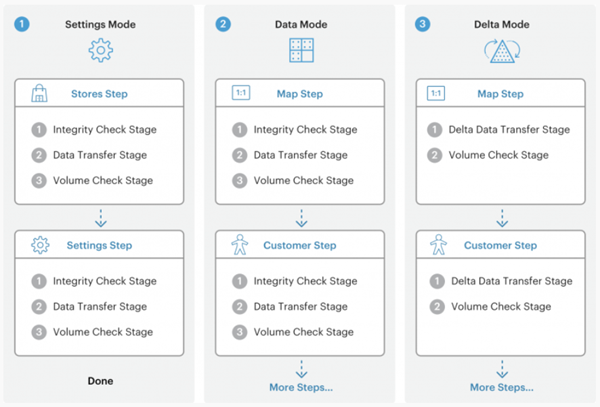
The tool operates in 3 modes which are shown in Figure 1.
Settings Mode
Manages and migrates configuration settings
Data Mode
Migrates data in bulk to the destination database
Delta Mode
Transfers incremental data updates to Magento storefront and admin panel while running previous migration modes
Figure 1: DMT modes
Before we discuss the issues faced while migrating, let’s briefly talk about the process of migration itself.
You can make a backup of your data with the following command:
In order to initiate the migration, you will use the following command:
bin/magento migrate:data [-r|–reset] [-a|–auto] {<path to config.xml>}
Now that we have covered the basics of getting started with migration, let’s move on to explore some of the most frequent issues faced when using DMT, and how you can solve them!
1. Mapping Issue with Fields and Source Documents
Have you ever seen the following error show up on your screen while migrating?
bash Source documents are not mapped: <EXTENSION_TABLE>
bash Source fields are not mapped. Document: <EXTENSION_TABLE>. Fields: <EXTENSION_FIELD>
An error like this appears when the Data Migration Tool is trying to check for consistency between the source and destination databases. Internal tests are run to check for data consistency between tables and fields. Instead of the word ‘Source’ in the error message, you may also see the word ‘Destination’ which implies the same problem.
Solution
To resolve this error, here are some practical solutions you can adopt:
Configure the Data Migration Tool Executing the –a argument will help auto-resolve errors and will ensure that the migration does not stop
You may also choose to ignore database entities that are not needed by adding <ignore> tag to the entity in the map.xml file
Here is how you can insert the <ignore> tag:
...
…
sales_flat_invoice_grid
sales_flat_order_address.address_id
…
…
2. Classes not mapped in records
While migrating an error like this may also appear:
Class <extension/class_name> is not mapped in record <attribute_id=196>
This error occurs at the Entity Attribute Value migration step. Usually, it is due to the missing class of an extension.
Solution
You resolve this error, you can:
Reinstall the existing extension
In the eav-attribute-groups.xml.dist, add the attribute that causes this error to <ignore>
Add class mapping using class-map.xml.dist file
3. Foreign Key Constraint Failure
You may also encounter an error like this:
Foreign key <KEY_NAME> constraint fails on source database. Orphan records id: <id_1>, <id_2> from <child_table>.<field_id> has no referenced records in <parent_table>
This occurs when there are missing database records in the parent_table, to which the field_id of the child_table is pointing to.
Solution
Some viable solutions for this can be:
Delete the records from the child_table if not needed.
Disable the Data Integrity step by modifying the DMT’s config.xml.
4. URL Rewrite Duplication
There are duplicates in URL rewrites:
Request path: towel.html Store ID: 2 Target path: catalog/product/view/id/10
Request path: towel.html Store ID: 2 Target path: catalog/product/view/id/12
The above error occurs when two entries use the same request path and store ID pair but with two different target path values. The target path in a URL must be specified by a unique pair of request path + store ID.
Solution
Resolution to this can be to enable the auto_resolve_url_rewrite_duplicates in the config.xml file. This configuration adds a hash-string to the conflicting records of URL rewrite and shows the resolution result in the command line interface.
5. Entity Mismatch
Mismatch of entities in the document: <DOCUMENT> Source:
Mismatch of entities in the document: <DOCUMENT> Source:
<COUNT_ITEMS_IN_SOURCE_TABLE>
Destination: <COUNT_ITEMS_IN_DESTINATION_TABLE>
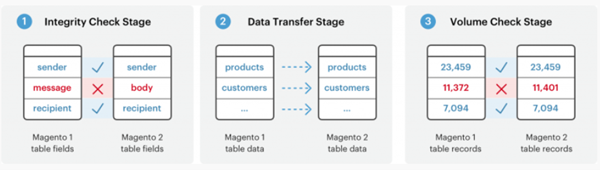
This error usually shows up when a customer places an order while the store is under active migration. To be precise, this occurs during the volume check setup (the stages are shown in Figure 2 below). This is when the Adobe Commerce database record encounters a mismatch between the original destination, and the final destination. It is common when a store is under migration for the website to say so and not take any orders. But some stores do allow orders to be compiled, and as soon as migration is done, those orders are automatically given the status of placed orders.
Solution
A possible solution to resolve this error would be to run the Data Migration Tool in delta mode to transfer incremental changes.
Figure 2: Check-stages for migration
6. Deltalog not installed
You may encounter this error as well:
Deltalog for <TABLE_NAME> is not installed
This means that deltalog tables (with prefix m2_c1_*) were not found. Data Migration Tool (DMT) installs these tables during data migration as well as database triggers which track changes and fill deltalog tables.
Encountering this error means that you are trying to migrate from a copy of the store and not the live store itself. Copy does not contain triggers and deltalogs needed to complete delta migration therefore resulting in a failure.
Solution
To troubleshoot this, testing of the migration process needs to be done. A specialized team is responsible for carrying out testing and the process usually entails scoping, dependencies/interactions, test cases, non-functional testing, and functional application tests.
Here are some important arguments for migration configuration:
bin/magento migrate:settings [-r|–reset] {<path to config.xml>}
[-r|–reset] stands for an optional argument that starts the migration from the beginning, which can be used for testing migration.
[-a|–auto] is also an options argument that prevents the migration from stopping if it encounters integrity check errors.
{<path to config.xml>} is the absolute file system path to the migration tool’s config.xml file: this argument is required.
7. MySQL Packets
MySQLError1153 – got a packet bigger than ‘max_allowed_packet’ bytes
This error occurs when MySQL is running in default settings.
Solution
To solve this error, use the following steps.
For the client, specify the following command:
mysql –max_allowed_packet=100M -u root -p database < dump.sql
Change the my.cnf or my.ini file (usually found in /etc/mysql/) under the mysqld section and set:
max_allowed_packet=100M
You can also use the MySQL console to log these commands:
set global net_buffer_length=1000000;
set global max_allowed_packet=1000000000;
We have discussed 7 common errors that one can encounter while upgrading Magento versions and migrating data. If you are considering migrating your own e-store to Magento or if you are considering upgrading your Magento version, it’s better to discuss with experts who have hands-on experience.
At Integriti, we have a capable team of web developers who can make your migration process smoother!
JavaScript is a powerful and popular programming language used to create dynamic and interactive websites. It’s nothing new to have robust JavaScript-based libraries and frameworks for developing single-page applications (SPAs), graphics and animation, and server-side JavaScript platforms. JavaScript is now fully commonplace in the realm of web app development, making it a crucial ability to know.
As with any programming language, there are several issues that development teams encounter when using JavaScript. From creating memory leaks to confusion about equality, developers must be aware of these common issues and how to resolve them.
In this article, we’ll discuss 10 of the most common JavaScript issues that businesses face and how to resolve them. By understanding and addressing these issues, your development team can create more efficient and reliable code.
So, let’s get started!
Creating Memory Leaks
Memory leaks occur when you allocate memory for an object or variable but do not free it when it is no longer required. This can cause your application to use more memory than it needs and can lead to performance issues. To prevent this, development teams need to be aware of the types of objects and variables they are using and ensure they are properly freed when they are no longer needed.
When creating memory leaks, developers should keep in mind the lifespan of the objects and variables they are working with. If an object or variable is not needed anymore, developers should make sure to free the associated memory as soon as possible. Furthermore, developers need to be aware of any external libraries or frameworks they are using and make sure to properly dispose of any objects or variables associated with them.
Thinking There Is Block-level Scope
One of the most common issues developers face is thinking that there is block-level scope in JavaScript. The block-level scope is the concept that variables declared within a certain block of code are only accessible within that block. This is not the case in JavaScript, as variables are scoped to the function, and they are declared in. This can lead to confusion and unexpected behaviour when working with variables.
To avoid this issue, developers should be aware of the scope of variables they are working with. In addition, developers should make use of the let keyword to ensure that variables are only accessible within the block they are declared in. This will help to avoid confusion and unexpected behaviour when working with variables.
Incorporating Helpful Error Handling into JavaScript Code
Error handling is an important part of any software application. Unfortunately, it is often overlooked or neglected when it comes to JavaScript code. Error handling is essential for ensuring that your application is stable and reliable. It can help to catch and fix errors before they become a problem.
When incorporating error handling into your JavaScript code, it is important to make use of the try/catch statement. This statement will allow you to catch any errors that occur in your code and handle them accordingly. Furthermore, you should make use of the console.error() method to log any errors that occur. This will help to ensure that any errors that occur in your application are properly handled and logged.
Setting a Breakpoint and Examining Data with Firebug
Firebug is a powerful debugging tool for JavaScript code. It allows developers to set breakpoints in their code and examine the data associated with it. This can be extremely useful for understanding how your code is working and can help to identify and fix errors quickly.
When using Firebug to debug your JavaScript code, it is important to understand the different types of breakpoints that can be set. There are line breakpoints, which will pause the code execution at a particular line of code, and conditional breakpoints, which will pause the code execution when a certain condition is met. It is also important to understand the data that can be examined with Firebug. This includes variables, functions, and objects.
Failure to Use “Strict Mode”
Strict mode is a feature of JavaScript that helps to enforce better coding practices. It helps to eliminate certain types of errors and can lead to more reliable code. Unfortunately, many developers do not make use of this feature and as a result, their code may be more prone to errors.
To make use of strict mode, developers need to add the “use strict” directive at the beginning of their JavaScript code. This will enable strict mode and help to ensure that their code is more reliable. Furthermore, developers should make use of the “strict” keyword when creating functions and classes. This will ensure that any errors that occur in these functions or classes are caught and handled properly.
Providing a String as the First Argument to setTimeout or setInterval
setTimeout and setInterval are two of the most used methods in JavaScript. They allow developers to schedule tasks to be performed later. One of the most common issues developers face when using these methods is providing a string as the first argument instead of a function. This can lead to unexpected behaviour or errors in your code.
To avoid this issue, you should always make sure to provide a function as the first argument to setTimeout and setInterval. If the function needs to be executed at a later time, developers should make sure to wrap it in an anonymous function. This will ensure that the function is executed at the correct time and with the correct parameters.
Creating Incorrect References to Instance Methods
When creating object-oriented applications in JavaScript, developers need to be aware of the instances of objects they are working with. One common issue developers face is creating incorrect references to instance methods. This can lead to unexpected behaviour or errors in your code.
To avoid this issue, developers should make sure to use the “this” keyword when referencing instance methods. This will ensure that the correct instance of the object is being used. Furthermore, developers should make use of the bind() method to bind the context of a function to a specific instance of an object. This will help to ensure that the correct instance is being referenced when the function is called.
Failure to Properly Leverage Prototypal Inheritance
Prototypal inheritance is a powerful feature of JavaScript that allows developers to extend an object’s functionality. Unfortunately, many developers do not take advantage of this feature and as a result, their code can be less efficient and less reliable.
To take advantage of prototypal inheritance, developers should make use of the prototype keyword when creating objects. This will allow them to create objects that inherit the properties and methods of other objects. Furthermore, developers should make use of the extend() method to easily extend the functionality of an existing object. This will help to ensure that their code is more efficient and reliable.
Inefficient DOM Manipulation
DOM manipulation is an essential part of any JavaScript application. Unfortunately, many developers do not take the time to optimize their DOM manipulation code and as a result, their applications can be slow and inefficient.
To optimize the DOM manipulation code, developers should make use of the querySelector() and querySelectorAll() methods. These methods will allow developers to select elements quickly and efficiently from the DOM. Furthermore, developers should make use of the createElement() and appendChild() methods to create and add elements to the DOM. This will help to ensure that their DOM manipulation code is fast and efficient.
Confusion About Equality
Equality is an important concept in any programming language. Unfortunately, many developers are confused about the different types of equality in JavaScript and as a result, their code can be unreliable.
In JavaScript, there are two types of equality: strict equality (===) and loose equality (==). Strict equality checks for both the value and the type of a variable, while loose equality only checks for the value. To avoid confusion, developers should always make use of strict equality when comparing two variables. This will help to ensure that their code is more reliable.
In this blog post, we looked at 10 common JavaScript issues that developers face. From creating memory leaks to confusion about equality, these issues can lead to unexpected behaviour or errors in your code. To avoid these issues, developers should make sure to understand the different types of errors in JavaScript and make use of the tools and features available to them. By doing so, they can ensure that their code is more reliable and efficient.
Did you know that 94% of a website’s first impressions are due to its design?
There is no doubt about the impact a web or app design has on user experience. If you want to hook your potential customers, then you need to say goodbye to plain UI designs, which cannot pop out in an already saturated digital market.
We have decided to list down 20 tried-and-true techniques that can spice up your designs to ensure a positive user experience for your customers.
1. Keep it simple
Having an easy-to-use interface can make or break your digital presence. Keep it simple, stupid (KISS) is a design principle that stresses keeping designs and systems as simple as possible. If you want to boost the levels of user acceptance and interaction, your safest bet is to avoid complexity. After all, the easier a design is to understand and use, the more likely it is to be adopted and engaged with.
White space, also known as “negative space,” is a portion of the web page that is left blank or unmarked and plays a pivotal role in communicating which features of the website need to stand out as vital aspects. Research also shows that white spaces are capable of increasing comprehension by around 20%.
Image Source: UX Design
3. Unity of elements
Visual unity is all about harmony. The idea is to create elements that support each other and work together to form a user-friendly and aesthetically pleasing design. Through ensuring this unity, the viewers will first look at the whole and then the sum of the parts making that whole. It will improve your design’s balance, contrast, emphasis, and proportion.
When designs are built around content, they become unique. Content provides the designer with insight on how to properly present on devices of all sizes, with good navigation and calls-to-action, and for the highest conversion of customers. Good content blends text and media to help your visitors comprehend what you do, how you do it, and why they need your product or services.
UX audit provides data that illuminates why a product is encountering issues and offers actionable recommendations that can resolve the problems and improve the user experience. You need to delve into both your own business goals and users’ needs to get productive results from the audit.
6. Consistent Typography
Selecting a typeface and sticking to it will help you avoid creating confusing and messy interfaces. A good practice that we have incorporated into our user interface design process is to set up a hierarchy of typefaces (one constant font for headers, another for subheadings) and commit to it.
Image Source: UX Design
7. Shadows from one source
Shadows are a great tool to bring more depth and emphasis to your designs, which enables users to differentiate between UI elements. However, they need to follow the rules of nature. You can create more realistic shadows by guaranteeing one common source.
Image Source: UX Design
8. Darker text on light background
If the content being displayed on the user interface is important and lengthy, then it’s better to keep a light theme with darker text for greater readability and legibility. We incorporated a lighter background with darker text on our website to make it easy for visitors to get the information they need.
9. High Contrast for Text Over Images
What happens if you want to place text on a background image? You can make sure that the text is legible by providing sufficient contrast. Accessibility requirements for color contrast dictate that text should have a contrast ratio of a minimum of 4.5:1. Remember, you don’t want users to strain their eyes due to unreadable text, and techniques like semi-opaque overlay, text shadow, or outline, and blur can help you avoid this issue.
10. Irregular backgrounds
When it comes to designing a website or an app, it’s clear that the screen background is very important to the overall look of the UI. Irregular backgrounds can help you create truly eye-catching designs that leave a lasting impression on users.
Icons can speed up user interactions when they are easy to recognize, and the meaning behind them is well communicated. By highlighting icons, you can add more style, clarity, and visual appeal to your user interface designs.
12. Subtle lines to break text
Visual dividers are handy in dividing pieces of content into groups, sections, or options. They help in setting up a visual hierarchy and make the design layout clearer and more digestible. For our website, we have used lines as a visual divider to break content apart, but you can also employ other dividers like color, negative space, shadows, and images.
13. Gradient borders and backgrounds
With the sheer volume of content in the digital world, businesses need to find ways to break through the clutter and get their target customers’ attention. Gradients can help you stand out. They are versatile and can be used as both the focal point of a design and a background element. They can be bold or subtle; the choices are extensive. One look at our website and logo, and you will know how much we love gradients!
14. Solid shadows
This technique is for those companies that wish to stand out from the crowd and entertain their users. Particularly associated with Neubrutalism design thought, these shadows offer a sharp contrast and have no blur on them.
Layering text and other design elements will add visual depth to your UI, and your headings will get a unique, characterful look. Notice how this technique blends text realistically into the background image shown below.
Image Source: Slider Revolution
16. Use of imagery
Research shows that photos, icons, and images are the top visual elements appreciated by consumers in a web design. An image’s ability to engage and communicate with viewers is enormous. Compared to text-based descriptions, complex concepts can be conveyed more effectively through the right imagery.
They are an easy way to add some visual excitement to your web or app designs. Grid designs add texture and can be used to fill out a space on the page. Note how, compared to say a block of color, a grid of dots is not too visually heavy.
Like many other components of web design, we have highlighted that hand-drawn elements are a great way to express individuality. Hand-drawn elements are ideal for creating an emotive and human design and can be a reminder for the users that there is a human behind the website.
Image Source: Jam.dev
19. Glassmorphism
As the name suggests, glassmorphism uses the properties of glass to enrich modern UI designs. A favorite approach of brands like Apple and Microsoft, it gives a translucent or transparent look to its elements and works well on vibrant, colorful backgrounds, which accentuate the glass effect. This design style is great for visual hierarchy and emphasizes the content you want to highlight.
The dark mode user interface refers to designs where the light-colored text sits on a dark background. Dark UIs’ popularity comes from their sleek and contemporary visual appeal and their ability to improve eye fatigue. For products where users are likely to be engaged for a longer period, adding a dark theme to UI design is a must.
UI Design is a link between customers and your website, which helps ensure a positive user experience through visually appealing designs, easy navigation, and effective visual hierarchy. We hope these techniques can help you in creating a beautiful and successful UI for your brand.
The world of eCommerce is saturated with cutthroat competition over getting customers’ attention, particularly in the apparel industry. With the rise of online shopping over the recent years, eCommerce has become an important playing ground for most fashion and apparel brands. Research shows that by 2025, the e-commerce fashion market is expected to generate a revenue of approximately 331.7 billion U.S. dollars in North America alone.
With Ecommerce more valuable today than ever before, it’s important to unlock the doors to new ideas and styles. Apparel brands need to create their eCommerce site differently than their competitors and get a lot of new visitors to their sites.
Most visitors take about 0.05 seconds to form an opinion about a website. This is where a good user experience comes in. For Ecommerce, UX is crucial because it makes sure that your customers can easily navigate your website, find the product they require, buy it, and move on.
As per UX Planet, for every dollar spent on UX, the company can expect a return on investment of up to $100. A good UX design raises a website’s conversion rate by approximately 200% and 80% of consumers are ready to pay extra for a better experience. The easier it is for people to buy from you, the greater your online revenue will be. That’s why it’s important for businesses to make sure they offer the best UX possible and stay ahead of all the new trends.
So, how can apparel brands create high-converting digital experiences?
User-centered design (UCD) is a design process that concentrates on users and their requirements. In UCD, a variety of research and design techniques are used to build highly compatible and accessible products for users. User-centric design is a great tool for you to develop a more inclusive online platform.
More and more businesses are starting to grasp the significance of being inclusive and there is a shift in attitudes toward gender and cultural inclusion. Non-English naming conventions are displayed in forms with non-binary options and “preferred name” fields. All such features provide users with a more customized and wide-ranging customer experience. Inclusivity is also reflected in the diversity of participants selected for user research.
Overall, by adopting this trend, companies can benefit from close user involvement in the design process and ensure an online shopping experience that meets users’ expectations and requirements. This results in increased sales and reduced costs incurred by customer services.
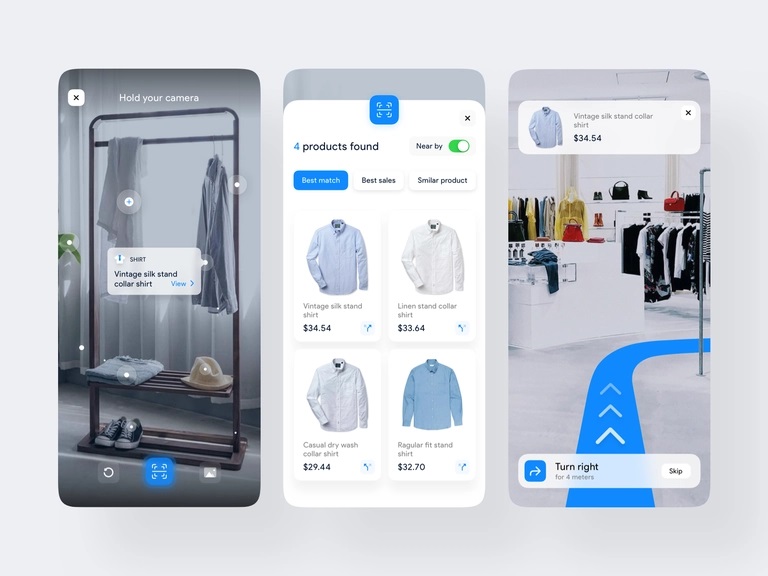
The barriers between the digital and real worlds are blurring due to advances in AR/VR technology. Designing with VR/AR has changed how companies are optimizing user experience on digital platforms. In UX design, extended reality particularly rose to fame during the COVID-19 pandemic when companies wanted to reach end-users who were stuck at home.
Employing this technology would mean that users are no longer required to issue any commands to applications in order to use them. Instead, user actions are interpreted in real time by the gadget which reacts to the user’s surroundings.
The fashion and retail sectors can employ this technology to connect with their customers in completely innovative ways. With the help of 3D designs, VR/AR technology will allow apparel brands to offer a first-person perspective to customers. Users will be able to engage with design components face-to-face and will get an immersive shopping experience.
Mobile-first Designs
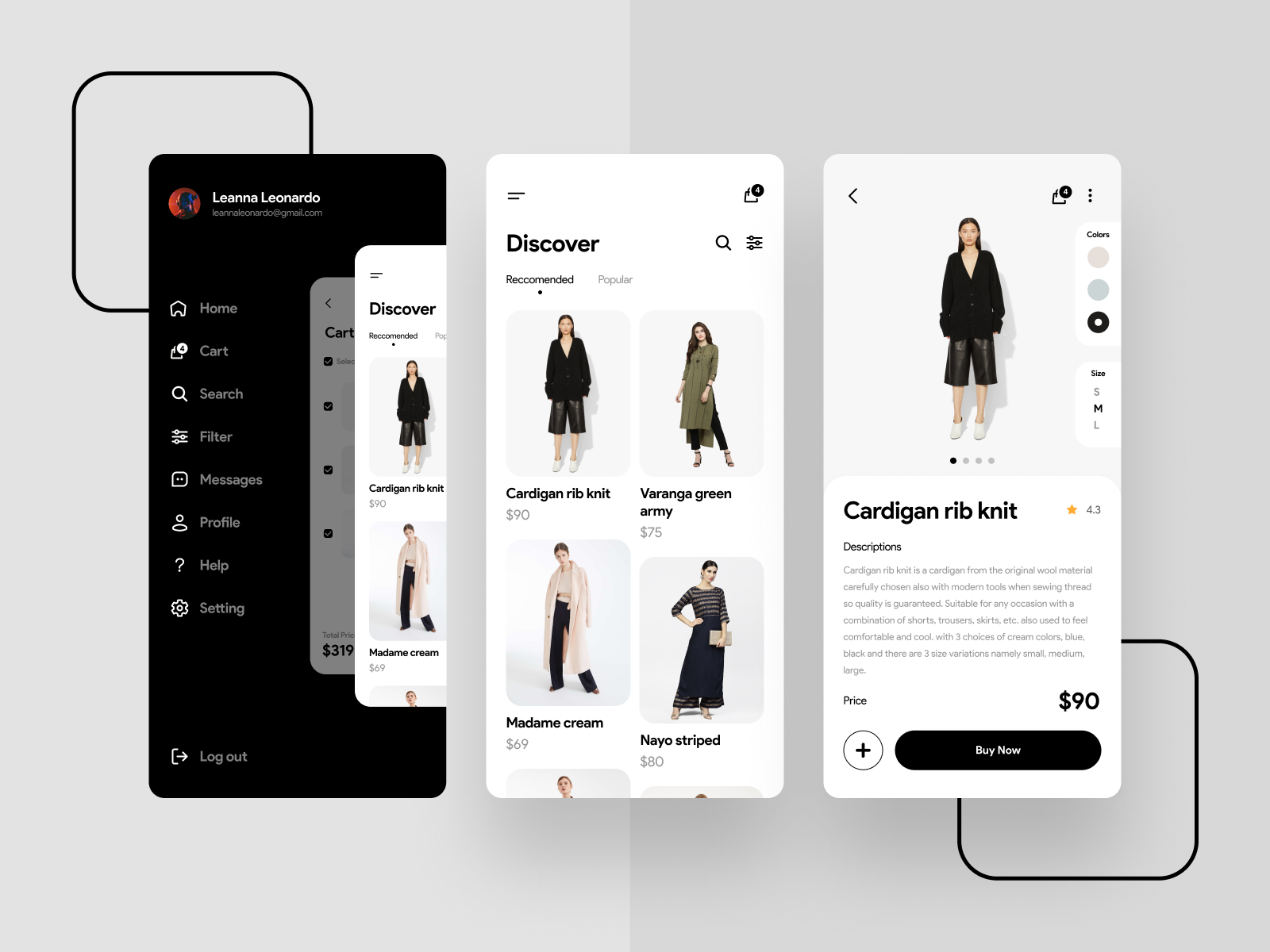
Mobile devices have become an essential part of the current digital landscape and will continue to remain so in the future as well. If an apparel brand wants to increase its online sales, then they need to focus on mobile E-commerce. When making a purchase decision, 59% of shoppers consider being able to buy products on mobile as an important factor.
In the Mobile-first design approach, designers will first work on creating a product design for mobile devices. This is done by prototyping the app’s design for the smallest screen first and then moving on to larger screen sizes. it makes sense to adopt this approach as devices with smaller screen sizes have space limitations and UX designers have to ensure that the key components of the website are prominently displayed for users.
If your business incorporates this UX trend in its fashion eCommerce, designers would be compelled to remove unnecessary elements to deliver seamless website rendering and navigation.
Voice-over Interfaces
User interface design is much more than just the visual screen. It takes into consideration other senses as well. Voice search is another design trend that is gaining hype. The speech and voice interface market is estimated to grow to approximately 25 billion dollars by 2025.
Users’ attention spans have declined over the years, and they demand more speed and ease. Businesses are moving towards voice-activated user interfaces to bring a whole new level of convenience to their customers. This offers users the ability to carry out a task hands-free and without looking at a device.
Fashion and retail companies can utilize sophisticated voiceover interfaces to provide users with a more personalized and highly efficient user experience as they would have someone to assist them. In fact, customers will have a personal store clerk with them to guide them along their digital shopping experience.
Conclusion
In conclusion, fashion eCommerce is a highly competitive arena to survive in, and apparel brands need to be open to experimenting with modern UI design trends. Retail businesses should be able to anticipate their users’ needs and ensure that they have the necessary tools to keep up with trends to provide the best user experience possible and achieve customer satisfaction. Adopting approaches like User-centric design and Mobile-first design can help you meet the current need of your customers. Similarly, incorporating voice-activated user interfaces and VR/AR technology in your eCommerce strategy can help you create more immersive, customized, and distinctive digital experiences. The need for this shift towards virtual and augmented reality will likely intensify in the future with the rise of Metaverse.