Tag: software development

  • Utilizing React for UI in Adobe XD

    Utilizing React for UI in Adobe XD

    Product teams are essential for bridging the gap between the project’s design and development. There may be a lot of guidelines for help, but until the execution is done right, guidelines don’t guarantee a perfect result. To close this gap between design and development, React was introduced.   

    React was brought in as a sophisticated and vital framework library of JavaScript. In the front-end development space, it is different from its competitors in a way that it does not attempt to provide a complete app framework that other mainstream frameworks offer. But rather, it provides mastering the art of user interfaces. And this is mainly the reason why React is majorly symbolized with UI/UX.

    React Native – a UI framework for building native apps uses native components like View, Text and Image for building the UI blocks. Diagram 1 summarizes this in a visual format.  

    Image to show react native app components
    Diagram 1: React UI Framework

    This component approach yields the following benefits:  

    • Components let you build a domain specific language  
    • They are shared across the boundaries meaning for a component on the design canvas, source code is given for it too.  
    • Platform specific versions get established so a single codebase can share code across platforms. React components wrap existing native code and interact with native API’s via React’s UI paradigm and JS.    
    Blog image to show structure of React Native app
    Diagram 2: Cross Platform Design in React

    Adobe XD is a fast and powerful UI/UX Design and collaboration tool. It offers a vector-based user experience design for web and mobile apps. It is actively used to create the overall prototype or wireframe for the app. Once the designing process is completed, the project may be exported to any other app framework. It is important to note that while exporting is done, it may disturb some of the design elements interfaces. To avoid this, there is a need for a plug-in to integrate the Adobe XD with React. Plug-in, in this scenario, would utilize react Framework using JSX, in conjunction with webpack to transform and bundle the source into JavaScript consumable by XD.   

    It is important to note that the XD plugin environment is not a browser. Instead, there is a technology called Unified Extensibility Platform (UXP) developed by Adobe that powers the plug-in’s code. It aims to map closely to web standards for HTML, CSS and JS. It should be noted that not all node packages are expected to work. XD’s plug-in sandbox supports NPM modules using only the core JavaScript API’s i.e., no file system access or external process launching.  

    Following is the mechanism to create the plug-in.  

    STEP 1: Choosing the kind of plug-in – Modal or Panel  

    XD supports two kinds of plug-in flows, namely Modal (also known as diagonal) and Panel. The difference between these two is that dialogue plug-ins drop down from the top of the application and block further user interaction until dismissed. They have their place, but not all tasks benefit from the need to interrupt workflow. Panel plug-ins integrate into a dedicated area off to the side. The plug-in effectively becomes another tool to use, embedded right into the XD’s native application. UXP engine renders true application UI elements from the plug-ins code. Here, we’ll proceed with panel type plug-in, but it’s completely optional which one needs to be used.      

    STEP 2: Project Set Up  

    Have the following up and running before starting with XD. 

    • JS IDE like VSCode, WebStorm, Atom or Notepad++.  
    • Repository management via Git. There will be a need to pull & push codes to the project report.  
    • Installation of JS sources from a remote registry and then build node packages: node with npm and yarn.   

    Once XD has been started, next step is to locate the plug-in development folder. This can be found in the path: XD > Main menu > Plug-Ins > Development > Show Develop Folder.  

    STEP 3: Project Installation 

    From git, clone the project files. Once the project has been pulled down, execute yarn install within the projects root directory to pull in the necessary dependencies. A good way is to keep a file watcher going on to recompile the project automatically by typing npm run watch (or yarn watch) in the terminal also from the project’s root folder. Project debugging can be done in the developer output console in XD, where runtime errors and console.log () statements are recorded. Diagram 3 shows a sample screenshot.  

    Image of project Installation
    Diagram 3: Project Installation

    STEP 4: XD Resources Configuration  

    In the project files, manifest.json would be present which contains metadata pertaining to the plug-in. Externals entry in the webpack.config.js is important because this is where native XD modules are listed. The webpack code will use externals from the XD binary instead of bundling them with build. Projects src folder will have main.jsx file. This is a standard looking entry point that requires a helper file react-shim.js as shown in code below.  

    if (window.setTimeout == null) { window.setTimeout = function(fn) { fn() }; } if (window.clearTimeout == null) { window.clearTimeout = function() {}; } if (window.cancelAnimationFrame == null) { window.cancelAnimationFrame = function() {}; } if (window.requestAnimationFrame == null) { window.requestAnimationFrame = function( {      console.log("requestAnimationFrame is not supported yet");   } } if (window.HTMLIFrameElement == null) { window.HTMLIFrameElement = class HTMLIFrameElement {}; } The shim provides XD’s JS engine with functions that are not there. It assigns the windows iframe element to HTMLFrameElement built into XD.  PanelController mounts the app and holds three functions implemented by the panel plug in specification: show(), hide (), and update ().  See the code below.   const React = require('react'); const ReactDOM = require('react-dom'); class PanelController {    constructor(App) {    this.App = App;     this.instance = null;    this.rootNode = document.createElement('div');      this.attachment = null;    ['show', 'hide', 'update'].forEach((fn) => this[fn] = this[fn].bind(this));   }    show(event) { const { selection, root } = require('scenegraph');      const App = this.App;   this.attachment = event.node;      this.attachment.appendChild(this.rootNode);      if (!this.instance) {        this.instance = ReactDOM.render(, this.rootNode);      }      this.update(selection, root);    }    hide(event) {      this.attachment.removeChild(this.rootNode); } update(selection, root) { if (this.instance.documentStateChanged) { this.instance.documentStateChanged(selection, root);    }   }   }

    After the plug-in loads successfully, show () is called where the app instance attached to a generated root div element, then rendered in typical React fashion. Then whenever the ScenegGraph changes, the update () function is called which in turn calls documentStateChanged() on app passing along the current selection with the SceneGraph root node. When the plug-in unloads, hide () is invoked and the app is then unmounted.  

    STEP 5: UI Components Addition  

    The app has three inner components within the plug-in panel area handling a couple of actions and functions. EditDocument function’s first parameter is the undo label. The second is the function passing the current selection + SceneGraph root node. This is the only place where document changes can be made from the code. SceneGraph can only be invoked by a user interaction like a button click or input change originating from the plug-ins UI. If the action is asynchronous, the operation must use a Promise or the sync await keywords in order to pause the plug-in until the action completes.  

    UI capabilities can be seen in MainContent.jsx. Let’s have a look.  

    const React = require('react'); const styles = require('./MainContent.css'); const btoa = require('btoa'); const application = require('application'); const { selection, Artboard, ImageFill, Line, Text } = require('scenegraph'); const fs = require('uxp').storage.localFileSystem; const UNSPLASH_API = 'https://api.unsplash.com/photos/random?client_id=b21ca0eaeafd7b2d3ad04aea61bc1ca8516fe43dfdb22ebd93e39aa25049a014'; class MainContent extends React.Component {    constructor(props) {    super(props);    this.state= {};    ['handleCreateRendition', 'handleFetchImage'].forEach((fn) => {      this[fn] = this[fn].bind(this);  }); }   handleCreateRendition = () => { application.editDocument({ editLabel : 'Export Rendition' }, (selection, documentRoot)  => { selection.items.forEachasync(node) => {      const folder = await fs.getFolder();              const filename = `${node.name}_${node.guid}${(node.fill instanceof ImageFill) ? '@2x.png' : '.svg'}`;          const file = await folder.createFile(filename, { overwrite : true });          const renditionSettings = [(node.fill instanceof ImageFill) ? {            node : node,            outputFile  : file,            type : application.RenditionType.PNG,            scale : 2 } : { node  : node,   outputFile  : file,           type        : application.RenditionType.SVG,          minify      : true,            embedImages : false,    scale       : 1      }]; … …

    … The UI in the above code shows some plug-in capability regarding buttons. The disabled attributes are set based on the current selection and a uxp-variant attribute provides basic built-in styling loosely adhering to XD’s native UI.  

    In a nutshell, the first button passes its click handler up the app to pan and zoom the viewport. The second button fills a shape type object with a random image provided by the API. Within the handlers editDocument(), a first async call is made which returns a JSON object describing the image. The description entry is used to rename the layer, one of the source URL’s is also grabbed for use on the following fetch call. Taking the entry’s full size image URL through the second and last async fetch call, the response is converted from a data buffer to a binary string.  

    Finally, the selected node gets filled with the base 64-encoded representation of that binary image data. The third button simply exports the image. A file handler is created at that path with a name generated from the layer’s name plus it’s a guid (a UIUD) properties. A set of export options are defined, createRendition() is called, ultimately writing the file contents and closing the handle.  

    The final steps are to package the plug-in. First execute the yarn build within the project’s root folder. The bundled JS is written by webpack to main.js located off the projects root folder. Files are imported in the source by using the require statement. A standard zip file would contain main.jsmanifest.json and the images folder, plus any other assets placed on the root folder by webpack. Then change the file extension from .zip to .xdx so Adobe XD recognizes it as a plug-in package.  

  • What is the future of AI in the recruitment industry in 2022?

    Talent hunting can be a costly and time-consuming process that is quite vulnerable to human lapses of judgment. This is why AI-enabled recruitment is highly demanded in the world of human resource management. AI talent acquisition is here to stay.  

    Recruitment agencies are already using machine learning algorithms for some stages of the hiring process, if not all. This could be for finding the right candidates, optimizing job ads or filtering resumes. In recent years, AI is even being used during job interviews. Candidates are often asked to record their answers to questions over video, which is then algorithmically analyzed to determine aptitude. Unilever uses the AI-empowered process of Hire Vue to do this for its initial stages of recruitment. A candidate’s behavior and aptitude are gauged from their facial expressions and these insights are then used to speed up the hiring process.   

    Proponents of AI insist that the process is grounded in data and research while critics have labeled it a pseudoscience, with a tendency to aggravate existing gender and racial biases.  

    So how effective is AI-enabled talent hunting? What are some advantages and disadvantages of AI recruitment? Let’s discuss!  

    Should we be excited about AI recruitment?

    AI-integrated hiring has the potential to offer unprecedented benefits to HR managers – from the screening process to managing employee experience. Recruitment today looks drastically different from recruitment of a decade ago. What does this mean for the future of hiring in 2022? Let’s take a look at some factors that brighten the future of recruitment.   

    It saves time  

    Menial tasks can often take up a disproportionate amount of an HR manager’s time. This is why automation of simple tasks helps HR save time so that they may be able to focus on more pressing matters. Many businesses today use applicant tracking systems to identify keywords in resumes and subsequently rank them based on candidate aptitude for a given job. Time is a precious commodity these days and AI can help you save it!  

    It helps with better alignment   

    Ensuring that the right candidates see your job posting can be difficult for HR managers. This is where AI can help. Software with predictive analytics can evaluate your past job postings as well as the job postings of your competitors in order to improve the language and structure of your future talent hunting content. This will allow HR to come up with stronger job descriptions, and a sharper overall hiring process.  

    AI can also help you avoid language that might appear discriminatory and unwelcoming.  

    Should we be wary of AI?

    Though there is a lot to be excited about when it comes to AI-integrated recruitment, we should still proceed with caution. 

    Flimsy evidence  

    Critics of AI enablement in recruitment point out that there is no evidence to suggest that facial expressions make someone a better candidate. Facial cues can be highly contextual and dependent on a multitude of factors. Gender, racial and cultural factors can also come into play here which makes AI usage less desirable. When AI replicates human biases, it can be a huge problem because people can still unlearn biases whereas AI won’t be able to unless reprogrammed.  

    Dehumanizes recruitment  

    Contemporary hiring practices place great emphasis on developing empathy and building relationships with candidates during the recruitment process. This increases the chances of hearing back from candidates and decreases the likelihood of recruiters getting ghosted. It is important to humanize a process that can otherwise feel disorienting and anxiety-inducing.  

    Conclusion  

    AI has already made its presence known in the recruitment industry. Some businesses are actively automating their processes while others are trying to catch up.  

    Though HR has already reaped the benefits of technology-empowered hiring, only time will unfold the true potential of AI. Critics of AI also make some good points about unnecessary reliance on automation which dehumanizes the already stressful process of hiring.  

    AI seems to be a harbinger of positive innovation but one should be cognizant of the fact that it can’t replace processes that require a human touch.  

  • Why does Magento stand out among all eCommerce Platforms?

    Magento is slowly but surely taking over the eCommerce landscape. With more than 250 thousand merchants around the world, Magento is one of the most popular eCommerce platforms and a go-to e-store choice for most businesses.  

    Some of the top reasons why Magento stands out from its competitors is because of its user-friendly interface, countless customization options and robust CRM integration. The backbone of Magento is the strong community that drives the platform forward, allowing it to evolve and remain relevant year after year.   

    Let’s discuss some broad reasons that give Magento a competitive edge and make it a preferred platform for e-store development 

    Magento Themes Customization  

    An eCommerce website has different requirements compared to a normal website. A lot needs to be taken into account and Magento presents itself as a comprehensive solution to all possible e-store challenges. This is largely due to the unrivaled customization options that Magento comes with.  

    The platform allows the development of unmatched front-end themes in which layout can be modified, templates can be edited and newer styles can be added. In addition to front-end design, back-end adjustments can also be made depending on what your e-store requires.   

    The reason why Magento customization options are so well regarded is because they have the ability to mirror the changing needs of your eCommerce business. This ensures that your business can remain flexible and scalable.  

    In today’s competitive commerce environment, customer needs are always evolving and the demand for dynamic digital experiences is unprecedented. Magento’s customization options help merchants create a user-friendly and responsive e-store with consistent branding. 

    CRM Integration  

    Customer Relationship Management is the cornerstone of all eCommerce businesses. Personalization has become the key to success; customers expect companies to understand their needs and tweak products and services according to their preferences. This is where Magento’s CRM integration comes in.  

    Integrating Magento with CRM allows businesses access to comprehensive insights about their customers which can be effectively leveraged to offer highly personalized digital experiences. CRM can also be used to identify buying patterns and pain points which can in turn help re-target customers for repeat purchases.   

    A CRM integration comes with many benefits for your e-store, including eCommerce metrics and other data for meaningful analysis. Better customer data can help businesses personalize the user experience of their Magento store as well as offer improved customer support, good market insights and optimized lead generation.  

    Magento for ECommerce Business  

    Perhaps the biggest reason why Magento stands out as an e-store building platform is because it is specifically designed for eCommerce websites, with relevant features and capabilities in-built in the system. Over the years, it has also grown to integrate a lot of other relevant features.  

    Thus, e-stores that are powered by Magento tend to offer memorable digital experiences to both merchants and their customers. The needs of the business as well as the end-users are both met by Magento’s comprehensive and agile capabilities. 

    Conclusion  

    Magento continues to gain popularity as one of the most well-regarded and advanced eCommerce platforms for building e-stores. Developers love it because of its agile and flexible features while businesses love it because it allows them to scale. Overall, the functionalities offered by Magento commerce are unmatched in the arena of e-store development.  

    This, of course, gives Magento a competitive edge in the market. From inventory control and coupon management to CRM integration and SEO tools, this platform seems to have all business needs covered.  

    If you are considering developing your own e-store using Magento or if you are considering migrating to Magento, it’s better to discuss this with experts who have hands-on experience. 

    At Integriti, we have the most capable team of web developers who will develop tailored eCommerce solutions for your business. Explore our Magento development services here.   

  • Impact of COVID-19 on E-commerce in Canada

    Did you know that the retail e-commerce sales in Canada reached a record of $3.9 billion in May – a 2.3% increase over April & a 99.3% increase over February?

    It would be widely inaccurate to assume only the adverse impacts of the pandemic on the retail industry in Canada when also what it did was inexcusably prompt every retailer to adopt digital expression for sales. While there was a threat lurking on the streets by the onset of COVID-19, the consumer decided to virtually shop while the retailers expanded their virtual presence, from the comfort of their homes. Symbiosis at its best.

    Year over year, e-commerce sales more than doubled—with a 110.8% increase in comparison to May 2019.

    Have a look at the comparative stats on online purchasing, greatly influenced by the pandemic, from Feb 2020 to onwards:  

    A graph Image shows the statistics of growing eCommerce industry in Canada

    Online sales of household appliances such as electronics, building materials, and DIY have rocketed since the outbreak of the coronavirus pandemic in Canada. Sales within this sector increased by 625% between March 11 and May 3, 2020, compared to the same period in 2019.

    How Ecommerce Will Change the Canadian Retail Industry

    Canadian federal agency stated that small businesses increasingly turned to e-commerce platforms by the onset of COVID-19 and are still turning to use these platforms in innovative ways. And this shall continue to do so from now onwards by virtue of this immediate transition. And the degree to which the Canadian consumers continue to choose e-commerce buying options or going back to previous purchasing methods possess the potential to restructure the retail trade industry in Canada. Clearly, the retail landscape is further expected to evolve.

    Online purchasing has become the new normal for the consumers, so it seems. And all for the right reasons – the consumer comfortably buys the objects of their need without having to leave their house and the retailers shift toward making their online stores more useful and functional.

    Challenges for the Retailers

    Having said that, e-commerce certainly made an abrupt shift and capitalized on the opportunity. But the rate at which COVID-19 accelerated digital fulfilment in the Canadian retail industry, it also created an increasing demand for tech talent and IT expertise to run the e-commerce stores.

    Ecommerce software developers and engineers have contributed to keep all the digital platforms we rely on run smoothly. Many businesses also counted on online sales during this period of social distancing. Developers helped businesses ramp up their e-commerce opportunities, debug and troubleshoot existing platforms, and also to build more enterprise tools in order to help employers transition their workforce to work from home.  

    While it became difficult for hiring agencies to combat the scarcity of tech talent in Canada, the opportunities expanded for more tech in the e-commerce industry, resulting in competition and further demand. COVID-19 may have deprived many of jobs in these tragic times, but it also has sprung a plethora of opportunities that only a genius can place and grow from. In short, e-commerce is the need of the hour and it’s best to realize this now.

  • Importance of modern JS frameworks and SPAs

    When it comes to modern front-end web development, how essential are JavaScript Frameworks?

    In computer programming, a framework is a foundation over which programmers build their software. A JavaScript framework would provide similar assistance. It provides a set of prewritten code enabling developers to use the framework as a structure for the JavaScript program or application without having to start from scratch. These frameworks are easier to apply as most applications and websites have some common features. Hence, they provide businesses with a great opportunity to reduce their development time and make the task less laborious for the development team.

    So, just as the skeleton is important for the support and shape of the human body, JavaScript frameworks are essential for providing a foundation for a given website or application.

    When we talk about modern JS frameworks, there are three in particular that we must discuss given their popularity and importance and building scalable interactive web applications.

    • Angular
    • React
    • Vue.js

    Let’s dig deep into each of these.

    Angular Framework

    Developed by Google, Angular is an open-source web application framework written in TypeScript and used for developing single-page applications (SPA).

    The features offered by this framework are:

    • Free control over adaptability.
    • Capability to meet huge data requirements.
    • Data binding & Dynamic rendering.
    • Simple, declarative, and effective templates (with easier DOM manipulation & two-way binding).
    • Instant help and feedback related to Angular with practically every IDE.
    • Intuitive API and ability to reuse the code to meet a particular development target.

    React Framework

    Most Popular JavaScript Frameworks
    Image Source: Google Trends

    Introduced in 2013, React is a reusable framework created by Facebook. According to Google Trends, React is one of the most popular frameworks. It is ideal for developing interactive user interfaces and offers features like:

    • Virtual DOM Model facilitating easy integration with applications.
    • Reusable components making website or application development simpler.
    • One-way flow of data (more intuitive than bi-directional data binding). 
    • Reload feature which allows users to immediately see the applied changes.

    Vue.js Framework

    A free open-source JavaScript framework, Vue.js is a progressive front-end framework that is approachable and easy to learn. Despite being a relatively new framework, it has already earned popularity due to its various features and is suitable for developing both small and large applications. Vue.js has the following features:

    • Reusable codes & predefined options for custom elements.
    • Employs an MVVM structural pattern to separate the GUI from the model’s business logic.
    • Dual integration mode to build high-end SPA.

    Which JS framework is the best?

    When it comes to web development, JavaScript continues to be the leading programming language even today. There are several frameworks, other than the three we mentioned, with their unique features, advantages, and drawbacks.

    However, out of all of these, there is no “best” JS framework.

    Each website or application comes with its own specific requirements which need to be decided before choosing an ideal framework. Remember, each framework has some exclusive features, and it is crucial to evaluate which one matches your requirements best.

    When working for our software development clients at Integriti, we first sit down to discuss project requirements and then evaluate each framework accordingly. We also consider a framework’s complexity, learning curve, and compatibility documentation before making a choice.

    How to make the right framework choice?

    JavaScript frameworks are key to optimizing the entire web development process and saving time, effort, and money. However, there is not one framework that is the perfect match for all projects.

    How are you going to make the right framework choice for your project and ensure a more efficient development process?

    To find the right framework, you need to consider four factors.

    • Existing Toolstack.
    • Complexity
    • Performance Requirements
    • Technical Competence

    Let’s explore each of these in detail below.

    Existing Toolstack

    It is important to make sure that the framework you are considering is compatible with the front-end programming language of the project. For example, if Java or Python is being used then you must select from their respective frameworks.

    If you’re looking to apply a framework to a pre-existing site, then more factors come into play. For instance, you need to consider the time and resources needed to build a new website with a framework as opposed to implementing that framework in an already existing code.

    Complexity

    Some frameworks can support large applications while some are suitable for building SPAs. Hence, you need to understand and evaluate the scope of the project before selecting a framework best suited to your project requirements.

    Performance requirements

    Another factor that you need to consider is the speed of your website. Some frameworks prioritize quick responses due to their focus on virtual DOM. On the other hand, if your project requires more built-in functions and control then a more robust framework would be a better choice.

    Technical Competence

    Some JavaScript frameworks are easy to learn and implement while others are more complicated but offer extra features. If you must use a framework soon, then an easy-to-use framework would be a better choice depending upon the proficiency of your team. However, if you are not short on time then a more complex framework can be beneficial in the long run.

    When deciding on the right JavaScript framework for your project you might not need to be restricted to one framework. If a project is using microservices architecture, then it might be worthwhile to use multiple frameworks.

    These decisions are critical for optimizing your web development process and should be taken after consulting with a tech professional.

    Single-page applications

    Single-page applications are applications that work inside the browser and do not need page reloading in the course of use. SPAs are part of your everyday use and include examples like Gmail, Google Maps, GitHub, and Facebook. They serve an exceptional UX by trying to replicate a “natural” environment in the browser with no page reloads and extra wait time etc. Basically, it’s one web page that you visit which then loads other content utilizing JavaScript.

    SPAs are heavily dependent on JavaScript.

    They request the markup and data independently and render pages up front in the browser. We can achieve this by using advanced JavaScript frameworks like Angular (How to hire angular developers), Meteor.js, Ember.js, Knockout.js, etc.

    Single-page sites are important in today’s digital age because they help keep the user in a comfortable web space where content is displayed in a simple, easy, and effective manner. They offer a much better user experience as you can easily navigate through content without waiting for the pages to load.

    The major distinction between multi-page and single-page applications is that SPAs download the page a single time. SPAs are also much faster in terms of interactivity because when a user interacts with the app, only the required component is modified not the complete application.

    Modern JS frameworks are essential in helping business optimize their web development process. They can help you save on time and costs when developing web applications. This is especially true for developing single-page applications (SPAs) which are very much in demand due to the fast speed of operations they offer.

    If you are looking for a partner for your front-end development project, get in touch with us here.

  • Layered architecture: What it is and how it can help you create applications?

    Application Layer Diagram

    What is web application architecture?

    Application architecture is the representation of how different services and systems are joined together. It helps us to understand how applications or services are placed in a layered architecture, who are the different actors at each layer and what is the fundamental role of each layer.

    It determines application components and different layers communicate with each other. These architectures are layered having different layers from the design or presentation layer to the data layer. Software architects or Web engineers ensure that all the elements or layers work together correctly.

    How does system architecture for web application works?

    In web application architecture, there are basically two parts working simultaneously, the client (frontend) and server (backend). The client represents the application UI on the browser from where the web server takes the request to the server, where the server has the code that responds to requests coming from the client. The Server manages the application logic and responds to HTTP requests.

    Learn more about our technology stack and software development services here.

    Models of web architecture

    One-tier architecture

    One-tier architecture involves putting all of the required components for a software application or technology on a single server or platform. This kind of architecture is often contrasted with multi-tiered architecture or the three-tier architecture that’s used for some Web applications and other technologies where various presentation, business, and data access layers are housed separately.

    Diagram of one-tier architecture

    Two-tier architecture

    The Two-tier architecture is divided into two parts: Client Application (Client-side) and Database (Server-side) respectively.

    Also called a client-server application, the communication in this architecture takes place between the client (browser) and the server. The client system will send the request to the server system which will process it and send back the data to the client side.

    Diagram of Two-tier architecture

    Multiple-tier architecture

    A Multi-tier Architecture is a software architecture in which different software components, arranged in tiers (layers), offer dedicated functionality. The most common example of multi-tier architecture is a three-tier system comprising a data management tier (encompassing one or several database servers), a client tier (interface functionality), and an application tier (business logic).

    Diagram of Multiple-tier architecture

    Microservices architecture

    You might have heard of the word microservices if you’re a tech enthusiast. Microservices are independent services like applications, which exist completely on their own. These come with their logic, state, and deployment and interact with each other via API calls, queues, etc. depending on the requirements. These microservices combine to deliver the complete application solution.

    With microservices architectures, applications are easier to scale and faster to develop allowing businesses to accelerate innovation and time-to-market for new features.

    Diagram of Microservices Architecture

    Layers and Components of Application Architecture

    The application architecture is made up of several layers: design layer, frontend layer (HTML and CSS), backend or data layer (database and scripting languages), platform (browser/OS), and business layer. These layers are built on top of each other and depend on each other to create a successful project.

    Presentation Layer

    This layer represents the design and UI components on the client side. Users interact with this layer to send requests through the application layer to the server. It displays the data flow for the users. The main purpose of this layer is to take data from users and show the response from the server (data layer).

    Our UI team can help you create the right experience to help your business attract customers’ attention.

    Application Layer

    The application layer consists of an API gateway. Front-end developers write code to pass the data from the presentation layer to the business logic layer where it is processed. Data will pass to APIs and get stored in the database, depending on the feature it is utilized in the business layer for application logic and to perform certain actions.

    Business Layer

    This layer has all implementation of application logic. Data from the application layer gets utilized here for example in a lead generation application a form is submitted in the presentation layer and data travels through APIs and is then used to send out emails or to perform any action on the lead before getting stored in the database.

    Data or Backend Layer

    All the data gets stored in the database and retrieved from it to use on the front end (client-side). Data travels from the database through APIs, from the application layer in creating modules or components that are converted to UI and the user then interacts with that in the presentation layer.

    Conclusion:

    To conclude, there are different ways to set up the architecture for applications software. Microservices architecture is the most popular choice of mid-sized and large companies like Amazon and Google. However, in order to find out more about which architecture to go with for building your project we recommend you reach out to any professional web development team that can guide you according to your needs and goals.

    Want us to help you build your next big product? Contact us.

  • Most Globally In-Demand Programming Languages, 2021.

    How do you choose a programming language from the plethora of options available?

    Mastering a new programming language can help you advance further in your career or switch careers completely. But you might be wondering how to make the right choice. After all, you will likely have to invest your time and money to learn it. The sheer number of programming languages out there does not help the situation either. This decision will likely involve several considerations like your past knowledge and coding skills, the difficulty level of a language, and your reasons for learning a new language in the first place.

    Another thing you should keep in mind while deciding on a programming language is employers’ demand. If you are aiming to work for big tech giants, then we suggest prioritizing programming languages that have earned their stripes. In fact, in our blog on most In-Demand web frameworks for 2021, we helped you choose the “right” framework by highlighting the needs of your potential employers. Following the similar approach here, we will be sharing In Demand programming languages for the year. 

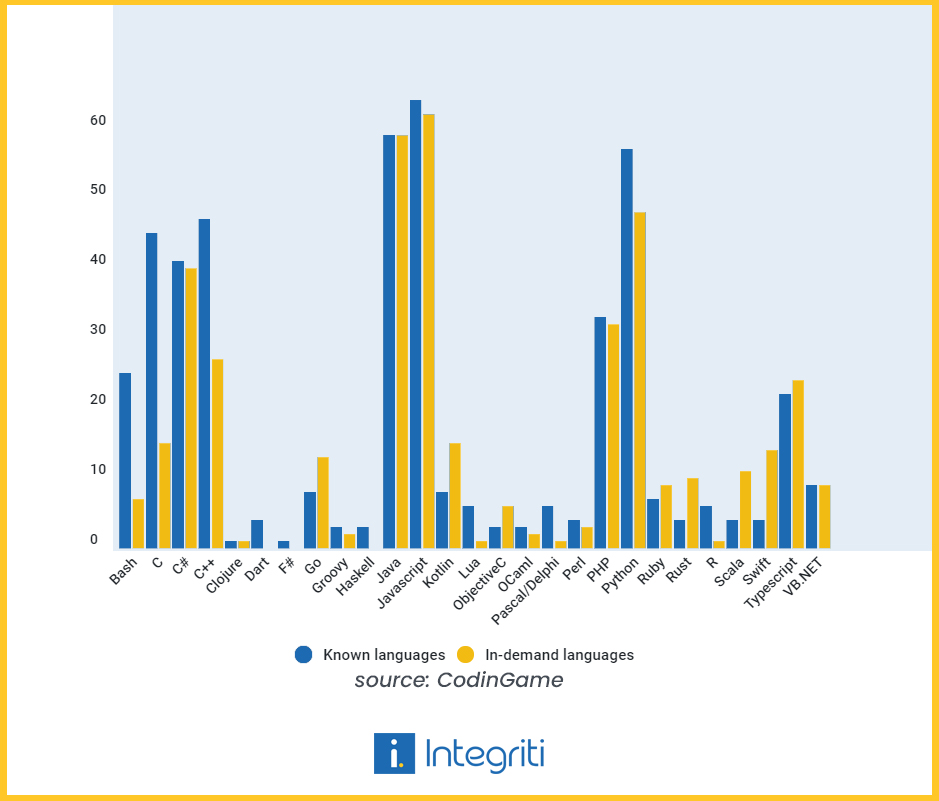
    A recent survey by CodinGame sheds light on the popularity of programming languages and their demand by employers. According to the results, more than half of the programmers knew how to code in JavaScript, Java, and Python. These three continue to be the most widely used programming languages in the world.

    A survey about most in demand programming languages

    On the demand side, results showed that close to 60% of the tech recruiters were on the lookout for professionals working with JavaScript and Java. These findings signal that the programmers and employers are in sync at least when it comes to these two languages. However, the same cannot be said for other languages like C, Python, etc. The demand for these languages is less than their popularity among programmers. For example, 57% of developers code in Python, but only 48% of companies need Python development. This gap is even bigger for C. 45.1% of programmers code in C however only 15.4% of companies require C development.

    These insights highlight how most tech companies favor 4 programming languages: JavaScript, Java, Python, and C#. In our opinion, it’s better to stick with JavaScript as it’s the most popular programming language for a reason. As a matter of fact, JavaScript development also made it to our list of Top Ten Tech skills in Canada for 2021! Most companies developing web UIs need to interface with JavaScript. Moreover, with the introduction of NodeJS, it’s also being used to develop server-side applications as well. If you want to learn a lesser-known language to stand out, then consider TypeScript. This past October, TypeScript was named among the fastest-growing languages in GitHub’s Octoverse Report. The results also showed a small shortage for this language as 24% of companies needed TypeScript development but only 22% of developers knew it.

    The survey overall highlights the dominance of few major programming languages like Java, JavaScript, and Python. The results also suggest a surplus of developers dealing with Python and C. For these developers, it would be better to switch to other languages to improve their job prospects in this competitive environment.

    For more relevant tech insights, subscribe to our blog!

  • On Humanizing the Process of Tech Recruitment

    According to Korn Ferry study, the global human talent shortage will increase to around 85 million by 2030. This highlights the severe competition for talent and the need to improve candidate experience. After all, providing a good candidate experience goes hand in hand with creating a great employer brand. Companies must evaluate their recruitment procedures to satisfy the needs of the applicants. In our humble opinion, a positive candidate experience can be derived from using: 

    • A Consistent Point of Contact:  

    Interviews can be a confusing and stressful experience. Having the same person guiding the applicant through the entirety of the hiring process will certainly improve candidate comfort and engagement. 

    • Proactive Onboarding:  

    The first days are usually very exciting and disorienting for the employees. Orientations and peer support programs can provide role clarity and social integration desperately desired by the new hires. 

    • Informal interviews:  

    Interviewing people in a more casual setting or over coffee chats can help remove the applicant’s anxiety and stress. 

    • Effective communication:  

    Often recruiters fail to fill the vacancies due to ineffective communication. Employers need to share the complete outline of the hiring process as well as address any queries related to the job description. Prompt responses at each stage will make candidates feel more valued. 

    • Constructive feedback:  

    Many applicants complain about never hearing back from the recruiters. By providing feedback, companies can avoid losing out on unsuccessful candidates who might be a good fit for a different vacancy in the future. The situation could also be improved if only the recruiter pays more heed to manage candidates in a more meaningful environment – i.e. by sending them constructive feedback that contains a list of the applicant’s shortcomings, strengths, and useful information/courses.   

    A lot of times, reasons like technical skills gap became an excuse to shrug off candidates. However, by following these steps, there is a possibility the gap between the recruiter and the candidate be filled, enriched with a more meaningful relationship. 

  • Pakistan among the top countries in South Asia for Software Outsourcing

    Pakistan among the top countries in South Asia for Software Outsourcing

    Photo by Pexels on Pixabay

    Software engineering is a rapidly growing field, with a wide range of opportunities for qualified professionals. As the demand for software engineers continues to grow, companies around the world are looking for ways to maximize their software development teams and gain access to the best talent.  

    Outsourcing software development to South Asia is quickly becoming a popular option for businesses looking to increase their efficiency and lower their costs. In this guide, we will explore how and why Pakistan is becoming a top choice for software outsourcing in South Asia and the benefits of outsourcing software development in this region.

    Introduction to Software Outsourcing

    Software outsourcing is the process of hiring a third-party contractor or agency to develop or maintain software applications or systems. This can be done either remotely or on-site, depending on the company’s needs and preferences.

    Software outsourcing is a cost-effective way for businesses to access the latest technology, without having to invest in in-house development or maintenance. It also allows companies to quickly scale up their software development teams, without having to hire and train additional staff.

    Understanding Nearshore vs Offshore Outsourcing

    When it comes to outsourcing software development, there are two main options: nearshore and offshore.  

    Nearshore outsourcing is when a company outsources to a nearby country, often within the same region or even the same time zone. This can be beneficial for companies who want to maintain close contact with their software development team, as well as reduce any language/cultural barriers.

    Offshore outsourcing is when a company outsources to a distant country, often thousands of miles away. This proves to be perfect for companies who are looking to reduce costs, as labor costs in other countries tend to be significantly lower than in their own.  

    However, there can be some communication barriers and timezone differences, as well as cultural and language differences, that can make offshore outsourcing more challenging.  

    How can companies benefit from outsourcing their software development?

    Outsourcing software development to South Asia can be beneficial for a number of reasons.  

    • Reduces cost
    • Improves quality
    • Conserves capital
    • Fosters innovation
    • Saves valuable time
    • Increases speed to usage
    • Helps focus on core operations

    Overview of the South Asian Software Development Market

    The South Asian software development market is growing rapidly, with a wide range of opportunities for qualified professionals. This is due to a number of factors, including the availability of highly skilled software engineers, the low cost of labor, and significant time-overlap.

    The subcontinent is the largest software development market in South Asia, and is home to some of the world’s best software engineers and developers. Countries in the region, such as, Pakistan, Vietnam and the Philippines, are becoming popular destinations for software outsourcing.

    Why Pakistan is the ideal place to outsource software development in 2023.

    When it comes to outsourcing software development, one of the main considerations is the time zone. Different countries have varied time zones, which can make communication and collaboration a challenge.

    Pakistan is quickly rising the ranks for IT solution outsourcing for its quality of work and availability of dedicated teams. While the service is being outsourced, companies provide overlap timings as per international clients, varying from off-shore solutions to nearshore timings and even full time overlap.

    Many countries in South Asia, including Pakistan also offer flexible working hours. This proves to be a viable option for companies who need to access their software development team at specific times or during different time zones. Fortunately, most companies situated in Pakistan provide significant time overlap with many allowing round-the-clock availability for outsourced work.

    Moreover, about 300+ companies which includes several Global enterprises like Bentley®, Ciklum, IBM, Mentor Graphics®, S&P Global, Symantec™, Teradata®, and VMware® have established research and development centers, BPO support service centers and global consulting service centers in Pakistan.  

    Pakistan is also ranked 5th most financially attractive location in the world for offshore services, according to A.T. Kearney’ s Global Services Location Index 2019.

    Cost Savings

    The major benefit of outsourcing software development to South Asia is cost savings. Labor costs in South Asia, specifically Pakistan, are significantly lower than in many other countries. This can be beneficial for companies who are looking for budget-friendly software development, as they can access the same quality of talent for a fraction of the cost.

    The average cost of a software engineer per hour is $18 in Pakistan, making it one of the most affordable countries to outsource software development in South Asia. Not to mention, many countries in South Asia offer attractive tax incentives for companies who are looking to outsource IT solutions.

    Pakistan’s IT Industry growth has been augmented by the fact that costs remain low for it due to a plethora of factors such as low labour costs and strong government incentives.

    Fun fact: The average annual cost of a software engineer in Pakistan is one-fifth of the cost in USA and Europe.

    Quality Assurance

    Approximately 25,000 IT graduates enter Pakistan’s workforce each year, thus providing the Pakistani lT industry with the much-needed workforce. The area is home to some of the world’s best software engineers and developers. By outsourcing their software development, companies can access a wide range of highly skilled professionals.

    With more than 150 ISO quality standards qualified companies businesses outsourcing their IT solutions to Pakistan can ensure that their projects are completed to the highest standards.

    Access to Talent: Pakistan is one of the leading countries from where students enter the world’s most prestigious universities in large numbers. Pakistanis also rank high on intelligence scales.

    Seamless Cultural Integration:

    Most of the IT professionals, IT executives and company founders in countries like Pakistan have graduated or lived in the West. Finding a skilled workforce in Pakistan in the technology field does not present a problem for foreign investors and there are no cultural barriers to overcome as Pakistani professionals are used to interacting with clients based in developed countries.

    Conclusion

    Software engineering is a rapidly growing field, with a wide range of opportunities for qualified professionals. As the demand for software engineers continues to grow, companies around the world are looking for ways to maximize their software development teams and gain access to the best talent. Outsourcing software development to South Asian countries is quickly becoming a popular option for businesses owing to the many incentives they offer.

    If you’re looking to outsource software development, Pakistan is a great option to consider. With its attractive labor costs, nearshore hours or full time overlap, and access to some of the world’s best software engineers, it is quickly becoming the go-to destination for software outsourcing.

  • Secrets of performance-oriented frontend development

    When a web page takes longer than three seconds to load, 40% of visitors leave, increasing the bounce rate.  

    Similarly, a slow mobile app would also have poor performance and irritate consumers. After a few tries, the customer will remove your application and download a more user-friendly one.

    The ease of use and user-friendliness of your specific digital solution has a direct impact on the performance of the app. If compromised, it degrades the user experience and lessens the likelihood that users will engage frequently or stay connected to the app or website over time.

    On the other hand, developing a web or mobile app with front-end performance in mind increases the chance that your product will succeed. As a result, your priority should be to create an app or website that loads quickly, is SEO-friendly, performs well, and is well-designed.

    Here are a few secrets that can help you build up your performance-oriented front-end development.

    Optimize Images & Use WebP 

    Images are a crucial component of web pages. Considering they increase user engagement, 93.7% of websites on the internet employ at least one image file format.

    The drawback of using images is that, unless they are optimized, they have a negative impact on the front-end loading time. However, there are various approaches to optimizing images:

    Use AVIF or WebP

    Compared to previous formats like JPEG and PNG, using modern image formats like WebP and AVIF shows better performance. When compared to JPEG and PNG, WebP is between 25% and 35% smaller. AVIF is 20% and 50% smaller than WebP and JPEG, respectively.

    The browser support is the drawback, though. WebP acquired browser support only recently, so older versions may not support it. In contrast, Chrome and Opera are the only browsers that support AVIF. As a result, you must utilize the <picture> element in native HTML with fallback support.

    Serve images of the right dimensions.

    Using responsive images is another approach to speed up a website’s performance and cut down on image delivery time. Mobile and tablet devices account for more than 50% of all traffic. The frontend loading time could be further reduced by scaling the image to popular device dimensions and serving it using a srcset.

    There are numerous other methods you can use to speed up the frontend loading time through image optimization in addition to picking the right format and dimensions. Additional recommended best practices are:

    • Use of progressive JPEGs.
    • Use of HTTP/2 instead of HTTP/1.1.
    • Use of image sets.
    • Image Compression
    • Serve smaller images to users on slow connections.

    Compress Files & Use CDNs 

    Building a lightweight front end for your web or mobile solution is made much easier with the use of content delivery networks, or CDNs. These web directories have a successful global network. Your app will load more quickly if you use files hosted on CDNs since you can use the cached versions of the files from the closest servers. It enables you to quickly serve more users while preventing bottlenecks.

    Compressing the files to be used comes next after using common files from CDNs. Every file, including documents, images (JPEG, PNG), videos, audio clips, and presentations, can be compressed to enhance the functionality of your application. There are many compression tools available on the market that might be deployed for this.

    Once you’ve completed these two steps, your website or application will be much more responsive to consumer inquiries.

    Bundle & Minify Assets 

    Two different performance improvements you may use in a web app are bundling and minification. By minimizing the amount of the requested static assets and decreasing the number of server requests, bundling and minification combined enhance performance.

    Multiple files are combined into one file by bundling. The quantity of server requests required to render an online asset, such as a web page, is decreased via bundling. Numerous unique bundles made expressly for CSS, JavaScript, etc. are possible. Having fewer files means that the browser will make fewer HTTP requests to the server or to the service that hosts your application. As a result, first-page performance is enhanced.

    Code that has undergone minification has unnecessary characters removed without affecting functionality. As a result, the size of the requested assets is significantly reduced (such as CSS, images, and JavaScript files). One of the most frequent side effects of minification is the reduction of variable names to one character, as well as the removal of comments and extraneous whitespace.

    Bundling and minification mainly speed up the first page request load time. After a web page has been requested, the web browser caches the static assets (JavaScript, CSS, and images). Therefore, bundling and minification don’t enhance performance when the same page, or pages, on the same site, are requested with the same assets. If bundling and minification aren’t used and the expires header isn’t set correctly on the assets, then the browser’s freshness heuristics mark the assets stale after some days. The browser also requires a validation request for each asset. Bundling and minification in this situation increase performance even after the initial page request.

    Use Caching and prefetching 

    Pre-fetching and caching are two essential tools for front-end web performance. Pre-fetching involves pre-loading resources such as images, scripts, and stylesheets so that they can be delivered to the user more quickly. Caching, on the other hand, involves storing assets on the user’s device so that they don’t have to be requested from the server every time the user visits the site.  

    Both of these techniques have a huge impact on website performance and user experience. By pre-loading resources and caching assets, sites can load faster and be more responsive, leading to improved performance and better user experience. Additionally, pre-fetching and caching can reduce the burden on the server, which can help to keep costs down and make sites more resilient.  

    So if you want to improve your site’s performance and user experience, be sure to take advantage of pre-fetching and caching.

    Reduce The Number Of Server Calls.

    Generally speaking, the more requests your front end sends to the server, the longer it takes to load. This is due to the fact that sending any request to the server demands full communication before the page can be rendered. There are several approaches you may take to cut down on the number of server requests required to load the website.

    One of the simplest ways to cut down on server calls is to use CSS Sprites. Sprite loads a single image file combined using a collection of images rather than ten separate images to the site. The background image and background-position CSS properties can be used to display the desired image segment. By doing this, you’re minimizing the number of server requests necessary.

    Reducing third-party plugins is also important as they make up a large number of external requests and cutting down on them will boost your application’s loading speed. Preventing broken links to files that don’t exist can also help.

    You might also consider server-side rendering to accelerate the application’s initial load time.

    Making the initial move is never easy. The future, however, belongs to those who aren’t scared to innovate and redefine conventional approaches. You can ensure that your website loads quickly and offers a positive user experience by using these web performance optimization approaches. Just be sure to keep everything simple, smart, and seamless. And keep in mind that you only have 15 seconds to make an impact!

    First impressions of apps and websites are based on their user interface (UI) and front end. The ease of use, seamless navigation, and fast loading are just a few of the elements that determine whether a user will use your digital product again. Therefore, it’s crucial to consider a web solution’s performance efficiency, whether it’s an App or an e-commerce website. You will be able to do so by using the advice we’ve provided above.

    Need help improving your front-end performance? Explore how our software engineering models can help your business here.