Blog

  • Data Migration to Shopify: A Comprehensive Checklist

    Data Migration to Shopify: A Comprehensive Checklist

    Making the move to Shopify as your e-commerce platform might highly transform your online business. Shopify is quite full of unique features, scalable, and it is an easy-to-use platform that makes store management feasible and gives you strong tools to increase sales. But moving the entire data from your store to Shopify is quite crucial procedure that has to be very carefully planned and carried out. A thorough migration checklist is included in this article to guarantee a very seamless and easy data migration process. This migration checklist helps ensure no data loss and a smooth transition for your new store.

    Why Is Data Migration to Shopify Important?

    Moving your data is only one aspect of migrating to Shopify; another is making sure your e-commerce store can run very effectively on a platform designed specifically for success. A successful transfer maintains the high integrity of your online store’s operations while preserving the important customer data, product data, and the entire purchase history.

    A well-conducted migration totally guarantees that your business and customer experience will be very minimally disrupted, regardless of whether you’re switching from WooCommerce, Magento, BigCommerce, or another old platform. Using a structured migration process and possibly a migration expert can further reduce risks in any platform migration.

    Pre-Migration Checklist‍

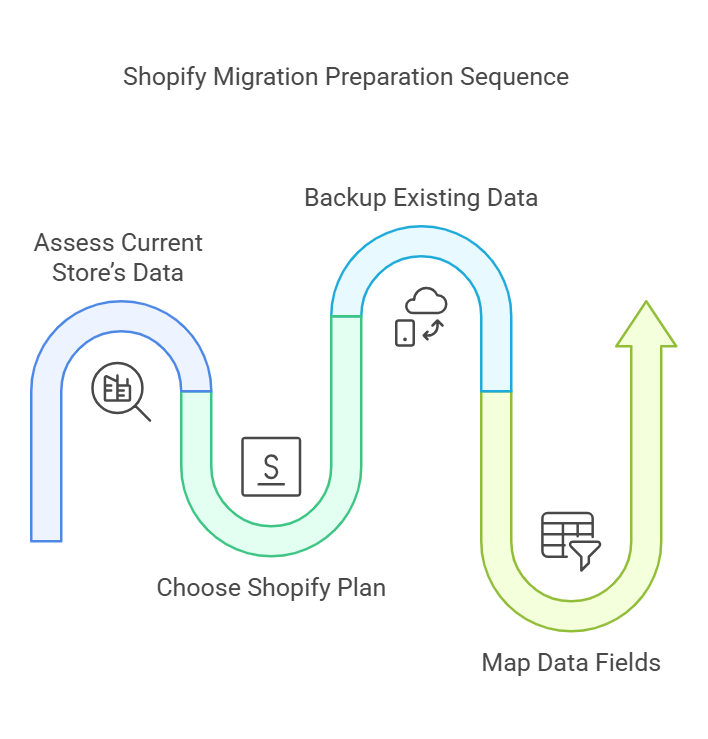
    1. Assess Your Current Store’s Data

    Before initiating the migration process, take stock of your current e-commerce store. Identify all the data you want to migrate, including:

    • Product information (titles, descriptions, images, prices)
    • Customer data (names, emails, purchase histories)
    • Order history and transaction details
    • Website content (blogs, policies, FAQs)

    This stage guarantees that during the migration, no important information is missed. Additionally, it is an excellent time to eliminate any unnecessary or obsolete data and audit the store assets and product pages.

    2. Choose the Right Plan

    Shopify offers various pricing plans tailored to different business needs. Before migration, review features and choose a plan that aligns with your store’s requirements. Consider factors such as product inventory size, sales volume, and advanced features like analytics, reporting, and Shopify admin tools.

    3. Backup Your Existing Data

    Backing up your store’s data is a non-negotiable step. In case anything goes wrong during the data transfer, a backup ensures you have a safety net to restore your data. Many platforms offer built-in backup tools, third-party apps from the Shopify App Store, or tools like Cart2Cart or LitExtension to simplify the CSV import process.

    4. Map Data Fields

    Shopify may use different naming conventions or field structures compared to your current platform. To ensure data import is accurate, create a mapping document that aligns your current data fields (e.g., product titles, SKU numbers, and images) with Shopify’s format. Consider using migration apps to reduce manual work.

    Migration Checklist

    1. Export Data from Your Current Platform

    Export all relevant data from your existing e-commerce business platform. Most platforms allow you to download data as CSV files, which can then be formatted and imported into Shopify. Be sure to export:

    • Products and categories
    • Customers and user accounts
    • Orders and transactions

    2. Import Data

    Once your complete data is properly formatted, you can easily upload it using third-party software like Matrixify, Shopify’s built-in admin tools, or migration apps. Shopify offers very detailed instructions for importing data to make sure you never overlook any important details, ensuring a successful migration.

    3. Test the Imported Data

    After the initial import, thoroughly test your new store to ensure the data from your current platform has been transferred accurately. Review:

    • Product listings and images
    • Customer profiles and order histories
    • Website navigation and categories

    Testing allows you to identify and fix any errors before the store goes live.

    4. Set Up Payment and Shipping Options

    During the migration process, configure payments, payment gateways, and shipping zones in your Shopify store. Ensure that your store supports all relevant payment methods and shipping regions to avoid disruptions for your customers. Consider setting shipping rules and configuring apps as needed.

    Post-Migration Checklist

    1. Optimize Your Store Design

    Once the entire data has been fully migrated, modify the store setup and layout to highly reflect your brand. There are tons of themes available on the theme store that can be customized according to your tastes. Make sure your website is quite easy to use, responsive, and visually very appealing.

    2. Set Up Redirects

    The URL structure for your store can change if you’re switching from one platform to another. Maintaining your SEO, organic traffic, and ensuring that clients can locate your products depend on the setup of 301 redirects or URL redirects. Shopify provides tools to help you create redirects efficiently.

    3. Enable Analytics and Tracking

    Google Analytics and other external platforms can be integrated with Shopify’s built-in analytics features. By turning on monitoring, you can keep an eye on your store’s performance, see patterns, and make informed decisions for meta titles, search engines, and sales.

    4. Notify Your Customers

    Inform your customers about the migration and any potential changes to their user experience. Reassure them that their accounts and customer records remain secure. To alert clients, use email campaigns, posts on your website, and social media.

    Key Benefits of Data Migration to Shopify

    1. Streamlined Management

    Shopify’s user-friendly dashboard and automation features make store management easier. You can handle products, orders, and customers more effectively by moving.

    2. Enhanced Scalability

    Shopify can effortlessly handle growing traffic and sales volumes as your company expands. Consistent performance during peak periods is guaranteed by the platform’s strong infrastructure.

    3. Access to Advanced Features

    Among the many services that Shopify provides are multi-channel selling, SEO optimization, and integrated marketing tools. These characteristics help businesses a lot in maintaining their competitive edge in the highly evolving e-commerce migration market.

    Conclusion

    Making a highly strategic choice to move can open up many opportunities for growth for your company. You can guarantee a successful and smooth store migration with little interruption to your business operations by following a thorough plan and making use of Shopify’s extensive skills.

    Keep in mind that extensive planning, implementation, and testing are essential for a successful migration. You can position your company for long-term success on Shopify by ensuring data accuracy, store optimization, and prioritizing client communication.

    FAQs

    What are the steps for data migration?

    Data migration involves assessing existing data, defining requirements, and creating a migration plan. Next, clean and map the data to the new system, run tests, and perform the transfer. After migration, validate accuracy, fix issues, and monitor performance to ensure everything runs smoothly in the new environment.

    What are the 4 types of data migration?

    The four types of data migration are storage migration, database migration, application migration, and cloud migration. Storage involves moving data to new hardware, database shifts data between database systems, application migration moves entire software environments, and cloud migration transfers data or systems to cloud platforms.

    Why migrate to Shopify?

    Brands migrate for its ease of use, fast performance, secure hosting, and built-in ecommerce tools. It reduces maintenance, supports powerful apps, and offers responsive themes. Shopify also scales easily, provides reliable checkout, and simplifies managing products, orders, and payments, making online selling smoother.

    How to import Shopify data?

    Importing data is easy using the built-in Import tool. Prepare a CSV file for products, customers, or orders, then upload it to the Shopify admin. Review the preview, fix errors, and confirm the import. Apps like Matrixify can also help with large or complex migrations.

  • Experience a New Era in WordPress Development with Studio Sync

    Experience a New Era in WordPress Development with Studio Sync

    Experience a New Era in WordPress Development with Studio Sync

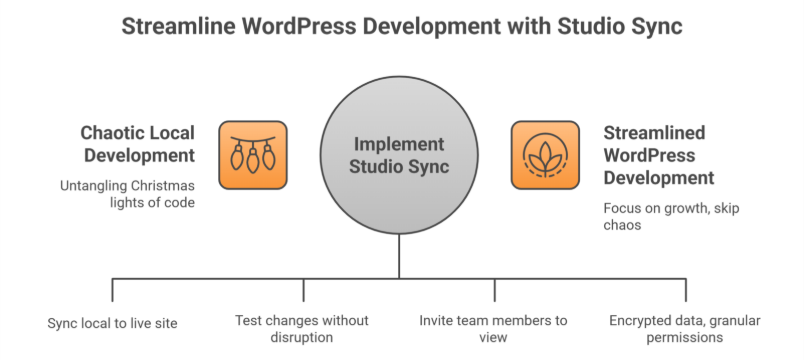
    Let’s face it: Local WordPress development has always felt a bit like untangling a box of Christmas lights. You tweak a plugin here, adjust a theme there, and pray nothing breaks when you push changes live. But what if you could skip the chaos and sync your local WordPress site or local studio site with your live WordPress.com site without the migraines?

    Enter WordPress Studio Sync, the long-awaited development app that’s turning heads in the developer community. Launched on August 15, 2024, this new feature isn’t just another shiny gadget—it’s solving real problems for agencies, entrepreneurs, and businesses juggling multiple WordPress.com sites.

    But here’s why you should care

    Whether you’re a DIY blogger or a Fortune 500 company, Studio Sync streamlines your development workflow so you can focus on growth. And if you’re thinking, “Sounds great, but I’d rather leave the tech stuff to pros,” better stick around. We’ll show how Integriti Studio’s WordPress maintenance and support services turn this tool into your secret weapon.

    Get Started

    What Makes Studio Sync Different? (Spoiler: It’s Not Just for Coders)

    What Makes Studio Sync Different? (Spoiler: It’s Not Just for Coders)

    Studio Sync lets developers build locally and test sites in a local development environment while seamlessly pushing or pulling changes to a live WordPress.com site or staging site. Think of it as a bridge between your computer and the cloud no more manual uploads, broken plugins, or “it worked on my machine” headaches.

    For agencies and solo developers alike, this means:  

    • Faster workflows: Test design changes, plugins, or custom code without disrupting your live site.  
    • Real-time collaboration: Invite team members or clients to view changes in real time—perfect for agencies juggling 10+ projects.  
    • Built-In Security: All synced data is encrypted, and permissions are granular (e.g., you can let a designer access themes but not plugins). Automatic syncing minimizes human mistakes during deployment.

    But here’s the kicker: Studio Sync integrates with popular page builders like Elementor and Bricks. Translation? Even if you’re using a WordPress website builder for your online store, you can test new product layouts locally before going live.

    4 Hidden Studio Sync Features You’ll Wish You Knew Sooner

    1. “Undo” Button for Live Sites (Yes, Really)

    Accidentally deleted a critical plugin during testing? Studio Sync’s version rollback lets you revert to any previous state in 2 clicks. Pair this with Integriti Studio’s WordPress maintenance service—which includes daily backups of your local WordPress site and staging site—and you’ve got a disaster-proof safety net.

    2. Client Demo Mode

    Agencies, listen up: Studio Sync lets you create shareable, password-protected live preview links. No more exporting dummy sites or worrying about clients seeing half-baked changes.

    3. Performance Analytics Built-In

    Before syncing changes, Studio Sync generates a report on:  

    • Page load speed impact  
    • Plugin conflicts  
    • Mobile responsiveness

    4. Multi-Site Management

    Managing 5+ WordPress Studio sites or local studio sites? Studio Sync’s dashboard lets you toggle between projects like switching Netflix profiles. Overwhelmed? Integriti’s WordPress site maintenance services handle the upkeep, so you can focus on strategy.

    Sign up now  

    Studio Sync vs. Competitors: Why It’s Winning Over Agencies

    ‘Local’ by Flywheel and DevKinsta have dominated the local WordPress development space for years. But since Studio Sync’s launch, 42% of agencies surveyed by WordPress Tavern say they’re switching—here’s why:

    Pain Point

    Traditional Tools

    Studio Sync’s Solution

    Client Feedback Loops

    Endless email threads

    Live preview links with comment threads

    Security

    Self-managed SSL certificates

    Auto-renewing HTTPS for all test sites

    Onboarding New Developers

    2+ hours per team member

    Role-based access in <10 minutes

    Cost

    $20–$50/month per user

    Free for WordPress.com users

    5 Common Studio Sync Mistakes

    1. Overloading Local Environments  

    Mistake: Testing 10+ plugins at once.  

    1. Ignoring Mobile Previews  

    Mistake: Assuming desktop edits will look fine on phones.  

    1. Forgetting to Limit User Access  

    Mistake: Giving clients full admin rights in demo mode.  

    1. Skipping Post-Sync Backups  

    Mistake: Assuming Studio Sync’s version control is enough.  

    1. Underestimating SEO Impact  

    Mistake: Not checking how changes affect metadata or alt tags.  

    How Integriti Studio Enhances Your Studio Sync Experience

    While Studio Sync simplifies local WordPress development, even the best tools need expert hands. Here’s where Integriti Studio’s custom WordPress development services shine:

    • Pre-Launch Audits: Before syncing your site live, we’ll check for speed issues, broken links, or security gaps.  
    • Post-Sync Maintenance: Our WordPress site maintenance services include nightly backups, malware scans, and performance optimizations.  
    • Custom Plugins & Themes: Studio Sync works smoothly with bespoke solutions—no off-the-shelf compromises.

    Let’s connect

    “But I’m Not a Developer Can I Still Use Studio Sync?”

    Absolutely! Studio Sync’s intuitive interface is designed for users of all skill levels. However, if terms like “GitHub,” “Git integration,” “staging environment,” or “local WordPress site” make your head spin, Integriti Studio’s WordPress website maintenance team can handle the technical heavy lifting.

    Pro tip: Pair Studio Sync with our WordPress maintenance and support services for a bulletproof workflow:  

    1. Draft changes locally.  
    1. Let us review and optimize them.  
    1. Sync and deploy with confidence.

    Learn more

    What’s Next for Studio Sync?

    WordPress.com’s CTO hinted at these 2024 Q4 updates:  

    • AI-Powered Conflict Detection: Get alerts like, “This plugin update broke 12% of sites last week—proceed?”  
    • E-Commerce Mode: Test payment gateways and inventory changes locally without risking real transactions.  
    • Agency Tier: Bulk user management and custom SLAs for large teams.

    Ready to Ditch Development Drama?

    Studio Sync is a leap forward, but let’s be real you didn’t start your business to babysit software updates. That’s where Integriti Studio comes in.

    Whether you need a custom WordPress development services partner to build your dream WordPress studio site or a WordPress maintenance support team to keep it safe, we’ve got your back.

    Don’t let local development hassles slow you down.

    ‍

    Frequently Asked Questions (Experience a New Era in WordPress Development with Studio Sync)

    What skills should a WordPress developer have?

    A WordPress developer should have strong PHP, HTML, CSS, and JavaScript skills, plus experience with MySQL and WordPress themes/plugins. They should know responsive design, SEO basics, website performance optimization, security best practices, and version control (Git). Problem-solving and communication skills are also essential.

    Why are people moving away from WordPress?

    People are moving away from WordPress due to concerns about speed, security vulnerabilities, and frequent plugin conflicts. Modern website builders offer easier drag-and-drop design, lower maintenance, and better scalability. Additionally, some prefer lightweight, headless, or static-site solutions for improved performance and flexibility.

    How to create a WordPress development environment?

    To create a WordPress development environment, install a local server like XAMPP, WAMP, or Local. Set up a database, download WordPress, and configure wp-config.php. Use a code editor, enable debugging, and integrate version control like Git to manage changes efficiently during development.

    How long does it take to develop a WordPress theme?

    Developing a WordPress theme typically takes 2 to 6 weeks, depending on complexity and customization. A simple theme with basic features can be completed in a couple of weeks, while advanced themes with custom designs, plugins, and functionality may require over a month, including testing and revisions.

  • How a Shopify App Development Agency Can Solve Your eCommerce Pain Points

    How a Shopify App Development Agency Can Solve Your eCommerce Pain Points

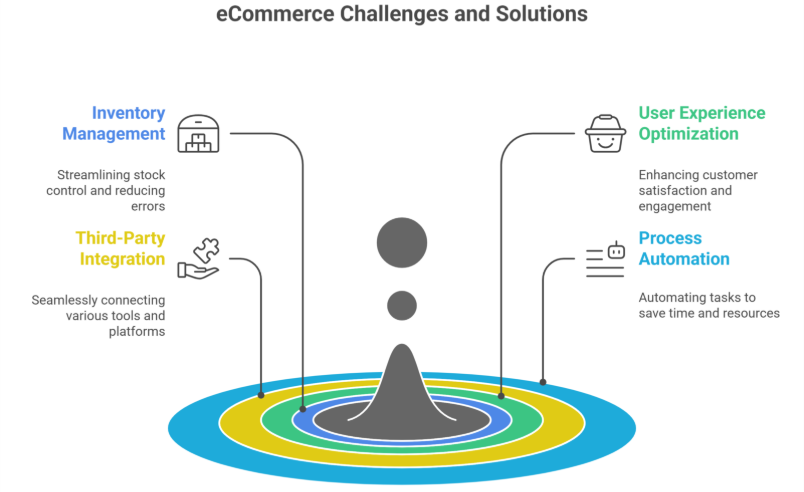
    Running a complete online store on Shopify comes with many immense opportunities. However, it also presents quite a few challenges. From managing inventory and highly optimizing user experience to integrating third-party tools and automating processes. Business owners often face hurdles that slow down growth on their e-commerce platforms and Shopify stores.

    This is where a Shopify App Development Agency or a Shopify development partner will come in. These agencies highly specialize in creating custom Shopify apps and solutions tailored to a store’s unique business needs. Helping businesses overcome bottlenecks, streamline operations, and scale effectively to achieve e-commerce success.

    In this blog, we will explore the common e-commerce challenges and Shopify merchant pain points. These problems can be solved by a Shopify app development agency smartly with custom development solutions.

    Common eCommerce Pain Points & Their Solutions

    Common eCommerce Pain Points & Their Solutions

    1. Limited Store Functionality

    While Shopify offers quite a huge range of built-in features, many business owners require advanced features that aren’t available by default. A Shopify app developer or app development agency can create custom apps to:

    • Add advanced filtering and search options.
    • Develop custom pricing models for wholesale or B2B customers.
    • Build unique checkout experiences that fit business needs.
    • Integrate subscription-based models for many recurring purchases.

    With a tailored app, your e-commerce store can function exactly the way you need it to, highly improving the overall shopping experience and increasing average order value.

    2. Slow & Inefficient Order Management

    Managing orders efficiently is crucial for customer satisfaction and business growth. A Shopify app development agency can automate and optimize order processes by:

    • Creating automated invoicing systems.
    • Developing custom dashboards for real-time order tracking.
    • Highly integrating order fulfillment solutions with third-party logistics (3PL) services.
    • Enabling bulk order processing to save time and reduce manual effort.

    This results in faster deliveries, fewer errors, and improved efficiency.

    3. Integration Issues with Third-Party Tools

    Many businesses rely heavily on external tools such as CRM, ERP, accounting software, and marketing platforms. However, integrating these third-party apps with Shopify can be very complex. A Shopify app development company can:

    • Seamlessly connect Shopify with inventory management and POS systems.
    • Sync customer databases with email marketing platforms.
    • Develop real-time data synchronization between Shopify and third-party services.
    • Ensure all integrations are stable and secure.

    These integrations streamline business operations and provide a unified workflow, enabling data-driven decision-making.

    4. Poor User Experience (UX) & Design Limitations

    A cluttered or confusing store layout can drive potential customers away. A Shopify design agency enhances user experience (UX) by:

    • Creating custom, responsive themes tailored to brand aesthetics.
    • Optimizing page speed and mobile performance.
    • Implementing user-friendly navigation for much better product discovery.
    • Highly personalizing the shopping journey with total AI-driven recommendations.

    A well-designed store leads to much increased engagement and pretty high conversions.

    5. Cart Abandonment & Low Conversion Rates

    Cart abandonment is a major issue for e-commerce businesses. A Shopify app development agency can help reduce drop-offs by:

    • Developing one-click checkout solutions.
    • Implementing exit-intent pop-ups with discounts.
    • Creating automated abandoned cart recovery emails.
    • Integrating multiple payment gateways for a highly seamless transaction experience.

    These improvements make the checkout process very smooth and completely hassle-free. This leads to higher conversions.

    6. Limited Analytics & Data Insights

    Without proper analytics, it’s quite hard to make data-driven decisions. A Shopify app development company can:

    • Develop custom analytics dashboards for sales tracking.
    • Implement heatmaps and user behavior tracking.
    • Enable AI-driven demand forecasting for much better inventory management.
    • Integrate Shopify with Google Analytics and other highly advanced tools.

    These insights help businesses optimize their strategies and improve performance.

    7. Scaling & Performance Issues

    As your Shopify store grows, handling increased traffic and transactions can become challenging. A Shopify app development agency ensures your store remains scalable by:

    • Optimizing database queries for faster load times.
    • Implementing server-side caching for better performance.
    • Enabling cloud-based solutions for high-traffic handling.
    • Creating multi-store setups for international expansion.

    This ensures a seamless shopping experience even during peak sales periods.

    8. Security & Compliance Concerns

    With rising cybersecurity threats, keeping your Shopify store secure is a top priority. A Shopify development agency enhances security by:

    • Implementing SSL encryption and PCI compliance.
    • Enabling two-factor authentication (2FA) for store access.
    • Securing customer payment information with tokenization.
    • Regularly updating apps and security patches.

    A secure store builds trust and protects both business and customer data.

    Why Work with a Shopify App Development Agency?

    1. Expertise in the Shopify Ecosystem

    A Shopify app development agency understands Shopify’s architecture, APIs, and best practices. This ensures that your store operates efficiently and leverages the full potential of the Shopify app store.

    2. Tailored Solutions

    Instead of relying on generic third-party apps, an agency develops custom solutions based on your business requirements.

    3. Ongoing Support & Maintenance

    A Shopify app development company offers continuous support, regular updates, and improvements to keep your store running smoothly and ensure customer satisfaction.

    4. Time & Cost Efficiency

    Custom-built apps eliminate the need for multiple third-party apps, reducing development costs and improving operational efficiency in the long run.

    Conclusion

    A Shopify app development agency can solve many critical e-commerce challenges. From improving store functionality and order management to enhancing user experience, conversion rates, and security, custom Shopify app development empowers businesses to scale efficiently.

    If you are looking to take your Shopify store to the very next level. Partnering with a Shopify development agency will ensure you stay pretty competitive in the ever-evolving eCommerce landscape.

    Frequently Asked Questions (How a Shopify App Development Agency Can Solve Your eCommerce Pain Points)

    What are the pain points of Shopify?

    Shopify’s main pain points include high app and transaction costs, limited design flexibility without coding, dependency on third-party apps, slower load speeds with heavy plugins, and challenges in SEO customization. Scaling can also get expensive as advanced features often require paid apps or higher-tier plans.

    What does a Shopify developer do?

    A Shopify developer builds, customizes, and optimizes Shopify stores. They handle theme development, app integrations, speed improvements, custom features, and bug fixes. They ensure the store looks professional, functions smoothly, converts well, and aligns with the brand’s goals while providing ongoing technical support.

    What are the skills required for a Shopify developer?

    A Shopify developer needs strong skills in HTML, CSS, JavaScript, and Liquid for theme customization. They should understand UX/UI, Shopify APIs, app integrations, site speed optimization, and eCommerce best practices. Problem-solving, debugging, and knowledge of SEO and conversion-focused design are also essential.

    How difficult is Shopify development?

    Shopify development is moderately difficult. Basic setup is easy, but advanced customization requires strong coding skills in Liquid, JavaScript, HTML/CSS, and API handling. Challenges arise with complex features, performance optimization, and integrating third-party apps. With practice, developers can build highly customized, high-converting stores.

  • How a Shopify Plus Development Agency Improves Store Performance & UX

    How a Shopify Plus Development Agency Improves Store Performance & UX

    Running a quite successful eCommerce store isn’t just about having very great products. It’s also about delivering a very exceptional user experience (UX). Also, maintaining top-notch performance. This is exactly where a Shopify Plus Development Agency will come in handy. With highly advanced features, custom development, and optimization strategies. They help brands scale efficiently and provide a very seamless shopping experience.

    In this blog, we will explore how working with a Shopify Plus Development Agency can highly enhance your store’s performance and user experience. It will ensure customers stay highly engaged and convert more often.

    What is Shopify Plus?

    Shopify Plus, an enterprise-level e-commerce platform, is highly designed for the growth of many businesses. Not similar to standard Shopify. It offers highly enhanced customization, automation, and scalability options. In order to unlock its full potential, brands often need high expertise of a Shopify Plus Developer or a very specialized Shopify Plus Development Company.

    A Shopify Plus Development Agency provides highly technical expertise. It ensures that your store is pretty optimized for speed, performance, and seamless user experience.

    How a Shopify Plus Development Agency Enhances Store Performance

    1. Optimizing Page Speed

    A very slow loading website leads to a high bounce rate and lost quite a few sales. A Shopify Plus Development Company helps a lot to optimize your store’s speed by:

    • Implementing lazy loading for images and videos.
    • Compressing and optimizing images without losing quality.
    • Reducing unnecessary code and scripts.
    • Utilizing Content Delivery Networks (CDNs) to speed up load times globally.
    • Enabling browser caching to improve the return visitor experience.
    • Minifying CSS, JavaScript, and HTML files to highly enhance load times.
    • Optimizing Shopify’s Liquid code for total efficiency.

    2. Customizing Shopify Plus for Performance

    A Shopify Plus Developer can fine-tune your store’s architecture for better performance by:

    • Creating custom themes that eliminate bloated code.
    • Optimizing server response times.
    • Improving database queries for faster backend operations.
    • Enabling progressive web app (PWA) features for better mobile performance.
    • Ensuring third-party apps do not slow down your store.
    • Enhancing API performance for smooth integrations.

    3. Ensuring Mobile Optimization

    With mobile shopping on the rise. Ensuring a very seamless mobile experience is quite crucial. A Shopify Plus Development Agency will:

    • Implement mobile-first design principles.
    • Optimize touch elements and navigation for smaller screens.
    • Reduce excessive pop-ups and intrusive elements.
    • Improve checkout flows for effortless mobile transactions.
    • Ensure pages load within three seconds for mobile users.
    • Develop Accelerated Mobile Pages (AMP) for much faster load times.

    How a Shopify Plus Development Agency Improves UX

    1. Enhancing Navigation & Site Structure

    A well-structured website improves usability and keeps visitors engaged. A Shopify Plus Development Company can:

    • Design intuitive navigation menus.
    • Optimize category pages for easier product discovery.
    • Implement AI-driven search functionality.
    • Create a user-friendly mega menu for large inventories.
    • Ensure breadcrumb navigation for better user journey tracking.
    • Improve internal linking to enhance product discoverability.

    2. Improving Checkout Experience

    A lengthy or complicated checkout process leads to cart abandonment. A Shopify Plus Developer can simplify it by:

    • Enabling one-click checkout.
    • Integrating multiple payment gateways.
    • Auto-filling customer details for returning buyers.
    • Reducing form fields to the essentials.
    • Implementing trust signals like secure payment icons and guarantees.
    • Offering post-purchase upsell opportunities.

    3. Personalization & Customer Engagement

    Personalization plays a key role in modern eCommerce UX. A Shopify Plus Development Agency can enhance engagement by:

    • Implementing AI-driven product recommendations.
    • Enabling dynamic content based on customer behavior.
    • Using chatbots and live chat for quite real-time support.
    • Automating follow-up emails and abandoned cart recovery messages.
    • Creating customer segments for targeted marketing campaigns.

    4. Enhancing Security & Trust

    Customers are more likely to shop on secure websites. A Shopify Plus Development Company ensures top-tier security by:

    • Implementing SSL certificates for encrypted transactions.
    • Enabling fraud detection tools.
    • Ensuring compliance with PCI DSS security standards.
    • Providing secure customer data management.
    • Regularly updating and patching possible security vulnerabilities.

    Why Work with a Shopify Plus Development Agency?

    While Shopify Plus offers powerful features, maximizing them requires expertise. A Shopify Plus Development Agency ensures your store remains competitive by:

    • Handling complex customizations that go beyond built-in features.
    • Providing continuous maintenance to prevent performance issues.
    • Implementing data-driven strategies for optimization.
    • Offering dedicated support to resolve technical challenges.
    • Scaling your store efficiently as your business grows.
    • Integrating third-party applications very seamlessly with your Shopify Plus store.
    • Creating automation workflows to highly improve operational efficiency.

    Conclusion

    A Shopify Plus Development Agency plays a vital role in enhancing your store’s performance and user experience. From much faster page speeds and mobile optimization to highly improved navigation and checkout flows. Their expertise helps you provide quite a seamless shopping journey.

    If you’re looking to highly scale your eCommerce business. Partnering with Shopify Plus Development Company ensures you stay way ahead in today’s highly competitive market.

  • How a WooCommerce Development Company Can Build Your Brand’s Identity

    How a WooCommerce Development Company Can Build Your Brand’s Identity

    In today’s highly competitive e-commerce landscape, simply having an online store isn’t enough. Your store needs to totally reflect your brand identity, ensuring that customers recognize and highly trust you. While WooCommerce offers so many ready-made themes, they may not always capture your brand’s unique personality or overall brand message. This is where a Development Company can make a huge difference.

    By leveraging reliable development services, businesses can create totally custom, high-performance stores that completely align with their branding and business goals. Whether you are a startup or a well-established store owner, working with a specialist can help you a lot in going beyond standard templates and craft a store that totally stands out, reflecting your new logo, visual identity, brand voice, and tone of voice.

    Why Branding Matters in WooCommerce

    Why Branding Matters in WooCommerce

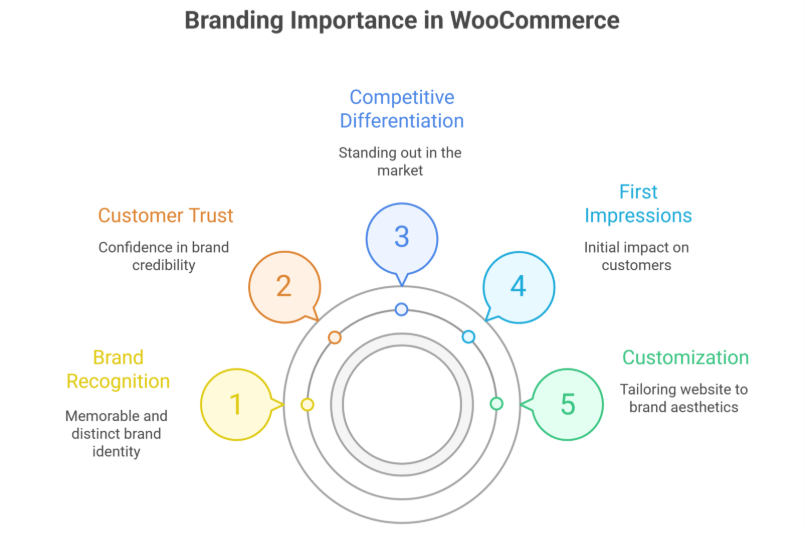
    1. First Impressions Count

    Your website is mostly the first interaction a customer has with your new brand. A very generic, template-based design can make your store look like countless others, highly reducing brand recognition. Investing in web development allows you to totally customize every aspect of your website. It will reflect your brand colors, typography, and refreshed color palette.

    2. Enhancing Customer Trust

    A well-branded store instills high confidence. Consistency in design, tone, and visuals makes a strong brand appear highly professional and very credible. Customers are more likely to buy from a store that looks polished and very trustworthy, helping brand awareness grow.

    3. Competitive Differentiation

    The e-commerce space is very saturated with businesses selling pretty similar products. Custom branding helps highly differentiate your store from competitors. Making your brand more recognizable and memorable allows your overall user experience to connect with your audience.

    How a WooCommerce Development Company Builds Your Brand Identity

    1. Custom Design Tailored to Your Brand

    A Development Company in the USA or anywhere else can help develop a store that totally aligns with your brand identity. This includes:

    • Custom layouts that highly reflect your brand’s personality.
    • Personalized fonts, colors, and graphics.
    • A user interface (UI) that completely enhances user experience (UX).

    Unlike pre-built themes, a totally custom design ensures that every visual element contributes highly to your brand story and overall brand.

    2. Personalized User Experience

    Every store owner has a unique audience with specific needs. A specialized company can optimize your site’s UX by:

    • Creating intuitive navigation structures.
    • Developing personalized product recommendations.
    • Implementing smooth checkout processes.

    This results in a highly engaging shopping experience, leading to higher conversion rates, and reinforcing your brand identity isn’t generic.

    3. Custom Functionalities and Features

    Out-of-the-box themes may not always fully support the functionalities your business requires. A WooCommerce specialist can highly integrate features such as:

    • Custom product filters.
    • Subscription services.
    • Dynamic pricing strategies.
    • Advanced analytics tools.

    These tailored features ensure that your store meets both your business and the entire Woo’s expectations.

    4. Mobile-Optimized Experience

    More than half of online shopping happens completely on mobile devices. A specialized team ensures your store is very responsive, providing a highly optimized shopping experience across devices.

    5. Seamless Third-Party Integrations

    To highly enhance branding and operations, you may need integrations such as:

    • Email marketing tools (e.g., Mailchimp, Klaviyo).
    • CRM software (e.g., HubSpot, Salesforce).
    • Social media feeds for high brand engagement.

    A dedicated company helps integrate these tools seamlessly, making brand communication more effective.

    6. SEO Optimization for Better Visibility

    SEO is essential for your product visibility and overall brand update. Developers ensure your site is totally SEO friendly, optimizing factors such as:

    • Page speed and performance.
    • Schema markup for better search engine indexing.
    • SEO-friendly URLs and meta descriptions.

    An optimized store improves search rankings, driving organic traffic and reinforcing brand credibility.

    The Role of Custom WooCommerce Themes

    While ready-made themes provide convenience, they often come with pretty limitations in customization and branding. An expert can build total custom themes that:

    • Align with your brand’s vision.
    • Provide better scalability and performance.
    • Ensure high security and compliance.

    Custom themes give you great control over the website’s design and functionality, allowing for a highly unique Woo identity.

    Choosing the Right Company

    Not all development services are equal. Here’s what to look for when hiring a WooCommerce development company:

    1. Experience and Portfolio

    Check if the company has experience in your industry and has worked on similar projects. A strong portfolio is a really good indicator of expertise.

    2. Client Reviews and Testimonials

    Look for client feedback and ratings. Platforms like Clutch, Upwork, or Google Reviews can be used to gauge reliability and better quality.

    3. Technical Expertise

    A good specialist should be skilled in:

    • Custom theme development.
    • Plugin development and integration.
    • Performance optimization.

    4. Post-Launch Support

    Your store will need ongoing maintenance and updates. Choose a company that offers post-launch support to ensure highly smooth operations.

    Conclusion

    Your WooCommerce store should be more than just a selling platform. It should be a true reflection of your brand, brand elements, and brand voice. A dedicated company helps create a store that stands out by highly customizing design, functionality, and user experience. This aligns with your brand identity and overall user experience.

    By investing in here, you ensure that your store not only looks unique but also provides a pretty seamless shopping experience. Whether you’re starting totally fresh or looking to upgrade, partnering with a specialist can elevate your brand to new heights.

    FAQs

    How to build a WooCommerce?

    To build a store, first install WordPress and choose a suitable theme. Then, install the WooCommerce plugin, configure store settings, add products with descriptions and images, set up payment and shipping options, and optimize for SEO. Finally, test the store before going live.

    What is WooCommerce built on?

    It is built on WordPress, which is a PHP-based content management system. It uses MySQL for database management and relies on HTML, CSS, and JavaScript for front-end design. WooCommerce leverages WordPress’s plugin architecture, making it highly flexible, customizable, and compatible with themes and extensions.

    What is a WooCommerce developer?

    A specialist who creates and customizes websites using the WooCommerce plugin on WordPress. They manage store setup, theme and plugin integration, payment and shipping configuration, and performance optimization, ensuring a smooth, secure, and fully functional online shopping experience.

    What programming language does WooCommerce use?

    It primarily uses PHP as its core programming language since it is built on WordPress. It also relies on MySQL for database management and uses HTML, CSS, and JavaScript for front-end design and interactivity. Developers can extend functionality through PHP, hooks, and WordPress APIs.

  • How to Design a Shopify Website

    How to Design a Shopify Website

    A well-designed Shopify website is highly important to engage and retain customers. Whether you have launched a completely new store or revamped an existing online store, having a well-structured Shopify site in context to website design ensures a quite seamless shopping experience.

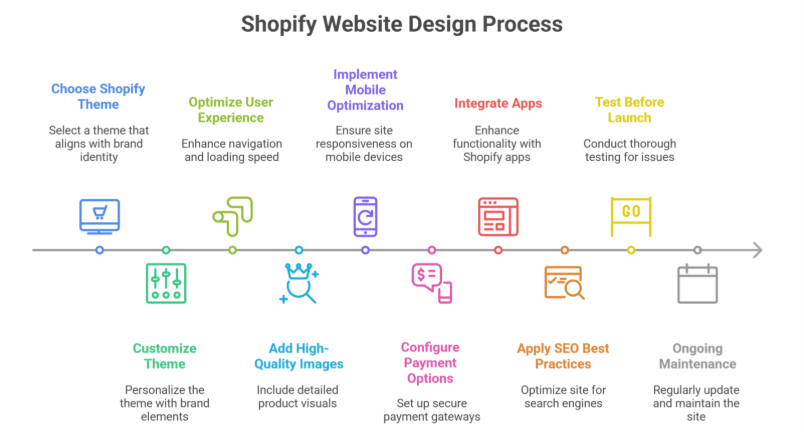
    In this blog, we will highlight the essential steps to designing a website. Covering almost everything from Shopify theme selection to mobile optimization. Whether you are a total beginner or working with a Shopify website designer, this blog will help you completely understand the process of creating a very user-friendly and visually appealing Shopify web design or Shopify store design.

    Why Shopify for eCommerce?

    Shopify is a highly well-known eCommerce platform due to its ease of use, extreme scalability, and unique customization options. Unlike other platforms that require highly complex coding, Shopify makes it easy for business owners to set up their website very quickly with very intuitive design tools and complete built-in features.

    A design agency or individual developers can help highly enhance the platform’s default capabilities. However, even without technical expertise, you can build your site or design a beautiful store with completely unique tools and resources, including no-code options and app store integrations.

    Step-by-Step Guide to Designing a Shopify Website

    ‍Step-by-Step Guide to Designing a Shopify Website

    1. Choosing the Right Shopify Theme

    Your themes highly determine the entire look and feel of your site. Shopify provides free and paid themes that cater to specific business needs. To select the best theme:

    • Consider your brand identity and aesthetics.
    • Ensure the theme is mobile-responsive.
    • Look for customization options.
    • Check customer reviews and ratings.
    • Test the demo version before committing.

    If you need more flexibility, hiring a professional designer or developer can help create a completely custom template tailored to your business’s unique requirements.

    2. Customizing the Theme

    Once you’ve chosen a theme, the next step is to customize your store. Shopify allows you to highly modify your store’s complete appearance using the theme editor. Key customizations include:

    • Changing fonts and color schemes.
    • Uploading a high-resolution logo.
    • Adjusting homepage layout and sections.
    • Adding promotional banners and sliders.
    • Configuring the navigation menu for easy browsing.

    3. High Optimizing for User Experience (UX)

    A well-designed website focuses highly on user experience to keep visitors very engaged. Consider the following UX principles:

    • Clear Navigation: Ensure menus and categories are easy to understand.
    • Fast Loading Speed: Optimize images and remove unnecessary scripts.
    • Simple Checkout Process: Reduce cart abandonment by offering a quick checkout.
    • Consistent Branding: Maintain uniform colors, fonts, and styles.

    Shopify design agency can help fine-tune these elements for maximum conversions.

    4. Adding High-Quality Images & Product Descriptions

    Your product pages are the heart of your online store. To make them effective:

    • Use high-quality images with multiple angles.
    • Include Zoom functionality for better viewing.
    • Write detailed product descriptions highlighting features and benefits.
    • Add customer reviews and ratings to build trust.

    5. Implementing Mobile Optimization

    With a majority of online shoppers using mobile devices, ensuring a mobile-friendly site is quite crucial. Shopify themes are inherently responsive, but additional steps include:

    • Using a mobile-friendly menu.
    • Ensuring buttons and CTAs are easily tappable.
    • Optimizing image sizes to prevent slow loading.
    • Testing the site on multiple devices before launch.

    6. Configuring Payment & Shipping Options

    A very seamless checkout process is pretty vital for conversion rates. Shopify integrates with multiple payment gateways, allowing customers to pay via credit cards, PayPal, or many other methods. Set up:

    • Secure payment options with Shopify Payments.
    • Transparent shipping policies.
    • Tax calculations based on customer location.
    • A return and refund policy for clarity.

    7. Integrating Apps for Enhanced Functionality

    Shopify’s App Store offers quite numerous plugins to enhance your store functionality. Some must-have apps include:

    • SEO apps to improve search rankings.
    • Live chat support for real-time assistance.
    • Email marketing tools to boost customer engagement.
    • Abandoned cart recovery apps to increase sales.

    These tools ensure a smooth user experience and improved performance.

    8. Complete Search Engine Optimization (SEO) Best Practices

    To attract complete organic traffic, implement SEO strategies:

    • Use relevant keywords in product descriptions and meta tags.
    • Optimize URLs for readability.
    • Write informative blog posts related to your products.
    • Use alt tags for images.
    • Submit your total sitemap to Google Search Console.

    SEO plays quite a significant role in bringing visitors to your store without relying solely on paid ads.

    9. Testing Before Launch

    Before going live, conduct a thorough test of your site:

    • Check for broken links.
    • Ensure all pages load correctly on different devices.
    • Test the checkout process.
    • Verify email notifications.
    • Run speed tests using tools like Google PageSpeed Insights.

    Addressing these issues beforehand ensures a highly smooth launch with very minimal technical glitches.

    10. Ongoing Maintenance & Updates

    A Shopify website isn’t just a one-time project. Regular maintenance helps keep your store updated and secure. Best practices include:

    • Updating plugins and themes regularly.
    • Monitoring analytics to understand customer behavior.
    • Refreshing content and product listings.
    • Conducting A/B testing for design improvements.
    • Keeping up with the latest features.

    Conclusion

    Designing a Shopify website involves some specific steps. From choosing a theme to optimizing for UX and SEO, whether you do it totally yourself or hire a design agency. Ensuring a high user-friendly, mobile-optimized, and high-performing site is quite essential for success.

    By following this guide, you can take your store to the next level and build a highly visually appealing and highly functional eCommerce website that stands out in a competitive market.

    FAQs

    Can I design a website on Shopify?

    Yes, you can design a website. It provides an intuitive drag-and-drop editor, customizable themes, and a wide range of apps to enhance functionality. Even without coding skills, you can create a professional, responsive eCommerce site tailored to your brand and business needs.

    How to design a Shopify store step by step?

    To design a store, first sign up and choose a theme. Customize it using the editor, add products with descriptions and images, set up navigation, payment, and shipping. Enhance functionality with apps, test your store on desktop and mobile, then connect a domain and launch it live.

    How to custom-design a Shopify website?

    To custom-design a website, select a flexible theme, use the drag-and-drop editor to adjust layouts, colors, fonts, and sections, and add custom code if needed. Incorporate your branding, upload products, configure navigation, and use apps to enhance functionality, then preview and launch your store.

    Does Shopify require coding?

    No, it does not require coding for most users. You can create and manage a fully functional online store using its drag-and-drop themes and built-in tools. Coding is only needed for advanced customizations, unique features, or modifying the underlying Liquid templates and CSS.

  • How to make the most of your Google Business Profile for online advertising?

    How to make the most of your Google Business Profile for online advertising?

    A Google Business Profile (GBP), aka Google My Business (GMB) is an essential tool for any company, especially those targeting local markets. Few firms make the most of their profiles, despite the fact that many develop them. Having a well-maintained business listing can significantly improve your online visibility and search rankings.

    According to Google’s GBP statistics, if your profile is complete, users are 50% more likely to think about making a purchase and 70% more likely to visit your shop. Optimizing your GMB helps customers find your business in local searches and boosts your local SEO strategies.

    In this blog, we’ll explore how optimizing your Google Business Profile can enhance visibility, attract local customers, boost engagement, and improve your business’s online presence.

    Why does GBP matter?

    Customers can find your company immediately through Google Maps and Search with a Google Business Profile, which is more than simply a digital listing. Regardless of the size of your business, having a well-optimized GBP helps you reach a wider audience, be more visible in search engines, interact with potential clients, and gain their confidence. Your business pin ensures your listing is trusted across directories.

    Many potential buyers search Google to start their buying journey, often looking for products or services by the label “near me.” Your company can more easily show up in local searches if your profile is completely optimized, giving you an advantage over the competition. A GBP serves as an instant point of contact for customers to phone, message, or locate your company, making it an essential component of your customer service and engagement plan.

    Knowing how to make the most out of it

    Now that Google has made it possible for companies to include social media accounts in their GMB, this is a fantastic chance to improve your SEO efforts and digital marketing approach. By displaying your services, contact details, business description, landing page, and photographs, GBP aims to make it simple for consumers to learn about your business’s offerings without them having to visit your website. Having your business’s GBP optimized is crucial for visibility since paid advertisements are driving organic results lower on the search results page.

    You may greatly expand the reach of GMB, interact with clients, and stand out in the congested search results of today by preserving your GBP with genuine content, adding photos and videos, connecting it to social media accounts, and maintaining consistent information across all directories.

    Steps to take for your GMB improvement:

    Optimizing your Google Business Profile (GBP) is important for improving your online presence and connecting with potential customers. Here’s how to do it efficiently:

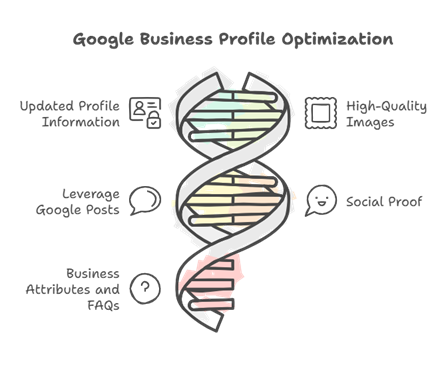
    __wf_reserved_inherit

    1. Updated Profile Information:

    Make sure that all of your company’s information, including the name of your business, address, phone number (NAP), and operating hours (keep in mind to adjust your hours in accordance with special occasions or holidays), is correct and up to date. Moreover, a well-written business description that includes relevant keywords and search terms draws attention, making it easier for clients to find you, boosting your SEO efforts, and improving your search rankings.

    2. High-Quality Images:

    Keep clear of stock photos and upload real shots to offer customers a sense of authenticity. Include pictures of your shopfront, staff, merchandise, and service-specific landing pages to give prospective buyers an idea of who you are. Businesses with high-quality photos get a lot more interaction and traction in local search results.

    3. Leverage Google Posts:

    By using this function, you can keep your profile interesting and up to date by sharing events, promotions, updates about your business, newsletters, and special offers right on it. Frequent postings can draw attention to new services, significant occasions, or special deals, making it simple for clients to discover what’s going on, increasing website traffic, and helping improve your business’s online visibility.

    4. Social proof:

    Good customer reviews and positive reviews increase credibility and trust. By responding to negative reviews and customer reviews, you show your concern for the client experience. Although most customers are not avid commenters, a rating of one or a rating between 0 and 5 stars is a little suspect.

    5. Add Business Attributes and FAQs:

    Use terms like “accessible,” “women-led,” or other business attributes to make a statement. By answering commonly asked questions (FAQs) immediately on your profile, you can reduce the volume of queries you have to answer, help improve customer understanding, and provide prospective clients with clarity.

    Key message to take away

    The first step to engaging local customers is creating a Google Business Profile. Optimizing it on a regular basis increases traffic, visibility, and customer attraction without incurring additional expenses. You will experience an increase in customer engagement and trust if you take the effort to update and maintain your profile on a regular basis.

    FAQs

    How do I advertise my Google Business Profile?

    To advertise your GBP, optimize your listing with accurate info, high-quality photos, and engaging posts. Use Local Ads campaigns to target nearby customers, encourage reviews, and share promotions. Consistently update your profile to improve visibility and attract more local traffic.

    Is $10 a day enough for Google Ads?

    A $10 daily budget for Ads can work for small campaigns or local businesses, but results may be limited. It’s enough to test keywords, ads, and targeting, but scaling or competing in high-demand markets usually requires higher budgets to achieve meaningful traffic and conversions.

    Is $500 a month enough for Google Ads?

    A $500 monthly budget for Ads can be enough for small to medium local businesses or niche campaigns. It allows testing multiple keywords, optimizing ads, and driving some conversions. However, highly competitive industries may need larger budgets to achieve significant traffic and measurable ROI.

    How to maximize your Google Business Profile?

    To maximize your GBP, ensure complete and accurate information, add high-quality photos, and regularly post updates or offers. Encourage customer reviews and respond promptly. Use relevant keywords, enable messaging, and track insights to optimize visibility, engagement, and local search performance effectively.

  • Make your Store a Must-Visit with these 13 Tried and Tested Strategies for 2025

    Make your Store a Must-Visit with these 13 Tried and Tested Strategies for 2025

    Make your Store a Must-Visit with these 13 Tried and Tested Strategies for 2025

    With their lightning-fast checkout processes and personalized offerings, online retailers have set a new standard for traditional stores. People now demand the same degree of customization and ease when they visit physical stores, just as they did when they shopped online before the pandemic. Shops in brick-and-mortar locations must therefore do more than meet consumers’ fundamental necessities; they must also entice them to leave the comfort of their homes. This is essential for any retail store looking to grow and implement effective retail marketing strategies in 2025.

    Secure Your Store with Shopify Support and Maintenance (CTA Button)

    Retailers need to make in-store visits more appealing by providing customers with reasons to visit in person. People can easily shop online with only a few clicks, thus providing the basics is no longer enough. Implementing retail strategies and using digital tools can help increase foot traffic and overall retail growth.

    Let’s be real, businesses have physical locations; the question is, how can they increase sales and foot traffic there while keeping customers coming back and boosting retail sales?

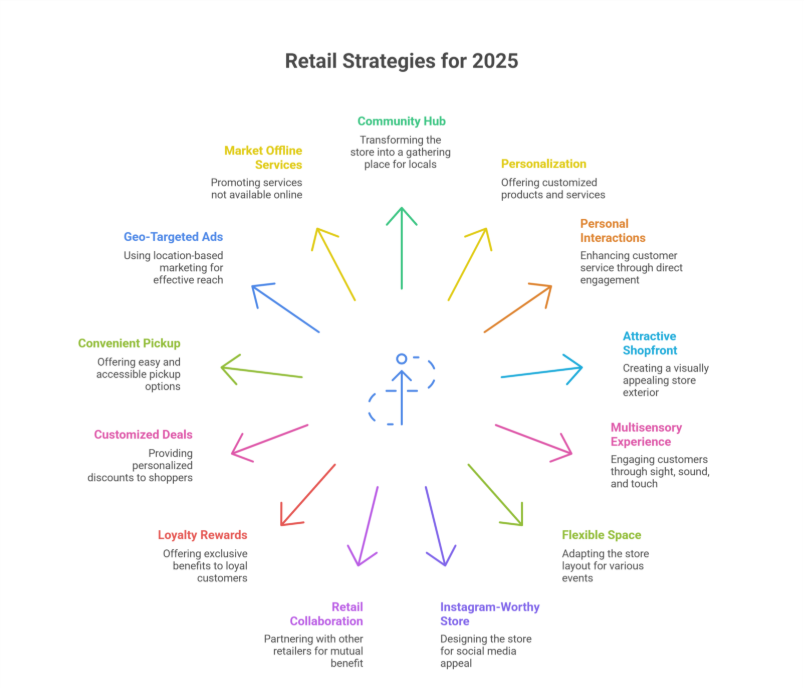
    1.Turn your store into a community hub

    2. Add a personal touch with customization

    3.Make the most of personal interactions

    4. Create a more attractive shopfront  

    5. Engage customers in a multisensory journey  

    6.  Make your store a flexible space

    7. Create an Instagram-Worthy store

    8.Collaborate with fellow retailers

    9. Reward loyalty with exclusive perks

    10. Offer customized deals to shoppers

    11. Provide convenient pickup choices

    12. Run Geo- Targeted Ads for effective Digital Marketing

    13.Market services not offered online

    1.Turn your store into a community hub

    Turn your store into a community hub

    Customers want more than just goods; they want a connection. Make your store a gathering spot by sponsoring in-store events, offering workshops, or simply creating an area for people to engage. Gym+Coffee’s running groups are an excellent example of retail-based community engagement and experiential retail.

    2. Add a personal touch with customization

    Personalized products can be quite appealing. Providing unique gifts or experiences, such as Sequoia Soaps’ build-your-own gift baskets, helps customers feel more connected to the products they purchase. This enhances the customer experience and builds a loyal customer base.

    3.Make the most of personal interactions

    In-store purchasing offers several benefits, one of which is personalized service. Shopify POS allows employees to support customers from anywhere in the store, moving away from the counter to offer individualized assistance. They can easily verify item availability at different locations, retrieve a customer’s past purchases, or complete an earlier-in-the-day online shopping cart.

    Casual browsers become purchasers thanks to these tools. Businesses that integrate their online and in-store systems with Shopify POS receive an average 8.9% boost in revenues. This frees up employees’ time to help clients instead of juggling many systems or looking for information, streamlining the point of sale process.

    Click here to learn more about Shopify App Development (CTA Button)

    4. Create a more attractive shopfront  

    Customers are more inclined to set foot in your store and prolong their visit if it exudes a welcoming atmosphere. By incorporating a well-organized design scheme, chic furniture, and refined lighting, any space can be entirely transformed. Along with fostering a more comfortable environment for your customers, this will also motivate them to spend additional time browsing with you. This is something that companies like July have perfected, employing cozy, warm lighting to entice clients to stay and interact, enhancing dwell time and the in-store experience.

    5. Engage customers in a multisensory journey

    Making an effort to engage all five senses when shopping enhances the store experience. Think about how your store can improve its ambiance, greeting, music, aromas, and even little snacks just like Chicago French Press does with its welcoming, fragrant feel. This improves the overall shopping experience and helps attract new customers.

    6.  Make Your store a flexible space

    Combine retail with additional activities, such as cafes or workshops, to keep customers in-store for longer. Forth & Nomad accomplishes this by offering coffee and classes alongside its lifestyle products, enticing customers to remain and browse. This flexible approach supports strategies for retail growth and encourages foot traffic.

    7. Create an Instagram-Worthy store

    Customers are more inclined to take pictures and discuss their experiences at a store that is visually appealing. Wish’s Atlanta location, with its art-gallery-inspired exhibits, is an excellent example of how to create a social media-worthy environment, generating buzz and increasing brand awareness.

    8.Collaborate with fellow retailers

    Collaborating with other retailers is one strategy to increase client reach. With the finest of both brands available to customers in one convenient location, the cooperation between Leesa and West Elm has increased foot traffic and revenue. These partnerships act as complementary retail marketing strategies that work effectively in 2025.

    9. Reward loyalty with exclusive perks

    A fantastic strategy to retain consumers is to implement a loyalty program. Customers are more likely to return and form stronger ties with businesses that offer incentives for in-store visits and purchases, such as Kenny Flower’s Island Society program. Loyalty programs directly impact conversion and keep customers coming back.

    10. Offer customized deals to shoppers

    Imagine a more meaningful connection with your clients through personalized adverts that cater to their individual preferences. With a mobile POS system, this becomes a piece of cake. You can provide customers with more relevant recommendations and promotions if you keep tabs on what they buy. Ultimately, your relationship with your clients will be strengthened and they will feel valued. This technique builds customer loyalty by making them feel appreciated and understood.

    In addition, you can create personalized promos and campaigns by analyzing your audience’s previous encounters with your brand. 

    If you own a swimwear business, for instance, and you introduce a new print to an existing model, you might contact all of your customers who have bought that suit style in the past to offer them a discount.

    Shopify POS makes it easy to create and maintain client profiles. With this function, you can keep tabs on what your consumers buy and what they like, which opens the door to targeted advertising.

    11. Provide convenient pickup choices

    Stores see an increase in foot traffic when customers have more flexible pickup alternatives, such as Buy Online, Pick Up In-Store (BOPIS). Offbeat Bikes had a notable surge in sales when they introduced this option, streamlining the purchasing process for their clients and creating a seamless omnichannel experience.

    12. Run Geo- Targeted Ads for effective Digital Marketing

    Google searches for “near me” and similar terms are common among consumers looking for local businesses and products. The phrase “shoe store near me” is one example of a possible search query. Traditional retailers should significantly spend on local SEO to entice these clients.

    Traditional retailers should significantly spend on local SEO to entice these clients.

    Want to boost your local visibility? Start with the basics:

    -Put your shop’s name, address, and phone number front and center on your website. Make it impossible to miss!

    -Then, claim your spot on Google My Business. It’s like giving your store a megaphone in the digital world.

    Pro tip: Keep your information consistent across both platforms. It’s the secret sauce for helping customers find you easily!

    Additionally, it’s important to encourage clients to post pictures and write reviews. To further improve your position in local search engine results, you should also develop “citations” in other internet business directories.  

    13.Market services not offered online

    Do something that your online competitors can’t if you want to bring in more customers to your physical store. Offering professional recommendations is equally important because it gets people to talk to you before they make a purchase, instead of blindly buying things online. 

    A hybrid business model that combines online and in-store shopping is something to think about. Ensure that buying in person is as painless as it may be. Nowadays, customers are accustomed to receiving mediocre service; therefore, going above and beyond to guarantee their happiness would distinguish you from the competition.

    For the majority of companies, providing services exclusively in person can yield enormous benefits. More people will visit your store because of this novel strategy, which boosts consumer satisfaction and retail business growth.

    In a nutshell,

    Bring the Buzz back with these Proven Tactics

    Shops have been and will continue to be vital to the retail industry. Nevertheless, their strategic significance has changed over time. These days, drawing in customers is all about making their in-store experiences memorable, using data-driven strategies, digital marketing, and AI-powered tools. 

    Frequently Asked Questions (Make your Store a Must-Visit with these 13 Tried and Tested Strategies for 2025)

    What are the in store shopping trends in 2025?

    In‑store shopping trends in 2025 include hyper‑personalised experiences using AI and data, seamless omnichannel integration, immersive phygital tech like AR/VR, automated self‑service and checkout, and sustainability‑focused products and layouts that appeal to eco‑conscious consumers.

    How to create a complete marketing strategy in 2025?

    To create a complete marketing strategy in 2025, start with data‑driven audience insights, define clear goals, and integrate AI-powered personalization. Combine omnichannel campaigns, immersive content, influencer collaborations, and sustainable messaging. Continuously track KPIs, optimize using real-time analytics, and adapt to emerging technologies and consumer behaviors.

    What are the challenges in retail in 2025?

    Retail challenges in 2025 include adapting to rapidly evolving consumer expectations, integrating seamless omnichannel experiences, managing supply chain disruptions, ensuring data privacy and security, adopting AI and automation effectively, and meeting sustainability demands. Rising competition and economic uncertainties further pressure retailers to innovate and stay agile.

    How do I attract customers to my store?

    To attract customers to your store, offer personalized experiences using AI insights, create engaging in-store events, leverage social media and local marketing, provide exclusive promotions or loyalty rewards, ensure a seamless omnichannel experience, and focus on a welcoming, visually appealing, and sustainable store environment.

  • Migrating From Magento to Shopify Successfully

    Migrating From Magento to Shopify Successfully

    Migrating completely from Magento to Shopify is a very decisive move. Only for businesses seeking a very user-friendly, highly scalable, and cost-effective eCommerce solution. While Magento is known for its high flexibility and customization. It often requires quite extensive technical expertise to manage properly. On the other hand, Shopify offers a highly intuitive platform with built-in tools. Making it ideal for merchants looking for high efficiency and growth.

    A successful migration requires careful planning to ensure data integrity, SEO rankings, and very smooth functionality. In this blog, we will walk you through the essential steps to migrate from Magento to Shopify. That too, without disrupting even a fraction of your online business.

    Why Migrate from Magento to Shopify?

    Before jumping into the migration process, it is highly crucial to understand why businesses choose to switch. Here are some of the most appealing features of Shopify:

    • Ease of Use: Has a highly intuitive and beginner-friendly interface as compared to Magento.
    • Lower Maintenance Costs: Pretty much eliminates the need for highly extensive development and hosting management.
    • Scalability: Cloud-based infrastructure supports businesses of all sizes without the need for any additional servers or maintenance.
    • App Ecosystem: Has a vast app store for extending functionality without custom development.
    • Security & Reliability: Handles security, updates, and hosting, reducing the burden on store owners.

    Pre-Migration Considerations

    1. Analyze Your Current Magento Store

    Before migrating, audit your current Magento store to understand what needs to be transferred. Key elements include:

    • Products & Categories
    • Customer Data
    • Order History
    • Website Content (pages, blogs, policies, etc.)
    • SEO Elements (meta titles, descriptions, URLs)

    2. Choose the Right Shopify Plan

    Shopify offers multiple plans. Including Basic and Advanced. If you run a large-scale store, a plus plan can also be an option. Select a plan based on your business needs and budget.

    3. Backup Your Magento Store

    Before proceeding with migration, always create a full backup of your Magento database to prevent data loss. Export the entire important data, including products, customers, orders, and CSV file imports, for a smooth data migration.

    Step-by-Step Complete Guide to Migrating from Magento to Shopify

    1. Set Up Your Shopify Store

    Once you’ve chosen your plan, set up your store by:

    • Registering a domain (or connecting your existing one)
    • Selecting a theme that quite perfectly aligns with your brand
    • Configuring general settings such as currency, tax rules, and payment gateways

    2. Use an Automated Migration Tool

    Manual data migration can be highly time-consuming and prone to errors. Consider using helpful tools like Cart2Cart, LitExtension, or Matrixify. This will completely automate the process. These tools help transfer:

    • Products and categories
    • Customers and orders
    • CMS pages and blog posts

    3. Manually Review & Clean Up Data

    Once the migration is complete, review your data to ensure everything has transferred correctly. Look for:

    • Missing product descriptions or images
    • Incorrect pricing or stock levels
    • SEO settings like URLs and metadata

    4. Redesign Your Store for Shopify

    Since Magento themes cannot be directly transferred, you’ll need to choose a Shopify theme or build a custom design. An experienced designer can help create a visually appealing and optimized store.

    5. Reconfigure Essential Apps & Integrations

    Shopify offers various apps to replace Magento’s extensions. Ensure that your store has the necessary apps for:

    • Email marketing
    • Inventory management
    • Analytics and reporting
    • Customer support (Live chat, Helpdesk)

    6. Test Your Store Thoroughly

    Before making your store live, conduct thorough testing:

    • Check product pages and categories
    • Verify payment and checkout processes
    • Test website speed and mobile responsiveness
    • Ensure customer accounts and order history are intact

    7. Set Up 301 Redirects

    To prevent broken links and maintain SEO rankings, set up 301 redirects for all important URLs. Shopify allows you to redirect old Magento URLs to new ones, ensuring a smooth transition without losing search engine rankings.

    8. Launch Your Store

    Once everything is in place, it will be time to go live! Before officially launching:

    • Announce the migration to customers via email and social media
    • Monitor performance and fix any post-launch issues
    • Keep an eye on analytics to track sales and traffic

    Post-Migration Tips

    1. Monitor Website Performance

    Use tools like Google Analytics and Shopify’s built-in reports to track performance post-migration. Pay attention to traffic fluctuations, conversion rates, and new store functionality.

    2. Optimize SEO & Content

    To maintain and improve SEO rankings:

    • Update meta descriptions and page titles
    • Submit a completely new sitemap to Google Search Console
    • Optimize product pages with relevant keywords

    3. Train Your Team on Shopify

    If your team is used to Magento, they might need some time to get quite familiar with Shopify’s admin interface. Provide training and resources to ensure a very smooth transition.

    4. Engage with Customers

    Keep customers informed about the changes and offer assistance if they face issues. Ensure smooth communication through:

    • FAQs about the new store
    • Live chat support
    • Promotional offers to welcome them to the new platform

    Conclusion

    Migrating from Magento to Shopify can be a total game-changer for your entire business. Making store management easier while highly improving the user experience. With proper planning, the right migration tools, and thorough testing, you can transition quite smoothly without losing data or customers.

    Following this migration checklist and step-by-step guide will help ensure a very successful and hassle-free migration process.

    FAQs

    Why should I migrate from Magento to Shopify?

    Shopify offers a highly user-friendly, scalable, and cost-effective eCommerce solution. Unlike Magento, which requires extensive technical knowledge, Shopify simplifies store management with built-in tools, making it ideal for businesses aiming for growth with less complexity.

    Will I lose my SEO rankings during migration?

    Not necessarily. By carefully redirecting old Magento URLs to Shopify URLs and preserving meta titles, descriptions, and alt tags, you can maintain most of your SEO value. Proper planning is crucial.

    How long does the migration take?

    The timeline depends on store size and complexity. Small stores may migrate in 1–2 weeks, while larger stores with thousands of products and custom functionalities could take 4–8 weeks.

    Can I migrate all my data automatically?

    Many tools and apps can automate the migration of products, customers, and orders. However, some custom data or extensions may require manual adjustments.