Blog

  • Fixing WordPress Backend Errors Caused by Weglot & WP Rocket Conflict

    The Problem: Editor Fails When Weglot Is Active

    Did your WordPress site started throwing fatal PHP errors, white screen of death, or screen of death when users tried to edit or update pages with Weglot enabled? While deactivating the plugin temporarily you resolved the issue but it wasn’t a long-term solution. Server logs pointed to a conflict in the way Weglot handled output buffering — and caching behavior from WP Rocket made it worse. This type of plugin conflict occurs when two or more WordPress plugins or a plugin and theme clash on a site.

    What is the Issue?

    • Plugin Overlap: Both Weglot and WP Rocket were trying to manage script execution, especially during backend AJAX calls in the WordPress admin panel.
    • Memory Pressure: Multiple backup plugin and optimization plugins were running at once, pushing server memory limits and causing performance issues.
    • Intermittent Fixes: Disabling “Load JavaScript Deferred” in WP Rocket helped in staging site, but not consistently on the live WordPress website.
    • Admin Load Failures: These conflicts were breaking editing screens, translation switchers, and page loading in the WordPress admin area.

    ️ Step-by-Step Fix

    Step 1: Test Plugin Conflicts

    Temporarily deactivate all plugins including WP Rocket and replace it with a new plugin like better plugin compatibility control to test performance without caching conflicts and complex WordPress plugin issues.

    Step 2: Review Server Logs

    Check for PHP error, memory exhaustion, and MySQL activity that might amplify plugin and theme conflicts in WordPress.

    Step 3: Apply a Safe Code Patch

    A snippet provided by Weglot disables translation during certain admin actions. This resolved backend access issues without affecting frontend translation and ensured every WordPress user could work correctly.

    Step 4: Roll It Out

    Test changes on staging site first, then deploy to live WordPress site after verifying stability, page loading, and editing access.

    ✅ Final Result

    After applying the patch and replacing the caching tool, the site’s WordPress admin dashboard and WordPress installation returned to full functionality. Editors could now update content, switch languages, and work without backend crashes. This prevents WordPress plugin conflicts in the future, keeps your WordPress site running smoothly, and avoids plugin problems like plugin conflict occurs when two or more WordPress plugins overlap.

    What You Should Know

    • Plugin Conflicts Happen: Even the best tools can clash, especially when both handle JavaScript or caching.
    • Always Test in Staging: Use a safe environment before applying fixes to your live site.
    • Reach Out to Plugin Support: Don’t troubleshoot alone—vendor support can offer solutions like patches or filters.
    • Don’t Ignore Logs: Server logs and error messages are your best friend when tracking down deeper PHP conflicts.

    Having issues with plugin compatibility or broken admin panels?

    ‍

  • Fixing “Connection Lost” Alerts in WordPress Classic Editor

    What Was Happening?

    Site editors were constantly seeing a “Connection Lost” message when working on WooCommerce orders, custom post types, and standard posts in the WordPress dashboard. Naturally, this raised alarms—especially when it seemed to suggest failed saves, document settings not saving, or connectivity issues in the admin area.

    But here’s the thing:

    • ✔️ Orders were saving fine.
    • ✔️ No data was actually lost.
    • ❗ The error was just… stuck.

    After digging in, we discovered that this wasn’t a connectivity issue—it was a cosmetic one, triggered by outdated plugins, PHP version inconsistencies, lazy load scripts, enqueue styles in the editor, and custom code affecting post types and the classic editor.

    What We Fixed

    ✅ 1. Outdated Plugins

    We updated plugins in the staging site and ensured compatibility with minimum WordPress version requirements. Once they were current, the connection lost error stopped appearing—clearly a compatibility glitch with plugins like Elementor or other WordPress plugin conflicts was at play.

    ✅ 2. Sticky Notices from Custom CSS

    A forgotten custom CSS snippet in functions.php forced all admin notifications to stay visible—including the outdated “Connection Lost” alert. We cleaned it up and restored normal notice behavior in the WordPress admin area.

    ✅ 3. Extensive Testing

    We validated edits on posts, pages, orders, and custom post types—no data loss, and no misleading alerts. Admins could now work without distraction or false warnings. We also checked page load, CSS files, JS files, and development mode performance.

    ✅ 4. Client Reassurance

    We explained the situation to the client—ensuring they knew everything was saving properly all along, and no backend issue or plugin conflict was putting data at risk.

    ✅ The Outcome?

    A smoother editing experience in the WordPress dashboard, no scary warnings, improved editor accessibility, and fewer distractions for the team. Classic editor, Gutenberg editor, and Elementor integration now function correctly, with saved settings and improved performance.

    Not every WordPress bug is what it seems.

    ‍

  • Fixing “Invalid Product” Errors from Upsell Plugin Conflicts in WooCommerce

    Issue Overview

    A WooCommerce store using WooCommerce’s variable products and product attributes saw sitewide cart failures after a plugin update. Users couldn’t add any WooCommerce product to their cart—each attempt triggered an “Invalid product” or fatal error. This occurred despite no changes to WooCommerce product data, metadata, or SKU settings.

    What We Found

    JavaScript conflicts

    DevTools and activity logs showed errors tied to modal popups triggered by the “Add to Cart” button and AJAX requests in the dashboard.

    Plugin interference

    The issue traced back to two plugins:

    • WooCommerce Upsell Popup
    • WooCommerce Upsell Popup PRO
    Staging validation

    Disabling these plugins restored normal cart functionality instantly across the WooCommerce store and WordPress site.

    How We Fixed It

    ✅ Disabled upsell plugins

    Both upsell extensions were deactivated to restore cart functionality and resolve plugin conflicts.

    ✅ Communication

    Clients were informed that upsells and upsell features were temporarily disabled to allow seamless purchases.

    ✅ Isolated the root cause

    The plugin tried fetching or loading a removed WooCommerce product, blocking the entire cart, checkout, or product query flow.

    ✅ Planned next steps

    Options included updating, replacing the plugin, using a CSV file for product import/export, or adjusting WooCommerce settings to avoid similar future compatibility issues with plugins or themes.

    Result

    Cart and checkout functionality, including default WooCommerce product types, variable products, and product categories, was fully restored within hours. Sales resumed, plugin conflicts were diagnosed and resolved, and a safe path was created for upsells reactivation, third-party plugin adjustments, or custom web development solutions.

    Experiencing errors with WooCommerce add-to-cart or upsell plugins?

    Integriti Studio can help you troubleshoot and resolve plugin conflicts without compromising your sales.

    ‍

  • How We Fixed News Post Imports in WordPress (And Prevented Broken Links)

    Issue Background

    During the migration of a legacy WordPress site to a new environment, two major problems appeared after the first import:

    ➡️ Duplicate Featured Images:

    ‍
    Multiple news posts ended up displaying the same featured image, hurting visual consistency across the WordPress site and dashboards.

    ➡️ Broken External Links:

    A custom “external link” field triggered errors if the URL wasn’t perfectly formatted with https://, causing broken links, broken URLs, and broken outgoing links that frustrated users and led to 404 errors.

    Both issues made the new site look unprofessional, broke user trust, and created numerous broken links across content for broken pages and posts.

    Diagnosis

    ‍
    We ran a detailed audit of the import scripts, custom fields setup, and plugins like ACF and Better Search Replace:

    ✔️ Duplicate images came from a scraping tool that didn’t handle similar metadata properly—often assigning one featured image to multiple posts.

    ✔️ Broken external links traced back to strict URL validation rules rejecting plain text or incomplete URLs in the external link field, which could lead to broken links on your WordPress site and broken internal links in posts.

    Resolution Steps

    ‍

    1️⃣ Refining the Import Script

    ‍
    Rebuilt the import process to fetch individual featured images for each post, guaranteeing unique images across the WordPress website and ensuring the site was free of broken links.

    2️⃣ Image Optimization

    ‍
    Manually resized and compressed oversized featured images to reduce page load times and improve site performance.

    3️⃣ Fixing the External Link Field

    ‍
    Converted the external link field from strict URL validation to plain text, avoiding broken URLs, broken outgoing links, and bad links, while keeping flexibility for editors.

    4️⃣ Conditional Logic for Display

    ‍
    External links now open in new tabs as outbound links, while internal posts remain native, providing proper internal linking and a seamless user experience.

    Final Outcome

    ‍
    With custom coding, content clean-up, plugin configuration, and thoughtful UI handling, the chaotic import became a polished news archive. Every post now displays correctly, links work across the site, and broken links were fixed or removed. Using tools like a broken link checker plugin, Better Search Replace, or plugin like Broken Link Checker made it easy to find and fix dozens of links, keeping your WordPress site free of broken links and ready for search engines.

    ‍

  • How to Add Categories or Tags Below Posts in WordPress Templates

    Issue Overview

    One WordPress site wanted to show taxonomy tags, category and tag, or custom taxonomies (like “News” or “Topics”) beneath each blog post, single post, or custom post type. But every time a developer tried to edit the WordPress theme via the WordPress dashboard, the changes failed—or worse, broke the template file or custom template.

    Key problems included:

    • Theme templates didn’t show tags by default
    • Theme editor caused errors or wiped files
    • Posts were properly tagged—but tags weren’t visible on the front end

    Fixing the Issue

    Access files securely

    Use an FTP client, WP admin, or your host’s file manager instead of the WordPress editor. Navigate to: /wp-content/themes/your-wordpress theme/

    Find the right template

    For blog posts: single.php, content-single.php, or /template-parts/content-single.php. For custom post types like News: Look for single-news.php or template logic in functions.php. Check category page templates or archive page templates if needed.

    ️ Insert taxonomy code

    Add this snippet where you want the tags or categories to appear—usually after the_content():

    php

    CopyEdit

    <div class=”post-taxonomies”>
    <?php the_terms( get_the_ID(), ‘category’, ‘Filed under: ‘, ‘, ‘ ); ?>
    <?php the_terms( get_the_ID(), ‘post_tag’, ‘Tags: ‘, ‘, ‘ ); ?>
    </div>

    Tip: Change ‘category’ or ‘post_tag’ to your own custom taxonomy slug if needed.

    Style and test

    Add simple CSS or use your theme’s Customizer to align the new section visually with your layout. Confirm that terms display cleanly on single post pages, category pages, tag pages, or custom page templates. This helps display posts, related posts, or show a list of posts of a particular category.

    Final Result

    Your blog posts block, single post, or news posts now include visible categories, tags, or category assigned information—boosting internal linking, search visibility, taxonomy functionality, and UX without the need for extra plugins. Published posts are assigned properly, and you can create a new post, add a new category, or add tags using a WordPress plugin if needed.

    Need help modifying your WordPress theme safely?

    At Integriti Studio, we fine-tune WordPress templates to support dynamic content, smart taxonomies, and better engagement across your site.

    ‍

  • Website Building Made Easy    Top 3 Website Builders of 2025

    Website Building Made Easy Top 3 Website Builders of 2025

    Website Building Made Easy Top 3 Website Builders of 2025

    Even the most tech-savvy people cannot take on the difficult process of building a website from scratch. Finding the perfect balance of form and function requires effort. However, you can streamline the process and spare yourself a ton of labor by using AI website builders driven by AI. These easy-to-use website builder tools help you create a website quickly while also providing options to customize your website.

    With tools like ChatGPT, creating a professional website that truly represents your identity and vision is now a reality. These website maker innovations have made website building accessible to individuals with any level of technical skill. For small business owners or individuals working on their own, these tools offer a simple and efficient way to establish online presence, grow your business, and build a business website.

    ‍

    Our Top 3 Picks

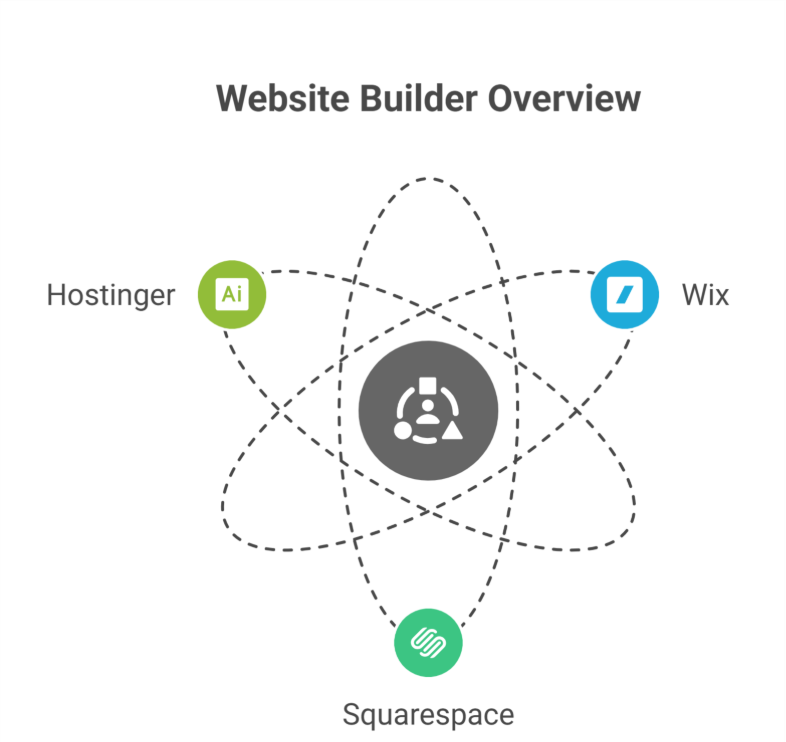
    1. Wix– A comprehensive solution for your website
    1. Squarespace – Most suitable for creative businesses
    1. Hostinger– Ideal for logo and copy generation

    Wix

    Wix is quite a popular website builder and it’s also well known for its intuitive and easy-to-navigate interface. It has a pretty wide variety of website templates, which is great. You don’t actually need to have a background in coding to create your own website.

    Wix offers nearly all the tools to help you create a website if you’re in search of the best website builder. With its intuitive editor X interface, you can choose from hundreds of customizable templates to establish professional-looking sites. Your site can be made more versatile and user-friendly with the help of a variety of drag-and-drop builder tools, widgets, and mobile solutions. The robust ecommerce features make it simple for businesses to create an online store, offer subscriptions, and sell digital downloads. On top of that, your site will always be accessible with exceptional uptime.

    Pros

    • Intuitive and easy-to-use website builder interface

    • A variety of widgets to improve efficiency

    • Customizable templates for various sectors and use cases

    • Powerful mobile website creation resources

    • Extensive online stores customization possibilities and robust ecommerce capabilities

    • Reliable uptime combined with exceptional customer support

    • Extensive business options include selling digital downloads.
    • AI-powered site design tools to help you create professional websites

    • Free plan offered

    Cons

    • Third-party applications can help boost analytics

    • Once atemplate is selected, it cannot be used again

    Who should use this?

    The free tier is just one more perk of Wix’s robust, business website-friendly features. Despite having to put up with some annoying on-site adverts and missing out on some paid features, Wix is still the greatest choice for users who want to build a website without paying a dime every month.

    Hostinger

    Hostinger’s site builder is always evolving with new features and updates that distinguish it in a competitive industry. Its drag-and-drop capability makes it simple to create visually appealing websites and fully functional online stores. Notable additions include a built-in logo generator, a free SSL certificate, and a photo repository for uploaded photographs. However, it is important to mention that the free website plan is not available.

    Pros

    • An intuitive website creator featuring a drag-and-drop interface

    • Smart AI website builder tools that optimize the design workflow

    • Consistent availability to ensure the seamless operation of your website

    • Effortlessly build your brand with the built-in logo maker

    • Free SSL certificate included

    • Efficient picture archive for organizing images

    • Unlimited storage and bandwidth with all subscriptions

    • Enhanced value through integration with Hostinger web hosting

    Cons

    • You can’t change the templates once chosen

    • Limited photo editing options

    • No free website plan available

    Who should use this?

    Hostinger has a great array of AI-powered website builder solutions. For example, you can select “entertainment” or “small business” as your category, and the builder will do the rest. SEO tools, website copywriting, heatmap analytics, and custom site designs are all included. Hostinger is ideal for those looking to create a professional website with ample support and marketing tools.

    Squarespace

    Squarespace is the go-to website builder for creating professional websites. It streamlines website building for visually attractive results. Their vast collection of website templates is optimized for mobile devices, making them perfect for any audience.

    Squarespace offers advanced coding possibilities, robust blogging, and ecommerce solutions, delivering everything a small business needs to create an online store.

    Pros

    • Elegant, mobile-friendly layouts for professional-looking sites

    • Fluid Engine makes website building simple

    • Comprehensive e-commerce solutions for selling products and digital downloads.
    • Freedom to incorporate one’s own code for extensive personalization
    • Content management tools for blogs that allow users to schedule posts
    • Detailed statistics to monitor your development and helpful assistance to accompany it
    • Obtain an SSL certificate for your website at no cost.
    • With every plan, you get unlimited storage and data transfers.

    Cons

    • Once selected, templates cannot be altered

    • Free plan is not available.  
    • Does not provide customer service over phone.

    Who should use this?

    Squarespace is ideal for those who want a custom website. With customizable templates, advanced SEO tools, and drag-and-drop builder tools, you can build a website that reflects your business goals and online presence. 

    How to choose a website builder that best fits your needs

    How to choose a website builder that best fits your needs

    Here are key factors to consider:

    • Simplify the process by selecting an intuitive website builder.

    • Seek customizable templates that match your brand’s aesthetic. 

    • Ensure mobile-responsive templates for users on mobile devices.

    • Use built-in SEO tools to improve your search results.

    • Read reviews to check support responsiveness.

    • Compare prices including domain name, web hosting, and other fees.

    • Use free trials or money-back guarantees to test your site builder before committing. 

    Frequently Asked Questions (Website Building Made Easy Top 3 Website Builders of 2025)

    What is the easiest way to build a website in 2025?

    The easiest way to build a website in 2025 is by using AI-powered website builders like Wix ADI, Shopify Magic, or WordPress AI tools. These platforms offer quick setup, ready-made templates, drag-and-drop design, and automated content creation, making website building simple even for complete beginners.

    Which is the easiest website builder?

    The easiest website builder is Wix ADI because it uses AI to create a complete site within minutes. You just answer a few questions, and the tool designs layouts, pages, and content automatically. Its drag-and-drop editor makes customization simple, even for users with zero technical or design skills.

    What is the #1 website builder?

    The #1 website builder is Wix because it offers powerful design freedom, an easy drag-and-drop editor, hundreds of templates, and strong AI tools for quick site creation. It suits beginners and professionals, supports eCommerce, and provides reliable performance, making it the top all-round website builder.

    Is website design still a good business in 2025?

    Yes, website design is still a good business in 2025 because every company needs a strong online presence, and demand for modern, mobile-friendly, and high-converting sites keeps growing. Even with AI tools, businesses still rely on designers for strategy, branding, customization, and professional-quality user experiences.

  • Why SMEs Should Consider Outsourcing Marketing Operations

    Why SMEs Should Consider Outsourcing Marketing Operations

    WHY SMES SHOULD CONSIDER OUTSOURCING MARKETING OPERATIONS

    ‍In the dynamic world of business, small businesses and small and medium-sized enterprises (SMEs) face unique challenges and opportunities. While SMEs often possess the agility and innovation to compete in their industries, they may lack the resources and expertise to execute comprehensive marketing strategies effectively. This is where outsourcing marketing for small businesses can be a game-changer, enabling SMEs to optimize resources, access specialized marketing professionals, and amplify their market presence. Let’s delve into why delegating marketing operations and outsourcing marketing tasks can empower SMEs to thrive and grow.

    The Landscape of SMEs: Challenges and Opportunities

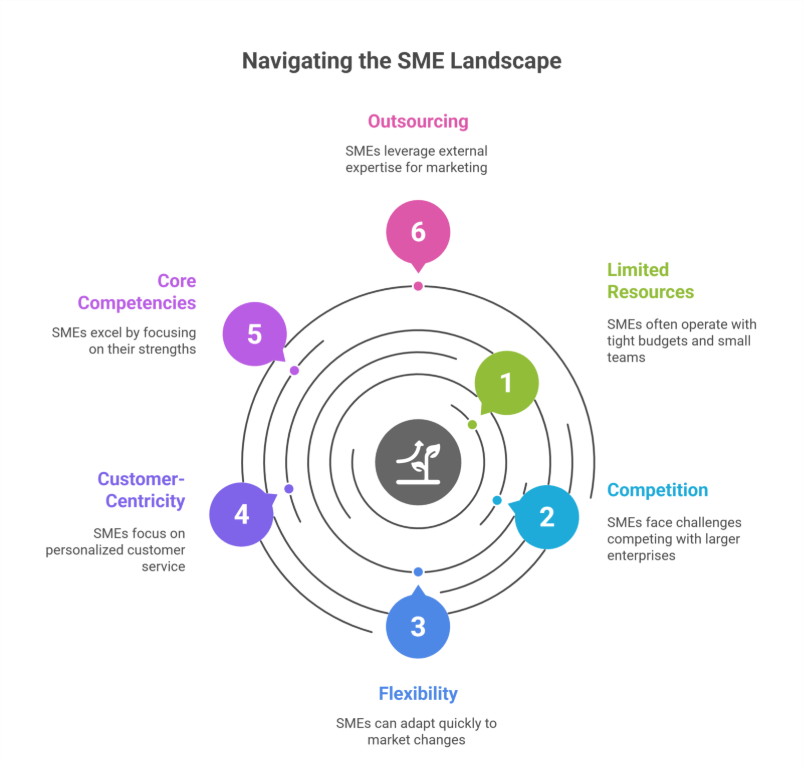
    SMEs play a vital role in the economy, driving innovation and job creation. However, they often operate with limited budgets and lean teams, making it challenging to allocate internal resources for robust marketing activities. Competing against larger enterprises with established brand recognition and extensive marketing budgets can further exacerbate the challenges faced by SMEs.

    On the flip side, SMEs possess inherent strengths such as flexibility, adaptability, and customer-centric approaches. Leveraging these strengths through strategic marketing strategies can unlock growth opportunities and establish a strong foothold in competitive markets.

    Focus on Core Competencies: Excel in Your Expertise

    Focus on Core Competencies: Excel in Your Expertise

    For SMEs, focusing on core business activities is essential for sustainable growth. By outsourcing marketing operations to experienced professionals or digital marketing agencies, SME owners and teams can dedicate their time and energy to driving business development, innovation, and customer satisfaction. This streamlined approach allows SMEs to excel in what they do best while leaving complex marketing tasks in capable hands.

    Outsourcing marketing encompasses a range of marketing services, including digital marketing, content marketing, email marketing, social media management, search engine optimization (SEO), marketing campaigns, advertising, and more. By partnering with specialized marketing agencies or freelancers, SMEs gain access to a diverse skill set without the overhead costs of building an in-house marketing team or outsourced marketing department.

    Resource Optimization: Maximize Efficiency and Cost-Effectiveness

    One of the primary reasons SMEs choose to outsource your marketing is resource optimization. Rather than investing in infrastructure, training, and overhead costs associated with hiring and training an in-house team, outsourcing offers a cost-effective solution. SMEs pay for specific services or campaigns based on their immediate marketing needs and budget constraints.

    Moreover, outsourcing allows scalability, letting SMEs ramp up or down marketing efforts based on market dynamics and business goals. Whether launching a new product, expanding into new markets, or running seasonal marketing campaigns, outsourcing offers flexibility without long-term commitments.

    Enhanced Agility: Adapt and Thrive in Competitive Markets

    Agility is a cornerstone of SME success. In rapidly changing markets, the ability to pivot marketing strategies quickly can make all the difference. Outsourced marketing efforts empower SMEs to adapt to market trends, consumer behaviors, and competitor actions efficiently.

    By leveraging external expertise and industry insights, SMEs can stay ahead of the curve and capitalize on emerging opportunities. Whether implementing new technologies, experimenting with innovative marketing techniques or marketing tactics, or optimizing conversion funnels, outsourced marketing services enable SMEs to thrive in dynamic environments.

    Building Strategic Partnerships: Access to Specialized Skills and Networks

    Collaborating with outsourced marketing partners goes beyond transactional services—it fosters strategic partnerships. Trusted agencies or freelancers become extensions of the SME’s team, sharing insights, refining strategies, and driving collective growth objectives.

    These partnerships offer access to specialized skills, cutting-edge technologies, and expansive networks that may otherwise be inaccessible to SMEs operating independently. From data analytics and market research to creative design and campaign execution, partnering with an outsourced marketing team opens doors to new possibilities and helps small businesses achieve their marketing goals.

    Let’s Make it Interactive: Visualize Your SME’s Growth Trajectory

    Take a moment to visualize your SME’s growth trajectory with outsourcing marketing activities. Envision reallocating time and resources towards innovation, customer engagement, and business expansion. How would partnering with marketing partners or a digital marketing agency transform your overall marketing strategy and overall business performance?

    Take Action: Embrace Outsourcing for Sustainable Growth

    Now that you understand the benefits, it’s time to take action. Research reputable marketing agencies, freelancers, or outsourced marketing services specializing in marketing for your small business solutions. Schedule consultations to discuss your business objectives, challenges, and growth aspirations.

    Empower your SME with the strategic advantage of outsourcing marketing operations. Embrace agility, optimize resources, and position your small business for sustainable growth and success in competitive markets.

    Frequently Asked Questions (Why SMEs Should Consider Outsourcing Marketing Operations)

    What are the benefits of outsourcing marketing?

    Outsourcing marketing provides access to specialized skills, advanced tools, and industry expertise without the cost of an in-house team. It allows businesses to focus on core operations, optimize resources, scale campaigns flexibly, stay agile in changing markets, and achieve more effective, results-driven marketing outcomes.

    Why is marketing important for small businesses?

    Marketing is crucial for small businesses to build brand awareness, attract and retain customers, and compete effectively in their market. It helps showcase products or services, drive sales, establish credibility, and foster customer loyalty, ultimately supporting growth, profitability, and long-term business success.

    Why do companies prefer to use outsourcing?

    Companies prefer outsourcing to access specialized expertise, reduce operational costs, and improve efficiency. It allows businesses to focus on core activities, scale services as needed, leverage advanced tools and technologies, and maintain flexibility in dynamic markets, ultimately enhancing productivity and achieving better business outcomes.

    What is outsourcing in marketing?

    Outsourcing in marketing is the practice of hiring external experts, agencies, or freelancers to handle marketing tasks and strategies. It provides businesses with specialized skills, advanced tools, and industry knowledge, enabling cost-effective, scalable, and efficient marketing while allowing the company to focus on its core operations.

  • Why Your E-Commerce Business Needs WooCommerce Development Services Today

    Why Your E-Commerce Business Needs WooCommerce Development Services Today

    E-commerce businesses must offer customers a very seamless shopping experience in the rapidly growing digital marketplace while also standing out in a totally crowded market. One product that has entirely transformed how businesses function is WooCommerce, a very dynamic and highly customizable platform built on top of WordPress (an e-commerce platform). But why would your business wish to invest heavily in WooCommerce website development services (WooCommerce development services, e-commerce development)? Let’s explore the specifics.

    What is WooCommerce?

    WooCommerce is a particularly open-source e-commerce extension for WordPress that allows businesses to completely transform their websites into highly functional e-commerce sites (e-commerce website). Since its launch in 2011, WooCommerce has become quite a popular e-commerce platform, which has run millions of online stores worldwide (online store, ecommerce site). Because of its high scalability, flexibility, and an extensive range of customizable options, it has become quite a solution for companies of all sizes (businesses of all sizes, scalable, scalability).

    Whether you’re an enterprise looking for a very specialized solution or a small business owner trying to expand your company online (online business), WooCommerce offers quite a range of WooCommerce development services (custom WooCommerce development services, WooCommerce solutions) to meet your needs.

    The Benefits of WooCommerce for E-Commerce Businesses
    The Benefits of WooCommerce for E-Commerce Businesses

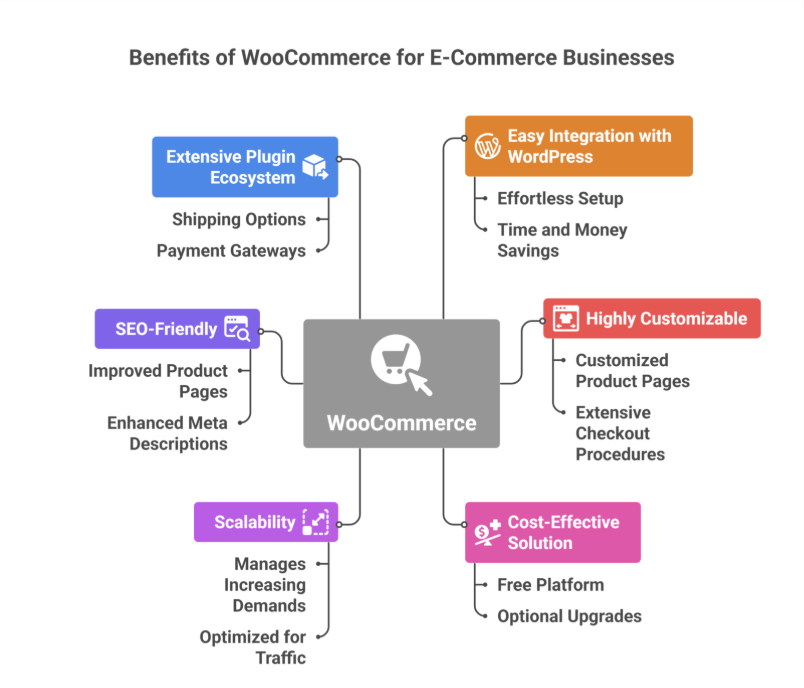
    1. Easy Integration with WordPress

    WordPress, a widely used content management system (CMS) worldwide, connects easily with WooCommerce (a WordPress plugin). Unlike building an e-commerce website from scratch, particularly adding WooCommerce to an already-existing WordPress website, is effortless and saves a lot of time and money (WordPress site, built on WordPress).

    2. Highly Customizable

    Custom WooCommerce development services allow companies to customize their online stores to reflect their personal brand identity (customization, customized solutions, brand identity). With features like customized product pages and extensive checkout procedures, the platform provides you the freedom to design a shopping experience that caters to your target market (shopping experience, customer experience).

    3. Cost-Effective Solution

    WooCommerce is a free e-commerce platform (WooCommerce is free), compared to some that require hefty subscription fees. It is still a cost-effective choice for enterprises, particularly those who are just getting started, even though quality upgrades or development services may incur additional fees (development needs).

    4. Scalability

    WooCommerce can grow alongside your business (business grows). The platform effectively manages increasing demands, regardless of how many products you have—ten or a thousand. You can make sure your store stays optimized regardless of traffic and merchandise growth with professional WooCommerce development (expert WooCommerce development, optimization).

    5. SEO-Friendly

    For your online store to draw in organic traffic, search engine optimization, or SEO, is essential. You may improve product pages, meta descriptions, and URLs to rank higher in search results via WooCommerce’s integration with WordPress, which ensures access to a variety of SEO tools (website design, long-term success).

    6. Extensive Plugin and Extension Ecosystem

    With the help of WooCommerce’s comprehensive plugin and extension library (WooCommerce plugins, plugin development), you can include features like shipping options, payment gateways (payment gateway), and advanced analytics. WooCommerce website development services can be used to further improve these plugins, guaranteeing smooth operation catered to your company’s requirements (functionality, best practices).

    Why Invest in WooCommerce Development Services?

    1. Enhanced User Experience

    A well-designed e-commerce store (e-commerce store) is essential for retaining clients. Expert WooCommerce development service providers (expert WooCommerce developers, WooCommerce experts) know how to maximize your store’s performance, guaranteeing smooth checkout, quick load times, and easy navigation (support and maintenance).

    2. Custom Features for Unique Needs

    Every company has different objectives. You can incorporate certain features like foreign support, complex search filters, or audience-specific recommendations with custom WooCommerce development services (custom solutions, tailor specific needs).

    3. Mobile Optimization

    Since a growing number of consumers are constantly shopping on mobile devices, it is essential to have a store that is properly optimized for mobile (mobile responsiveness). By ensuring that your store functions highly and looks attractive on all screen sizes, WooCommerce developers can highly enhance the user experience (skilled WooCommerce developers).

    4. Integration with Third-Party Tools

    Third-party technologies are crucial for digital e-commerce for marketing, analytics, and customer service. Because WooCommerce is open-source, it integrates easily with programs like CRM systems, MailChimp, and Google Analytics (seamless integration with third-party). These integrations can be further tailored by skilled developers to fit your company’s operations (creating a plugin).

    Choosing the Right WooCommerce Development Partner

    The performance and success of your store can be greatly impacted by investing in professional development services. What to look for in a development partner for WooCommerce:

    1. Expertise and Experience

    Inspect the developers’ history of successfully finishing WooCommerce tasks (experienced WooCommerce developers). Analyze portfolios, case studies, and customer recommendations to evaluate their experience level (development company).

    2. Understanding of Business Needs

    An ideal partner will take the time to understand the goals of your business (business needs) and tailor their solutions accordingly. Look for developers who respect communication and teamwork throughout the entire project (customer satisfaction).

    3. Post-Launch Support

    E-commerce websites need constant maintenance and updates. To handle technical problems and maintain the functionality of your business after launch, pick a development partner that provides post-launch support (support and maintenance).

    Real-World Applications of WooCommerce

    Businesses across industries have leveraged WooCommerce to create unique online stores:

    • Retail: WooCommerce enables small businesses to provide an extensive range of products at low setup costs (WooCommerce store, e-commerce business).
    • Subscription Services: Companies can provide subscription-based business models for recurring income with the appropriate extensions.
    • Digital Products: Software and eBooks are among the digital products that WooCommerce makes easy to market.
    • Service-Based Enterprises: Companies may partially incorporate customer service tools and reservation systems directly into their WooCommerce websites (WooCommerce plugin development).

    Is WooCommerce Right for Your Business?

    Despite its many advantages, WooCommerce might not be the very best option for every company. Here are a few considerations:

    • Budget: Although WooCommerce is free, you should factor in additional costs for development services, plugins, and hosting (VPS).
    • Technical Expertise: Setting up and constantly maintaining a WooCommerce store requires a certain level of expertise in technology. This process can be made very simple with expert WooCommerce development (experienced WooCommerce). 
    • Business Scale: WooCommerce is highly suited for small to medium-sized businesses; it can also service large corporations with the right customization (choose WooCommerce, reasons to choose).

    Businesses looking to establish a strong online presence in the competitive marketplace of e-commerce today would be wise to invest sufficiently in WooCommerce website development services (WordPress, ecommerce solutions). WooCommerce’s highly unmatched adaptability satisfies a variety of business goals, including scalability, customization, and mobile and SEO optimization (customize, tailor). You may fully utilize the platform and create an online store that attracts and engages a lot of clients by collaborating with highly knowledgeable developers (development company, WooCommerce development company).

    FAQs

    What is the purpose of WooCommerce?

    WooCommerce is a powerful WordPress plugin designed to turn a website into a fully functional online store. It allows businesses to sell products and services, manage inventory, handle payments, and customize the shopping experience. Its flexibility makes it ideal for small to large e-commerce businesses.

    Do you need a developer for WooCommerce?

    You don’t always need a developer for WooCommerce, as it’s user-friendly and offers many ready-made themes and plugins. However, a developer is helpful for advanced customizations, integrating complex features, optimizing performance, or ensuring security, especially for larger stores or unique business requirements.

    Why is web development important for business?

    Web development is crucial for businesses because it establishes an online presence, builds credibility, and attracts customers. A well-designed website improves user experience, boosts sales, supports marketing efforts, and enables businesses to compete effectively. It also allows easy communication, engagement, and growth in the digital marketplace.

    What are the needs for successful eCommerce?

    Successful eCommerce requires a user-friendly website, secure payment systems, and reliable inventory management. Effective marketing, fast shipping, and excellent customer service are essential. Additionally, mobile optimization, analytics, and personalized experiences help attract and retain customers, driving growth and long-term business success.



  • WordPress Development: Custom vs. Off-the-Shelf Solutions

    WordPress Development: Custom vs. Off-the-Shelf Solutions

    WordPress Development: Custom vs. Off-the-Shelf Solutions

    When it comes to building your business related WordPress website using WordPress themes, one of the very major challenges you’ll face is to choose either between the custom development or the off-the-shelf solutions. Each option particularly has its own advantages and drawbacks, and the better choice will depend on your business needs, budget, and the long-term goals. This blog totally explores the major differences between the two approaches to help you make a very informed decision while using WordPress for website development and improving your online presence.

    Understanding Off-the-Shelf Solutions

    What Are Off-the-Shelf Solutions?

    Off-the-shelf solutions are specifically pre-built themes, templates and plugins, and third-party tools that are quite easily available or can be purchased. These options are designed to meet totally different variety of customer needs and are quite easy to install and setup, making them ideal for people building a website with minimal initial investment.

    Benefits of Off-the-Shelf Solutions

    Benefits of Off-the-Shelf Solutions

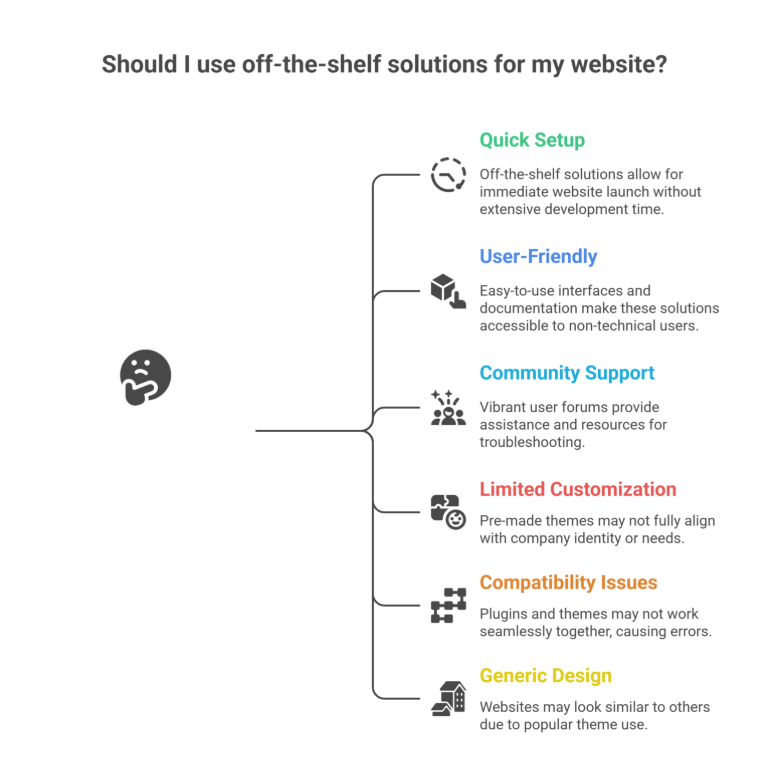
    • Quick Setup: Since all these pre-built WordPress solutions are quite easy to use instantly, you may launch your very own website right away without having to spend quite a lot of time and effort in developing it using custom code.
    • User-Friendly: Even a non-technical user can utilize a template or pre-built platforms because they frequently include easy drag-and-drop builders and comprehensive documentation, offering a user-friendly experience.
    • Large Community Support: The Well-known themes and plugins frequently have quite vibrant user forums and communities that offer helpful assistance and resources for troubleshooting, especially when dealing with performance issues, vulnerability, or integration problems.

    Drawbacks of Off-the-Shelf Solutions

    While off-the-shelf WordPress solutions are quite convenient, they come with some limitations:

    • Limited Customization: It’s quite possible that pre-made themes don’t always highly suit the identity or needs of your company or brand, especially when you need tailored solutions.
    • Compatibility Issues: Some plugins and themes might not always function highly together, causing errors in functionality.
    • Generic Design: Your website is more likely to seem like others if you use a very popular template or premium themes.

    Exploring Custom WordPress Development

    What Is Custom WordPress Development?

    Custom WordPress development basically means creating a website that is especially suited to your company’s personal requirements. Professionals providing Custom WordPress Development, custom web development, or working at a development company or WordPress web design agency, handle this particular procedure using unique code and custom solutions.

    Benefits of Custom Development

    • Unique Design: Since a customized website is created from the very scratch, it will accurately represent your brand identity and set you quite apart from the competition.
    • Tailored Functionality: You can incorporate particular unique features and functions that are quite essential to your company’s operations through the custom-built development that is fully tailored to your business.
    • Scalability: Because the custom-built websites are made to always grow with your business, adding new features or expanding your website as your business grows will be very simpler, ensuring long-term scalability and long-term growth.
    • Enhanced Performance: Custom websites frequently load quite faster and offer a much better user experience by removing the unnecessary code and focusing on your specific needs and requirements.
    • SEO Optimization: By including specific SEO guidelines directly into the website’s design, developers can highly increase the site’s exposure in the search engine results and help you optimize your content management system.

    Drawbacks of Custom Development

    Despite its advantages, custom development has some challenges:

    • Higher Initial Cost: Because the custom development takes much more time and experience than off-the-shelf options, it may require a higher initial investment.
    • Longer Development Time: If you need a new website launched very quickly, it might not be the very best option to build it from scratch.
    • Dependence on Developers: For immediate updates and frequent ongoing maintenance, you might require continuous assistance from a WordPress design or Shopify Services agency or developers.

    Key Factors to Consider While Choosing Between the Custom and Off-the-Shelf Solutions

    1. Budget

    It can be highly convenient to use off-the-shelf alternatives if you have limited budgets. Custom development, on the other hand, provides long-term advantages and greater alignment with your business objectives.

    2. Business Goals

    Custom development is best for companies who need special features, custom themes, or have certain branding needs. Simpler websites with conventional features are more suitable for off-the-shelf themes.

    3. Timeline

    Off-the-shelf options are more practical if you need to start your website rapidly. Although custom development takes longer, the end product is a website that is precisely customized to meet your unique requirements.

    4. Scalability

    Consider your future growth and success plans. Custom websites are more scalable, while off-the-shelf systems might require extensive modification or rebuilding.

    How Professional Services Can Help

    Working with experienced professionals helps guarantee an effortless process, regardless of whether you decide to use off-the-shelf solutions or custom creation. Experts in both strategies are available through WordPress Development, Shopify Development, Shopify Design, Webflow Services, and other web solutions, enabling you to maximize the benefits of your selected solution. A WordPress web design agency can also offer assistance, support, and improvements.

    Conclusion

    Your specific business needs, financial limitations, and goals will determine whether you choose custom vs off-the-shelf WordPress solutions. Custom development provides more flexibility, scalability, and a customized user experience, even while off-the-shelf alternatives are quicker to adopt and less expensive. You can make a highly informed choice that supports your business goals by being aware of the benefits and drawbacks of each strategy. To achieve an optimal outcome, think about collaborating with a Custom WordPress Development Services Company to ensure your website meets your expectations and delivers long-term value in a competitive digital landscape.

    Frequently Asked Questions (WordPress Development: Custom vs. Off-the-Shelf Solutions) 

    What is the difference between custom software and off-the-shelf solutions?

    Custom software is built specifically for your business needs, offering unique features, full control, and scalability. Off-the-shelf solutions are pre-made, affordable, and quick to deploy but come with limited customization and may not fit every requirement perfectly. The choice depends on budget, goals, and flexibility needs.

    What is the difference between custom and WordPress?

    Custom development creates a fully tailored website built from scratch to match unique business needs, design, and functionality. WordPress uses pre-built themes, plugins, and templates, making it faster and more affordable but less specialized. Custom sites offer flexibility, while WordPress offers convenience and ease of use.

    What is the advantage of developing your own software over using custom of the shelf software cots?

    Developing your own software offers complete control, tailored features, stronger scalability, and better integration with your workflows. Unlike off-the-shelf COTS software, it avoids unnecessary features, reduces long-term limitations, and supports unique business processes. Though costlier upfront, it delivers higher efficiency and competitive advantage over time.

    Do nearly 75% of all websites use WordPress?

    No, nearly 75% of all websites do not use WordPress. Currently, WordPress powers around 43–45% of all websites. It remains the most popular content management system, but other platforms like Shopify, Wix, and custom-built sites also hold significant market share.


  • WordPress Users Beware – These Popular Theme Plugins Have Some Major Security Issues

    WordPress Users Beware – These Popular Theme Plugins Have Some Major Security Issues

    WordPress powers more than 40% of websites worldwide, making it one of the very most widely used content management systems. While it offers high flexibility and ease of use, WordPress security remains a very major concern, especially when it comes to WordPress plugins and themes. Many popular WordPress plugins contain high security vulnerabilities that hackers or cybercriminals exploit to gain unauthorized access, inject malicious code, or totally compromise website security.

    If you highly rely on WordPress custom development to enhance your WordPress website, understanding these security risks is crucial. In this blog, we’ll discuss the major security issues highly associated with some very popular WordPress themes and plugins, and how you can protect your site effectively.

    Why WordPress Theme Plugins Are Vulnerable

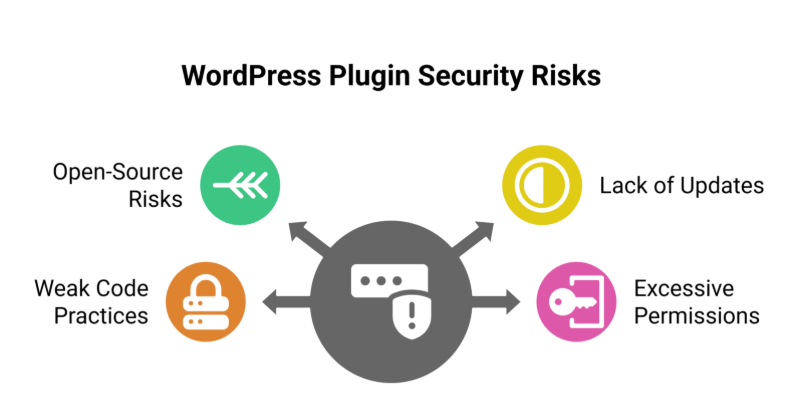
    1. Open-Source Nature

    WordPress is a totally open-source platform. This means anyone can develop and distribute WordPress plugins. While this encourages high innovation, it also highly increases the risk of very poorly coded or unmaintained plugins introducing security vulnerabilities that can be exploited by threat actors.

    2. Lack of Regular Updates

    Some WordPress plugins and themes are quite abandoned by their developers, leaving them highly vulnerable to common security threats. If a plugin is not updated regularly, security researchers warn that hackers can exploit outdated plugins to gain full control of the site.

    3. Weak Code Practices

    Not all plugin developers follow critical security practices. Very poorly written code can create many backdoors for malicious scripts, exposing sensitive data or allowing unauthorized access.

    4. Excessive Permissions

    Some popular plugin or WordPress themes request unnecessary permissions, giving them more access to your WordPress dashboard or admin accounts than required. This can be exploited by attackers to manipulate your site’s security or escalate login credentials privileges.

    Popular WordPress Theme Plugins with Security Issues

    Popular WordPress Theme Plugins with Security Issues

    ‍

    1. Elementor

    Risk: Cross-Site Scripting (XSS) or SQL Injection

    Elementor is one of the very highly used WordPress plugins. However, it has faced multiple security vulnerabilities in the past. Hackers have used XSS and SQL injection tactics to exploit weaknesses in outdated versions of the plugin, leading to highly compromised WordPress websites.

    2. WPBakery Page Builder

    Risk: Remote Code Execution

    WPBakery is another popular WordPress plugin that has had plugin vulnerabilities, particularly involving remote code execution. Attackers have used this flaw to upload malicious code and take full control of the site.

    3. Revolution Slider

    Risk: File Upload Exploits

    Revolution Slider has been associated with major security breaches due to improper file upload validation. Unauthorized access via malicious scripts has been reported on many WordPress sites.

    4. Essential Addons for Elementor

    Risk: Arbitrary File Upload

    This plugin extends Elementor’s functionality but has vulnerabilities allowing unauthorized file uploads, posing a high risk to WordPress site security.

    5. Ultimate Addons for WPBakery

    Risk: SQL Injection Privilege Escalation

    This plugin enhances WPBakery but has been targeted by SQL injection attacks, compromising database integrity and allowing attackers to escalate privileges on WordPress websites.

    How to Protect Your WordPress Website

    1. Keep Plugins Updated

    Always update your WordPress plugins and themes to their latest versions. Developers often release security patches to fix exploited vulnerabilities. Ignoring updates leaves your WordPress site exposed to site takeover risks.

    2. Use Only Trusted Plugins

    Download plugins and themes from reputable sources like the official WordPress repository. Avoid third-party plugins or nulled versions, which often contain malware or other critical security flaws.

    3. Monitor Plugin Permissions

    Review the permissions requested by each plugin before installing it. If a plugin requests access to sensitive data or critical files, reconsider its use to keep your site secure.

    4. Implement Web Application Firewalls (WAFs)

    A WAF helps detect and block malicious code and attacks before they reach your WordPress website. Services like Cloudflare or Sucuri provide protection against common security threats.

    5. Regularly Back Up Your Website

    In case of a security breach, recent backups ensure you can restore your WordPress site without losing sensitive data. Use plugins like UpdraftPlus or BackupBuddy for automated backups.

    6. Remove Unused or Inactive Plugins

    Inactive WordPress plugins can increase your attack surface. Delete plugins that are not actively used to reduce potential security risks.

    7. Use Security Plugins

    Install security plugins like Wordfence or Sucuri to monitor malicious scripts, block attacks, and enforce critical security measures.

    8. Enable Two-Factor Authentication (2FA)

    Adding 2FA to your WordPress admin login provides an extra layer of protection, making it harder for hackers to gain unauthorized access.

    Conclusion

    While WordPress plugins and themes offer high functionality and design flexibility, they can introduce major security issues if not managed properly. By keeping plugins updated, using trusted sources, and implementing proactive security measures, you can protect your site from potential threats.

    If you rely on WordPress custom development, working with experienced security experts who follow best practices is essential. Prioritizing website security safeguards sensitive data and ensures a seamless experience for your visitors.

    FAQs

    What are the security issues with WordPress?

    WordPress faces security risks due to outdated plugins, themes, and core files, weak passwords, and improper user permissions. Vulnerabilities like SQL injection, cross-site scripting (XSS), and malware attacks are common. Regular updates, strong passwords, secure hosting, and reliable security plugins are essential to protect WordPress sites effectively.

    Are WordPress plugins safe?

    WordPress plugins can be safe if sourced from trusted developers and regularly updated. However, poorly coded or outdated plugins may contain vulnerabilities, malware, or backdoors that hackers exploit. Always use reputable plugins, keep them updated, and limit unnecessary additions to ensure your WordPress site remains secure.

    Why are people moving away from WordPress?

    People are moving away from WordPress due to security vulnerabilities, frequent updates, and performance issues on large or complex sites. Many prefer simpler, faster, or more secure platforms with better scalability, built-in hosting, and easier maintenance, reducing the need for constant plugin management and technical troubleshooting.

    Which is the best security plugin for WordPress?

    The best WordPress security plugin is Wordfence Security, offering a firewall, malware scanning, login protection, and real-time traffic monitoring. Other strong options include Sucuri Security for cloud-based protection and iThemes/Solid Security for comprehensive site hardening, 2FA, and file-change detection. Choose based on site size and risk.