Tag: WordPress Development

  • A Practical Guide to WordPress 7.0 for Agency Owners  

    A Practical Guide to WordPress 7.0 for Agency Owners  

    A Practical Guide to WordPress 7.0 for Agency Owners 
     

    WordPress 7.0 shipped on May 20, 2026. It is the largest core release since Gutenberg launched in WordPress 5.0. 

    And it is the first major release in years where “update on Friday and hope” is genuinely no longer a safe operating model. 

    I have been watching how agencies are handling the rollout over the last few weeks. The gap between the agencies doing it well and the ones running into trouble is not technical skill. It is rollout discipline. 

    This is the practical guide I would hand to any agency owner managing more than five WordPress client sites right now. 

    Why 7.0 is Different 

    WordPress still powers around 43% of the publict web, but it is also at a strategic inflection point. The 7.0 release is not a feature dump. It is the foundation for WordPress becoming an AI-native platform alongside an iframed editor, a redesigned admin built on Data Views, and block-level editorial Notes. 

    The headline collaboration feature, ‘real-time co-editing’ did not ship. WordPress core pulled it on May 8 due to race conditions and server memory issues and deferred it to 7.1 in August 2026. 

    That detail matters for one reason: any agency that was planning to sell live co-editing as a 7.0 feature to enterprise clients should hold that pitch until 7.1 ships in August. 

    What will quietly break in production 

    Six categories of breaking changes ship with 7.0. None is catastrophic on its own. The problem is scale across a portfolio of 50 to 100 client sites, even a 5% failure rate means real fires. 

    • PHP 7.4 is the new minimum. Sites on PHP 7.2 or 7.3 will not receive the 7.0 update at all. 
    • The iframed editor is enforced. Any custom block, plugin, or admin extension that reaches into parent window global will break silently in the editor while the front end keeps rendering fine. 
    • Classic meta boxes disable real-time collaboration. Post types relying on classic meta boxes drop out of the collaborative layer. 
    • Data Views API changes affect plugins that customize admin list tables. 
    • The group By Field to group By API change is a clean break for affected REST end points. 
    • Admin CSS overrides may conflict with the refreshed design tokens in 7.0. 

    The security context most agencies are missing 

    Plugin compatibility is the headline story. Plugin security is the bigger one. 

    Patchstack’s State of WordPress Security in 2026 documented 11,334 new vulnerabilities discovered in the WordPress ecosystem in 2025. This is a 42% year-over-year increase. 91% of those vulnerabilities were in plugins. Only six were in WordPress core itself. 

    The median time from public disclosure to first exploitation is now five hours. 46% of disclosed vulnerabilities have no patch available at the time of disclosure. 

    The takeaway is simple. Every WordPress 7.0 rollout is also a chance to audit the plugin stack to remove what is not maintained, replace what is risky, document what remains. Agencies who treat 7.0 as a security event, not just a feature event, protect their clients far better. 

    A practical rollout sequence 

    This is the sequence I recommend for portfolios above five sites. 

    • Tier 1 — Low-risk sites with simple stacks. Update within two to three weeks of release. 
    • Tier 2 — Sites with custom blocks, page builders, or WooCommerce. Wait for 7.0.1 and for major plugin developers to ship compatibility releases. 
    • Tier 3 — Mission-critical or heavily customized sites. Wait four to six weeks minimum. Update only after staging validation. 

    For every tier, do three things every time:  

    1- Stage the update before production. 

    2- Send clients a short pre-update email so they know what to expect. 

    3- Monitor for 72 hours after the update. 

    This is unglamorous work. It is also exactly what separates the agencies clients trust long-term from the ones quietly being replaced. 

    The bigger picture 

    WordPress 7.0 is the start of WordPress becoming AI-native; similar to Shopify’s Winter ’26 release of Agentic Storefronts earlier this year. 

    The agencies adapting to this shift less template installer, a more strategic platform partner will be in a much stronger position twelve months from now. 

    7.0 is the inflection point that makes that shift visible. 

    Want a second set of eyes on your 7.0 rollout? 

    If your agency is preparing for the WordPress 7.0 rollout and would value a conversation about how to approach it, feel free to reach out. My team at Integriti studio is supporting several agencies through this release right now, and I am happy to share what is working — and explore whether we can help. 
     

    Book a 30-minute WordPress 7.0 readiness call

  • WordPress Development: Custom vs. Off-the-Shelf Solutions

    WordPress Development: Custom vs. Off-the-Shelf Solutions

    WordPress Development: Custom vs. Off-the-Shelf Solutions

    When it comes to building your business related WordPress website using WordPress themes, one of the very major challenges you’ll face is to choose either between the custom development or the off-the-shelf solutions. Each option particularly has its own advantages and drawbacks, and the better choice will depend on your business needs, budget, and the long-term goals. This blog totally explores the major differences between the two approaches to help you make a very informed decision while using WordPress for website development and improving your online presence.

    Understanding Off-the-Shelf Solutions

    What Are Off-the-Shelf Solutions?

    Off-the-shelf solutions are specifically pre-built themes, templates and plugins, and third-party tools that are quite easily available or can be purchased. These options are designed to meet totally different variety of customer needs and are quite easy to install and setup, making them ideal for people building a website with minimal initial investment.

    Benefits of Off-the-Shelf Solutions

    Benefits of Off-the-Shelf Solutions

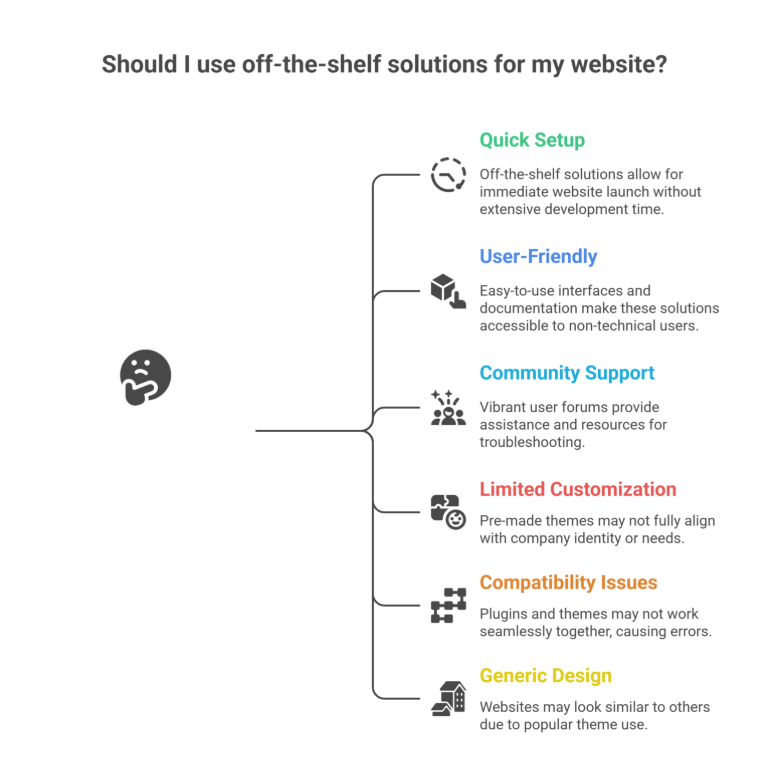
    • Quick Setup: Since all these pre-built WordPress solutions are quite easy to use instantly, you may launch your very own website right away without having to spend quite a lot of time and effort in developing it using custom code.
    • User-Friendly: Even a non-technical user can utilize a template or pre-built platforms because they frequently include easy drag-and-drop builders and comprehensive documentation, offering a user-friendly experience.
    • Large Community Support: The Well-known themes and plugins frequently have quite vibrant user forums and communities that offer helpful assistance and resources for troubleshooting, especially when dealing with performance issues, vulnerability, or integration problems.

    Drawbacks of Off-the-Shelf Solutions

    While off-the-shelf WordPress solutions are quite convenient, they come with some limitations:

    • Limited Customization: It’s quite possible that pre-made themes don’t always highly suit the identity or needs of your company or brand, especially when you need tailored solutions.
    • Compatibility Issues: Some plugins and themes might not always function highly together, causing errors in functionality.
    • Generic Design: Your website is more likely to seem like others if you use a very popular template or premium themes.

    Exploring Custom WordPress Development

    What Is Custom WordPress Development?

    Custom WordPress development basically means creating a website that is especially suited to your company’s personal requirements. Professionals providing Custom WordPress Development, custom web development, or working at a development company or WordPress web design agency, handle this particular procedure using unique code and custom solutions.

    Benefits of Custom Development

    • Unique Design: Since a customized website is created from the very scratch, it will accurately represent your brand identity and set you quite apart from the competition.
    • Tailored Functionality: You can incorporate particular unique features and functions that are quite essential to your company’s operations through the custom-built development that is fully tailored to your business.
    • Scalability: Because the custom-built websites are made to always grow with your business, adding new features or expanding your website as your business grows will be very simpler, ensuring long-term scalability and long-term growth.
    • Enhanced Performance: Custom websites frequently load quite faster and offer a much better user experience by removing the unnecessary code and focusing on your specific needs and requirements.
    • SEO Optimization: By including specific SEO guidelines directly into the website’s design, developers can highly increase the site’s exposure in the search engine results and help you optimize your content management system.

    Drawbacks of Custom Development

    Despite its advantages, custom development has some challenges:

    • Higher Initial Cost: Because the custom development takes much more time and experience than off-the-shelf options, it may require a higher initial investment.
    • Longer Development Time: If you need a new website launched very quickly, it might not be the very best option to build it from scratch.
    • Dependence on Developers: For immediate updates and frequent ongoing maintenance, you might require continuous assistance from a WordPress design or Shopify Services agency or developers.

    Key Factors to Consider While Choosing Between the Custom and Off-the-Shelf Solutions

    1. Budget

    It can be highly convenient to use off-the-shelf alternatives if you have limited budgets. Custom development, on the other hand, provides long-term advantages and greater alignment with your business objectives.

    2. Business Goals

    Custom development is best for companies who need special features, custom themes, or have certain branding needs. Simpler websites with conventional features are more suitable for off-the-shelf themes.

    3. Timeline

    Off-the-shelf options are more practical if you need to start your website rapidly. Although custom development takes longer, the end product is a website that is precisely customized to meet your unique requirements.

    4. Scalability

    Consider your future growth and success plans. Custom websites are more scalable, while off-the-shelf systems might require extensive modification or rebuilding.

    How Professional Services Can Help

    Working with experienced professionals helps guarantee an effortless process, regardless of whether you decide to use off-the-shelf solutions or custom creation. Experts in both strategies are available through WordPress Development, Shopify Development, Shopify Design, Webflow Services, and other web solutions, enabling you to maximize the benefits of your selected solution. A WordPress web design agency can also offer assistance, support, and improvements.

    Conclusion

    Your specific business needs, financial limitations, and goals will determine whether you choose custom vs off-the-shelf WordPress solutions. Custom development provides more flexibility, scalability, and a customized user experience, even while off-the-shelf alternatives are quicker to adopt and less expensive. You can make a highly informed choice that supports your business goals by being aware of the benefits and drawbacks of each strategy. To achieve an optimal outcome, think about collaborating with a Custom WordPress Development Services Company to ensure your website meets your expectations and delivers long-term value in a competitive digital landscape.

    Frequently Asked Questions (WordPress Development: Custom vs. Off-the-Shelf Solutions) 

    What is the difference between custom software and off-the-shelf solutions?

    Custom software is built specifically for your business needs, offering unique features, full control, and scalability. Off-the-shelf solutions are pre-made, affordable, and quick to deploy but come with limited customization and may not fit every requirement perfectly. The choice depends on budget, goals, and flexibility needs.

    What is the difference between custom and WordPress?

    Custom development creates a fully tailored website built from scratch to match unique business needs, design, and functionality. WordPress uses pre-built themes, plugins, and templates, making it faster and more affordable but less specialized. Custom sites offer flexibility, while WordPress offers convenience and ease of use.

    What is the advantage of developing your own software over using custom of the shelf software cots?

    Developing your own software offers complete control, tailored features, stronger scalability, and better integration with your workflows. Unlike off-the-shelf COTS software, it avoids unnecessary features, reduces long-term limitations, and supports unique business processes. Though costlier upfront, it delivers higher efficiency and competitive advantage over time.

    Do nearly 75% of all websites use WordPress?

    No, nearly 75% of all websites do not use WordPress. Currently, WordPress powers around 43–45% of all websites. It remains the most popular content management system, but other platforms like Shopify, Wix, and custom-built sites also hold significant market share.