
Your ads are working.
Traffic is coming in.
But sales are not where they should be.
In many cases, the problem is not your product or pricing. It’s performance.
Slow-loading stores quietly kill conversions. Visitors do not complain. They simply leave. That’s why improving shopify site speed is not just a technical task. It’s a revenue decision.
This masterclass breaks down what actually affects performance and how to fix it without overcomplicating your store.
Why Speed Directly Impacts Revenue
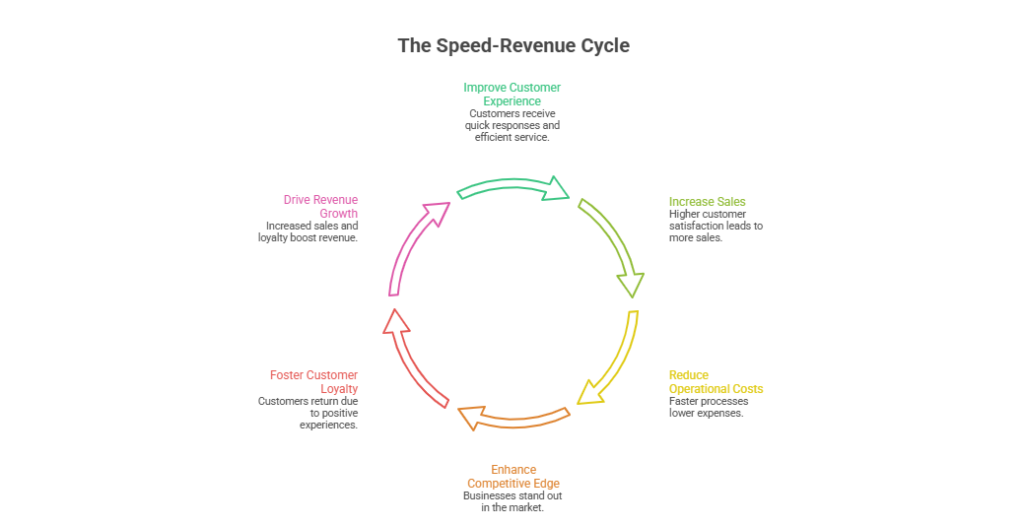
Customers expect websites to load almost instantly. If your homepage takes more than a few seconds drop-offs begin. If product pages lag trust drops. If checkout slows down carts get abandoned.
Speed influences:
- Conversion rate
- SEO rankings
- Ad performance
- Bounce rate
- Customer trust
A fast store feels reliable and premium. A slow one feels risky.
If you want consistent growth shopify store optimization must start with performance.
Step One: Audit Before You Change Anything
Before trying random fixes measure your current performance.
Check:
- Homepage load time
- Product page load time
- Mobile performance score
- Core Web Vitals
- App impact on loading
Many merchants install multiple apps without realizing each app injects scripts that slow down the site.
A performance audit gives clarity. Optimization without data is guessing.
The Real Causes of Slow Shopify Stores
Let’s break this down clearly.
Most performance issues come from five areas:
- Heavy, uncompressed images
- Too many third-party apps
- Bloated themes
- Excessive JavaScript
- Poor mobile optimization
If your goal is to speed up shopify website performance these are the areas that need attention first.
Image Optimization: The Silent Killer
Images are often the biggest performance bottleneck.
Large uncompressed product images can dramatically increase load time. The fix is simple but powerful:
- Compress all images before uploading
- Use modern formats where possible
- Avoid uploading oversized banners
- Limit unnecessary decorative graphics
Visual quality is important but oversized media slows everything down.
In most cases optimizing images alone can significantly improve shopify site speed.
Reduce App Bloat Without Losing Functionality
Apps are useful. But too many apps create performance debt.
Each app can:
- Add scripts
- Increase API calls
- Slow down rendering
- Conflict with other tools
Instead of stacking apps, consider:
- Removing unused apps
- Replacing multiple apps with one multi-feature solution
- Custom-building lightweight features where necessary
A clean store always performs better. True shopify store optimization is often about removing things not adding more.
Optimize Your Theme Structure
Not all themes are built equally. Some themes are visually impressive but technically heavy.
If your theme includes:
- Large animation files
- Sliders with multiple scripts
- Complex layout frameworks
You may be sacrificing speed for aesthetics.
Sometimes, simplifying your design improves both usability and performance. A clean structured layout improves shopify site speed and conversion at the same time.
Mobile Performance Is Not Optional
Most customers shop on mobile devices. Yet many stores are optimized primarily for desktop.
Mobile optimization includes:
- Fast tap response
- Lightweight design
- Minimal popups
- Clear call-to-action buttons
- Streamlined navigation
If your mobile experience is slow, your revenue suffers silently.
To truly speed up shopify website performance test everything on mobile first.
Advanced Optimization: When Basic Fixes Are Not Enough
For growing brands basic fixes may not be sufficient. Larger catalogs and higher traffic require deeper improvements.
Advanced performance strategies include:
- Lazy loading below-the-fold images
- Reducing render-blocking scripts
- Optimizing checkout experience
- Implementing structured data properly
- Improving server response time
This is where professional shopify store optimization becomes strategic rather than reactive.
Performance should scale with your business not limit it.
The Hidden Link Between Speed and SEO
Google considers page speed a ranking factor. Slow websites struggle to compete in organic search.
Improving shopify site speed can:
- Improve search rankings
- Lower bounce rates
- Increase time on site
- Improve crawl efficiency
If you are investing in SEO or paid ads slow performance reduces your return on investment.
Speed amplifies every marketing channel.
Measuring the Business Impact
Optimization should not stop at technical metrics. Measure business outcomes.
Track:
- Conversion rate before and after optimization
- Cart abandonment rate
- Average session duration
- Revenue per visitor
Many brands see noticeable revenue growth after they properly speed up shopify website performance.
Speed is not just technical improvement. It’s conversion optimization.
Performance as a Continuous Strategy
One common mistake is treating speed as a one-time project.
As you:
- Add new products
- Install new apps
- Launch campaigns
- Redesign pages
Performance can decline again.
Ongoing shopify store optimization ensures that growth does not come at the cost of speed.
Regular audits prevent future revenue leaks.
Final Thoughts
You might be losing sales right now without realizing it.
Customers will not email you to say your store is slow. They will simply leave and buy from someone else.
Improving shopify site speed is one of the highest ROI actions you can take. When you speed up shopify website performance and approach shopify store optimization strategically you create:
- Better user experience
- Higher conversions
- Stronger SEO
- Better ad efficiency
- More predictable growth
Speed is not a technical detail.
It is a competitive advantage.
Frequently Asked Questions (Stop Losing Sales: A Masterclass in Shopify Performance Optimization)
Why do 90% of people doing Shopify with FB ads fail?
90% fail due to poor product-market fit weak ad strategy, high costs low conversion rates and neglected store optimization.
How do I improve my Shopify performance?
Improve Shopify performance by optimizing images using fast themes enhancing UX minimizing apps enabling caching and monitoring site speed regularly.
What are common Shopify selling mistakes?
Common Shopify selling mistakes include poor product selection weak branding low-quality images slow site speed unclear pricing and weak marketing.
What are performance optimization techniques?
Performance optimization techniques include caching image compression code minification fast hosting lazy loading CDN usage database optimization and reducing HTTP requests.