Category: StaffingBlogs

  • The Delayed Payout Problem: How to Configure Stripe Connect for Service Marketplaces 

    The Delayed Payout Problem: How to Configure Stripe Connect for Service Marketplaces 

    Delayed payouts are one of the fastest ways to erode trust in a service marketplace. Whether you are operating a two sided platform for freelancers, home services, consultants, or on demand professionals, payout delays directly impact provider retention, platform credibility and cash flow predictability. 

    For many marketplace founders, the issue does not stem from Stripe itself, but from misconfigured Stripe Connect setups, misunderstood account models and poor alignment between product logic and payment flows. 

    This article breaks down why delayed payouts happen, how Stripe Connect should be configured for service marketplaces and what architectural decisions separate scalable platforms from operational bottlenecks. 

    Why Delayed Payouts Are a Marketplace Specific Problem 

    Unlike traditional eCommerce, service marketplaces introduce complexity at multiple layers: 

    • Funds are collected before the service is delivered 
    • Multiple parties are involved in a single transaction 
    • Disputes, cancellations and refunds are more common 
    • Regulatory and compliance requirements vary by region 

    Stripe defaults are optimized for direct sellers, not marketplaces. When platforms apply basic Stripe logic to a marketplace model, payouts often become delayed due to: 

    • Incorrect account types 
    • Improper fund flow ownership 
    • Compliance verification gaps 
    • Manual intervention points in automated systems 

    This becomes even more critical for teams launching a white-label service marketplace MVP, where payout reliability directly affects early provider adoption and brand trust across multiple deployments. 

    Choosing the Right Stripe Connect Account Type 

    Stripe Connect offers three primary account types and selecting the wrong one is a leading cause of payout delays. 

    Standard Accounts 

    Best for platforms that want minimal responsibility. Providers manage their own Stripe accounts and payout schedules. 

    Common problem: 

    You lose control over payout timing, fee logic and dispute handling. Providers blame the platform for delays you cannot technically control. 

    Express Accounts 

    Stripe handles most compliance, but the platform retains control over payout timing and fee structures. 

    Best for: 

    Most service marketplaces where providers expect fast payouts but don’t want full Stripe ownership. 

    Custom Accounts 

    The platform fully controls onboarding, payouts and compliance. 

    Best for: 

    High volume or enterprise marketplaces with strict payout logic, escrow like flows, or region specific compliance rules. 

    Key insight: 

    Many delayed payout issues occur when platforms start with Express accounts but implement logic that requires Custom level control, creating technical mismatches that Stripe resolves by holding funds. 

    Understanding Stripe’s Fund Flow Logic 

    One of the most misunderstood concepts in Stripe Connect is who owns the money and when. 

    Stripe operates on three key fund states: 

    1. Pending – Funds are captured but not yet settled 
    1. Available – Funds cleared Stripe’s risk and bank settlement checks 
    1. Paid Out – Funds transferred to the connected account 

    Delayed payouts often happen because platforms assume: 

    “Once a payment is successful, payouts should be instant.” 

    In reality, Stripe enforces: 

    • Risk evaluation windows 
    • Bank settlement timelines 
    • Dispute and fraud buffers 

    If your platform: 

    • Captures payment before service completion 
    • Uses manual capture 
    • Applies delayed transfers without clarity 

    Stripe may hold funds longer to reduce exposure. 

    Designing Payout Timing Based on Service Completion 

    Service marketplaces must explicitly model service lifecycle states into payment logic. 

    A scalable approach looks like this: 

    1. Authorization at booking 
    1. Capture after service completion 
    1. Transfer after confirmation window 
    1. Payout based on provider preference 

    Common mistake: 
    Platforms capture and transfer funds immediately, then attempt to “reverse” flows in case of disputes. Stripe flags this as high risk, leading to payout delays. 

    Instead: 

    • Use separate charges and transfers 
    • Delay transfers, not charges 
    • Keep platform funds segregated until conditions are met 

    This reduces Stripe risk scoring and accelerates payouts long term. 

    Compliance Holds: The Silent Payout Killer 

    Stripe is aggressive about compliance, and for good reason. 

    Delayed payouts frequently occur due to: 

    • Incomplete identity verification 
    • Missing tax information 
    • Unsupported countries or currencies 
    • Inconsistent business details 

    What platforms get wrong: 

    • Treating onboarding as a one time step 
    • Not monitoring verification status changes 
    • Ignoring Stripe webhooks related to account restrictions 

    Best practice: 

    Build proactive compliance checks into your admin dashboards. If a connected account enters a “restricted” state, surface it immediately to the provider instead of letting payouts silently fail. A well-executed multi-role dashboard design ensures that admins, service providers, and finance teams each have real-time visibility into payout status, verification issues, and transfer failures without relying on manual support workflows. 

    Webhooks: The Backbone of Reliable Payouts 

    Many payout delays are not Stripe issues, they’re visibility issues. 

    If your platform is not consuming and acting on: 

    • account.updated 
    • payout.failed 
    • balance.available 
    • transfer.created 

    You are operating blind. 

    Webhooks allow you to: 

    • Trigger payouts the moment funds become available 
    • Alert providers about verification issues 
    • Retry failed payouts automatically 
    • Maintain accurate wallet balances 

    Without webhooks, platforms often rely on cron jobs or manual checks, introducing artificial delays that users blame on “Stripe. This event-driven approach plays a major role in reducing operational overhead through backend automation, eliminating the need for manual payout reconciliation and reactive customer support. 

    Multi Region Marketplaces and Currency Pitfalls 

    Global marketplaces face additional payout delays due to: 

    • Currency conversion windows 
    • Cross border settlement times 
    • Local banking infrastructure limitations 

    Stripe may settle funds quickly in one region and slowly in another. 

    Advanced platforms: 

    • Offer region specific payout schedules 
    • Clearly communicate expected timelines 
    • Adjust provider expectations during onboarding 

    Transparency reduces churn even when delays are unavoidable. 

    When Custom Development Becomes Necessary 

    A robust Stripe Connect delayed payout architecture becomes essential once marketplaces move beyond simple charge-and-transfer flows and begin enforcing service completion, dispute windows, or escrow-like logic. 

    You likely need custom backend logic if: 

    • You support partial payouts 
    • You offer platform wallets or balances 
    • You manage escrow style flows 
    • You apply tiered commissions 
    • You operate in multiple regulatory zones 

    These scenarios often demand a carefully planned service marketplace escrow workflow design, where funds are programmatically held, released, or redistributed based on real-world service outcomes. 

    At Integriti Studio, we design and implement Stripe Connect architectures that align payout logic with real world service workflows. From choosing the correct account model to building webhook driven payout engines, we ensure marketplaces scale without payout friction or trust erosion. 

    Final Thoughts 

    Delayed payouts are rarely caused by Stripe alone. They are almost always the result of: 

    • Incorrect account models 
    • Poor lifecycle modeling 
    • Inadequate compliance handling 
    • Missing event driven architecture 

    Service marketplaces that treat payouts as a core product feature, not an afterthought, retain providers longer and scale faster. 

    Configuring Stripe Connect correctly is not just a financial decision. It is a platform trust decision. 

  • How To Use Responsive Web Design for Your Ecommerce Store in A Future Proof Guide

    How To Use Responsive Web Design for Your Ecommerce Store in A Future Proof Guide

    How To Use Responsive Web Design for Your Ecommerce Store in 2025: A Future-Proof Guide

    Picture this-A customer browses your Shopify store on their mobile device while waiting for their coffee. Your product images load instantly, buttons are thumb-friendly, and checkout takes fewer taps than ordering a latte. By the time their name is called, they’ve bought two items and tagged your brand on Instagram.

    This isn’t just convenience it’s 2025’s make-or-break standard for ecommerce website, user experience, and website performance. With mobile shoppers projected to drive 75% of global web traffic by next year (Statista), responsive web design, responsive website, and responsive site are no longer optional. For Integriti’s clients, it’s the secret weapon turning casual browsers into loyal buyers. Let’s unpack how to future-proof any site, whether it’s a Shopify store, WordPress, or online store, today.

    Discover more

    Why 2025 Demands a Mobile-First Overhaul (Hint: It’s Not Just Phones)

    Why 2025 Demands a Mobile-First Overhaul (Hint: It’s Not Just Phones)

    Google’s 2024 “Mobile-First Evolution” update made one thing clear: Sites not optimized for all screen size, different screen sizes, screen size and resolution, and smaller screens will vanish from search results. But “responsive” in 2025 means more than fitting different devices—it’s about anticipating how, where, and why people shop:

    • 73% of shoppers abandon sites that feel “clunky” on their device (Baymard Institute)
    • AI-driven layouts, layout, and design ensures now adjust to ambient light, user grip patterns, and fluid grid requirements
    • Voice commerce is exploding, with 45% of Gen Z using smart speakers to shop (Adobe)

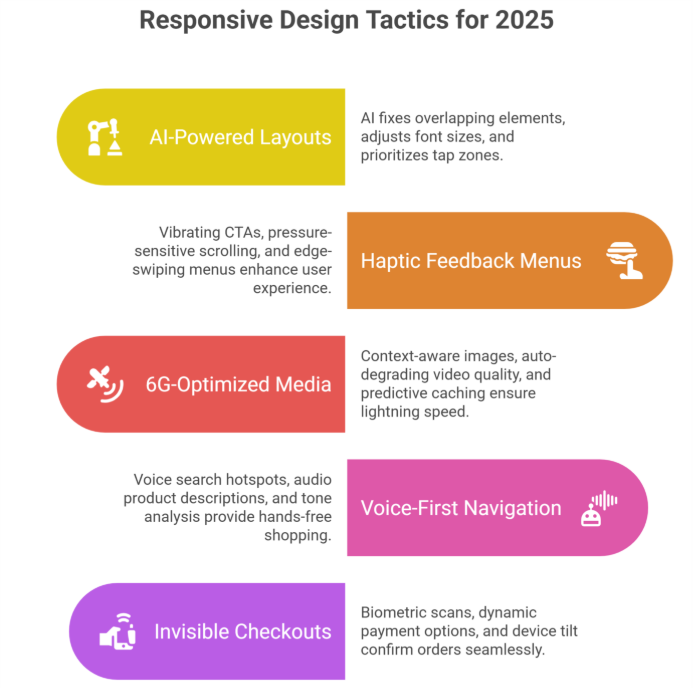
    5 Game-Changing Responsive Web Design Best Practices, principles of responsive web design, and responsive techniques for 2025

    AI-Powered “Self-Healing” Layouts

    • Forget manual tweaks. Tools like Google’s Auto-RWD now:
    • Fix overlapping elements in real-time
    • Adjust font size, use relative units, and adapt to different screen sizes based on reading distance (hello, smartwatches!)
    • Prioritize “tap zones” for left- vs. right-handed users

    2:Haptic Feedback Menus That Guide Thumbs

    The 2025 shopper expects tactile responses:

    • Vibrating CTAs confirm button presses
    • Pressure-sensitive scrolling (light vs. hard swipes
    • Edge-swiping menus inspired by TikTok’s UX

    3:6G-Optimized Media That Loads in 0.2 Seconds

    With 6G rolling out globally, shoppers expect lightning speed:

    • Context-aware responsive images, images and other media, flexible images, and pixel-perfect visuals (show winter coats if local temp drops)
    • Auto-degrading video quality during spotty connections
    • Predictive caching that pre-loads products you’ll likely view

    4:Voice-First Navigation for Hands-Free Shopping

    “Hey Shopify, find eco-friendly yoga mats under $50”:

    • Voice-search hotspots in headers, specific design areas, and style guide sections
    • Audio product descriptions for accessibility
    • Tone-analysis suggesting items based on vocal stress cues

    5:“Invisible” Checkouts That Feel Like Magic

    2025’s gold standard? Checkouts that:

    • Auto-fill details via biometric scans (no more typing CVV codes)
    • Offer dynamic payment options, design choice, and device-friendly methods (Apple Pay on iOS, GPay on Android)
    • Use device tilt to confirm orders (tilt right = purchase)

    The Hidden Costs of Outdated Responsive Web Design, importance of responsive design, and modern web development (And How to Avoid Them)

    PSA: Google’s 2025 Core Web Vitals, website experience, and website that works requirements will penalize sites that:

    • Take >0.5 seconds to respond to taps
    • Lack foldable/flexible screen size and different devices support
    • Ignore “ambient commerce” (shopping via AR glasses, car dashboards)

    Scary Stat: 81% of shoppers distrust sites that fail basic mobile-first design, mobile version, and desktop and mobile tests (McKinsey).

    Your 3-Step 2025 Responsive Web Design Checklist, design principles, and responsive design best practices

    1:Audit Ruthlessly
    • Test on emerging devices: Samsung Rollable Phones, Meta VR headsets, tablet, and browser types
    • Simulate 6G speeds with Cloudflare’s new testing suite
    • Track “rage clicks” (frustrated multiple taps) via Hotjar
    2:Prioritize Profit-Boosting Fixes
    • First: Checkout flow & core product pages, web pages, and creating a website
    • Then: Blog/media layouts, design work, and design tips
    • Finally: Experimental features (AR try-ons)
    3:Prepare for the Next Shift
    • Bookmark Google’s 2025 RWD guidelines (updated quarterly)
    • Invest in AI tools that auto-adapt to new website versions, desktop and mobile devices
    • Train staff on anticipatory design, thoughtful design, and “adapt to different screen sizes” principles

    “But Wait—My Desktop Traffic Still Matters!”

    Here’s the kicker: 2025’s best-performing websites use device-agnostic design:

    • Desktops get keyboard shortcuts (Ctrl + “/” opens search)
    • Tablets activate stylus hover menus
    • TVs show 3D product zooms during ads

    3 RWD Myths Debunked (Stop Believing These!)

    “Mobile-first means mobile-only”

    → Truth: 2025’s RWD is context-aware. Your site should:

    • Enlarge buttons in cold weather (gloves!)
    • Simplify layouts, website looks, and design ensures during peak commute hours
    “All devices get the same content”

    → Truth: Smart RWD delivers tailored experiences:

    • Show video demos on Wi-Fi
    • Display text summaries on cellular
    “Shopify handles it automatically”

    → Truth: Shopify provides tools, not strategy.

    Need help with Shopify website design and development, website design, design and development, and design services? Integriti’s team of Shopify website designers are your best bet!

    Click here for Shopify support and maintenance

    How to Future-Proof Any Site (Shopify or Not)

    Test on 2025’s devices (not just iPhones):
    • Meta Quest VR headsets
    • BMW’s in-car browsers
    • Samsung’s Flex In & Out laptops

    Adopt AI-powered RWD tools, use responsive, and modern web solutions:

    • Adobe Firefly: Auto-generates responsive images
    • Google’s Aurora: Predicts different devices trends (e.g., surge in AR shopping)

    Audit quarterly:

    67% of websites break after adding new features (WebAIM)

    The Bottom Line

    Responsive web design, make your website responsive, building a responsive site, and building a website are non-negotiable for every website, online store, ecommerce website, or Shopify store. The difference? Shopify gives you a head start; other platforms require more heavy lifting.

    Here’s the kicker: 58% of shoppers won’t recommend brands with poor mobile phone, tablet, or mobile device experiences (2024 Moz data). In 2025, shoppers won’t just prefer responsive websites they’ll demand them. But with Integriti’s RWD solutions, creating a website, and design work, you’re not just keeping up. You’re staying 10 steps ahead.

    Claim your spot with Integriti

    Frequently Asked Questions (How To Use Responsive Web Design for Your Ecommerce Store in A Future Proof Guide)

    What is responsive web design (RWD)?

    Responsive web design ensures your ecommerce store automatically adjusts its layout, images, and content to fit any screen size mobile, tablet, or desktop providing a seamless shopping experience.

    Why is RWD important for ecommerce stores?

    RWD improves user experience, increases conversion rates, and boosts SEO rankings since Google prioritizes mobile-friendly websites. It also future-proofs your store as devices and screen sizes continue to evolve.

    How do I implement RWD for my store?

    Use flexible grids, fluid images, and CSS media queries. Start with a mobile-first approach, then progressively enhance for larger screens. Test across devices to ensure smooth functionality and navigation.

    Which platforms support responsive ecommerce design?

    Most modern ecommerce platforms Shopify, WooCommerce, BigCommerce, and Magento offer responsive themes or templates. You can also customize them further for unique branding and functionality.

  • How to Build a High Performing Remote Team in 2025

    How to Build a High Performing Remote Team in 2025

    Remote work is no longer just a trend. It’s the new normal. As we step into 2025, businesses of all sizes are embracing remote teams to access global talent, reduce overheads and offer flexibility to employees. But building a successful remote team is more than just hiring people who work from home. It requires strategy, structure and the right tools.

    In this blog, we’ll walk you through the key steps to building a high-performing remote team in 2025—from hiring to culture to communication.

    Why Remote Teams Are the Future

    Remote work has changed how businesses think about productivity and team building. With better internet access, communication tools and flexible work policies, companies can now hire top talent from anywhere in the world.

    But flexibility doesn’t mean lower standards. In fact, the best remote teams are often more productive, more engaged and more efficient than traditional office teams. If built the right way.

    Step 1: Hire the Right People

    Hiring for a remote team isn’t the same as hiring for an in-office position. You need people who are self-motivated, good communicators and comfortable working independently.

    What to look for in a remote candidate:

    • Strong written and verbal communication skills
    • Self-discipline and time management
    • Experience with remote tools like Slack, Zoom, or Asana
    • Ability to work across different time zones
    • Problem-solving and decision-making skills without micromanagement

    Use structured interviews and practical tests to evaluate candidates’ remote-readiness. It’s also helpful to assess cultural fit and values, especially in a distributed setup.

    Step 2: Set Clear Expectations from Day One

    When team members are not in the same room, miscommunication can happen easily. That’s why clarity is key.

    Be clear about:

    • Working hours and availability
    • Project timelines and deadlines
    • Communication norms (e.g. when to use email vs chat)
    • Performance metrics and goals

    Create a remote employee handbook or onboarding guide. It helps new hires understand your processes and feel aligned with the team early on.

    Step 3: Use the Right Technology

    In 2025, remote work tools are smarter and more advanced than ever. Use them wisely to enable collaboration and track progress.

    Must-have tools for remote teams:

    • Communication: Slack, Microsoft Teams, Zoom
    • Project management: Trello, Asana, Monday.com
    • Document sharing: Google Workspace, Notion, Dropbox
    • Time tracking: Hubstaff, Clockify, Toggl
    • Feedback & engagement: Officevibe, 15Five, Lattice

    Make sure everyone on the team is trained on how to use these tools effectively. The goal is not to overload people with apps—but to make collaboration smooth.

    Step 4: Build a Strong Remote Culture

    One of the biggest challenges in remote teams is building a sense of belonging. People can feel disconnected if culture is ignored.

    Tips to create a great remote culture:

    • Schedule regular team check-ins and one-on-one meetings
    • Celebrate small wins, birthdays and milestones
    • Encourage casual conversations (e.g. virtual coffee breaks)
    • Be transparent about company goals and updates
    • Offer personal development opportunities

    A strong culture helps reduce turnover and increases trust across the team.

    Step 5: Focus on Outcomes, Not Hours

    Remote work offers flexibility—but with that comes the need to trust your team. Instead of tracking hours, focus on results.

    Define clear goals and measure performance based on output. This gives employees more ownership and makes them feel empowered to deliver their best.

    Managers should avoid micromanaging and instead offer support, mentorship and accountability.

    Step 6: Support Mental Health and Work-Life Balance

    Burnout can be real in remote environments, especially when work blends into personal life. Leaders need to be proactive about employee well-being.

    Ways to support your team:

    • Promote regular breaks and time off
    • Offer wellness programs or mental health days
    • Encourage flexible schedules where possible
    • Set boundaries around after-hours communication

    When employees feel cared for, they’re more likely to stay motivated and loyal.

    Step 7: Keep Evolving

    The way we work remotely is always changing. What worked last year may not work today. Stay open to feedback and adjust your processes regularly.

    • Run anonymous surveys to check team satisfaction
    • Ask for feedback after major projects or team changes
    • Revisit your tools and systems every quarter

    A high-performing remote team is one that’s continuously learning and improving.

    Final Thoughts

    Building a high-performing remote team in 2025 isn’t about copying office life—it’s about creating a new kind of workplace. One that values trust, flexibility, communication and culture.

    Whether you’re building your first remote team or scaling an existing one, remember that your people are your biggest asset. Hire with intention, lead with empathy and always keep evolving.

    ‍

  • The Future of Recruitment: Trends Every Business Should Watch

    The Future of Recruitment: Trends Every Business Should Watch

    Recruitment isn’t what it used to be—and that’s a good thing. With changing work cultures, evolving technology, and shifting employee expectations, the way businesses hire is going through a major transformation.

    In 2025, staying ahead in recruitment means more than just posting job ads and screening résumés. Businesses that understand the new trends are the ones attracting the best talent—and keeping them. This blog explores the top recruitment trends every business should keep an eye on.

    Why the Recruitment Landscape Is Changing

    We’ve moved past the era of generic job portals and lengthy hiring processes. Today’s workforce is more diverse, digitally connected, and values-driven. Candidates are looking for more than just a paycheck—they want purpose, flexibility, and growth.

    At the same time, companies need to hire faster, smarter, and more efficiently in a competitive market.

    1. Remote Hiring Is Here to Stay

    The remote work revolution has changed hiring forever. Companies are no longer limited by geography. In fact, remote hiring opens access to global talent pools and helps businesses build more diverse teams.

    What this means for recruiters:

    • Interviews are now mostly virtual
    • Onboarding processes are remote-friendly
    • Time zones and asynchronous work need to be considered
    • Soft skills like communication and self-management matter more than ever

    To stay competitive, businesses must build remote-ready recruitment processes that prioritize clarity, culture, and collaboration.

    2. AI and Automation in Recruitment

    Artificial Intelligence (AI) is reshaping how companies find and filter candidates. While AI won’t replace recruiters, it can make their work faster and more accurate.

    How AI is being used in hiring:

    • Screening résumés and ranking candidates
    • Chatbots for candidate communication
    • Video interview tools that analyze tone, confidence, and communication
    • Predictive analytics to improve hiring decisions

    However, it’s important to keep the human touch. Automated tools should support recruiters—not replace them.

    3. Skills Over Degrees

    More companies are shifting their focus from education to skills. This is especially true in tech, design, and digital roles where portfolios and practical knowledge matter more than formal degrees.

    What to expect:

    • Job descriptions will prioritize skills and outcomes
    • Online certifications and bootcamps will gain more value
    • Tests, case studies, and project-based assessments will become more common
    • Micro-credentials (small, skill-based certificates) will become part of hiring criteria

    ‍

    Hiring for potential, adaptability, and soft skills is becoming just as important as hiring for experience.

    4. Employer Branding Matters

    In a world full of job options, candidates want to know what makes your company different. A strong employer brand can be the deciding factor for top talent.

    Ways to build a strong employer brand:

    • Showcase team stories and culture on your website and social media
    • Be transparent about company values, benefits, and growth opportunities
    • Improve the candidate experience—from first contact to onboarding
    • Collect and display testimonials from current employees

    Remember, your hiring process is a reflection of your brand. Make it memorable—for the right reasons.

    5. DE&I Will Drive Strategy

    Diversity, Equity, and Inclusion (DE&I) is no longer a checkbox—it’s a core business priority. Candidates care deeply about inclusive workplaces, and companies are being held accountable.

    How DE&I is shaping hiring:

    • Inclusive language in job descriptions
    • Blind résumé reviews to reduce bias
    • Structured interviews to ensure fairness
    • Outreach to underrepresented talent communities

    Investing in DE&I not only improves your team—it also enhances innovation, performance, and company reputation.

    6. Faster Hiring Through RPO and Staffing Partners

    The talent market is moving fast, and businesses need to respond quickly. That’s where Recruitment Process Outsourcing (RPO) and staffing partnerships come in.

    Companies are increasingly turning to expert partners to:

    • Reduce time-to-hire
    • Access larger talent pools
    • Scale hiring without straining internal teams
    • Improve quality of hire with pre-vetted candidates

    In 2025, outsourced hiring is no longer just for big companies—it’s a smart solution for businesses of all sizes.

    7. Data-Driven Decision Making

    Recruitment teams are becoming more analytical. Instead of relying on gut feeling, hiring decisions are now backed by data.

    Metrics that matter:

    • Time to fill
    • Cost per hire
    • Quality of hire
    • Source of hire
    • Candidate satisfaction scores

    ‍

    By tracking the right data, companies can continuously improve their recruitment strategy—and reduce costly hiring mistakes.

    8. Employee Referrals and Internal Mobility

    Referrals are still one of the best sources of quality hires. At the same time, companies are focusing more on growing talent from within.

    What this looks like:

    • Encouraging employee referrals with rewards
    • Promoting internal job opportunities
    • Upskilling current employees instead of hiring externally
    • Building career development paths to boost retention

    These approaches not only cut hiring costs but also build loyalty and boost morale.

    Final Thoughts

    The future of recruitment is fast, flexible, and human-centered. From remote hiring and AI to employer branding and diversity, businesses need to embrace change to attract and retain the best people.

    If you’re still relying on old-school methods, now is the time to evolve. The talent market is moving quickly—and the companies that adapt will lead the way.

    Whether you’re a growing startup or an established enterprise, keeping up with recruitment trends isn’t optional—it’s essential.

  • Top 5 Hiring Mistakes Companies Make—and How to Avoid Them

    Top 5 Hiring Mistakes Companies Make—and How to Avoid Them

    Hiring the right people is one of the most important things a business can do. The right hire can boost productivity, improve team morale, and help you grow faster. But the wrong hire? It can cost time, money, and even hurt your company culture.

    In today’s fast-moving job market, companies can’t afford to make the same old hiring mistakes. Let’s take a closer look at the top five hiring mistakes businesses still make—and more importantly, how to avoid them.

    Mistake #1: Rushing the Hiring Process

    In a rush to fill a role quickly, many companies end up hiring the first “okay” candidate who checks a few boxes. While speed is important, hiring too fast often leads to poor long-term results.

    Why it’s a problem:

    • You may overlook better candidates
    • You don’t get enough time to properly evaluate fit
    • You might end up rehiring for the same role within months

    How to avoid it:

    • Create a clear, structured hiring process with timelines
    • Take time to screen and interview multiple candidates
    • Involve more than one person in the decision-making
    • Plan ahead so you’re not hiring reactively

    The goal is to hire well, not just quickly.

    Mistake #2: Focusing Only on Skills, Not Cultural Fit

    A candidate may look perfect on paper, but that doesn’t mean they’ll thrive in your team. Many companies focus solely on technical skills and ignore whether the person will actually fit into the culture.

    Signs of poor cultural fit:

    • Misalignment with your company values
    • Struggles to work with the team
    • Low engagement or interest in the role
    • Resistance to your work style (e.g., remote, fast-paced, or collaborative)

    How to avoid it:

    • Include behavioral and cultural questions in interviews
    • Let the candidate meet team members or shadow a meeting
    • Talk openly about your company culture during the hiring process
    • Ask: “Would this person thrive here?”

    Hiring someone who aligns with your mission and work style is just as important as their qualifications.

    Mistake #3: Writing Vague or Unrealistic Job Descriptions

    Job descriptions are your first impression—and often your first mistake. Many businesses post vague, outdated, or unrealistic descriptions that confuse or turn off the right candidates.

    Common issues:

    • Too generic or full of jargon
    • A laundry list of skills and tasks that don’t reflect the actual role
    • No mention of company culture, growth opportunities, or values
    • Lack of clarity on what success in the role looks like

    How to avoid it:

    • Write clear, honest, and engaging job descriptions
    • Focus on outcomes—what will the person actually do and achieve?
    • Highlight your company’s culture, benefits, and values
    • Limit “must-haves” to actual requirements

    A good job description attracts the right people and sets clear expectations from day one.

    Mistake #4: Not Having a Structured Interview Process

    Winging interviews may work in movies—but not in real life. Unstructured interviews often lead to biased decisions, missed red flags, and hiring mistakes.

    Risks of unstructured interviews:

    • Inconsistent candidate experience
    • Difficulty comparing candidates fairly
    • Over-reliance on gut feelings
    • Missed opportunities to assess key skills or behaviors

    How to avoid it:

    • Use a structured interview format with predefined questions
    • Align questions with the role and your company’s values
    • Include both technical and behavioral assessments
    • Train your interviewers to evaluate objectively

    Structure helps remove bias and makes your hiring process more fair and effective.

    Mistake #5: Ignoring the Candidate Experience

    Even if you don’t hire someone, their experience still matters. Poor communication, long delays, or impersonal interviews can damage your employer brand—and cause top candidates to walk away.

    Poor candidate experience includes:

    • Long gaps between interview stages
    • No follow-up or feedback after interviews
    • Confusing or disorganized processes
    • Not showing respect for the candidate’s time

    How to avoid it:

    • Communicate clearly and consistently throughout the process
    • Set expectations about timelines and next steps
    • Provide feedback, even if it’s a “no”
    • Treat candidates like people, not just applications

    A great candidate experience builds trust and can lead to future referrals—even from people you don’t hire.

    Final Thoughts

    Hiring mistakes happen—but they’re avoidable. In today’s competitive market, companies that hire with intention, clarity, and care will always come out ahead.

    To recap, here are the top 5 mistakes to avoid:

    1. Rushing the hiring process
    1. Ignoring cultural fit
    1. Writing vague job descriptions
    1. Skipping a structured interview process
    1. Neglecting the candidate experience

    Hiring is more than just filling a seat—it’s about building a team that drives your business forward. Slow down, stay thoughtful, and make each hire count.

  • Why Cultural Fit Matters More Than Ever in Hiring

    Why Cultural Fit Matters More Than Ever in Hiring

    Hiring the right person isn’t just about ticking off skills on a checklist. It’s about finding someone who believes in your mission, shares your values, and can thrive in your company’s environment. That’s where cultural fit comes in—and in 2025, it’s more important than ever.

    As companies continue to adopt flexible work models and build global teams, hiring someone who “fits in” isn’t just a nice-to-have—it’s essential for long-term success.

    What Is Cultural Fit?

    Cultural fit refers to how well a candidate’s values, beliefs, and working style align with your company’s culture. It’s about more than just personality—it’s about shared purpose and compatibility.

    If your company values collaboration, innovation, and ownership, then hiring someone who prefers solo work, fixed routines, and top-down management might cause friction—even if they’re highly skilled.

    Why It Matters in 2025

    The way we work has changed. Remote work, global teams, and shifting expectations have made cultural alignment even more critical. Here’s why cultural fit has become a major factor in successful hiring:

    • Higher Retention: Employees who feel connected to your culture are more likely to stay.
    • Better Performance: Teams with strong cultural alignment collaborate more easily and stay motivated.
    • Faster Onboarding: Culturally aligned employees adapt quicker and start contributing sooner.
    • Improved Morale: A good cultural match leads to less conflict and more cohesion across teams.

    Skills vs. Culture: It’s Not Either/Or

    Some companies fear that prioritizing culture might lead to hiring the wrong person just because “they’re nice.” But hiring for culture doesn’t mean ignoring skills. It means finding someone who has the right skills and can thrive in your environment.

    In fact, the best hires are both technically qualified and culturally aligned.

    A good hire in 2025 should have:

    • The required skill set or potential to grow into the role
    • Alignment with the company’s mission, values, and work style
    • The ability to work effectively with your existing team
    • Adaptability to your specific business and communication style

    Red Flags of a Poor Cultural Fit

    Even the most experienced candidates can be a poor match if they’re not aligned with your company’s ways of working.

    Watch out for these signs:

    • They speak negatively about past team experiences or collaboration
    • They value job titles more than learning or growth
    • They prefer rigid routines in a fast-moving, flexible company
    • They show resistance to feedback or working in a team setting
    • They don’t ask questions about your company culture during the interview

    Sometimes, the lack of interest in how your team works is a clear sign they may not be invested for the long haul.

    How to Assess Cultural Fit During Hiring

    Cultural fit isn’t always obvious from a résumé. That’s why you need a thoughtful hiring process that goes beyond the surface.

    Here are a few ways to do it:

    1. Ask the Right Questions

    Go beyond technical interviews. Include behavioral and situational questions like:

    • “What type of team do you work best in?”
    • “Tell us about a time you had to adapt to a new culture or work environment.”
    • “How do you handle feedback and communication on remote teams?”

    2. Share Your Company Culture Clearly

    Make your company values, expectations, and working style visible during the hiring process. A culture deck, short video, or real employee stories can help candidates self-assess if they’re a good match.

    3. Involve Multiple Team Members

    Let candidates meet future coworkers or other departments. This gives a more complete picture and helps both sides evaluate chemistry and collaboration styles.

    4. Use Culture-Focused Assessments

    Some companies use personality or values assessments—not to reject candidates, but to guide better team alignment and onboarding.

    Cultural Add vs. Cultural Fit

    It’s important to note that cultural fit doesn’t mean hiring people who all think or look the same. That can lead to groupthink or a lack of innovation.

    Instead, aim for “culture add.” This means hiring people who share your values but bring different perspectives and experiences to the table.

    A culture add can:

    • Challenge existing assumptions
    • Contribute to innovation
    • Make your team more inclusive and dynamic
    • Bring in fresh problem-solving approaches

    This balance between alignment and diversity is the sweet spot for strong teams.

    The Cost of Ignoring Cultural Fit

    Hiring someone who doesn’t align with your culture can lead to:

    • Early resignations or quiet quitting
    • Conflict with other team members
    • Low morale across departments
    • Loss of time, money, and training investment

    The cost of a bad hire can go well beyond salary. It impacts team energy, customer satisfaction, and your employer brand.

    Final Thoughts

    In today’s hiring environment, cultural fit isn’t a bonus—it’s a must. When you bring people into your team who understand your mission, share your values, and fit your work style, you’re not just filling a role. You’re building a team that’s stronger, more connected, and more productive.

    So next time you’re hiring, take a step back and ask:
    “Will this person succeed here—not just on paper, but in our world?”

    That answer could make all the difference.